
Logilink EM0006
LogiLink EM0006 Energy Cost Meter User Manual
Model: EM0006
1. Konec produktuview
The LogiLink EM0006 is an advanced energy cost meter designed to monitor the power consumption of connected electrical appliances. It features a remote display unit connected via an extension cable, allowing for convenient reading even when the main plug is in a hard-to-reach outlet. This device helps users understand their energy usage, calculate electricity costs, and estimate CO2 emissions, promoting energy efficiency.

Obrázek 1: The LogiLink EM0006 Energy Cost Meter, showing the main plug unit and the remote display connected by a cable.

Obrázek 2: Bližší fronta view of the LogiLink EM0006, highlighting the display and control buttons.
2. Bezpečnostní informace
Před použitím zařízení si prosím přečtěte a pochopte všechny bezpečnostní pokyny. Nedodržení těchto pokynů může vést k úrazu elektrickým proudem, požáru nebo vážnému zranění.
- Zařízení nerozebírejte ani neupravujte.
- Nevystavujte zařízení vodě, vlhkosti ani extrémním teplotám.
- Ensure the total power consumption of connected appliances does not exceed the maximum load capacity specified in the technical specifications.
- Uchovávejte mimo dosah dětí.
- Zařízení používejte pouze v interiéru.
3. Obsah balení
Ověřte, zda jsou v balení přítomny všechny položky:
- LogiLink EM0006 Energy Cost Meter unit with integrated extension cable and remote display.
- Uživatelská příručka (tento dokument).

Obrázek 3: The LogiLink EM0006 device shown alongside its retail packaging.
4. Nastavení
Follow these steps to set up your LogiLink EM0006 Energy Cost Meter:
- Počáteční umístění: Plug the main unit of the energy cost meter into a standard wall outlet. The remote display unit can be placed on a desk or mounted on a wall using the integrated mounting holes on its back.
- Připojit spotřebič: Plug the appliance you wish to monitor into the socket on the front of the energy cost meter.
- Initial Display Settings: When first powered on, the display may show default values or require initial setup.
- Nastavit čas/datum: Press the 'SET' button to enter the setting mode. Use 'UP/Δ' and 'TOTAL/V' buttons to adjust values (e.g., time, date, day of week). Press 'SET' again to confirm each setting and move to the next.
- Set Electricity Price: In setting mode, navigate to the price setting. Input your local electricity cost per kilowatt-hour (kWh) using the 'UP/Δ' and 'TOTAL/V' buttons. This is crucial for accurate cost calculations.
- Resetovat data: To clear all accumulated data (total consumption, cost, CO2), locate the 'RESET' button (often a small pinhole) and press it with a thin, non-metallic object.
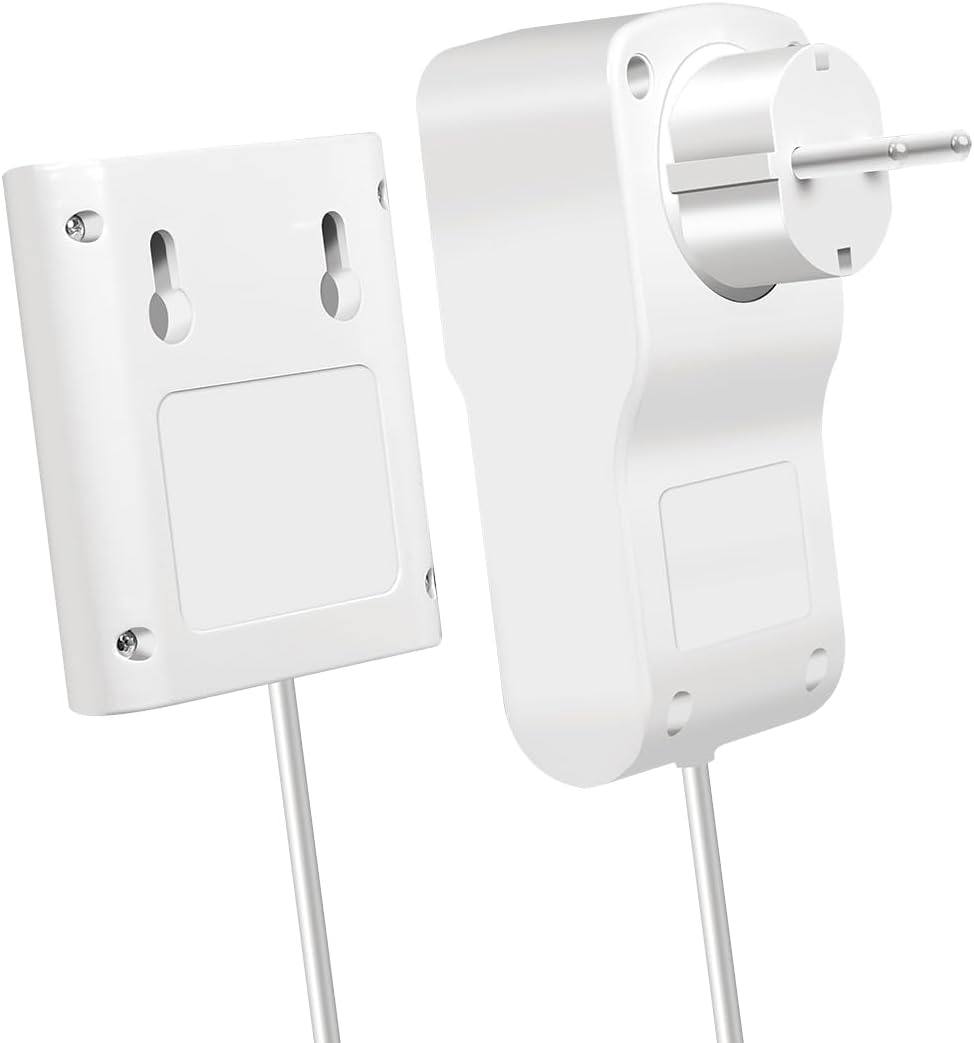
Obrázek 4: Zadní view of the LogiLink EM0006 display unit, showing the mounting points for wall installation.
5. Návod k obsluze
The LogiLink EM0006 provides various measurement modes accessible via the control buttons:

Obrázek 5: The LogiLink EM0006 in use, demonstrating its remote display capability for convenient monitoring of an appliance like a refrigerator.
- Tlačítko MODE: Press the 'MODE' button repeatedly to cycle through different display screens, which typically include:
- Aktuální výkon (W): Shows the real-time power consumption of the connected appliance.
- svtage (V) / Amperage (A) / Frequency (Hz): Displays electrical parameters.
- Celková spotřeba energie (kWh): Accumulates the total energy consumed since the last reset.
- Total Cost (€/$/£): Calculates the total cost based on accumulated kWh and the set electricity price.
- CO2 Emissions (kg): Estimates CO2 emissions based on energy consumption.
- Minimum/Maximum Power (W): Shows the lowest and highest power readings recorded.
- TOTAL/V Button: In certain modes, this button may switch between total accumulated values and instantaneous voltage čtení.
- UP/Δ Button: Used for navigating menus or increasing values during setup.
6. Údržba a péče
To ensure the longevity and accurate operation of your energy cost meter:
- Čištění: Zařízení otřete měkkým, suchým hadříkem. Nepoužívejte abrazivní čisticí prostředky ani rozpouštědla.
- Skladování: When not in use for extended periods, unplug the device and store it in a cool, dry place away from direct sunlight.
- Vyhněte se dopadu: Chraňte zařízení před pády a silnými nárazy.
7. Řešení problémů
If you encounter issues with your LogiLink EM0006, refer to the following common problems and solutions:
| Problém | Možná příčina | Řešení |
|---|---|---|
| Displej je prázdný nebo se nezapíná. | Žádné napájení, uvolněné připojení nebo vnitřní závada. | Ensure the meter is securely plugged into a live outlet. Check the connected appliance is working. If the issue persists, the device may be faulty. |
| Údaje se zdají být nepřesné. | Incorrect electricity price set, or appliance is drawing very low power. | Verify the electricity price setting. For very low power devices, the meter's accuracy might be limited. |
| Tlačítka nereagují. | Dočasná softwarová závada. | Unplug the meter from the wall outlet for a few seconds, then plug it back in. If available, perform a hard reset using the 'RESET' pinhole button. |
| No CO2 calculation. | CO2 emission factor not set or feature not active. | Ensure the device is in the correct mode to display CO2. Some models may require an initial setup for the CO2 factor. |
8. Technické specifikace
Below are the technical specifications for the LogiLink EM0006 Energy Cost Meter:
- Číslo modelu: EM0006
- Rozměry produktu: 12.1 x 6 x 7.7 cm
- Hmotnost: 265 g
- Výrobce: LogiLink
- Datum vydání: 1. ledna 2023
- Jazyk (Manuál): angličtina
- Vstupní objemtage: Typically 230V AC, 50Hz (check device label for exact range)
- Maximální zatížení: (Not specified in input, typically 3600W/16A for EU plugs)
- Zobrazit: LCD
- Funkce: Power (W), Voltage (V), Amperage (A), Frequency (Hz), Power Factor, Total Energy (kWh), Total Cost, CO2 Emissions, Min/Max Power.
9. Záruka a podpora
LogiLink products are designed for reliability and performance. For warranty information, technical support, or service inquiries, please refer to the warranty card included with your product or visit the official LogiLink webUschovejte si účtenku jako doklad o koupi pro případ reklamace.
LogiLink Official Webmísto: www.logilink.eu
Ask a question about this manual
Ask about setup, troubleshooting, compatibility, parts, safety, or missing instructions. Manuals+ will review the question and use this page’s manual context to help answer it.