
1. Úvod
Thank you for choosing the Devoko Electric Height Adjustable Desk. This manual provides comprehensive instructions for the assembly, operation, and maintenance of your new desk. Designed for a healthier work-life balance, this desk allows you to seamlessly switch between sitting and standing positions, promoting better posture and productivity.
Key features include a robust steel frame, a spacious 120x80cm desktop, integrated USB-A and USB-C charging ports, and a smart control panel with memory presets and anti-collision functionality.

The Devoko Electric Height Adjustable Desk, showcasinjeho čistý design a amppracovní prostor.
2. Bezpečnostní informace
- Před montáží a použitím si pečlivě přečtěte všechny pokyny.
- Během provozu držte děti a domácí zvířata v dostatečné vzdálenosti od stolu.
- Ujistěte se, že všechny kabely jsou správně vedeny a zajištěny, aby se předešlo nebezpečí zakopnutí nebo poškození.
- Do not overload the desk beyond its maximum weight capacity (70 kg dynamic, 80 kg static).
- Neumisťujte tekutiny přímo na ovládací panel nebo do blízkosti elektrických součástí.
- In case of malfunction, unplug the desk immediately and contact customer support.
- The desk is equipped with an anti-collision system. Do not obstruct its movement.
3. Obsah balení
Před zahájením montáže zkontrolujte, zda jsou všechny komponenty přítomny:
- Panely pro stolní počítače (4 sekce)
- Nohy stolu (2)
- Komponenty příčníku/rámu
- Ovládací skříňka
- Control Panel with USB Ports
- Napájecí adaptér a kabel
- Kabel pro správu kabelů
- Montážní materiál (šrouby, vruty atd.)
- Montážní nářadí (imbusový klíč, šroubovák)
- Uživatelská příručka
4. Montážní návod
Assembly is designed to be straightforward, typically taking around 30 minutes. All necessary tools are included.
Podrobný průvodce:
- Rozbalení a uspořádání: Opatrně vybalte všechny součásti a rozložte je na čistý, měkký povrch, abyste zabránili poškrábání. Identifikujte každou součást pomocí přiloženého diagramu.
- Sestavte rám: Attach the crossbar components to the desk legs using the provided hardware. Ensure all connections are secure.
- Připojení panelů plochy: Secure the four desktop panels to the assembled frame. The pre-drilled holes will guide you.
- Install Control Box and Panel: Mount the control box and the control panel to the underside of the desktop as indicated in the instructions.
- Připojit kabely: Connect the motor cables from the legs to the control box, and then connect the control panel cable to the control box. Finally, connect the power adapter to the control box.
- Instalace kabelového žlabu: Attach the cable management tray to the underside of the desk to organize your power strips and cables.
- Závěrečné kontroly: Dvakrát zkontrolujte všechny šrouby a spoje, zda jsou pevné a bezpečné.

The desk is designed for very easy installation, with assembly tools included.

The included cable management tray helps keep your workspace tidy.
5. Návod k obsluze
Your Devoko desk features an intelligent control panel for effortless height adjustment and convenient charging.
Funkce ovládacího panelu:
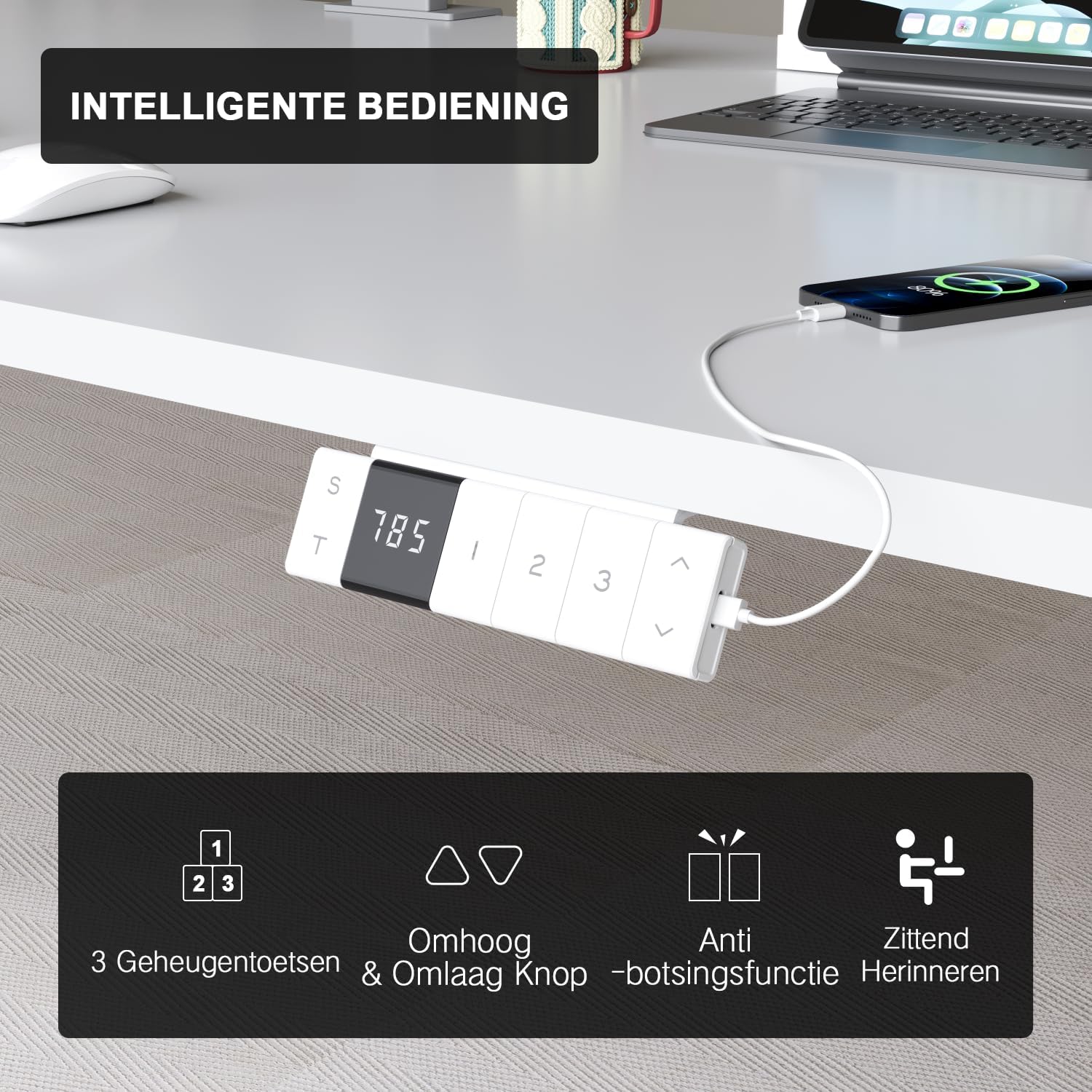
The intelligent control panel features a digital display, height adjustment buttons, memory presets, and USB charging ports.
- Tlačítka nahoru/dolů (▲ / ▼): Press and hold to smoothly adjust the desk height. The desk moves at a speed of 20mm/s with operating noise less than 45dB.
- Předvolby paměti (1, 2, 3): Save your preferred sitting and standing heights. To set a preset: adjust the desk to the desired height, then press the 'S' button followed by the desired number (1, 2, or 3). The desk will automatically move to this height with a single press.
- USB-A & USB-C Charging Ports: Conveniently located on the control panel, these ports allow you to charge your devices directly from the desk, eliminating the need for extra wall adapters.
- Funkce proti kolizi: The desk is equipped with a sensitive anti-collision system that detects obstacles during movement and automatically stops to prevent damage or injury.
- Sitting Reminder (T): The control panel may feature a timer function (indicated by 'T') to remind you to switch between sitting and standing positions for healthier work habits.

Easily switch between sitting mode (72 cm) and standing mode (118 cm) to optimize your comfort and health.
6. Údržba
- Čištění: Použijte měkký, damp cloth to wipe down the desktop and frame. Avoid abrasive cleaners or harsh chemicals that could damage the finish.
- Správa kabelů: Periodically check and reorganize cables to prevent tangles and ensure smooth operation.
- Spojovací materiál: Občas zkontrolujte všechny šrouby a vruty, zda jsou pevně utažené. V případě potřeby je dotáhněte.
- Péče o motor: The motor is designed for durability and has been tested over 10,000 cycles. No special maintenance is required for the motor itself.
7. Řešení problémů
If you encounter any issues with your Devoko desk, please refer to the following common problems and solutions:
| Problém | Možná příčina | Řešení |
|---|---|---|
| Stůl se nehýbe. | Power cable disconnected; Control box error. | Check power connection. Unplug and replug the desk for 10 seconds to reset the control box. |
| Stůl se pohybuje nerovnoměrně nebo vydává neobvyklé zvuky. | Volné spojení; Překážka. | Check all assembly connections. Ensure no objects are obstructing the legs' movement. |
| Protikolizní systém se spouští příliš často. | Sensitivity setting; Obstruction. | Ensure no objects are near the desk's path. Refer to the full manual for anti-collision sensitivity adjustment if available. |
| USB porty se nenabíjejí. | Desk not powered; Device compatibility. | Ensure the desk is plugged in and powered on. Check if the device requires specific charging protocols. |
If the problem persists after trying these solutions, please contact Devoko customer support for further assistance.
8. Specifikace
| Funkce | Detail |
|---|---|
| Značka | Devoko |
| Číslo modelu | 0077B-1222 |
| Barva | Bílý |
| Rozměry pracovní desky (D x Š) | 120 cm x 80 cm (47.2 x 31.5 palce) |
| Výškový rozsah | 72 cm až 118 cm (28.3 až 46.5 palce) |
| Materiál | FSC-certified particle board (desktop), Industrial-grade steel (frame) |
| Dynamická únosnost | 70 kg (154 lb) |
| Kapacita statického zatížení | 80 kg (176 lb) |
| Rychlost zvedání | 20 mm/s |
| Úroveň hluku | < 45 dB |
| Speciální funkce | Electric height adjustment, Ergonomic design, Integrated USB-A & USB-C charging, 3-Function Memory, Anti-collision system, Mobile with wheels |
| Certifikace | TÜV, CE |
| Hmotnost produktu | 24.5 kg (54 lb) |

Desktop dimensions: 120cm x 80cm.

Key performance metrics: 70kg load capacity, 20mm/s speed, quiet operation, and anti-collision safety.
9. Záruka a podpora
The Devoko Electric Height Adjustable Desk comes with a 5-letá záruka, ensuring peace of mind regarding its durability and performance. This warranty covers manufacturing defects and motor malfunctions under normal use.
For technical support, warranty claims, or any questions not covered in this manual, please contact Devoko customer service through the retailer's platform or the official Devoko website. Please have your model number (0077B-1222) and purchase date ready when contacting support.