
B0C135YQKX
Uživatelská příručka pro generický dálkový ovladač
Model: B0C135YQKX
1. Úvod
This document provides instructions for the Generic replacement remote control, designed for use with various portable Bluetooth party PA DJ speaker systems, including specific models like Ridgeway QS-1238 D1208, REX Speaker, Sytech SY-XTR27BT, and Soundart SPM-W8400M. This remote functions as an infrared (IR) replacement and requires no complex setup or coding.
It is crucial to verify that your original remote or speaker system is compatible with this replacement. Please compare your current remote with the images provided in this manual to ensure compatibility before use.
2. Nastavení
2.1 Instalace baterie
The remote control requires 1 CR2 battery (not included). Follow these steps to install the battery:
- Najděte přihrádku na baterie na zadní straně dálkového ovladače.
- Posunutím otevřete kryt baterie.
- Vložte baterii CR2 a dbejte na správnou polaritu (+ a -) vyznačenou uvnitř přihrádky.
- Pevně zavřete kryt baterie.
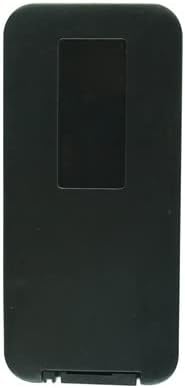
Obrázek 2.1: Zadní view dálkového ovladače, zvýrazněním prostoru pro baterie.
This image displays the back of the remote control, which is black and rectangular. A rectangular indentation is visible at the top, indicating the location of the battery compartment cover. This is where the CR2 battery should be inserted.
2.2 První použití
This remote control is an infrared replacement and does not require any special setup, pairing, or code programming. Once the battery is correctly installed, it should be ready for immediate use with compatible speaker systems.
3. Návod k obsluze
Point the remote control directly at the infrared receiver on your speaker system. Ensure there are no obstructions between the remote and the speaker.

Obrázek 3.1: Přední strana view dálkového ovladače s rozložením tlačítek.
This image shows the front face of the remote control, which is silver-grey with various circular buttons. Key buttons include Power (red), Mode, Mute, Play/Pause, Previous/Next Track, Volume Up/Down, EQ, Number Pad (0-9), Repeat, and Scan.
3.1 Funkce tlačítek
- Moc (Red button with universal power symbol): Zapíná nebo vypíná systém reproduktorů.
- režim: Cycles through different input modes (e.g., Bluetooth, USB, SD card, FM radio).
- Mute (Speaker icon with a cross): Ztlumí nebo zruší ztlumení zvukového výstupu.
- Play/Pause (Triangle and two vertical lines icon): Spustí nebo pozastaví přehrávání médií.
- Previous/Next Track (Double arrow pointing left/right with a vertical line): Přeskočí na předchozí nebo další skladbu/stanici.
- HLASITOST- / HLASITOST+: Snižuje nebo zvyšuje úroveň hlasitosti.
- EQ (Purple button with "EQ" text): Adjusts the equalizer settings (if supported by the speaker).
- Numerická klávesnice (0-9): Used for direct track selection or FM radio frequency input.
- RPT (Opakování): Toggles repeat modes for media playback.
- SKENOVAT: Zahájí vyhledávání stanic FM rádia.
4. Údržba
4.1 Výměna baterie
When the remote control's range decreases or buttons become unresponsive, it is likely time to replace the battery. Refer to Section 2.1 for battery installation instructions.
4.2 Čištění
K čištění dálkového ovladače používejte měkký, suchý hadřík. Nepoužívejte tekuté čisticí prostředky, aerosoly ani abrazivní materiály, protože by mohly poškodit povrch dálkového ovladače nebo jeho vnitřní součásti.
4.3 Skladování
Dálkový ovladač skladujte na chladném a suchém místě mimo dosah přímého slunečního záření a extrémních teplot. Pokud dálkový ovladač nebudete delší dobu používat, doporučuje se vyjmout baterii, aby nedošlo k jejímu vytečení.
5. Řešení problémů
- Dálkové ovládání nereaguje:
- Ujistěte se, že je baterie správně nainstalována a není vybitá. V případě potřeby ji vyměňte.
- Check for any obstructions between the remote control and the speaker system's IR receiver.
- Ensure you are within the effective operating range of the speaker's IR receiver.
- Funkce dálkového ovladače jsou nesprávné nebo omezené:
- This remote is a replacement. Verify that your specific speaker model is listed as compatible in the product title or description.
- Consult your speaker system's original manual to confirm the correct remote control type and functions it supports.
- If your speaker model is not explicitly mentioned as compatible, the remote may not function correctly or fully. In such cases, please contact the seller for assistance.
6. Specifikace
| Funkce | Detail |
|---|---|
| Model ASIN | B0C135YQKX |
| Značka | Obecný |
| Technologie připojení | Infračervený (IR) |
| Typ ovladače | Ovládání tlačítkem |
| Zdroj napájení | 1 baterie CR2 (není součástí balení) |
| Barva | Random (as per product listing) |
| Speciální funkce | Přenosný |
7. Záruka a podpora
This product is a replacement remote control. For any issues, questions, or concerns regarding compatibility or functionality, please contact the seller directly through the platform where the purchase was made. Please refer to your purchase details for seller contact information.
It is recommended to retain your purchase receipt or order confirmation for any support inquiries.
Ask a question about this manual
Ask about setup, troubleshooting, compatibility, parts, safety, or missing instructions. Manuals+ will review the question and use this page’s manual context to help answer it.