
USHINING T380
USHINING T380 4G Unlocked Flip Phone
Uživatelská příručka
1. Úvod
Thank you for choosing the USHINING T380 4G Unlocked Flip Phone. This device is designed with simplicity and ease of use in mind, making it ideal for seniors. It features large buttons, a clear display, and essential functions like SOS emergency calls, speed dial, and a charging dock for convenient power management. This manual provides detailed instructions to help you set up, operate, and maintain your new phone.

Image: The USHINING T380 flip phone, closed and resting in its charging dock. The phone is blue with a black dock.
2. Obsah balení
Zaškrtněte prosím políčko u následujících položek:
- USHINING T380 4G Senior Cell Phone
- Nabíjecí dok
- Long Lasting Battery (1000mAh Lithium Ion)
- Uživatelská příručka (tento dokument)
- Speedtalk SIM Card (if included with your purchase)
- Charging Cord (USB to Micro USB)
- Napájecí adaptér

Image: A visual representation of the items included in the product package, showing the phone, charging dock, battery, user manual, Speedtalk SIM card, and charging cable with adapter.
3. Vlastnosti produktu
The USHINING T380 is equipped with a range of features designed for convenience and safety:
- Připojení 4G LTE: For reliable call quality and basic internet access.
- Velká tlačítka a přehledný displej: Easy to see and press for comfortable dialing and navigation.
- Nouzové tlačítko SOS: Quickly contacts pre-set emergency numbers with a single press.
- Rychlé vytáčení: Assign up to 8 contacts for quick calling.
- Nabíjecí dok: Simple drop-in charging, eliminating the need to fumble with cables.
- FM Radio & MP3 Player: Enjoy audio entertainment.
- Basic Camera: For simple photo capture.
- Svítilna: Vhodné pro situace se slabým osvětlením.
- Bluetooth: For connecting to compatible headsets or other devices.
- Calendar & Alarm Clock: Useful daily tools.
- Blacklist Function: Protects against unwanted calls.

Image: A graphic displaying various practical features of the phone, including FM Radio, Camera, Bluetooth, 4G LTE, MP3 player, Calendar, Call logs, Flashlight, Speed Dial, Alarm Clock, SMS, SOS, and Large buttons.
4. Nastavení
4.1 Instalace baterie
- Open the back cover of the phone by gently prying it from the notch at the bottom.
- Align the battery's gold contacts with the phone's terminals.
- Pevně zatlačte baterii dolů, dokud nezacvakne na místo.
- Nasaďte zpět zadní kryt a ujistěte se, že bezpečně zacvakne.
4.2 SIM Card & Micro SD Card Installation
The phone supports dual SIM cards (Standard SIM) and one Micro SD card for expanded storage.
- With the back cover and battery removed, locate the SIM card slots. There are two standard SIM slots and one Micro SD card slot.
- Gently slide your SIM card(s) into the designated slot(s) with the gold contacts facing down, following the diagram on the phone.
- If installing a Micro SD card, carefully slide it into its slot. Note: There may be a small plastic cover over the Micro SD slot; slide the card underneath it.
- Znovu vložte baterii a nasaďte zpět zadní kryt.
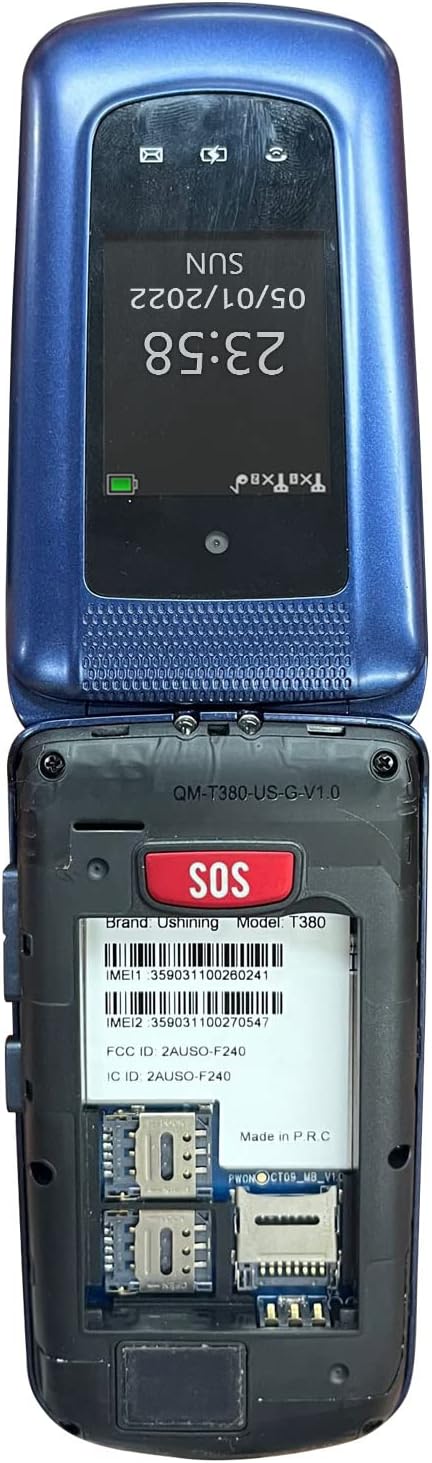
Image: The back of the USHINING T380 flip phone with the cover removed, revealing the battery compartment and slots for two SIM cards and one Micro SD card.
4.3 Nabíjení telefonu
Before first use, fully charge the phone for approximately 3 hours.
- Používání nabíjecího doku: Place the phone into the charging dock, ensuring it sits securely. The charging indicator on the phone's screen will activate.
- Přímé nabíjení: Connect the Micro USB charging cable directly to the phone's charging port and the other end to the power adapter, then plug into a wall outlet.
4.4 Zapnutí/vypnutí
- Zapnutí: Stiskněte a podržte červené tlačítko Ukončit hovor/Napájení (⏏), dokud se obrazovka nerozsvítí.
- Vypnutí: Stiskněte a podržte červené tlačítko Ukončit hovor/Napájení (⏏), dokud se nezobrazí možnosti vypnutí, a poté vyberte „Vypnout“.
4.5 Kompatibilita se sítí
The USHINING T380 is designed to work with T-Mobile and its associated MVNOs (Mobile Virtual Network Operators) in the United States. It is není kompatibilní with AT&T, Sprint, or Verizon networks.
Compatible Carriers (T-Mobile Network):
- T-Mobile
- Metro od T-Mobile
- RedPocket (GSMT)
- Speedtalk Mobile
- Tello
- Lyca Mobile
- Ultra mobilní
- Mint Mobile

Image: A diagram illustrating compatible carriers (T-Mobile, Metro, RedPocket, Speedtalk, Tello, Lyca, Ultra, Mint Mobile) and incompatible carriers (AT&T, Sprint, Verizon) for the USHINING T380 phone.
5. Návod k obsluze
5.1 Základní funkce volání
- Uskutečnění hovoru: Enter the phone number using the keypad and press the green Call button (✆).
- Přijetí hovoru: When the phone rings, open the flip or press the green Call button (✆).
- Ukončení hovoru: Stiskněte červené tlačítko pro ukončení hovoru (⏏) or close the flip.
- Nastavení hlasitosti: Během hovoru používejte tlačítka hlasitosti na boku telefonu.
5.2 Nouzové volání SOS
The SOS button is located on the back of the phone. It allows you to quickly contact pre-set emergency contacts.
- Nastavení kontaktů SOS: Navigate to the SOS settings in the phone's menu. You can typically add up to 5 emergency numbers. These numbers will be called in sequence until one answers. The phone will also send an emergency SMS message to these contacts.
- Použití funkce SOS: In an emergency, press and hold the SOS button on the back of the phone for a few seconds. The phone will activate an alarm, send an SMS to your emergency contacts, and then begin dialing them one by one.

Image: A visual explanation of the SOS Emergency Call feature, showing how it supports up to 5 family numbers and guarantees safety, alongside a Blacklist feature for protection from fraud calls.
5.3 Rychlá volba
Pro rychlé vytáčení přiřaďte často volaná čísla konkrétním klávesám.
- Setting Up Speed Dial: Go to the phone's settings or contacts menu to find the speed dial options. You can typically assign numbers to keys 2-9.
- Používání rychlé volby: Press and hold the assigned number key (e.g., '2' for Son, '3' for Daughter) to automatically dial the pre-set contact.

Image: A graphic demonstrating the 8 speed dial buttons on the phone, allowing users to assign contacts like Son, Daughter, Mom, Dad, etc., for quick access.
5.4 Messaging (SMS)
- Přejděte do nabídky „Zprávy“.
- Vyberte možnost „Napsat zprávu“ pro napsání nové SMS zprávy.
- Zadejte číslo příjemce nebo jej vyberte z kontaktů a poté napište zprávu pomocí klávesnice.
- Stiskněte tlačítko „Odeslat“.
5.5 FM rádio
- Aplikaci „FM rádio“ otevřete z hlavní nabídky.
- Pomocí navigačních tlačítek můžete vyhledávat stanice nebo ručně ladit frekvenci.
- Pro optimální příjem mohou být vyžadována sluchátka, která budou sloužit jako anténa.
5.6 MP3 přehrávač
- Ensure you have MP3 files stored on a Micro SD card inserted into the phone.
- Go to the 'MP3 Player' or 'Music' application.
- Browse and select your desired audio files hrát.
5.7 Fotoaparát
- V nabídce otevřete aplikaci „Fotoaparát“.
- Komponujte snímek pomocí displeje.
- Press the 'OK' or center navigation button to capture the photo.
5.8 Svítilna
- The flashlight can typically be activated by a dedicated button on the side of the phone or through the main menu.
5.9 Bluetooth
- Přejděte do „Nastavení“ a poté do „Bluetooth“.
- Zapněte Bluetooth.
- Hledat available devices and pair with your desired Bluetooth headset or speaker.
5.10 Calendar & Alarm Clock
- Access 'Calendar' to view data a přidat připomenutí.
- Access 'Alarm Clock' to set multiple alarms with custom times and tones.
6. Údržba
- Čištění: K čištění vnější strany telefonu používejte měkký, suchý hadřík. Nepoužívejte tekuté čisticí prostředky.
- Péče o baterie: Chcete-li prodloužit životnost baterie, vyhněte se extrémním teplotám. Nenechávejte telefon delší dobu zcela vybitý.
- Skladování: Pokud telefon nepoužíváte, skladujte jej na chladném a suchém místě.
- Vyhněte se kapkám: While durable, repeated drops can damage the internal components.
7. Řešení problémů
| Problém | Možná příčina / řešení |
|---|---|
| Telefon se nezapne | Battery is low or not installed correctly. Charge the phone for at least 30 minutes. Ensure battery is properly seated. |
| "Emergency Call Only" or No Network | SIM card not installed correctly or not activated. Ensure your carrier is compatible with the phone (T-Mobile network only). Contact your service provider. |
| Cannot hear caller / Low sound | Volume is too low. Press the volume up button during a call. Ensure speaker is not blocked. |
| Nelze odesílat/přijímat SMS | Check network signal. Verify SMS center number in message settings (contact your carrier for this). |
| Flashlight is dim | This phone's flashlight is designed for basic illumination and may not be as bright as smartphone flashlights. Ensure battery is charged. |
| Telefon se zasekává nebo nereaguje | Vyjměte baterii, počkejte několik sekund, poté ji znovu vložte a zapněte telefon. |
8. Specifikace
| Funkce | Detail |
|---|---|
| Název modelu | T380 |
| Značka | USHINING |
| Form Factor | Flip Phone |
| Barva | Modrý |
| Buněčná technologie | 4G |
| Kompatibilita bezdrátových operátorů | T-Mobile Network (e.g., T-Mobile, Metro, Speedtalk, Mint Mobile) |
| Velikost obrazovky | 2.4 palce |
| Rezoluce | 240 x 320 pixelů |
| BERAN | 64 MB |
| Kapacita paměti | 128 MB (Internal) |
| Rozšiřitelné úložiště | Slot pro Micro SD kartu (karta není součástí balení) |
| Kapacita baterie | 1000 miliamp Hodiny (lithium-iontová) |
| Technologie připojení | Bluetooth, mobilní |
| Vstup lidského rozhraní | Tlačítka, Číselník |
| Rozměry produktu | 4.09 x 2.11 x 0.83 palce |
| Hmotnost položky | 10.2 unce |
9. Záruka a podpora
For warranty information and technical support, please refer to the documentation provided with your purchase or contact USHINING customer service directly. Contact details can typically be found on the manufacturer's official webmístě nebo na obalu produktu.
Ask a question about this manual
Ask about setup, troubleshooting, compatibility, parts, safety, or missing instructions. Manuals+ will review the question and use this page’s manual context to help answer it.