
1. Úvod
Děkuji za nákupasing the ZAPUVO Wireless Bluetooth Speaker with Phone Stand. This versatile 2-in-1 device combines a high-quality portable Bluetooth speaker with a convenient, adjustable phone stand. Designed for ease of use and superior audio experience, it is perfect for indoor and outdoor use, whether you're at your desk, in the kitchen, or enjoying the outdoors. Please read this manual carefully to ensure proper setup, operation, and maintenance of your new device.
2. Co je v krabici
- 1 x Phone Stand with Bluetooth Speaker
- 1 x nabíjecí kabel typu C
- 1 x Uživatelská příručka
3. Vlastnosti produktu
3.1 2-in-1 Portable Design
The ZAPUVO H77 features a unique detachable design, allowing the phone stand and Bluetooth speaker to be used together or separately. The phone stand magnetically attaches to the speaker base, providing a stable viewing platform for your smartphone or tablet.

Image: The ZAPUVO H77 showing its detachable phone stand and speaker components.
3.2 Enhanced Sound Quality
Experience rich, full-bodied sound with advanced audio technology. Whether for music, movies, or calls, the speaker delivers powerful and dynamic audio.

Obrázek: Explodoval view of the speaker's internal components, highlighting its audio drivers for superior sound.
3.3 Adjustable Height and Angle ViewIng
The phone stand offers adjustable height and angle settings, ensuring optimal viewing for various activities like watching videos, video calls, or following recipes. The stand's base and phone cradle are equipped with anti-skid silicone for device protection.

Image: The ZAPUVO phone stand in use on a desk, holding a smartphone for hands-free viewIng.
3.4 Dlouhá výdrž baterie
Equipped with a built-in 2400mAh battery, the speaker provides up to 7 hours of continuous playtime on a single charge, ensuring extended listening sessions without interruption.
3.5 Univerzální kompatibilita
The phone stand is compatible with most smartphones, tablets, and e-readers, including various iPhone and Samsung Galaxy models, iPads, and Google Nexus devices.
3.6 White Noise Functionality
The speaker includes 10 different white noise sound settings, such as ocean, rain, heartbeat, brook, fan, wind, bird, thunderstorm, piano, and campfire, to help you relax and sleep better.

Image: The ZAPUVO speaker illustrating its white noise sound options, with a visual of people sleeping peacefully.
4. Nastavení
4.1 Nabíjení zařízení
Before first use, fully charge your ZAPUVO speaker. Connect the provided Type-C charging cable to the charging port on the side of the speaker and the other end to a USB power adapter (not included) or a computer USB port. The LED indicator will show charging status.
4.2 Montáž
The phone stand magnetically attaches to the top of the speaker. Simply align the stand with the speaker's top surface until it clicks into place. To detach, gently pull the stand upwards.
4.3 Párování Bluetooth
- Ujistěte se, že je reproduktor nabitý.
- Slide the power switch on the side to the 'ON' position. The speaker will announce "Power on" and enter Bluetooth pairing mode, indicated by a flashing blue light.
- V mobilním zařízení přejděte do nastavení Bluetooth a vyhledejte dostupná zařízení.
- Select 'H77' (or 'F20' as seen in some pairing examples) from the list to connect. The speaker will announce "Bluetooth mode" upon successful pairing.
- You are now ready to play audio through your ZAPUVO speaker.
Video: Demonstrates the unboxing, assembly, and basic Bluetooth pairing process of the ZAPUVO speaker and phone stand.
5. Návod k obsluze
5.1 Zapnutí/vypnutí
To power on, slide the power switch to 'ON'. To power off, slide the switch to 'OFF'.
5.2 Ovládání hlasitosti
Use the '+' and '-' buttons on the speaker to adjust the volume. Long press for continuous volume adjustment, short press for incremental changes.
5.3 Ovládání trati
Use the 'Previous Track' and 'Next Track' buttons (often integrated with volume controls, requiring a short press) to navigate through your audio tracks.
5.4 Přehrát / Pozastavit
Press the 'Play/Pause' button to pause or resume audio playback.
5.5 Přepínání režimů
Press the 'Mode' button to switch between Bluetooth mode, Micro SD card playback, and USB playback (if supported and connected).
5.6 Using the Phone Stand
Extend the phone cradle supports and place your device securely. Adjust the stand's angle and height as needed for comfortable viewing. The stand can hold devices in both portrait and landscape orientations.
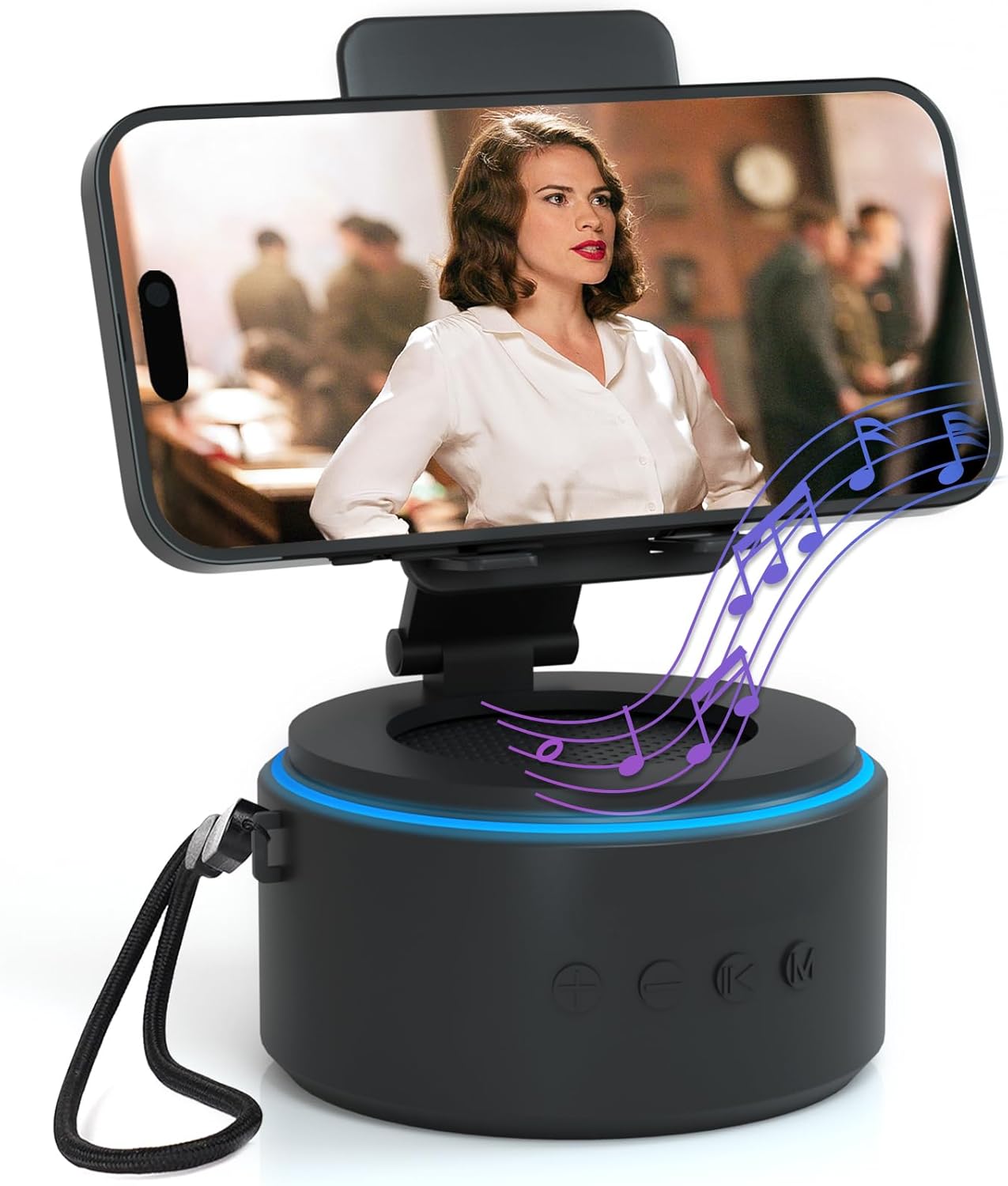
Image: The ZAPUVO speaker with a smartphone securely placed on its adjustable stand, ideal for media consumption.
6. Údržba
6.1 Čištění
Wipe the device with a soft, dry cloth. Do not use abrasive cleaners or solvents. Avoid exposing the device to excessive moisture.
6.2 Skladování
Pokud reproduktor delší dobu nepoužíváte, skladujte jej na chladném a suchém místě mimo dosah přímého slunečního záření a extrémních teplot.
7. Řešení problémů
- Zařízení se nezapíná: Ensure the device is fully charged. If it still doesn't power on, try connecting it to a different power source.
- Unable to pair Bluetooth: Make sure the speaker is in pairing mode (flashing blue light). Ensure Bluetooth is enabled on your device and it's within range. Try restarting both the speaker and your device.
- Žádný zvuk: Check the volume levels on both the speaker and your connected device. Ensure the correct mode is selected (Bluetooth, SD, or USB).
- Špatná kvalita zvuku: Ensure your device is within Bluetooth range. Move away from potential interference sources. Check the audio source quality.
8. Specifikace
| Rozměry produktu | 7.48 x 3.24 x 1.75 palce |
| Hmotnost položky | 11 unce |
| Číslo modelu | H77 |
| Typ baterie | 2 lithium-iontové baterie (součástí balení) |
| Kapacita baterie | 2400 XNUMX mAh |
| Prázdno | Až 7 hodin |
| Konektivita | Bluetooth 5.0 |
9. Záruka a podpora
Your ZAPUVO Wireless Bluetooth Speaker with Phone Stand comes with a standard manufacturer's warranty. For detailed warranty information or technical support, please refer to the contact information provided on the product packaging or visit the official ZAPUVO webmísto.