
1. Úvod
This manual provides essential information for the safe and efficient operation, setup, and maintenance of your Airwheel SE3S Smart Rideable Suitcase. Please read this manual thoroughly before using the product to ensure proper function and to prevent damage or injury.
2. Bezpečnostní informace
Vaše bezpečnost je prvořadá. Dodržujte prosím následující bezpečnostní pokyny:
- Hmotnostní limit: Do not exceed the maximum load capacity of 110 kg (242 lbs) when riding.
- Věkové omezení: This product is intended for adult use. Children should not operate the rideable function.
- Bezpečnost baterie: The lithium-ion battery is rechargeable and designed to meet airline carry-on requirements. Always remove the battery before checking the suitcase as luggage. Do not expose the battery to extreme temperatures or puncture it.
- Provozní prostředí: Use the rideable function on flat, stable surfaces. Avoid steep slopes, uneven terrain, wet conditions, or areas with heavy pedestrian traffic.
- Povědomí: Always be aware of your surroundings when operating the suitcase in ride-on mode. Maintain a safe distance from others.
- Údržba: Regularly inspect tires, brakes, and the handle mechanism for wear or damage.
3. Konec produktuview
The Airwheel SE3S is a smart rideable suitcase designed for convenient travel. It features a lightweight design, a retractable handle for ride-on or pull-behind use, and integrated charging capabilities.

Obrázek 3.1: The Airwheel SE3S Smart Rideable Suitcase in silver, showcasindíky kompaktnímu designu a integrovaným kolečkům.
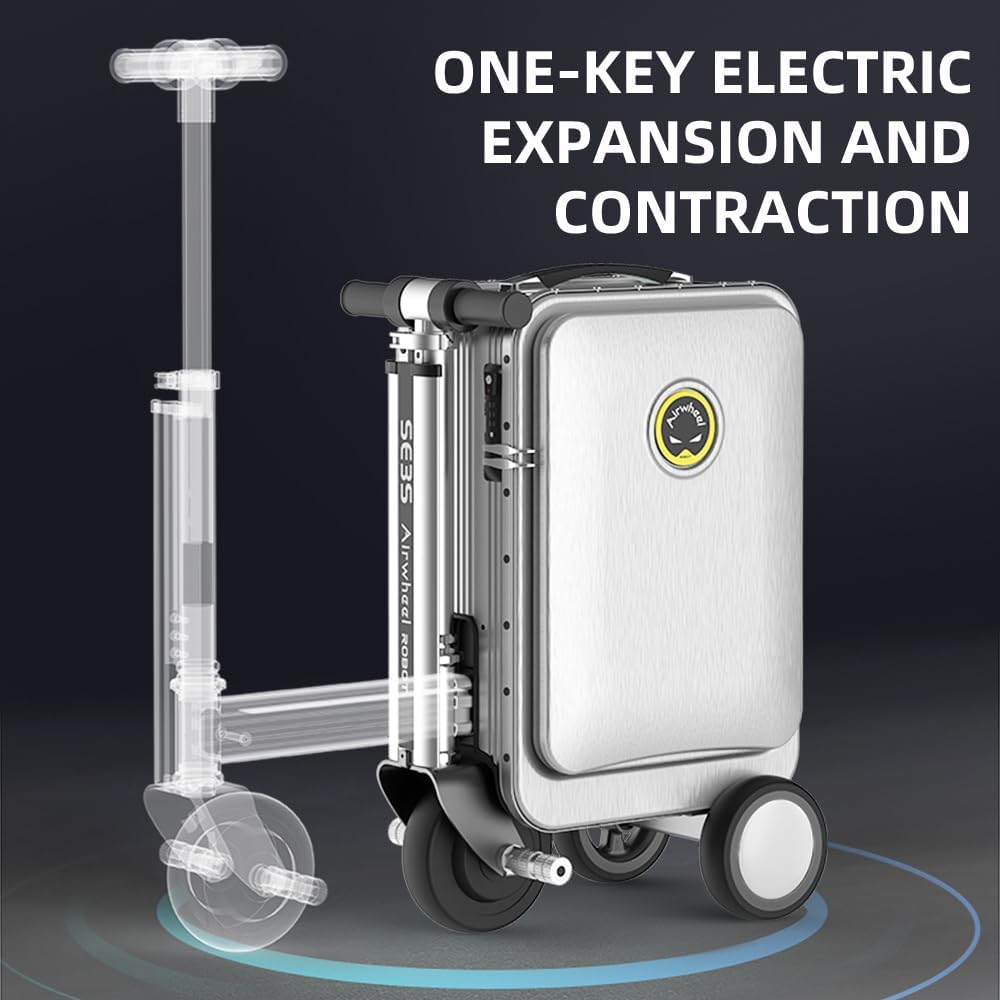
Obrázek 3.2: Illustration of the one-key electric expansion and contraction mechanism, allowing the scooter components to extend or retract.

Obrázek 3.3: Detailní view z klíčových vlastností: (1) Rubber Anti-Skid Handle, (2) International TSA Password Lock, (3) Breathing Light Effect of LED, and (4) External USB Interface.

Obrázek 3.4: The Airwheel SE3S with its handle extended, indicating its compliance with cabin size regulations for air travel.
Klíčové vlastnosti:
- Ride-on Functionality: Easily switch between ride-on mode and traditional pull-behind luggage.
- Vyjímatelná baterie: Rechargeable lithium-ion battery that meets airline carry-on requirements.
- Duální USB výstup: External USB ports for charging mobile devices simultaneously.
- Kombinovaný zámek TSA: Integrated lock for enhanced security.
- Odolné pneumatiky: Wear-resistant, puncture-resistant solid tires for various terrains.
- Ovládání aplikace: Bluetooth connectivity for remote control, speed adjustment, and monitoring.
4. Nastavení
4.1 Vybalení a úvodní kontrola
Upon receiving your Airwheel SE3S, carefully unpack all components. Verify that the following items are present:
- Airwheel SE3S Smart Rideable Suitcase
- Nabíječka
- Power Bank (if included)
- Napájecí kabel
- Polštář
- Uživatelská příručka (tento dokument)

Obrázek 4.1: The complete set of items included with the Airwheel SE3S, showing the suitcase, charger, power bank, power cord, and cushion.
4.2 Instalace a nabíjení baterie
- Locate the battery compartment on the side of the suitcase.
- Insert the lithium-ion battery into the compartment, ensuring it clicks securely into place.
- Connect the charger to the charging port on the suitcase and then to a power outlet. The charging indicator will illuminate.
- Allow the battery to fully charge before first use. A full charge typically takes several hours.
- To remove the battery for airline travel, press the release button and carefully pull the battery out.
4.3 Připojení aplikace
To unlock advanced features and control options, download the official Airwheel app from your device's app store. Enable Bluetooth on your smartphone and follow the in-app instructions to pair with your SE3S suitcase.

Obrázek 4.2: The Airwheel mobile application interface, demonstrating features like remote control, Bluetooth alarm, speed adjustment, and cruise control for the smart suitcase.
5. Návod k obsluze
5.1 Ride-on Mode
- Ensure the suitcase is on a flat, stable surface.
- Press the one-key electric expansion button to extend the scooter components. The handle and footrests will deploy.
- Carefully sit on the suitcase, placing your feet on the designated footrests.
- Use the handlebar controls to accelerate and steer. The maximum speed is approximately 13 km/h.
- To brake, use the designated brake lever on the handlebar.

Obrázek 5.1: A user demonstrating the ride-on mode of the Airwheel SE3S suitcase.

Obrázek 5.2: The suitcase in ride-on mode, highlighting a speed of 13 km/h and a load capacity of 110 kg, with an endurance of 8 km.
5.2 Pull-behind Mode
- If in ride-on mode, press the one-key electric contraction button to retract the scooter components.
- Extend the telescopic pull rod from the top of the suitcase.
- Tilt the suitcase and pull it behind you like traditional luggage.

Obrázek 5.3: A user pulling the Airwheel SE3S suitcase in its traditional luggage configuration.
5.3 Using the External USB Charging Ports
The Airwheel SE3S is equipped with dual high-speed USB output ports. Simply connect your mobile phone, tablet, or other USB-powered devices to these ports for convenient charging during your travels.
6. Údržba
6.1 Čištění
- Wipe the exterior of the suitcase with a soft, damp tkanina.
- Nepoužívejte abrazivní čisticí prostředky nebo rozpouštědla, která by mohla poškodit povrchovou úpravu.
- Ensure all ports and electrical components are dry before use or charging.
6.2 Péče o baterii
- Pravidelně nabíjejte baterii, i když ji nepoužíváte, abyste zachovali její životnost.
- Baterii skladujte na chladném a suchém místě mimo dosah přímého slunečního záření.
- If the battery will not be used for an extended period, charge it to approximately 50-60% before storage.
6.3 Tire and Mechanism Inspection
- Periodically check the solid tires for any signs of wear or damage.
- Inspect the retractable handle and scooter mechanism to ensure smooth operation. Do not force any components.
7. Řešení problémů
7.1 Suitcase Not Turning On/Riding
- Zkontrolujte, zda je baterie správně nainstalována a plně nabitá.
- Ujistěte se, že je tlačítko napájení pevně stisknuto.
7.2 Problémy s připojením aplikací
- Ensure Bluetooth is enabled on your smartphone and the suitcase is powered on.
- Restartujte aplikaci a zkuste spárování znovu.
- Ujistěte se, že máte aktuální operační systém telefonu.
7.3 Problémy s nabíjením
- Verify that the charger is correctly connected to both the suitcase and a working power outlet.
- Zkontrolujte nabíjecí kabel, zda není viditelně poškozený.
For issues not covered here, please refer to the official Airwheel support channels.
8. Specifikace
| Funkce | Specifikace |
|---|---|
| Číslo modelu | SE3S |
| Rozměry produktu | 1.18 x 0.79 x 1.8 palce (složené) |
| Hmotnost položky | 20.7 libry (9.39 kg) |
| Kapacita | 20 litrů |
| Max Load (Ride-on) | 110 kg (242 lb) |
| Typ baterie | Lithium Ion (included, removable) |
| Maximální rychlost | Cca. 13 km/h |
| Konektivita | Bluetooth (pro ovládání aplikací) |
| USB výstup | Dual high-speed USB ports |

Obrázek 8.1: Detailed dimensions of the Airwheel SE3S suitcase.
9. Záruka a podpora
For warranty information, product support, or service inquiries, please contact the official Airwheel customer service or visit their authorized webUschovejte si účtenku jako doklad o koupi pro případné reklamace.