
Flashpoint R2 XPro II
Uživatelská příručka k bezdrátovému blesku Flashpoint R2 XPro II 2.4 GHz TTL pro fotoaparáty Sony
Model: R2 XPro II
1. Úvod
This manual provides comprehensive instructions for the safe and effective use of the Flashpoint R2 XPro II 2.4GHz TTL Wireless Flash Trigger for Sony Cameras. This device is designed to provide reliable wireless control over compatible flash units, offering advanced features such as TTL, Manual, and Multi-flash modes, High-Speed Sync (HSS), and a robust 2.4GHz radio system.
Před použitím zařízení si prosím pečlivě přečtěte tento návod k obsluze, abyste zajistili jeho správnou funkčnost a předešli poškození.
2. Bezpečnostní opatření
- Nerozebírejte ani neupravujte zařízení. Neoprávněné úpravy mohou vést k poruše nebo úrazu elektrickým proudem.
- Keep the device dry. Do not expose it to rain, moisture, or high humidity.
- Avoid strong impacts or vibrations. Dropping the device may cause internal damage.
- Uchovávejte mimo dosah dětí.
- Use only specified batteries. Incorrect battery types may cause leakage or explosion.
- Do not operate in environments with flammable gases or liquids.
- Turn off the device when not in use or during cleaning.
3. Součásti a ovládací prvky produktu
The Flashpoint R2 XPro II features an intuitive layout for easy operation. Familiarize yourself with the various parts and controls:
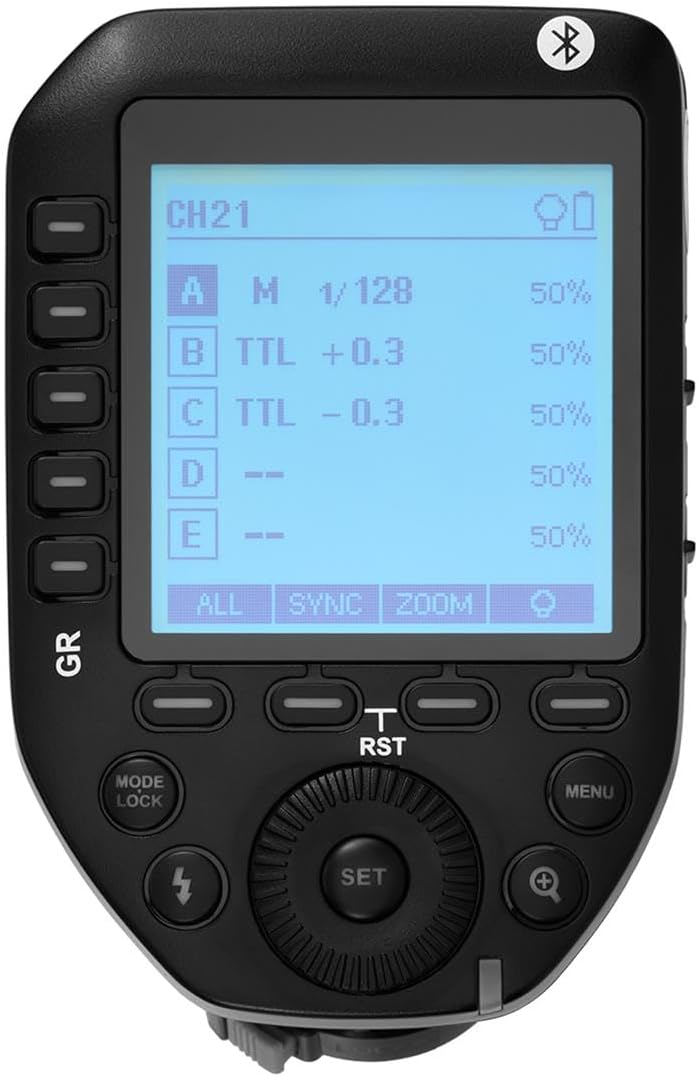
Obrázek 3.1: Nahoře view of the Flashpoint R2 XPro II, highlighting the large dot matrix LCD display and various control buttons including Group (GR), Mode/Lock, Set, Menu, and Zoom.

Obrázek 3.2: Úhlové view of the Flashpoint R2 XPro II, illustrating the hot shoe mount for camera attachment and the power ON/OFF switch located on the side.
Klíčové ovládací prvky:
- LCD displej: Large dot matrix display with adjustable backlight for clear visibility of settings.
- Group (GR) Buttons: Control individual flash groups (A, B, C, D, E).
- Mode/Lock Button: Switches between flash modes (TTL, Manual, Multi) and locks settings.
- Tlačítko nastavení: Potvrzuje výběry a vstupuje do podnabídek.
- Tlačítko nabídky: Přístup k nastavení systému a pokročilým možnostem.
- Tlačítko přiblížení: Adjusts flash zoom settings for specific groups.
- Vytočit: Navigates menus and adjusts values.
- Vypínač: Zapíná/vypíná jednotku.
- Uchycení sáněk blesku: Connects the trigger securely to your camera's hot shoe.
4. Nastavení a instalace
4.1 Instalace baterie
The R2 XPro II uses two AA batteries (not included). Ensure correct polarity when inserting.

Figure 4.1: The battery compartment of the Flashpoint R2 XPro II, with the cover removed, illustrating the correct orientation for inserting AA batteries.
- Vyhledejte kryt přihrádky na baterie na spodní straně jednotky.
- Posunutím otevřete kryt.
- Insert two AA batteries, matching the positive (+) and negative (-) indicators inside the compartment.
- Bezpečně zavřete kryt bateriového prostoru.
4.2 Montáž na kameru
Attach the trigger to your Sony camera's hot shoe for seamless integration.

Obrázek 4.2: Spodní část view of the Flashpoint R2 XPro II, displaying the hot shoe mount and the instant flip locking mechanism designed for secure camera connection.
- Ensure the trigger is turned OFF.
- Slide the hot shoe mount of the R2 XPro II into your camera's hot shoe.
- Secure the trigger by engaging the locking mechanism (typically a lever or dial) on the hot shoe mount.
- Turn on the trigger and your camera.
5. Návod k obsluze
The R2 XPro II offers various modes and settings for precise flash control.
5.1 Zapnutí/vypnutí
Use the ON/OFF switch located on the side of the unit to power the trigger.
5.2 Basic Screen Navigation
The large LCD display shows current settings for channels, groups, and flash modes. Use the dial to navigate and adjust values, and the SET button to confirm.
5.3 Flash Modes (TTL / M / Multi)
Stiskněte tlačítko Režim/Zámek tlačítko pro přepínání mezi dostupnými režimy blesku:
- TTL (Skrz objektiv): Automatic exposure control. The trigger communicates with the camera to determine optimal flash output.
- M (Manuální): Allows manual adjustment of flash power output (e.g., 1/1 to 1/128).
- Multi (stroboskopický): Odpálí sérii rychlých záblesků pro kreativní efekty.
The R2 XPro II also features TCM (TTL Converted to Manual) fusion, which allows you to capture an exposure in TTL mode and then convert that exposure value to a manual setting for consistent repeat shots.
5.4 Správa kanálů a skupin
The trigger supports 32 channels and multiple groups (A, B, C, D, E) for managing complex lighting setups.
- Použijte GR (Group) buttons to select and adjust individual flash groups.
- Access the menu to change the wireless channel to avoid interference.
5.5 Vysokorychlostní synchronizace (HSS)
The R2 XPro II supports High-Speed Sync up to 1/8000s, enabling you to use flash with fast shutter speeds, ideal for overpowering ambient light or freezing fast motion.
5.6 Smartphone APP Control (Bluetooth)
The built-in Bluetooth allows for smartphone app control of flash functions. Download the compatible Flashpoint R2 app to manage settings remotely.

Figure 5.1: Illustration of the R2 Wireless System, demonstrating the Flashpoint R2 XPro II's ability to work with a complete family of Flashpoint speedlights, monolights, and strobe lights, and transmit atop any Sony DSLR, MSLR, or M Series body.
6. Údržba a péče
- Čištění: Use a soft, dry cloth to clean the exterior of the unit. Do not use solvents or abrasive cleaners.
- Skladování: Pokud zařízení delší dobu nepoužíváte, vyjměte baterie, abyste zabránili jejich vytečení. Skladujte zařízení na chladném a suchém místě, mimo dosah přímého slunečního záření a extrémních teplot.
- Aktualizace firmwaru: Pravidelně kontrolujte informace od výrobce website for available firmware updates to ensure optimal performance and compatibility. The unit is Mac and PC firmware updatable.
7. Řešení problémů
If you encounter issues with your Flashpoint R2 XPro II, refer to the following common problems and solutions:
| Problém | Možná příčina | Řešení |
|---|---|---|
| Zařízení se nezapne. | Baterie jsou vybité nebo nesprávně vložené. | Vyměňte baterie nebo zajistěte správnou polaritu. |
| Flash unit does not fire. | Incorrect channel/group settings; flash unit not compatible; trigger not securely mounted. | Verify channel and group settings on both trigger and flash; ensure flash is compatible with R2 system; re-mount trigger securely. |
| Inconsistent flash firing. | Interference from other wireless devices; low battery. | Change to a different wireless channel; replace batteries. |
| TTL exposure is inaccurate. | Environmental factors; flash unit limitations. | Adjust flash exposure compensation on the trigger or camera; consider switching to Manual mode. |
8. Specifikace
| Funkce | Detail |
|---|---|
| Model | R2 XPro II |
| Bezdrátový systém | Flashpoint R2 / Godox X - 2.4GHz Radio System |
| Kompatibilita | Sony Cameras (TTL support) |
| Dosah převodovky | 300–400 stop (přibližně 90–120 metrů) |
| Kanály | 32 |
| Skupiny | 5 (A, B, C, D, E) |
| Režimy blesku | TTL, Manuální, Multi |
| Vysokorychlostní synchronizace (HSS) | Až 1/8000 XNUMX s |
| Zobrazit | Large Dot Matrix LCD with Adjustable Backlight |
| Konektivita | Built-in Bluetooth for Smartphone APP Control |
| Aktualizace firmwaru | Mac and PC Updatable via USB-C port |
| Zdroj napájení | 2 x AA baterie |
| Rozměry produktu | 5.15 x 4 x 2.8 palce |
| Hmotnost položky | 8.8 unce |
9. Informace o záruce
Flashpoint products are designed and manufactured to the highest quality standards. For specific warranty terms and conditions, please refer to the warranty card included with your product or visit the official Flashpoint webUschovejte si účtenku jako doklad o koupi pro případ reklamace.
10. Zákaznická podpora
For technical assistance, troubleshooting, or service inquiries, please contact Flashpoint customer support. You can find contact information on the official Flashpoint webwebu nebo prostřednictvím svého prodejce.
Online zdroje: Flashpoint Official Store on Amazon
Ask a question about this manual
Ask about setup, troubleshooting, compatibility, parts, safety, or missing instructions. Manuals+ will review the question and use this page’s manual context to help answer it.