
1. Úvod
This manual provides essential information for the setup, operation, maintenance, and troubleshooting of your A4tech FX60H QWERTY Gaming Keyboard. Please read these instructions carefully to ensure optimal performance and longevity of your device.
The A4tech FX60H is a wired QWERTY keyboard featuring 12 multimedia navigation keys, two integrated USB ports, and a vibrant neon backlight. Its slim design with X-key scissor switches offers a comfortable and quiet typing experience.
2. Nastavení
2.1 Připojení klávesnice
- Unpack the A4tech FX60H keyboard and its USB cable.
- Vyhledejte volný USB port na vašem počítači (PC nebo notebooku).
- Insert the USB connector of the keyboard's cable into the computer's USB port.
- The keyboard is Plug & Play, meaning it should be automatically recognized by your operating system (Windows, Mac) without requiring additional driver installation.
- Wait for your operating system to confirm the device installation. The keyboard is now ready for use.

Figure 2.1: Connecting the A4tech FX60H keyboard via USB.
3. Návod k obsluze
3.1 Základní funkce klávesnice
The A4tech FX60H features a standard QWERTY layout for typing. All standard alphanumeric and symbol keys function as expected.
3.2 Multimediální klávesy
The keyboard is equipped with 12 dedicated multimedia keys for quick access to various functions. These keys are typically located along the top row of the keyboard or integrated with function keys (F1-F12) and accessed via a 'Fn' key combination. Refer to the keycap legends for specific functions such as volume control, media playback, and web zkratky prohlížeče.
3.3 Ovládání podsvícení LED
The A4tech FX60H features a multi-colored LED backlight. The intensity of the backlight can be adjusted, or it can be turned off completely. Specific keys or key combinations are used to cycle through brightness levels or toggle the backlight on/off. Consult the keyboard's keycap legends for the designated backlight control keys, often indicated by a sun or light bulb icon.
3.4 Integrated USB Ports
The keyboard includes two additional USB ports. These ports can be used to connect other low-power USB devices, such as a mouse, USB flash drive, or charging small accessories. Avoid connecting high-power devices to these ports to prevent potential issues.
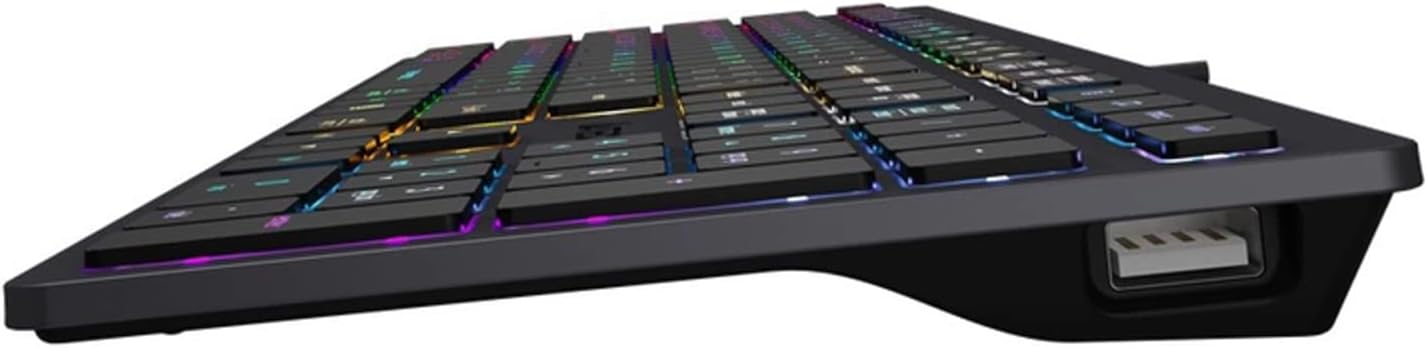
Figure 3.4: Integrated USB port on the A4tech FX60H keyboard.
4. Údržba
4.1 Čištění klávesnice
Pro zachování vzhledu a funkčnosti klávesnice:
- Před čištěním odpojte klávesnici od počítače.
- Použijte měkký hadřík, který nepouští vlákna dampKlávesy a povrch otřete vodou nebo jemným čisticím roztokem.
- Nepoužívejte agresivní chemikálie, abrazivní čisticí prostředky ani nestříkejte tekutiny přímo na klávesnici.
- K odstranění prachu a nečistot z prostoru mezi klávesami použijte stlačený vzduch.
4.2 Splash Protection
The A4tech FX60H keyboard features splash protection. While it is designed to withstand minor spills, it is not fully waterproof. In case of a liquid spill, immediately disconnect the keyboard, gently wipe away the liquid, and allow it to dry completely before reconnecting.
5. Řešení problémů
5.1 Klávesnice nereaguje
- Ujistěte se, že je kabel USB bezpečně připojen k klávesnici i k počítači.
- Zkuste připojit klávesnici k jinému USB portu na počítači.
- Otestujte klávesnici na jiném počítači, abyste zjistili, zda je problém s klávesnicí nebo s USB portem/ovladači počítače.
- Restartujte počítač.
5.2 Podsvícení nefunguje
- Check if the backlight has been turned off or set to the lowest brightness level using the dedicated backlight control keys.
- Ujistěte se, že je klávesnice správně připojena a napájena.
5.3 Multimediální klávesy nefungují
- Ensure you are pressing the correct key combinations (e.g., 'Fn' key + F-key) if required for your specific multimedia functions.
- Verify that your operating system's media player or browser is active and supports the multimedia commands.
6. Specifikace
| Funkce | Popis |
|---|---|
| Značka | A4tech |
| Název modelu | FX60H |
| Technologie připojení | USB (kabelové) |
| Délka kabelu | 1.5 metrů |
| Typ klávesnice | QWERTY |
| Klíčový mechanismus | X-structure (Scissor-Switch) |
| Zdvih kláves | Nízký profile (1.5 mm actuation point) |
| Počet multimediálních kláves | 12 |
| Podsvícení | Multi-colored LED (Neon Backlight), adjustable intensity |
| Integrované USB porty | 2x USB 2.0 |
| Kompatibilita | Windows, Mac |
| Speciální funkce | Splash protection, "Chocolate" design, Laser engraved key markings |
| Materiál | Plast |
7. Informace o záruce
The A4tech FX60H QWERTY Gaming Keyboard comes with a 2letá záruka výrobce. Please retain your proof of purchase for warranty claims. For detailed terms and conditions, refer to the warranty documentation provided with your product or contact A4tech customer support.
8. Podpora
If you encounter issues not covered in this manual or require further assistance, please visit the official A4tech website for support resources, FAQs, and contact information for customer service.