
1. Úvod
Děkuji za nákupasing the Panasonic VL-SE35XLA Video Door Phone. This manual provides essential information for the safe and efficient use of your new device. Please read this manual thoroughly before installation and operation, and retain it for future reference.
Důležité bezpečnostní informace
- Ensure all electrical work is performed by a qualified electrician and complies with local codes.
- Nevystavujte venkovní jednotku přímému stříkajícímu proudu vody ani ji neponořujte do vody.
- Používejte pouze specifikovaný napájecí zdroj a příslušenství.
- Avoid installing the outdoor unit in direct sunlight or where it may be subject to extreme temperatures.
- Keep the indoor monitor unit away from heat sources and moisture.
2. Obsah balení
Ověřte, zda jsou v balení přítomny všechny položky:
- Indoor Monitor Unit (VL-ME35)
- Outdoor Camera Unit (VL-V522L)
- Wall Mounting Bracket for Indoor Unit
- Montážní šrouby a kotvy
- Power Adapter for Indoor Unit
- Návod k použití (tento dokument)
3. Konec produktuview
The Panasonic VL-SE35XLA is a wireless video door phone system designed for home security and convenience. It features an indoor monitor with an LCD display and an outdoor camera unit.
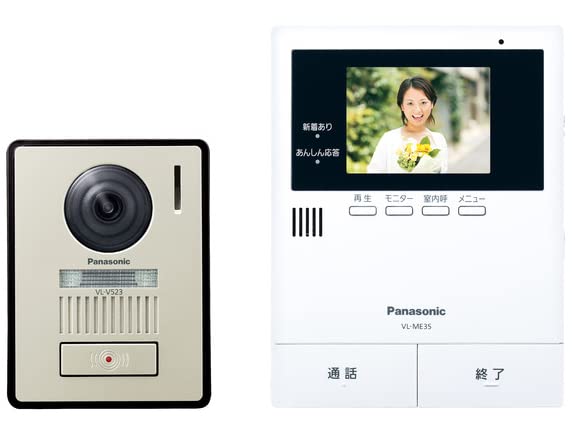
Image: Panasonic VL-SE35XLA Video Door Phone System, showing both indoor monitor and outdoor camera units.
Klíčové komponenty:
- Indoor Monitor Unit: Features a color LCD display for viewing visitors, communication buttons, and settings controls.
- Venkovní kamerová jednotka: Equipped with a camera, microphone, speaker, and call button for two-way communication and video capture.
4. Nastavení a instalace
Správná instalace je klíčová pro optimální výkon. Pečlivě dodržujte tyto kroky.
4.1 Mounting the Outdoor Camera Unit
- Choose a suitable location near your entrance, approximately 1.4 to 1.6 meters (4.6 to 5.2 feet) from the ground, ensuring a clear view návštěvníků.
- Označte si body pro vrtání pomocí montážního držáku jako šablony.
- Vyvrtejte otvory a v případě potřeby vložte do zdi hmoždinky.
- Připevněte montážní konzolu ke zdi pomocí šroubů.
- Connect the necessary wiring (e.g., power supply, if not battery-operated, and any existing intercom wiring) to the outdoor unit terminals. Refer to the wiring diagram in the separate installation guide for detailed instructions.
- Attach the outdoor camera unit to the mounting bracket.
4.2 Mounting the Indoor Monitor Unit
- Select a convenient indoor location, such as a hallway or living room, within range of the outdoor unit's wireless signal.
- Secure the indoor unit's wall mounting bracket to the wall.
- Connect the power adapter to the indoor monitor unit and plug it into a standard electrical outlet.
- Attach the indoor monitor unit to its wall mounting bracket.
4.3 První zapnutí a párování
- Once both units are powered, the indoor monitor unit should automatically attempt to pair with the outdoor camera unit.
- If pairing does not occur automatically, refer to the 'Pairing' section in the detailed installation guide for manual pairing instructions.
- Test the system by pressing the call button on the outdoor unit. The indoor monitor should ring and display the visitor's image.
5. Návod k obsluze
This section describes the basic functions of your video door phone.
5.1 Přijetí hovoru
- Když návštěvník stiskne tlačítko volání na venkovní jednotce, vnitřní monitor zazvoní a zobrazí obraz návštěvníka.
- Stiskněte tlačítko Mluvit button on the indoor monitor to establish two-way communication.
- Chcete-li konverzaci ukončit, stiskněte tlačítko Ukončit hovor tlačítko.
5.2 Monitoring the Entrance
- Na view venkovní kamerový obraz kdykoli stisknutím tlačítka Monitor button on the indoor unit.
- The display will show the live video feed from the outdoor camera.
- Stiskněte tlačítko Monitor button again or wait for the automatic timeout to exit monitoring mode.
5.3 Recording Visitors
- The system supports automatic or manual recording of visitors.
- When a visitor calls, the system may automatically record a short video or still image.
- To manually record during a call or monitoring, press the Záznam button on the indoor monitor.
- Recorded images and videos can be reviewed through the menu on the indoor monitor.
5.4 Adjusting Volume and Settings
- Použijte Objem buttons on the indoor monitor to adjust the ringtone and communication volume.
- Přístup k Menu button to configure various settings, including display brightness, recording preferences, and date/time.
6. Údržba
Pravidelná údržba zajistí dlouhou životnost a optimální výkon vašeho zařízení.
6.1 Čištění
- Wipe the indoor and outdoor units with a soft, dry cloth.
- Pro odolnou špínu lehceamphadřík vodou a jemným čisticím prostředkem a poté ihned otřete dosucha.
- Do not use abrasive cleaners, solvents, or alcohol, as these can damage the surfaces.
- Ensure the camera lens on the outdoor unit is clean for clear image quality.
7. Řešení problémů
Pokud narazíte na problémy, podívejte se na následující běžné problémy a jejich řešení.
| Problém | Možná příčina | Řešení |
|---|---|---|
| Na vnitřním monitoru není žádný obraz. | Power issue, units not paired, or out of range. | Check power connections. Ensure units are paired. Reduce distance between units or check for interference. |
| Během komunikace není slyšet žádný zvuk. | Volume too low, or microphone/speaker issue. | Adjust volume settings on the indoor monitor. Check for obstructions on microphone/speaker. |
| Outdoor unit not responding. | Power issue to outdoor unit, or wiring problem. | Verify power supply to the outdoor unit. Check wiring connections. |
| Špatná kvalita obrazu. | Dirty camera lens, poor lighting, or interference. | Clean the camera lens. Ensure adequate lighting at the entrance. |
Pokud problém přetrvává i po vyzkoušení těchto řešení, kontaktujte zákaznickou podporu.
8. Specifikace
| Funkce | Popis |
|---|---|
| Číslo modelu | VL-SE35XLA |
| Značka | Panasonic |
| Technologie připojení | Bezdrátový |
| Speciální funkce | LCD displej |
| Vnitřní/venkovní použití | Indoor (Monitor Unit) |
| Barva | Bílý |
| Rozměry produktu (DxŠxV) | 29.7 x 5.9 x 22.9 cm (11.7 x 2.3 x 9.0 palce) |
| Hmotnost produktu | 920 g (2.03 lb) |
| Doporučené použití | Outdoor Security (as a system) |
9. Záruka a podpora
Panasonic products are manufactured to high-quality standards and are backed by a limited warranty. Please refer to the warranty card included with your product for specific terms and conditions.
For technical assistance, troubleshooting beyond this manual, or warranty claims, please contact Panasonic customer support through their official webwebu nebo kontaktních informací uvedených na obalu produktu.
- Online podpora: Navštivte oficiální podporu Panasonic webweb s nejčastějšími dotazy, aktualizacemi softwaru a dalšími zdroji.
- Služby zákazníkům: Kontaktní čísla regionálního zákaznického servisu naleznete v dokumentaci k produktu.