
1. Důležité bezpečnostní pokyny
- Před použitím produktu si důkladně přečtěte tyto pokyny.
- Uschovejte tento návod pro budoucí použití.
- Do not expose the product to extreme temperatures, humidity, or corrosive environments.
- Vyhněte se dlouhodobému poslechu při vysoké hlasitosti, abyste předešli poškození sluchu.
- Do not disassemble, repair, or modify the product. Contact authorized service personnel for assistance.
- Udržujte výrobek mimo dosah dětí a domácích zvířat.
- Výrobek a jeho baterii zlikvidujte zodpovědně v souladu s místními předpisy.
2. Obsah balení
Ověřte, zda jsou v balení přítomny všechny položky:
- Edifier TO-U6+ True Wireless Earbuds (Left and Right)
- Nabíjecí pouzdro
- USB nabíjecí kabel
- Špunty do uší (různé velikosti)
- Uživatelská příručka (tento dokument)
3. Konec produktuview
The Edifier TO-U6+ earbuds are designed for comfortable in-ear fit and provide high-quality audio with touch controls.
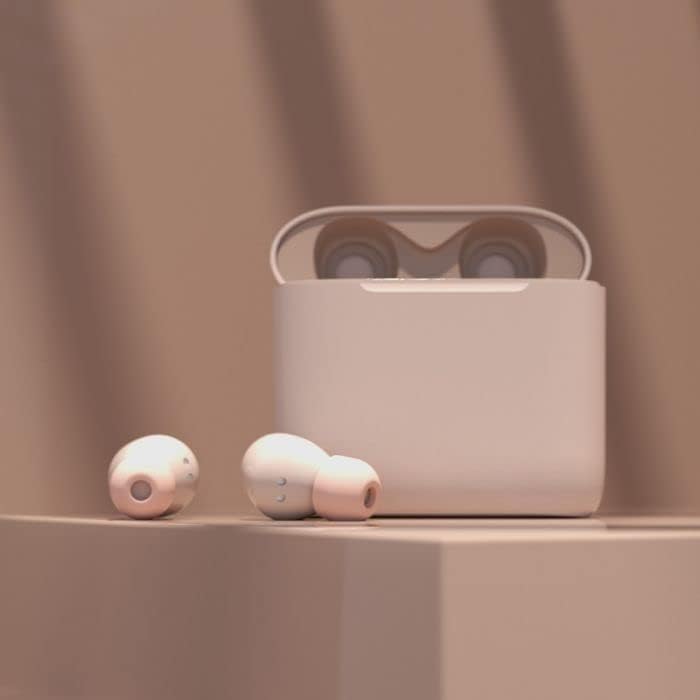
Image: Edifier TO-U6+ Earbuds removed from their open charging case, showcasinjejich design.

Image: A person wearing Edifier TO-U6+ earbuds, demonstrating their ergonomic fit during use.
The charging case protects the earbuds and provides additional battery life for extended listening.
4. Nastavení
4.1 Nabíjení sluchátek a pouzdra
Před prvním použitím sluchátka a nabíjecí pouzdro plně nabijte.
- Vložte sluchátka do nabíjecího pouzdra. Ujistěte se, že jsou správně usazena.
- Connect the USB charging cable to the charging port on the case and to a USB power source.
- The indicator light on the charging case will show charging status. A full charge provides up to 8 hours of playback for the earbuds and an additional 24 hours from the case, totaling 32 hours. A 15-minute charge can provide 1 hour of music playback.
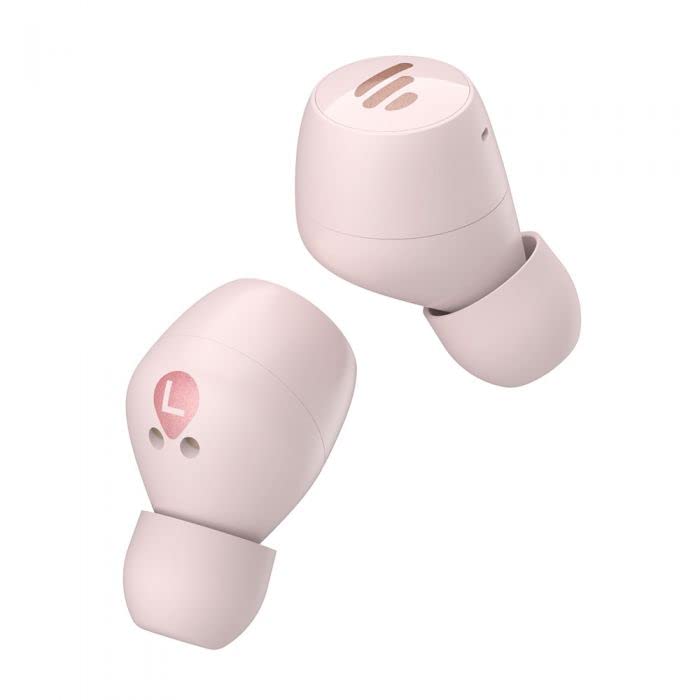
Image: The Edifier TO-U6+ charging case, illustrating its compact design.
4.2 Párování Bluetooth
- Otevřete nabíjecí pouzdro. Sluchátka se automaticky přepnou do režimu párování, což bude signalizováno blikajícím světlem na sluchátkách.
- Na svém zařízení (chytrém telefonu, tabletu atd.) povolte Bluetooth.
- Hledat available Bluetooth devices and select "Edifier TO-U6+" from the list.
- Once connected, the earbud indicator lights will turn off or show a steady light, depending on the model.
- If pairing fails, place the earbuds back into the case, close the lid, and then reopen to re-enter pairing mode.
5. Návod k obsluze
5.1 Dotykové ovládání
The Edifier TO-U6+ earbuds feature intuitive touch controls on each earbud. The touch-sensitive area is located on the outer surface of each earbud.

Obrázek: Nahoře view of the Edifier TO-U6+ earbuds, highlighting the touch control area.
| Akce | Funkce |
|---|---|
| Jedno klepnutí (vlevo/vpravo) | Přehrát/Pozastavit hudbu, Přijmout/Ukončit hovor |
| Dvojité klepnutí (pravé sluchátko) | Další stopa |
| Dvojité klepnutí (levé sluchátko) | Aktivujte hlasového asistenta |
| Trojité klepnutí (pravé sluchátko) | Předchozí stopa |
| Dlouhé stisknutí (vlevo/vpravo) | Odmítnout hovor |
5.2 Hlasové hovory
The earbuds feature CVC 8.0 voice call noise cancellation, which reduces ambient noise for clearer conversations. Use the single tap action to answer or end calls, and long press to reject incoming calls.
6. Údržba
6.1 Čištění
- Pravidelně čistěte ušní nástavce měkkým, suchým hadříkem.
- Wipe the charging contacts on the earbuds and inside the case with a dry cotton swab to ensure proper charging.
- K čištění nepoužívejte agresivní chemikálie nebo abrazivní materiály.
6.2 Skladování
- Vždy uchovávejte sluchátka v nabíjecím pouzdře, když je nepoužíváte, aby byla chráněna a zůstávala nabitá.
- Výrobek skladujte na chladném a suchém místě, mimo dosah přímého slunečního záření a extrémních teplot.
6.3 Odolnost proti vodě a prachu
The Edifier TO-U6+ earbuds are IP55-rated for dust and water resistance. This means they are protected against limited dust ingress and low-pressure water jets from any direction. They are suitable for workouts and light rain, but ne for swimming or submersion in water.
7. Řešení problémů
If you encounter issues with your Edifier TO-U6+ earbuds, refer to the following common solutions:
- Žádný zvuk: Ujistěte se, že jsou sluchátka nabitá, správně spárovaná a že je nastavená hlasitost na sluchátkách i na vašem zařízení.
- Problémy s párováním: Turn off Bluetooth on your device, place earbuds back in the case, close and reopen the lid, then try pairing again. Clear previous Bluetooth connections on your device if necessary.
- Jedno sluchátko nefunguje: Place both earbuds back in the case, close the lid, wait a few seconds, then take them out again. This often re-syncs them.
- Problémy s nabíjením: Check the charging cable and power source. Ensure charging contacts on earbuds and case are clean and free of debris.
- Špatná kvalita hovoru: Ensure earbuds are properly seated in your ears. Check for strong Bluetooth signal.
If problems persist, consult the Edifier support webnebo kontaktujte zákaznický servis.
8. Specifikace
| Funkce | Detail |
|---|---|
| Model | TO-U6+ |
| Konektivita | Bezdrátové, Bluetooth 5.0 |
| Bluetooth Profiles | A2DP, AVRCP, HFP |
| Audio technologie | Qualcomm aptX |
| Redukce šumu při hovoru | CVC 8.0 |
| Doba hraní (sluchátka) | Až 8 hodin |
| Celková doba přehrávání (s pouzdrem) | Až 32 hodin |
| Rychlé nabíjení | 15 minut pro 1 hodinu přehrávání |
| Voděodolnost | IP55 Prachu & Vodotěsný |
| Kontrolní metoda | Dotek |
| Rozměry produktu | 2 x 2 x 3 cm (earbuds); 180 g (total weight) |
| Kompatibilní zařízení | Chytré telefony, tablety, notebooky, stolní počítače |
9. Záruka a podpora
Edifier products are covered by a limited warranty. For detailed warranty information, please refer to the warranty card included with your purchase or visit the official Edifier webmísto.
For technical support, product registration, or further inquiries, please visit the Edifier customer support portal or contact their authorized service centers. Keep your proof of purchase for warranty claims.