
Konec produktuview
The PSIER Wireless Earbuds are designed for an immersive audio experience with enhanced call clarity and extended playtime. Featuring Bluetooth 5.3 technology, these earbuds offer stable connectivity and superior sound quality. The ergonomic design with earhooks ensures a secure fit, making them ideal for sports and active use. The included charging case provides multiple recharges, extending your listening time significantly.

Image showing the PSIER wireless earbuds with various sizes of replaceable soft eartips and earwings (XS, S, M, L) for a customizable and secure fit. The image also displays a person wearing the earbuds, demonstrating their ergonomic design.
Obsah balení
- PSIER Wireless Earbuds (Left and Right)
- Nabíjecí pouzdro
- Nabíjecí kabel USB-C
- Multiple Sizes of Eartips (XS, S, M, L)
- Uživatelská příručka
Nastavení
Počáteční nabíjení
Před prvním použitím sluchátka a nabíjecí pouzdro plně nabijte.
- Připojte dodaný kabel USB-C k nabíjecímu portu na pouzdře a ke zdroji napájení.
- Alternatively, place the charging case on a compatible wireless charging pad (not included).
- The LED digital display on the case will show the charging progress. A full charge is indicated by 100% on the display.
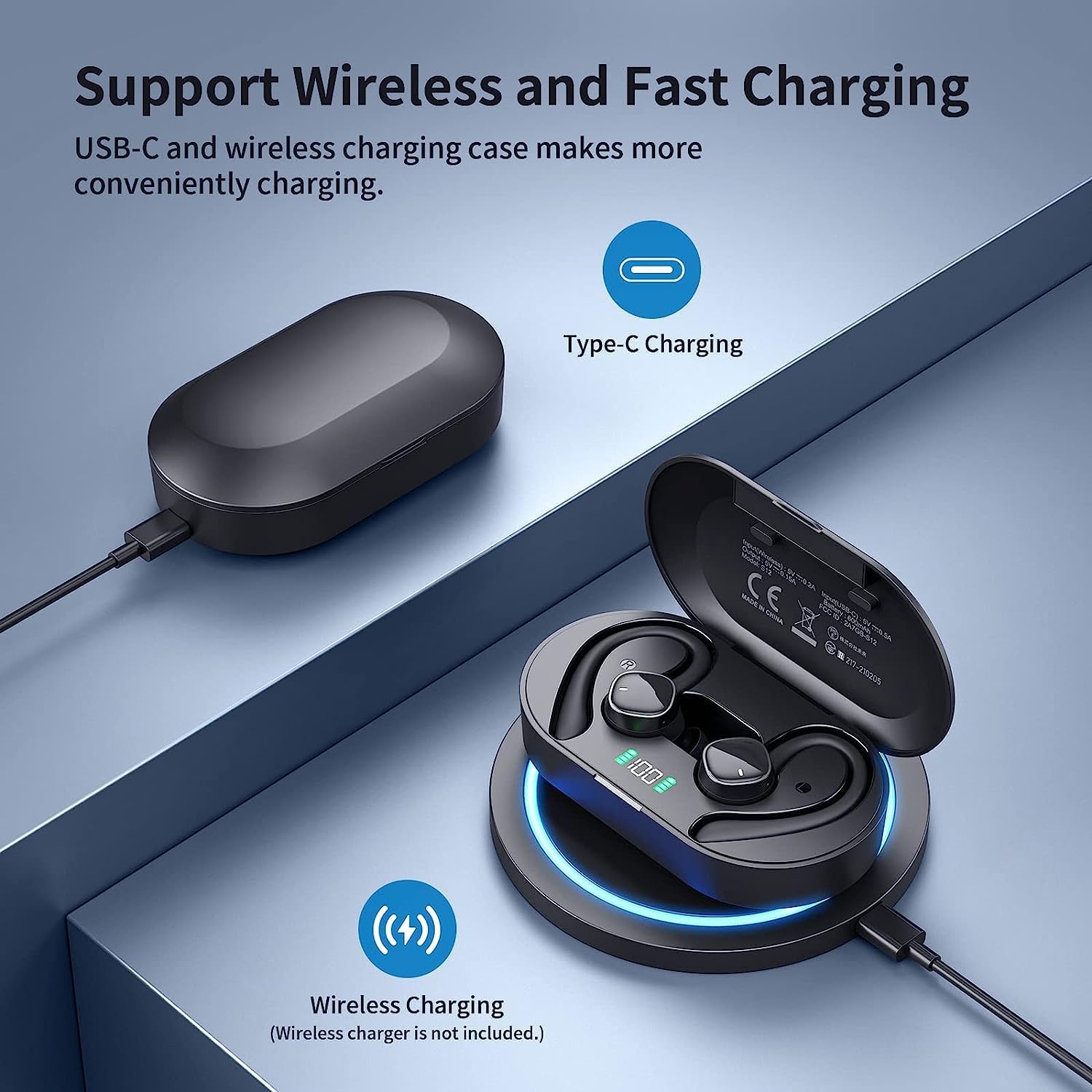
Image illustrating the two charging methods for the PSIER wireless earbuds: USB-C cable charging and wireless charging on a compatible pad. The charging case with LED display is shown.
Zapnutí/vypnutí
- Zapnutí: Otevřete nabíjecí pouzdro. Sluchátka se automaticky zapnou a pokusí se připojit k poslednímu spárovanému zařízení.
- Vypnout: Vložte sluchátka zpět do nabíjecího pouzdra a zavřete víko. Automaticky se odpojí a vypnou.
Párování pomocí Bluetooth
Sluchátka se pro pohodlné používání párují v jednom kroku.
- Ujistěte se, že jsou sluchátka nabitá a vložená do nabíjecího pouzdra.
- Otevřete nabíjecí pouzdro. Sluchátka se automaticky přepnou do režimu párování.
- Na svém zařízení (chytrém telefonu, tabletu atd.) povolte Bluetooth a vyhledejte dostupná zařízení.
- V seznamu zařízení, která chcete připojit, vyberte „S12“.
- Once connected, you will hear an audio prompt, and the device will show "Connected."

Image demonstrating the one-step pairing process for the PSIER wireless earbuds. The charging case is open, showing the earbuds, and a smartphone screen displays 'S12 Connected' in its Bluetooth settings.
Nošení sluchátek
For optimal sound quality and comfort, choose the correct eartip size and ensure the earhooks are securely positioned.
- Select the eartips (XS, S, M, L) that provide a snug fit in your ear canal.
- Jemně vložte sluchátko do ucha.
- Adjust the earhook over your ear to secure the earbud in place.
Návod k obsluze
Ovládání médií
The earbuds feature multi-function buttons for easy control of audio playback and calls.
| Funkce | Akce |
|---|---|
| Přehrát/Pozastavit | Single press on either earbud |
| Další stopa | Double press on the Right earbud |
| Předchozí stopa | Double press on the Left earbud |
| Zvýšení hlasitosti | Triple press on the Right earbud |
| Snížit hlasitost | Triple press on the Left earbud |
| Přijmout/ukončit hovor | Single press on either earbud |
| Odmítnout hovor | Stiskněte a podržte jedno ze sluchátek |
| Aktivujte hlasového asistenta | Press and hold on either earbud (when not on a call) |
Správa hovorů
Each earbud is equipped with two microphones, totaling four microphones, to ensure clear call quality by accurately picking up your voice and isolating environmental noise through advanced algorithms.

Image depicting a person using PSIER wireless earbuds in a noisy environment, with graphics illustrating how 4 microphones isolate voice from background noise for clearer calls.
LED digitální displej
The charging case features an LED digital display that shows the remaining power in percentage (1%-100%). This allows you to easily monitor the battery level of the case and plan your charging accordingly. Individual indicators for left (L) and right (R) earbuds may also be present.

Ukázka obrázkůasing the digital LED display on the PSIER earbud charging case, indicating 100% charge. It also highlights the 60 hours total playtime, with 10 hours on a single earbud charge and 50 hours from the charging case.
Kvalita zvuku
The PSIER Wireless Earbuds are equipped with a 6mm large size speaker driver, engineered to deliver powerful deep bass and dynamic treble. This design aims to provide a 3D spatial sound experience, enhancing your music listening across a wide sound range.

Close-up image of the PSIER earbud's internal components, highlighting the 6mm large size speaker driver and Bluetooth 5.3 chip, emphasizing powerful stereo sound with dynamic treble and deep bass.
Údržba a péče
Čištění
- Regularly clean the earbuds, eartips, and charging contacts with a soft, dry, lint-free cloth.
- Nepoužívejte abrazivní materiály, rozpouštědla nebo chemické čisticí prostředky.
Voděodolnost (IPX7)
The earbuds are rated IPX7 waterproof, meaning they can withstand splashes, sweat from workouts, and rain. They are not designed for swimming or prolonged submersion in water. Ensure the earbuds are dry before placing them back in the charging case to prevent damage.
Skladování
- Když sluchátka nepoužíváte, uložte je do jejich nabíjecího pouzdra, abyste je ochránili a udrželi nabitá.
- Vyhněte se skladování při extrémních teplotách nebo vysoké vlhkosti.
Odstraňování problémů
- Sluchátka se nespárují: Ujistěte se, že jsou obě sluchátka nabitá a vyjmutá z pouzdra. Vypněte a zapněte Bluetooth na zařízení. Pokud problémy přetrvávají, zkuste sluchátka resetovat (viz pokyny výrobce). webstránky s konkrétními pokyny k resetování).
- Žádný zvuk: Zkontrolujte úroveň hlasitosti na zařízení i ve sluchátkách. Ujistěte se, že jsou sluchátka správně připojena k zařízení.
- Problémy s nabíjením: Verify the USB-C cable is securely connected or the wireless charging pad is functioning correctly. Clean the charging contacts on both the earbuds and the case.
- Špatná kvalita hovoru: Ujistěte se, že mikrofony nejsou zakryty. Zkuste se přesunout do oblasti s menším hlukem v pozadí.
Specifikace
| Funkce | Detail |
|---|---|
| Číslo modelu | B0BY911HRZ |
| Značka | PSIER |
| Technologie připojení | Bezdrátové připojení Bluetooth 5.3 |
| Umístění uší | Open Ear (with earhooks) |
| Form Factor | V uchu |
| Barva | Černý |
| Typ ovládání | Ovládání médií |
| Mikrofony | 4 (2 na sluchátko) |
| Prázdno | Up to 10 hours (single charge), 60 hours total with charging case |
| Nabíjení | USB-C, bezdrátové nabíjení |
| Voděodolnost | IPX7 |
| Hmotnost položky | 5.3 unce |
| Rozměry balení | 5.24 x 3.86 x 1.46 palce |
Záruka a podpora
For warranty information, technical support, or further assistance, please refer to the documentation included with your product or visit the official PSIER webmísto. Uschovejte si doklad o koupi pro případ záručních reklamací.