
OPTICON L-46X
Návod k obsluze 1D a 2D USB skeneru čárových kódů L-46X
Model: L-46X | Brand: OPTICON
1. Úvod
The OPTICON L-46X 2D Imager is a versatile barcode scanner designed to read both 1D and 2D barcodes. It incorporates Opticon’s advanced 2D CMOS imaging technology, enabling efficient point-and-shoot barcode scanning. The device features a disinfectant-ready protective casing, making it suitable for use in various environments, including healthcare settings.
2. Klíčové vlastnosti
- Pokročilá technologie skenování: Utilizes next-generation scanning technology for optimal performance, durability, and reliability.
- Robustní odolnost: Constructed with a durable, lightweight, and ergonomic design for comfortable extended use. The scanner is drop-tested to withstand falls of up to 6 feet onto concrete.
- Odolnost vůči prostředí: Features an IP42 rating, providing protection against dust and water splashes, making it suitable for demanding environments such as retail, logistics, and healthcare.
- Disinfectant Ready: Designed with a protective casing that can be safely disinfected.
- Konektivita: USB Cable for reliable connection to desktop and laptop computers.
3. Obsah balení
Prosím, ověřte, zda jsou v balení přítomny všechny položky:
- L-46X Barcode Scanner Unit
- USB propojovací kabel
- Stand Mount (if included with your specific model)
4. Průvodce nastavením
Follow these steps to set up your L-46X Barcode Scanner:
- Vybalení skeneru: Carefully remove the L-46X scanner and its accessories from the packaging.
- Připojte kabel USB: Insert the USB cable into the port at the base of the scanner. Connect the other end of the USB cable to an available USB port on your desktop or laptop computer.
- Instalace ovladače: The L-46X is typically a plug-and-play device. Your operating system (Windows, macOS, Linux) should automatically detect and install the necessary drivers. Wait for the installation to complete, which may take a few moments.
- Umístění skeneru: If your model includes a stand mount, assemble it according to its instructions and place the scanner securely in the stand. Ensure the scanner is positioned for easy access and comfortable use.
- Otestujte skener: Open a text editor (e.g., Notepad, Word) or a compatible application. Scan a known barcode. The barcode data should appear in the text editor or application, indicating successful setup.
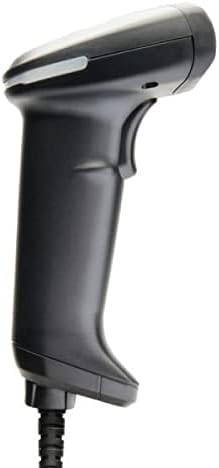
Image: The L-46X barcode scanner, a black handheld device with a trigger button and a USB cable extending from its base. This image illustrates the scanner's design and connectivity point.
5. Návod k obsluze
To operate your L-46X Barcode Scanner:
- Zapnutí: Skener se automaticky zapne po připojení k napájenému portu USB.
- Namiřte skener: Point the scanning window of the L-46X directly at the barcode you wish to scan. Ensure the entire barcode is within the scanner's field of view.
- Stiskněte spoušť: Press and hold the trigger button located on the handle of the scanner. A scanning beam or light will be emitted.
- Potvrzení skenování: Upon a successful scan, the scanner will typically emit an audible beep and/or a visual indicator (e.g., an LED light will flash). The scanned data will be transmitted to your connected computer and appear in the active application.
- Uvolnění spouště: Release the trigger button after a successful scan.
The L-46X is capable of reading both 1D (linear) and 2D (matrix) barcodes, including QR codes, Data Matrix, and PDF417.
6. Údržba
Proper maintenance ensures the longevity and optimal performance of your L-46X scanner:
- Čištění skenovacího okna: Použijte měkký hadřík, který nepouští vlákna dampened with water or a mild, non-abrasive cleaning solution to gently wipe the scanning window. Avoid harsh chemicals or abrasive materials that could scratch the surface.
- Čištění Casing: The L-46X features a disinfectant-ready casing. You may use common disinfectant wipes or solutions to clean the exterior. Always follow the disinfectant manufacturer's instructions and ensure the scanner is powered off and disconnected before cleaning.
- Skladování: When not in use, store the scanner in a clean, dry environment, away from extreme temperatures, direct sunlight, and corrosive materials.
- Péče o kabely: Neohýbejte ani nekruťte kabel USB nadměrně, mohlo by dojít k poškození vnitřních vodičů.
7. Řešení problémů
If you encounter issues with your L-46X scanner, refer to the following common problems and solutions:
| Problém | Možná příčina | Řešení |
|---|---|---|
| Skener se nezapne. | USB cable not properly connected or USB port is faulty. | Ujistěte se, že je kabel USB bezpečně připojen ke skeneru i k počítači. Zkuste jiný port USB na počítači. |
| Skener nečte čárové kódy. | Barcode is damaged, poor quality, or not supported; scanner window is dirty; incorrect aiming. | Try scanning a different, known-good barcode. Clean the scanning window. Ensure the barcode is fully within the scanner's field of view and the trigger is pressed. Verify the barcode type is supported (1D/2D). |
| Naskenovaná data se zobrazují nesprávně. | Keyboard layout mismatch or software conflict. | Ensure your computer's keyboard layout matches the scanner's default settings. Restart the computer and the application you are using. |
| No beep or visual confirmation after scanning. | Scanner settings may have disabled feedback. | Refer to the full programming manual (available from Opticon support) to enable audible/visual feedback. |
If the problem persists, please contact Opticon customer support for further assistance.
8. Specifikace
| Funkce | Detail |
|---|---|
| Model | L-46X |
| Technologie skenování | 2D CMOS Imager (1D and 2D barcode support) |
| Konektivita | USB kabel |
| Zdroj napájení | Elektrické napájení (přes USB) |
| Kompatibilní zařízení | Stolní počítač, notebook |
| Hmotnost položky | 1.5 libry |
| Hodnocení trvanlivosti | IP42 (odolnost proti prachu a stříkající vodě) |
| Specifikace pádu | 6 feet to concrete |
| Výrobce | Opticon |
9. Záruka a podpora
The OPTICON L-46X Barcode Scanner is backed by a dvouletá záruka výrobce od data nákupu. Tato záruka se vztahuje na vady materiálu a zpracování při běžném používání.
For technical support, warranty claims, or additional information, please contact Opticon customer service. You can typically find contact details on the official Opticon website or through your product reseller.
Uschovejte si prosím doklad o koupi pro účely záruky.
Související dokumenty - L-46X
 |
Uživatelská příručka k ručnímu skeneru Opticon L-46X 2D Uživatelská příručka pro ruční skener Opticon L-46X 2D, s podrobným popisem funkcí, nastavení, konfigurace, možností rozhraní, nastavení kódu a řešení problémů pro efektivní snímání dat čárových kódů. |
 |
Uživatelská příručka Opticon H21 Komplexní uživatelská příručka pro mobilní počítač Opticon H21 s podrobným popisem nastavení, ovládání, multimédií, připojení, bezpečnosti, záruky a regulačních informací. Zahrnuje pokyny k jeho funkcím a funkcím. |
 |
Stručný návod k obsluze Opticon OPN-2500 Stručný návod k nastavení a spárování čtečky čárových kódů Opticon OPN-2500 s Bluetooth s vaším hostitelským zařízením, včetně pokynů pro různé režimy připojení a kompatibilitu se systémem iOS. |
 |
Stručný návod k obsluze Opticon OPN-3102i – Nastavení skeneru Bluetooth Stručný návod k použití skeneru Opticon OPN-3102i s technologií Bluetooth, který zahrnuje nastavení, párování a základní operace. Naučte se, jak se připojit přes Bluetooth, používat různé režimy, jako jsou HID a SPP, a porozumět funkcím zařízení. |
 |
Opticon OPN-2500 User Manual: Your Guide to Efficient Barcode Scanning Discover the capabilities of the Opticon OPN-2500 barcode companion scanner. This user manual provides detailed instructions on setup, Bluetooth and USB connectivity, scanning procedures, configuration, and troubleshooting for retail, logistics, and inventory management. |
 |
Uživatelská příručka a technické specifikace skeneru čárových kódů KUIIYER Komplexní průvodce pro skenery čárových kódů KUIIYER, který zahrnuje funkce produktu, bezdrátové a Bluetooth připojení, technické parametry, provozní režimy, nastavení jazyka a poprodejní servis. Obsahuje podrobné pokyny pro různé modely, jako například KU061, KU062, KU063 a jejich PRO verze. |
Ask a question about this manual
Ask about setup, troubleshooting, compatibility, parts, safety, or missing instructions. Manuals+ will review the question and use this page’s manual context to help answer it.