
1. Úvod
The SHREYANS SRS588 is a compact and lightweight 2-inch portable Bluetooth thermal printer designed for various mobile printing applications. This manual provides essential information for setting up, operating, maintaining, and troubleshooting your printer to ensure optimal performance.

Image 1.1: SHREYANS SRS588 Portable Bluetooth Printer in use.
2. Co je v krabici
Upon unpacking your SHREYANS SRS588 printer, please verify that all the following items are included:
- SHREYANS SRS588 Portable Bluetooth Printer
- USB nabíjecí kabel
- Napájecí adaptér
- Uživatelská příručka (tento dokument)
- Leather Protective Case (may vary by version)
- Thermal Paper Roll (initial roll)
3. Konec produktuview
The SHREYANS SRS588 printer features a compact design with intuitive controls. It utilizes thermal printing technology, eliminating the need for ink cartridges or ribbons.

Obrázek 3.1: Přední strana view of the SHREYANS SRS588 printer, showing power and feed buttons.
Key features include wireless Bluetooth connectivity, fast printing, and a built-in rechargeable battery for portability.

Image 3.2: Visual representation of key features: Wireless Connection, Fast Printing, Small & Portable, Built-in Battery.
4. Nastavení
Follow these steps to prepare your SHREYANS SRS588 printer for first use:
4.1. Vybalení a počáteční nabití
Carefully remove all components from the packaging. Connect the printer to the power adapter using the provided USB cable and charge it fully before initial use. The battery indicator lights will show charging status.
4.2. Instalace baterie
If the battery is not pre-installed, open the battery compartment cover on the bottom of the printer. Insert the rechargeable battery, ensuring correct polarity. Close the cover securely.
4.3. Instalace papírové role
- Open the printer's top cover by pressing the release button or lifting the latch.
- Insert a 58mm thermal paper roll into the compartment. Ensure the paper feeds out from the bottom of the roll and the leading edge is straight.
- Vytáhněte malé množství papíru za řeznou hranu.
- Pevně zavřete horní kryt, dokud nezacvakne na místo.

Image 4.1: Printer with the paper roll compartment open, showing proper paper insertion.
4.4. Párování Bluetooth
The SHREYANS SRS588 printer supports Bluetooth connectivity with Android and iOS devices.
- Zapněte tiskárnu stisknutím a podržením tlačítka napájení, dokud se nerozsvítí kontrolka.
- V mobilním zařízení přejděte do nastavení Bluetooth a vyhledejte dostupná zařízení.
- Select 'SHREYANS Printer' or a similar device name (e.g., 'SRS588') from the list.
- If prompted for a PIN, enter '0000' or '1234'.
- Once paired, the Bluetooth indicator on the printer will confirm the connection.

Image 4.2: Bluetooth pairing process with Android and iOS devices.
4.5. Video Guide: Unboxing, Setup & Printing
Video 4.1: This video demonstrates the unboxing, battery installation, paper roll loading, and a sample print operation of the SHREYANS SRS588 printer.
5. Návod k obsluze
5.1. Zapnutí/vypnutí
- Zapnutí: Stiskněte a podržte tlačítko napájení přibližně 2–3 sekundy, dokud se nerozsvítí kontrolka.
- Vypnutí: Stiskněte a podržte tlačítko napájení přibližně 3–5 sekundy, dokud kontrolka nezhasne.
5.2. Printing from Mobile Devices
To print, you will need a compatible application on your smartphone or tablet. Many billing and POS applications support this printer. Examples include Vyapar, Loyverse, TabShop, Pozool, Expressprint, ireap, CashSale POS, O3POS, and others.
- Ensure the printer is powered on and successfully paired via Bluetooth with your device.
- Open your preferred printing application.
- Navigate to the print function within the application.
- Select the SHREYANS SRS588 printer from the list of available printers.
- Initiate the print command. The printer will automatically print and cut the receipt.
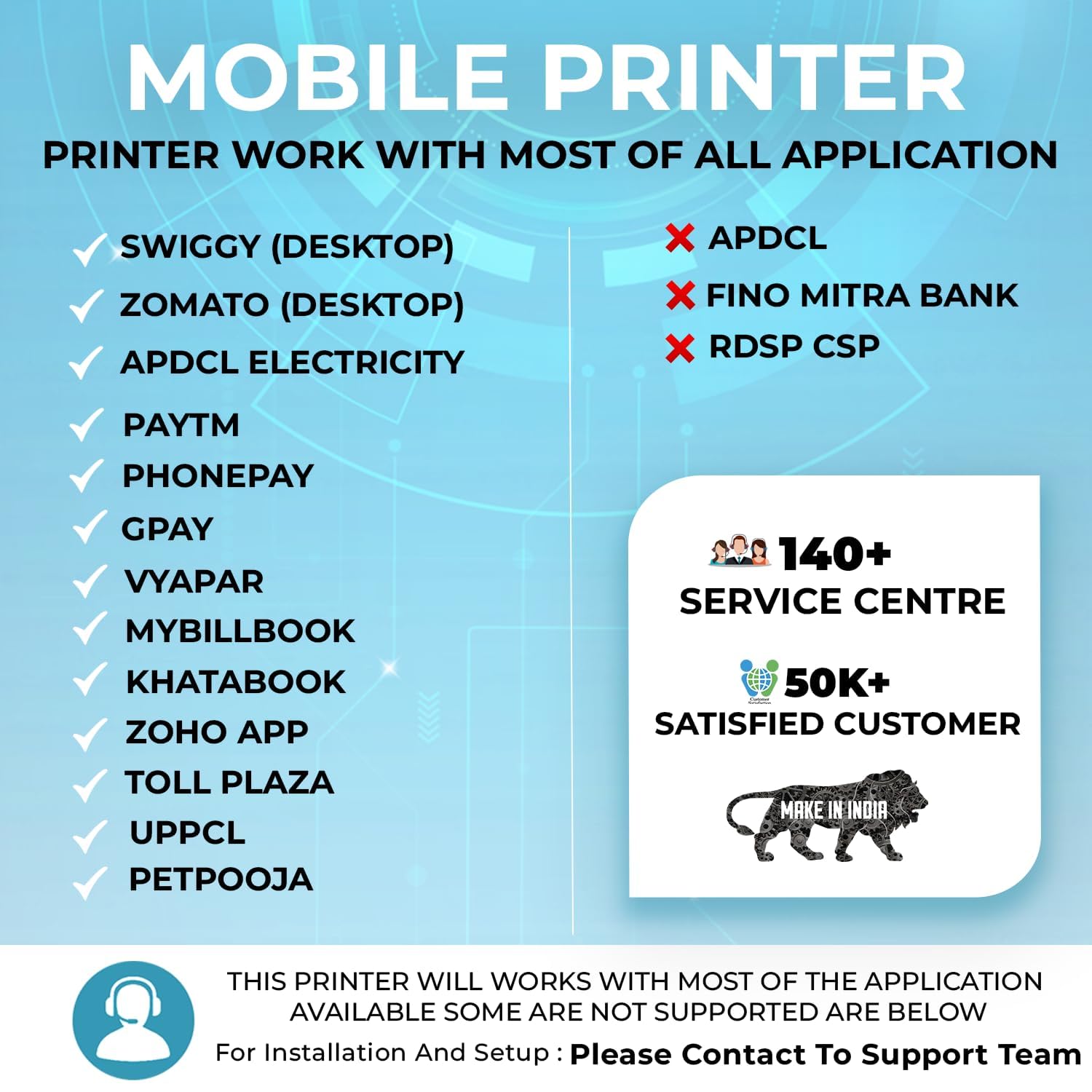
Obrázek 5.1: Příkladamples of compatible applications for the SHREYANS SRS588 printer.
5.3. Auto-Cutter Feature
The SRS588 features an automatic cutter that provides a clean and precise cut after each print job, enhancing efficiency and presentation.
6. Údržba
Pravidelná údržba zajišťuje dlouhou životnost a optimální výkon vaší tiskárny.
6.1. Čištění tiskové hlavy
The thermal print head is a critical component. Clean it periodically to prevent print quality issues.
- Vypněte tiskárnu a odpojte ji od napájení.
- Otevřete přihrádku na papír.
- Gently wipe the print head (the dark strip) with a cotton swab lightly dampzakončené isopropylalkoholem.
- Před zavřením krytu a zapnutím tiskárny nechte tiskovou hlavu zcela vyschnout.
6.2. Péče o baterie
- Před prvním použitím baterii plně nabijte.
- Vyhněte se častému úplnému vybíjení baterie.
- Pokud tiskárnu skladujete delší dobu, nabijte baterii přibližně na 50 % a skladujte ji na chladném a suchém místě.
6.3. Paper Roll Storage
Store thermal paper rolls in a cool, dry place away from direct sunlight and heat to prevent premature fading of printouts.
7. Řešení problémů
If you encounter issues with your SHREYANS SRS588 printer, refer to the following common problems and solutions:
| Problém | Možná příčina | Řešení |
|---|---|---|
| Tiskárna se nezapne | Slabá baterie; Tlačítko napájení nebylo správně stisknuto | Nabijte tiskárnu; Stiskněte a podržte tlačítko napájení po dobu 2–3 sekund. |
| Nelze se připojit přes Bluetooth | Printer not in pairing mode; Incorrect PIN; Device Bluetooth off | Ensure printer is on; Re-enter PIN (0000 or 1234); Enable Bluetooth on your device. |
| Špatná kvalita tisku / Vybledlé výtisky | Dirty print head; Low battery; Old thermal paper | Clean the print head (see Section 6.1); Charge the printer; Use fresh thermal paper. |
| Zaseknutý papír | Improper paper loading; Foreign object in paper path | Open cover, remove jammed paper, re-load correctly; Check for obstructions. |
| Tiskárna nereaguje na tiskové příkazy | Bluetooth disconnected; Application error; Printer in error state | Verify Bluetooth connection; Restart application/printer; Check printer indicator lights for error codes. |
If the problem persists after attempting these solutions, please contact SHREYANS customer support.
8. Specifikace
Detailed technical specifications for the SHREYANS SRS588 Portable Bluetooth Printer:
- Značka: SHREYANS
- Název modelu: SRS58201 (also referred to as SRS588)
- Technologie připojení: Bluetooth, USB
- Technologie tisku: Tepelný
- Speciální funkce: Portable, Auto-Cutter
- Barva: Bílý
- Tiskový výstup: Monochromatický
- Maximální rychlost černobílého tisku: 30 ppm
- Hmotnost položky: 340 gramů
- Rozměry položky (D x Š x V): 4H x 8Š x 11V centimetrů
- Typ ovladače: Android
- Printing Media Type: Papír (obyčejný)
- Kompatibilní zařízení: chytré telefony
- Barva inkoustu: Black (Thermal, no ink required)
- Rezoluce: 2 inch (print width)
- Další funkce tiskárny: Pouze tisk
- Způsob ovládání: Dotek
- Maximum Copy Resolution Black and White: 150 dpi
- Maximální velikost média: 58 mm
- Velikost papíru: 58 milimetrů
- Max Print Resolution Color: 200 dpi (for color images, though output is monochrome)
- Max Print Speed Black/White: 150 dpi
- Dual-sided printing: Žádný
- Duplex: Manuál
- Země původu: Indie
9. Záruka a podpora
9.1. Informace o záruce
The SHREYANS SRS588 Portable Bluetooth Printer comes with a 1 rok záruka od data nákupu. Uschovejte si prosím doklad o koupi jako doklad o záruce.
9.2. Zákaznická podpora
For any technical assistance, warranty claims, or further inquiries, please contact Shreyans Retail Solution. Refer to the contact information provided with your product packaging or visit the official SHREYANS webstránky pro podrobnosti o podpoře.