
1. Úvod
The OWON SPE6053 is a high-performance, single-channel programmable DC power supply designed for a wide range of laboratory and industrial applications. It offers a stable output of 0-60V and 0-5A with a maximum power of 300W. Featuring a 2.8-inch TFT LCD display, it provides comprehensive information at a glance, including set and actual voltage/current values, output power, and cumulative running time. The device incorporates multiple protection functions to ensure safe and reliable operation, along with convenient USB connectivity for charging and PC software control.
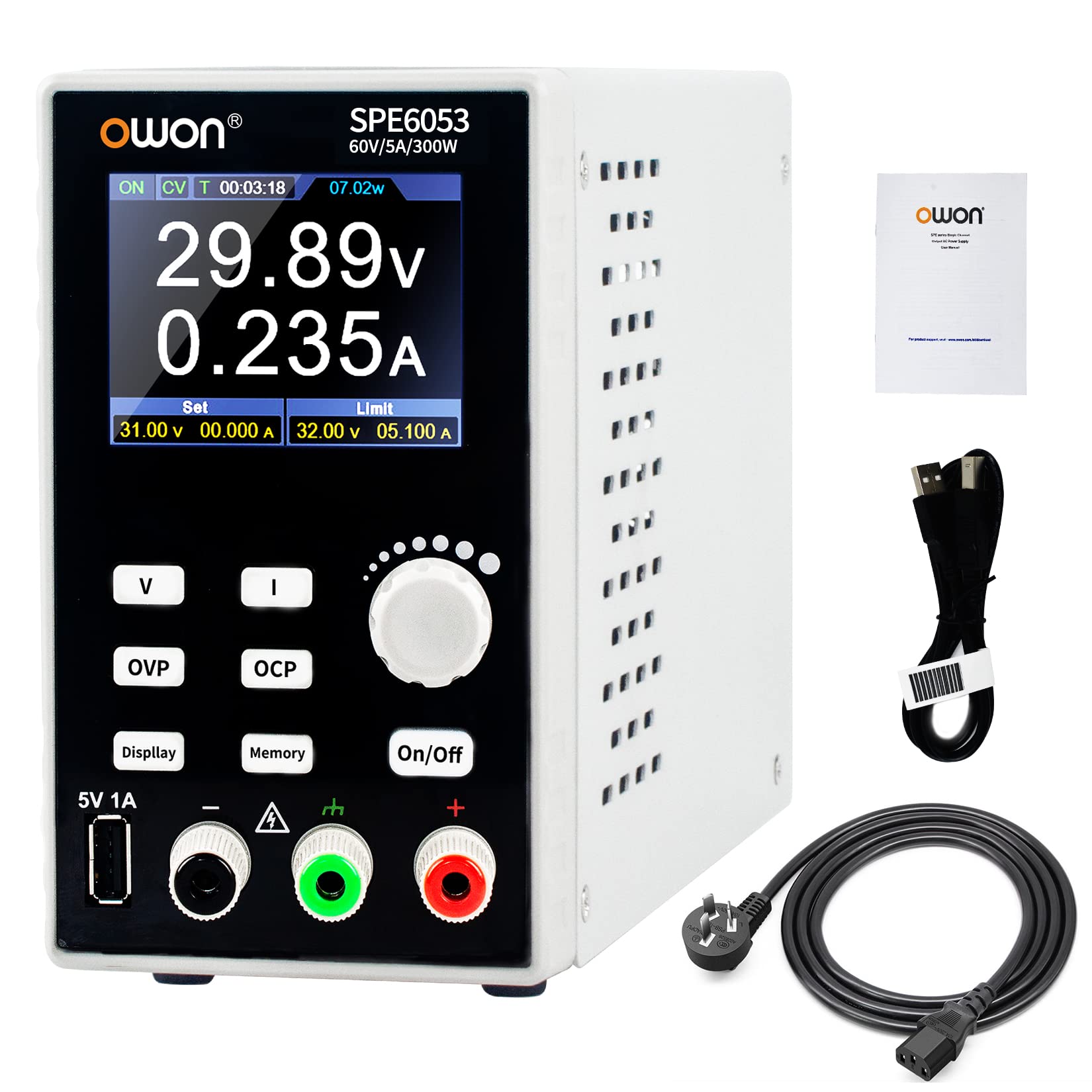
Figure 1: OWON SPE6053 Programmable DC Power Supply
2. Nastavení
2.1 Vybalení a kontrola
Carefully unpack the OWON SPE6053 power supply and inspect it for any signs of damage during transit. Retain the packaging for future transport or storage. The package should contain the following items:
- OWON SPE6053 Programmable DC Power Supply
- Napájecí kabel
- USB kabel
- Uživatelská příručka (tento dokument)
2.2 Připojení napájení
Connect the provided power cord to the AC input socket on the rear panel of the power supply and then to a suitable AC power outlet. Ensure the power supply is placed on a stable, level surface with adequate ventilation.
2.3 Output Terminal Connection
Connect your load to the output terminals on the front panel using appropriate test leads. The red terminal is for positive (+) output, and the black terminal is for negative (-) output. Ensure connections are secure before powering on the unit.

Figure 2: OWON SPE6053 connected in a typical laboratory setup.
3. Návod k obsluze
3.1 Přední panel Overview
The front panel of the SPE6053 features a 2.8-inch TFT LCD display, control buttons, an adjustment knob, and output terminals. Familiarize yourself with the layout for efficient operation.

Obrázek 3: Ovládací prvky a indikátory na předním panelu.
- 2.8-Inch LCD: Displays output parameters and status.
- Nastavovací knoflík: Používá se k nastavení hlasitostitage, current, and navigate menus.
- Tlačítko zapnutí/vypnutí: Toggles the channel output. Long press to activate automatic output function.
- Front USB Port (5V/1A): Pro nabíjení externích zařízení.
- Channel Output Terminals: Připojte se k zátěži.
- svtage Setting Button (V): Enters voltage setting mode.
- Current Setting Button (I): Enters current setting mode.
- Přepětítage Protection Setting (OVP): Configures OVP limits.
- Overcurrent Protection Setting (OCP): Configures OCP limits.
- Tlačítko zobrazení: Switches curve display.
- Tlačítko paměti: Accesses memory functions for saving/recalling parameters.
3.2 Zobrazení informací
The 2.8-inch TFT LCD provides real-time feedback on the power supply's status and output. Key information displayed includes:
- Set Output Voltage and Actual Output Voltage
- Set Output Current and Actual Output Current
- Actual Output Power
- Cumulative Running Time
- Channel Output Status (ON/OFF, CV/CC mode)
- Set values for Overvoltage Protection (OVP) and Overcurrent Protection (OCP)

Obrázek 4: Detailní view of the 2.8-inch LCD display showing various parameters.
When the actual current exceeds the set current value, the power supply automatically switches to Constant Current (CC) mode to protect the circuit.
3.3 Nastavení Voltage a proud
- Stiskněte tlačítko V tlačítko pro zadání voltage setting mode. The voltage value on the display will become editable.
- Otočte Seřizovací knoflík to change the desired voltage value. Press the knob to move between digits.
- Stiskněte tlačítko I button to enter current setting mode. The current value on the display will become editable.
- Otočte Seřizovací knoflík to change the desired current value. Press the knob to move between digits.
- Jakmile se požadovaný objtage and current limits are set, press the Zapnuto/Vypnuto button to enable the output.
3.4 Protection Functions (OVP, OCP)
The SPE6053 includes multiple protection features:
- Přepětítage Ochrana (OVP): Prevents damage to the load by limiting the maximum output voltagE. zmáčkni OVP button to set the overvoltage limit.
- Nadproudová ochrana (OCP): Protects the load from excessive current. Press the OCP button to set the overcurrent limit.
- Ochrana proti zkratu: Automaticky vypne výstup v případě zkratu.
- Over Power Protection: Limits the total output power.
- Tepelná ochrana: Protects the unit from overheating.
It is recommended to set OVP and OCP values slightly above your desired operating voltage and current to provide a safety margin for your connected circuit.
3.5 Funkce paměti
The power supply features 4 groups of memory parameters for quick recall of frequently used settings. Press the Paměť button to access these functions. Refer to the on-screen prompts for saving and recalling parameters.
3.6 USB Charging and PC Software Control
The front panel includes a 5V/1A USB output port for charging mobile phones or other compatible devices. Additionally, the rear USB communication port allows for firmware updates and control via PC software. This enables advanced programming and monitoring capabilities.

Figure 5: USB charging capability and typical application areas including circuit board, appliance, phone, and computer repair.
4. Údržba
4.1 Čištění
K čištění nástroje použijte měkký hadřík dampened with a mild detergent. Do not use abrasive cleaners or solvents. Ensure the power supply is disconnected from the main power before cleaning.
4.2 Podmínky prostředí
Operate and store the power supply in a clean, dry environment, away from direct sunlight, excessive dust, and moisture. Ensure proper ventilation around the unit to prevent overheating.
5. Řešení problémů
This section provides solutions to common issues you might encounter with the OWON SPE6053 power supply.
| Problém | Možná příčina | Řešení |
|---|---|---|
| No power when turned on. | Power cord not connected, power switch off, or no power from outlet. | Check power cord connection. Ensure the main power switch is on. Verify the power outlet is functional. |
| Výstupní objemtage/current is zero or unstable. | Output is off, OVP/OCP triggered, or faulty connection. | Stiskněte tlačítko Zapnuto/Vypnuto button to enable output. Check OVP/OCP settings. Verify load connections. |
| Protection (OVP/OCP) frequently triggers. | OVP/OCP limits set too low, or load demands exceed limits. | Increase OVP/OCP limits if appropriate for your application, or reduce load requirements. |
| Jednotka se zdá být horká. | Inadequate ventilation or prolonged high-power operation. | Ensure clear airflow around the unit. Reduce load or operating time if necessary. The unit has thermal protection. |
6. Specifikace
The following table lists the key technical specifications for the OWON SPE6053 Programmable DC Power Supply.
| Funkce | Specifikace |
|---|---|
| Název modelu | SPE6053 |
| Značka | OWON |
| Výstupní objemtage Dosah | 0-60V |
| Rozsah výstupního proudu | 0-5A |
| Výstupní výkon | 300W |
| Zobrazit | 2.8palcový TFT LCD |
| Vstupní objemtage (AC) | 120V (AC) / 230V (AC) (Min/Max) |
| Způsob chlazení | Větrák |
| Hmotnost | 1.92 kg (přibližně 3.3 libry) |
| Konektivita | USB (Front 5V/1A, Rear for PC control) |
| Ochranné funkce | OVP, OCP, Short Circuit, Over Power, Thermal |

Figure 6: The SPE6053 provides stable output with low ripple and noise, as demonstrated by oscilloscope measurements.
7. Záruka a podpora
For warranty information, technical support, or service inquiries, please contact your local OWON distributor or visit the official OWON website. Ensure you have your product model number (SPE6053) and purchase details available when seeking support.