
SOLIOM S40-4G
SOLIOM S40 3G/4G LTE Cellular Solar Security Camera
Uživatelská příručka
1. Úvod
Thank you for choosing the SOLIOM S40 3G/4G LTE Cellular Solar Security Camera. This manual provides detailed instructions for the proper installation, operation, and maintenance of your camera. Please read this manual thoroughly before using the product to ensure correct usage and to prevent damage.
Důležité bezpečnostní informace:
- Ujistěte se, že je kamera instalována na stabilním místě, aby nedošlo k jejímu pádu.
- Nevystavujte fotoaparát extrémním teplotám ani korozivnímu prostředí.
- Use only the recommended power accessories.
- Uchovávejte mimo dosah dětí.
2. Konec produktuview
2.1 Komponenty produktu
The SOLIOM S40 camera package typically includes the following items:
- SOLIOM S40 3G/4G LTE Cellular Solar Security Camera
- Solární panel
- Montážní držák a šrouby
- USB nabíjecí kabel
- Nano SIM Card (pre-installed or included separately)
- Micro SD karta (předinstalovaná nebo dodávaná samostatně)
- Uživatelská příručka (tento dokument)
2.2 Klíčové vlastnosti
- Připojení 3G/4G LTE: Funguje bez Wi-Fi, ideální pro odlehlá místa.
- Solární napájení: Equipped with a solar panel for continuous power, reducing the need for manual recharging.
- 1080p Full HD video: Poskytuje jasné a podrobné video footage.
- Funkce otáčení a naklápění: Nabízí horizontální otáčení o 355° a vertikální náklon o 90° pro pokrytí široké oblasti.
- Detekce pohybu PIR: Advanced passive infrared sensor detects human and animal movement, minimizing false alarms.
- Barevné noční vidění: Enhanced night vision capabilities with spotlight for full-color viewza zhoršených světelných podmínek.
- Obousměrný zvuk: Vestavěný mikrofon a reproduktor pro komunikaci v reálném čase.
- IP66 Odolnost vůči povětrnostním vlivům: Odolná konstrukce pro venkovní použití za různých povětrnostních podmínek.
- Lokální a cloudové úložiště: Supports Micro SD card storage and optional cloud storage.

Figure 2.1: SOLIOM S40 Camera with Solar Panel

Figure 2.2: Camera operating in a remote location without Wi-Fi or power outlet.
3. Nastavení
3.1 Než začnete
- Nabijte baterii: Before initial use, fully charge the camera's internal battery using the provided USB cable. Connect the USB cable to the camera's charging port and a 5V/2A USB power adapter (not included).
- Vložte SIM kartu: Ensure the Nano SIM card is active and has a data plan. Open the rubber cover on the camera body to access the SIM card slot. Insert the Nano SIM card with the gold contacts facing down, following the diagram.
- Vložte Micro SD kartu: If not pre-installed, insert a Micro SD card (up to 128GB, Class 10 or higher recommended) into the designated slot for local video storage.

Figure 3.1: SIM and SD Card Installation
3.2 Stažení aplikace a registrace účtu
Download the 'SOLIOM+' app from the App Store (iOS) or Google Play Store (Android). Follow the on-screen instructions to register a new account and log in.
3.3 Párování fotoaparátu
- Open the SOLIOM+ app and tap 'Add Device' or the '+' icon.
- Select '4G Camera' from the device list.
- Follow the in-app prompts to scan the QR code on the camera or manually enter the device ID.
- Po připojení můžete kameru pojmenovat a spustit živý přenos viewIng.
3.4 Fyzická instalace
Choose a suitable location for installation, ensuring good 4G signal reception and sufficient sunlight exposure for the solar panel. The camera is IP66 weather-resistant, suitable for outdoor environments.
- Montáž kamery: Use the provided mounting bracket and screws to securely attach the camera to a wall or pole. Ensure the camera has a clear line of sight to the area you wish to monitor.
- Positioning the Solar Panel: Mount the solar panel in a location that receives direct sunlight for several hours a day. Connect the solar panel cable to the camera's charging port.

Figure 3.2: Wire-Free Installation with Solar Power

Figure 3.3: IP66 Weather-resistant Design
4. Provoz
4.1 Rozhraní aplikaceview
Upon opening the SOLIOM+ app, you will see a list of your connected cameras. Tap on a camera to access its live view a možnosti ovládání.
4.2 Živě View a přehrávání
- Žít View: Tap on the camera feed to see real-time video.
- Přehrávání: Přístup zaznamenán footage from the Micro SD card or cloud storage via the playback option in the app. You can filter by date and time.
4.3 Ovládání otáčení/náklonu
V přímém přenosu view interface, use the on-screen joystick or directional arrows to remotely control the camera's pan (355° horizontal) and tilt (90° vertical) movements to adjust the viewúhel.

Obrázek 4.1: Funkce otáčení a naklápění
4.4 Detekce pohybu a upozornění
The camera uses PIR (Passive Infrared) technology for accurate motion detection. When motion is detected, the camera can:
- Odesílejte push notifikace do svého smartphonu.
- Record video clips to the SD card or cloud.
- Activate the built-in spotlight and/or siren alarm.
Adjust motion detection sensitivity and alert settings within the app to suit your needs.
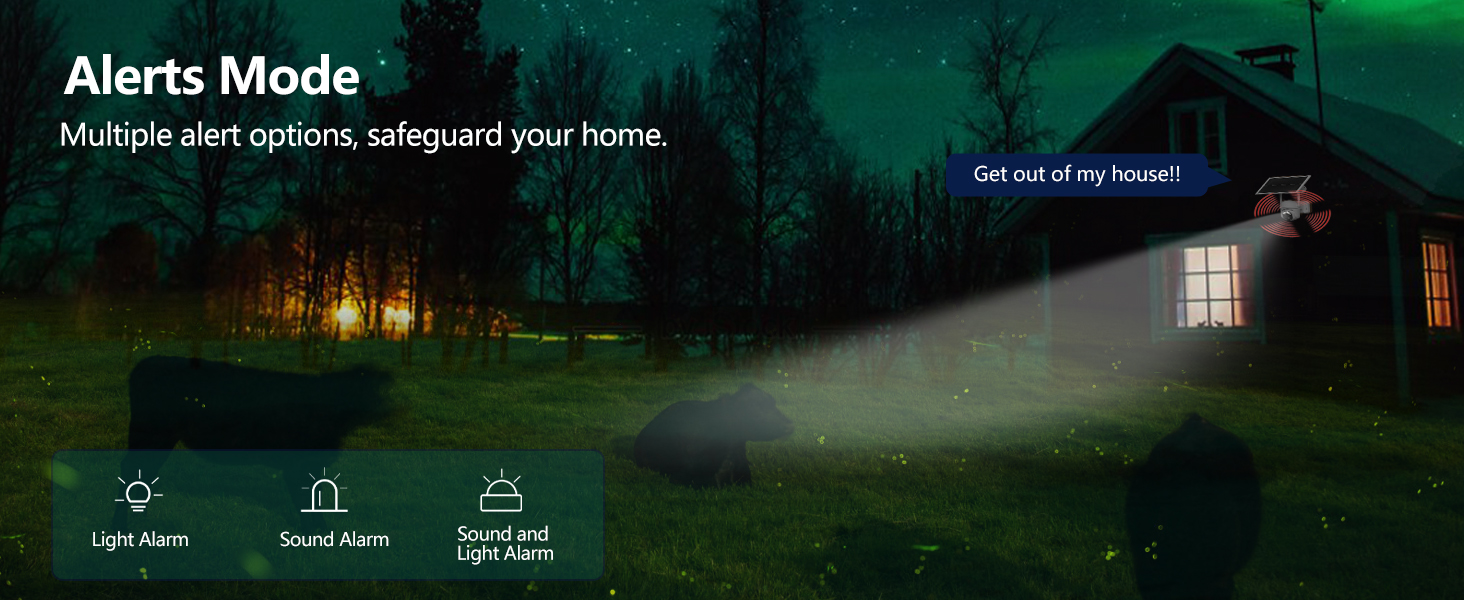
Figure 4.2: Alerts Mode (Light and Sound Alarm)
4.5 Noční vidění
The SOLIOM S40 features advanced night vision modes:
- Infračervené noční vidění: Poskytuje jasné černobílé video v naprosté tmě.
- Barevné noční vidění: When motion is detected or manually activated, the built-in spotlight illuminates the area, allowing for full-color video recording at night.

Obrázek 4.3: Porovnání denního a nočního vidění
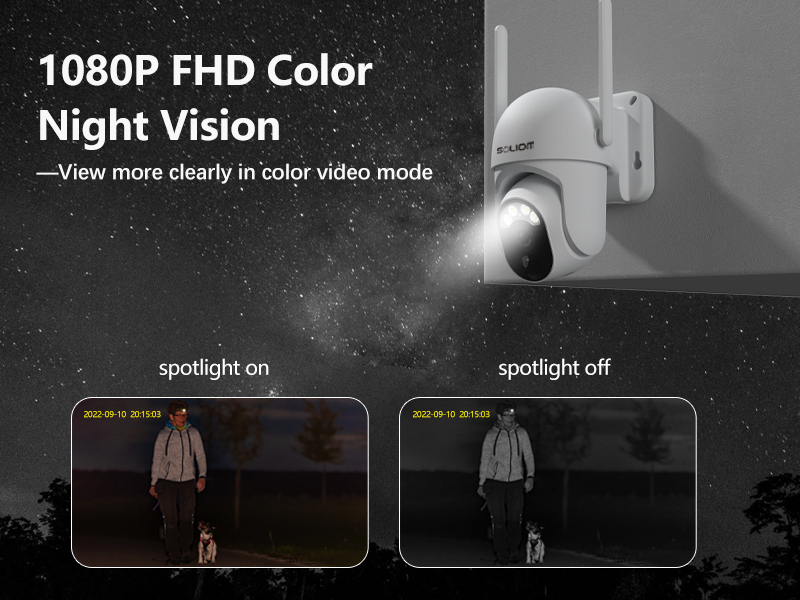
Figure 4.4: Color Night Vision with Spotlight
4.6 Obousměrný zvuk
Use the microphone and speaker icons in the app's live view to enable two-way communication. This allows you to speak to visitors or deter intruders remotely.
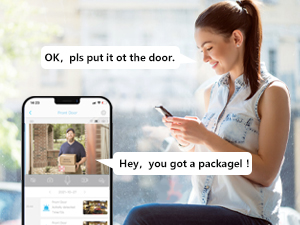
Obrázek 4.5: Obousměrná zvuková komunikace
5. Údržba
- Čištění: Pravidelně čistěte objektiv fotoaparátu a solární panel měkkým hadříkem.amp hadříkem pro zajištění optimálního výkonu. Nepoužívejte agresivní chemikálie.
- Stav baterie: While the solar panel provides continuous charging, ensure the solar panel is free from obstructions and receives adequate sunlight. If the camera's battery level drops significantly, manually charge it via USB.
- Aktualizace firmwaru: Check the SOLIOM+ app regularly for firmware updates. Keeping your camera's firmware up-to-date ensures optimal performance and security.
- Správa SD karet: If using an SD card, periodically check its storage capacity and format it through the app if necessary to maintain recording efficiency.
6. Řešení problémů
- Fotoaparát offline:
- Check 4G signal strength at the camera's location.
- Ensure the SIM card is properly inserted and has an active data plan.
- Ověřte, zda je baterie fotoaparátu nabitá.
- Restart the camera by pressing the reset button (if applicable) or power cycling.
- Špatná kvalita videa:
- Vyčistěte čočku fotoaparátu.
- Ensure adequate lighting, especially at night.
- Check 4G signal stability.
- Detekce pohybu nefunguje:
- Upravte citlivost PIR v aplikaci.
- Ujistěte se, že fotoaparát view je bez překážek.
- Check the motion detection schedule in the app.
- Battery Not Charging via Solar:
- Ujistěte se, že solární panel je čistý a bez nečistot.
- Ověřte, zda je solární panel umístěn tak, aby byl několik hodin denně vystaven přímému slunečnímu záření.
- Zkontrolujte propojovací kabel mezi solárním panelem a kamerou.
- Nelze se připojit k aplikaci:
- Ujistěte se, že váš smartphone má stabilní připojení k internetu.
- Verify the camera is powered on and has a working SIM card.
- Try resetting the camera (refer to the reset button location near the SIM/SD card slots).
7. Specifikace
| Funkce | Specifikace |
|---|---|
| Číslo modelu | S40-4G |
| Konektivita | 3G/4G LTE (SIM Card required) |
| Zdroj napájení | Napájení z baterií, solární napájení |
| Rozlišení videa | 1080 Pixels (Full HD) |
| Pan Angle | 355 stupňů |
| Úhel náklonu | 90 stupňů |
| Pole View | 360 Degrees (Pan/Tilt combined) |
| Noční vidění | Infrared, Color Night Vision (with Spotlight) |
| Detekce pohybu | Pohybový senzor PIR |
| Zvuk | Obousměrný zvuk |
| Skladování | Karta Micro SD (až 128 GB), cloudové úložiště (vyžaduje předplatné) |
| Odolnost vůči povětrnostním vlivům | IP66 |
| Rozměry (D x Š x V) | 3 x 3 x 5 palce |
| Hmotnost položky | 2.48 libry |
8. Záruka a podpora
8.1 Informace o záruce
SOLIOM products typically come with a limited warranty. Please refer to the warranty card included with your product or visit the official SOLIOM webpodrobné záruční podmínky naleznete na webu.
8.2 Zákaznická podpora
If you encounter any issues or have questions not covered in this manual, please contact SOLIOM customer support. Contact information can usually be found on the SOLIOM official webmístě nebo na obalu produktu.
Nejnovější informace a zdroje podpory naleznete na adrese: SOLIOM Official Store on Amazon