
1. Úvod
Thank you for choosing the EZAIoT Smart WiFi Thermostat. This device is designed to provide intelligent control over your electric underfloor heating system, enhancing comfort and energy efficiency in your home. Featuring a 2.8-inch color display, it offers advanced functionalities such as humidity and weather information, weekly programming, and remote control via the Smart Life or Tuya app. Please read this manual thoroughly before installation and operation to ensure proper use and optimal performance.
2. Bezpečnostní informace
- Elektrická instalace: Installation must be performed by a qualified electrician in accordance with local electrical codes and regulations. Ensure the main power supply is disconnected before any wiring work.
- svtage: This thermostat operates at 230 Volts. Verify your power supply matches this requirement.
- Vystavení vodě: Do not install the thermostat in areas where it may be exposed to water or excessive humidity, unless specifically rated for such environments.
- Bezpečnost dětí: Keep the device out of reach of children. The key lock function can prevent unintended changes.
- Provozní teplota: Ensure the operating environment is within the specified temperature range to prevent damage.
3. Obsah balení
Ověřte, zda jsou v balení přítomny všechny položky:
- EZAIoT Smart WiFi Thermostat
- Uživatelská příručka
- Montážní šrouby
- External Temperature Sensor (NTC 10K)
4. Konec produktuview a funkce
The EZAIoT Smart WiFi Thermostat offers a range of features for intelligent heating control:
- Upgraded 2.8-inch Color Screen: Provides a clear and intuitive display of temperature, heating status, humidity, and weather conditions. Icons indicate when the heating valve is active.
- Humidity and Weather Display: Connects to Wi-Fi to show local weather conditions and humidity, offering more comprehensive environmental information.
- Weekly Heating Program: Supports 3 weekly modes (5+2, 6+1, 7 days) with 6 programmable heating periods per day, allowing for optimized energy savings.
- Dálkové ovládání aplikace: Fast and easy connection to the Smart Life/Tuya app for remote control of your thermostat from anywhere, preventing unnecessary heating.
- Ochrana proti mrazu: Activates automatically to prevent pipes from freezing when low temperatures are detected.
- Zámek: Prevents unauthorized access or accidental changes to settings.
- Power-loss Memory: Retains settings even after a power outage.

Image: The EZAIoT Smart Thermostat with its colorful display, showing integration with Google Assistant and Amazon Alexa.
5. Specifikace
| Atribut | Hodnota |
|---|---|
| Značka | EZAIoT |
| Model | EZ-R7C.716-WS |
| Barva | Bílá Stříbrná |
| Rozměry produktu | 4.4 x 8.6 x 8.6 cm |
| Hmotnost | 240 g |
| Výkon (W) | 1.8 W |
| svtage | 230 voltů |
| Protokol připojení | Wi-Fi |
| Typ montáže | Držák na zeď |
| Podsvícení | Ano |
6. Instalace a nastavení
6.1. Fyzická instalace a zapojení
Varování: Disconnect power at the circuit breaker before beginning installation to prevent electrical shock.
- Montáž: The thermostat is designed for wall mounting. Ensure you have a standard electrical box for installation.
- Zapojení: Connect the thermostat according to the wiring diagram. This model is for electric underfloor heating systems (16A Max, 220V). The external temperature sensor (NTC 10K) should also be connected.
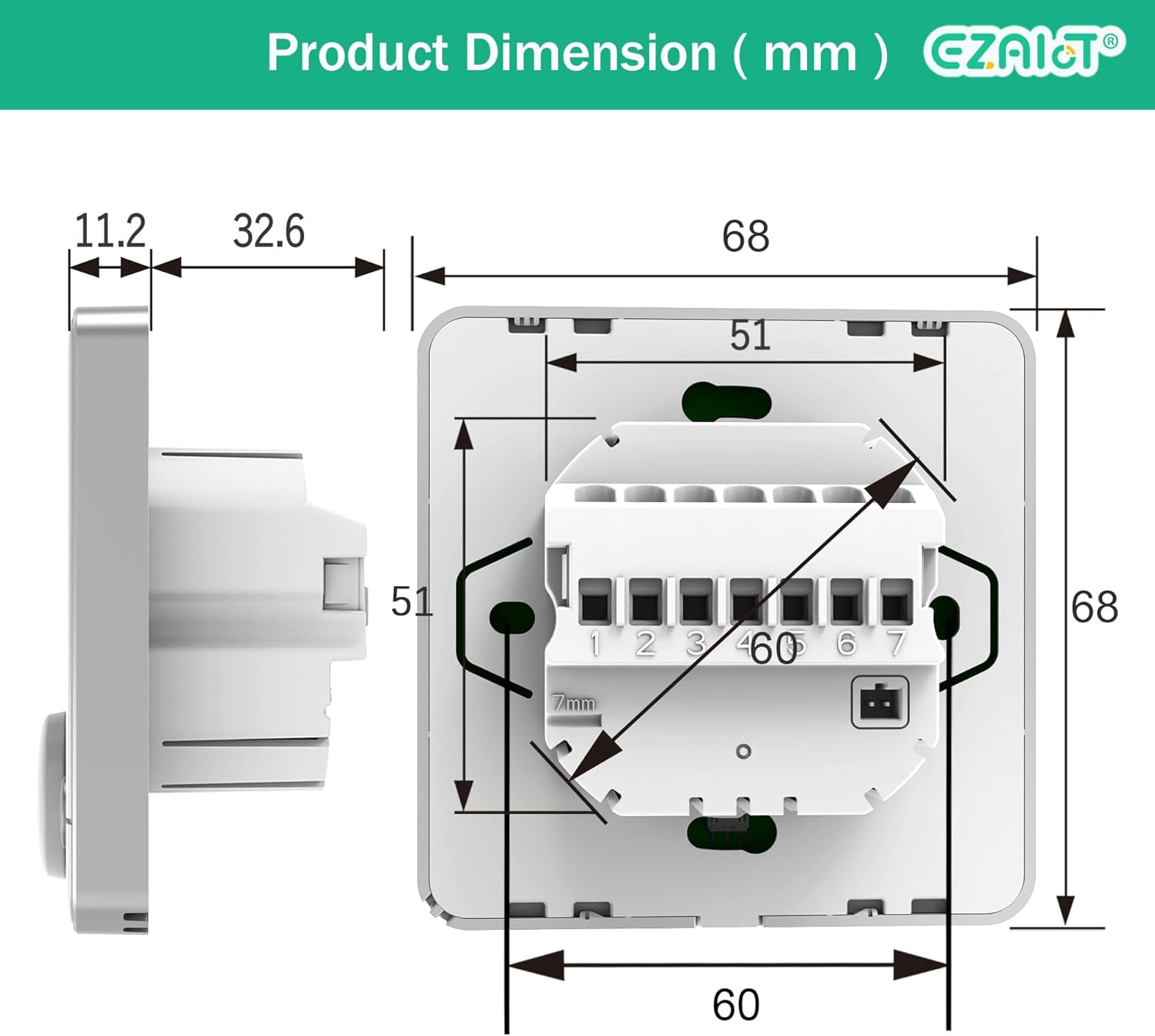
Image: Detailed wiring diagram showing connections for Line (L), Neutral (N), Common (COM), Load Out (LOUT), and external temperature sensor (NTC1, NTC2).

Image: Dimensional drawing of the thermostat, showing front and side views s mírami v milimetrech.
6.2. Initial Power-On and Wi-Fi Connection
After successful wiring and mounting, restore power. The thermostat will power on. Follow the on-screen instructions or refer to the app's guide for Wi-Fi setup. The thermostat uses a fast networking technology for quick connection to the Smart Life or Tuya app.
7. Návod k obsluze
7.1. Základní ovládací prvky a displej
The thermostat features a 2.8-inch color screen and a rotary dial for navigation and setting adjustments. The screen displays current room temperature, set temperature, humidity, and local weather conditions (after Wi-Fi connection).

Image: Multifunction screen of the thermostat, displaying icons for Wi-Fi setting, Auto Mode, Cloud Service, Engineer Mode, System Setting, and Back.
7.2. Nastavení teploty
Rotate the dial to adjust the desired temperature. The new setpoint will be displayed prominently on the screen.

Image: A hand precisely adjusting the temperature using the thermostat's rotary dial.
7.3. Týdenní programování
The thermostat supports flexible weekly programming with 3 modes: 5+2 days (weekday/weekend), 6+1 days (single day off), or 7 individual days. Each day can have up to 6 distinct heating periods. This allows you to customize your heating schedule to match your lifestyle and save energy.
- Do programovacího menu se dostanete přes rozhraní termostatu nebo mobilní aplikaci.
- Select your preferred weekly mode (5+2, 6+1, or 7 days).
- Set the desired temperature and time for each of the 6 periods (e.g., Wake up, Leave (am), Return (am), Leave (pm), Return (pm), Sleep).

Image: A mobile app screenshot illustrating the weekly programming interface with six time periods for weekdays and weekends.
7.4. App Remote Control (Smart Life/Tuya)
Download the Smart Life or Tuya app from your smartphone's app store. After connecting the thermostat to your home Wi-Fi network, you can control it remotely from anywhere. The app allows you to:
- Upravte nastavení teploty.
- Modify weekly heating schedules.
- Monitor current room temperature, humidity, and weather.
- Enable/disable frost protection.
- Sdílejte ovládání zařízení s členy rodiny.

Image: A mobile phone screen showing the Smart Life app, demonstrating remote control capabilities for the thermostat.
7.5. Hlasové ovládání (Alexa/Google Home)
Once connected to the Smart Life/Tuya app, you can integrate your thermostat with Amazon Alexa or Google Home for voice control. Follow the instructions within the Smart Life/Tuya app to link your account with your preferred voice assistant.
8. Údržba
- Čištění: Otřete obrazovku a tělo termostatu měkkým, suchým hadříkem. Nepoužívejte abrazivní čisticí prostředky ani rozpouštědla.
- Žádné díly opravitelné uživatelem: The thermostat contains no user-serviceable parts. Do not attempt to open or repair the device yourself.
9. Řešení problémů
- Termostat se nezapíná: Check the main power supply and circuit breaker. Ensure wiring is correct according to the installation diagram.
- Problémy s připojením Wi-Fi: Ensure your Wi-Fi network is 2.4GHz. Check your router's signal strength near the thermostat. Restart the thermostat and your router, then attempt to reconnect via the app.
- Nepřesné údaje o teplotě: Verify the external temperature sensor is correctly installed and not obstructed.
- Topení se neaktivuje: Check the set temperature is higher than the current room temperature. Ensure the thermostat is not in an 'Off' or 'Frost Protection' mode if heating is desired. Verify wiring connections to the heating element.
- Ovládání aplikací nefunguje: Ensure your phone has an active internet connection. Check if the thermostat is still connected to Wi-Fi. Log out and back into the Smart Life/Tuya app.
10. Záruka a podpora
This EZAIoT Smart WiFi Thermostat comes with a Záruka 12 měsíců for replacement or refund. For any installation assistance, technical issues, or warranty claims, please contact EZAIoT customer support. Our support team is available to provide assistance.
Please refer to the product packaging or the EZAIoT official webweb pro konkrétní kontaktní údaje.