
Zavedení
Děkuji za nákupasing the Dolphin LX-220 Boombox Bluetooth Speaker. This manual provides essential information for setting up, operating, and maintaining your speaker. Please read it thoroughly before use to ensure optimal performance and safety.
Důležité bezpečnostní informace
- Nevystavujte reproduktor extrémním teplotám ani přímému slunečnímu záření po delší dobu.
- Keep the speaker away from heat sources, dust, and corrosive materials.
- Reproduktor sami nerozebírejte, neopravujte ani neupravujte. Požádejte o pomoc kvalifikovaný servisní personál.
- Ensure all port covers are securely closed when using the speaker near water to maintain its IPX5 waterproof rating.
- K nabíjení používejte pouze dodaný nabíjecí kabel nebo certifikovaný kabel USB-C.
- Nepokládejte na reproduktor těžké předměty.
Obsah balení
- Dolphin LX-220 Boombox Bluetooth Speaker
- Nabíjecí kabel USB-C
- Dálkové ovládání v plné velikosti
- Uživatelská příručka (tento dokument)
Konec produktuview
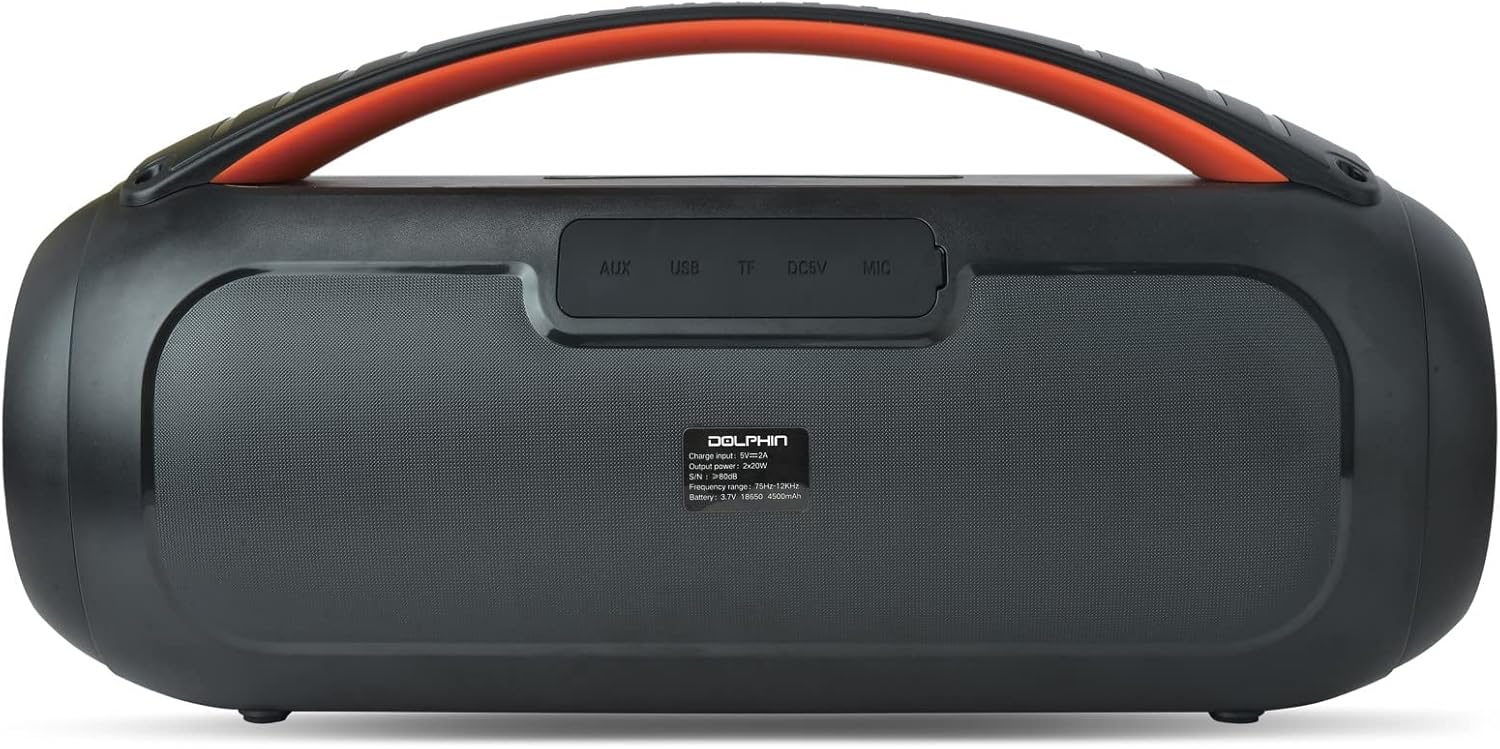
The Dolphin LX-220 is a portable Bluetooth speaker designed for robust audio performance and versatility. It features dual bass radiators and dual 3-inch full-range drivers for powerful sound. Its IPX5 waterproof rating makes it suitable for various environments, and the sound-activated ring lights add a dynamic visual element.
Komponenty a ovládací prvky reproduktorů


Rozložení ovládacího panelu
- Vypínač: Stiskněte a podržte pro zapnutí/vypnutí reproduktoru.
- Tlačítko Bluetooth: Stisknutím vstoupíte do režimu párování Bluetooth.
- Snížit hlasitost (-): Snížit hlasitost.
- Tlačítko Přehrát/Pozastavit: Přehrát nebo pozastavit přehrávání zvuku.
- Zvýšení hlasitosti (+): Zvyšte hlasitost.
- Tlačítko světelného režimu: Cycle through 10 different sound-activated lighting modes.
- Tlačítko zvýraznění basů: Aktivace nebo deaktivace vylepšených basů.
Rear Port Panel (Under Protective Cover)
- Vstup AUX: 3.5mm jack pro připojení externích audio zařízení.
- USB port: For USB drive playback or charging external devices (power bank function).
- Slot na kartu TF: Pro přehrávání z TF (microSD) karet.
- DC 5V (USB-C) Port: Pro nabíjení reproduktoru.
Nastavení
Nabíjení reproduktoru
- Open the protective rubber cover on the rear panel to access the charging port.
- Připojte dodaný nabíjecí kabel USB-C k portu DC 5V na reproduktoru.
- Připojte druhý konec kabelu USB-C ke kompatibilnímu napájecímu adaptéru USB (není součástí balení).
- The battery level indicator will show the charging status. Charge until the indicator shows a full charge.
- Once fully charged, disconnect the cable and securely close the protective rubber cover to maintain waterproofing.
Zapnutí/vypnutí
- Zapnutí: Press and hold the Power button on the top panel for approximately 2-3 seconds until the speaker powers on and the lights activate.
- Vypnutí: Press and hold the Power button again for approximately 2-3 seconds until the speaker powers off.
Párování pomocí Bluetooth
- Ensure the speaker is powered on and in Bluetooth mode (indicated by a flashing blue light). If not, press the Bluetooth button to enter pairing mode.
- Na svém mobilním zařízení (chytrém telefonu, tabletu atd.) povolte Bluetooth a vyhledejte dostupná zařízení.
- Select "Dolphin LX-220" from the list of devices.
- Once paired, the speaker will emit an audible confirmation, and the Bluetooth indicator light will become solid blue.
WaveSync Technology (True Wireless Stereo Pairing)
To achieve a stereo sound experience, you can pair two Dolphin LX-220 speakers using WaveSync technology.
- Ensure both LX-220 speakers are powered on and in Bluetooth pairing mode.
- On one of the speakers, press and hold the WaveSync button (often indicated by a chain-link icon).
- The speakers will automatically search for and connect to each other. An audible prompt will confirm successful pairing.
- Once paired, connect your mobile device to one of the speakers via Bluetooth as described above. Audio will now play in stereo across both speakers.
Provozní režimy
Režim Bluetooth
After successful Bluetooth pairing, you can control playback (Play/Pause, Volume Up/Down) directly from your connected device or using the speaker's control panel/remote control.
USB přehrávání
- Vložte USB flash disk s audio soubory ve formátu MP3 files into the USB port on the rear panel (under the protective cover).
- The speaker will automatically switch to USB mode and begin playing audio.
- Use the Play/Pause and Volume buttons on the speaker or remote to control playback.
Přehrávání TF karet
- Vložte kartu TF (microSD) s audio soubory ve formátu MP3 filedo slotu pro TF kartu na zadním panelu.
- The speaker will automatically switch to TF card mode and begin playing audio.
- Use the Play/Pause and Volume buttons on the speaker or remote to control playback.
Režim rádia FM
- Press the Mode button (often labeled 'M') on the speaker or remote to cycle through modes until FM Radio is selected.
- Reproduktor automaticky prohledá a uloží dostupné FM stanice.
- Use the Previous/Next track buttons (often combined with Volume +/-) to navigate between saved stations.
Režim vstupu AUX
- Connect an external audio device (e.g., MP3 player, laptop) to the AUX input port on the rear panel using a 3.5mm audio cable (not included).
- Reproduktor se automaticky přepne do režimu AUX.
- Control audio playback and volume directly from your connected external device.
Zvukově aktivovaná světla
The Dolphin LX-220 features sound-activated speaker ring lights and side lights with 10 different lighting modes.
- Press the Light Mode button on the speaker or remote to cycle through the available lighting patterns.
- The lights will react to the rhythm and intensity of the music being played.
Specifikace
| Funkce | Detail |
|---|---|
| Název modelu | LX-220 |
| Typ reproduktoru | Přenosný Bluetooth reproduktor |
| Výkon | 30 RMS Watts |
| Velikost reproduktoru | Dual 3" Full Range Drivers |
| Hodnocení voděodolnosti | IPX5 |
| Baterie | Built-In 4500mAh 3.7V Lithium-ion Battery |
| Nabíjení | USB-C Chargeable with Battery Level Indicator |
| Konektivita | Bluetooth, USB, TF, FM, AUX (3.5mm Jack) |
| Speciální funkce | Dual Bass Radiator, WaveSync Technology, Sound Activated Speaker Ring Lights & Side Lights (10 modes), Remote Control |
| Rozměry produktu | 7.3"H x 14.3"W x 5.5"D (Unit Information) |
| Hmotnost položky | 4.5 libry |
Odstraňování problémů
- Bez napájení: Ujistěte se, že je baterie nabitá. Připojte reproduktor ke zdroji napájení pomocí kabelu USB-C.
- Nelze spárovat Bluetooth: Ujistěte se, že je reproduktor v režimu párování Bluetooth (bliká modře). Ujistěte se, že je Bluetooth na vašem zařízení zapnutý a v dosahu. Zkuste restartovat reproduktor i zařízení.
- Žádný zvuk: Check the volume levels on both the speaker and your connected device. Ensure the correct input mode (Bluetooth, USB, TF, AUX, FM) is selected.
- Špatná kvalita zvuku: Ensure the speaker is not too far from the connected Bluetooth device. Check for interference from other wireless devices. For AUX mode, ensure the cable is fully inserted and not damaged.
- Světla nefungují: Press the Light Mode button to ensure lights are enabled and to cycle through modes.
- Dálkové ovládání nefunguje: Check the remote control's battery. Ensure there are no obstructions between the remote and the speaker.
Údržba
- Vyčistěte reproduktor měkkým, damp tkanina. Nepoužívejte abrazivní čisticí prostředky nebo rozpouštědla.
- Ensure all port covers are sealed when not in use or when exposed to water.
- Reproduktor skladujte na chladném a suchém místě mimo dosah přímého slunečního záření a extrémních teplot.
- If the speaker will not be used for an extended period, charge it periodically to maintain battery health.
Záruka a podpora
The Dolphin LX-220 Boombox Bluetooth Speaker comes with a limited warranty. For detailed warranty information, please refer to the warranty card included in your package or visit the official Dolphin website. For technical support, troubleshooting assistance, or service inquiries, please contact Dolphin customer service through the contact information provided on our webwebu nebo v dokumentaci k produktu.
Můžete také navštívit Dolphin Store on Amazon pro další informace o produktu a zdroje podpory.