
Zavedení
Thank you for choosing the Genai True Wireless Earphones. This manual provides detailed instructions on how to set up, operate, maintain, and troubleshoot your new earphones. Please read this manual carefully before use to ensure optimal performance and longevity of your device.
Konec produktuview
The Genai True Wireless Earphones feature a digital intelligence LED display on the charging case, tap control for easy operation, and Bluetooth 5.0 for stable connectivity. They are designed for comfortable in-ear wear and deliver clear stereo sound.
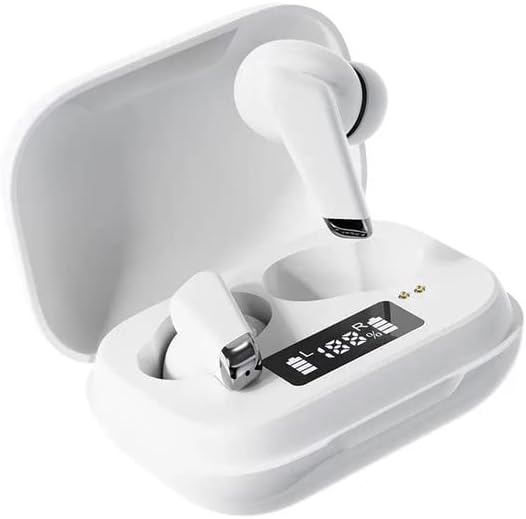
Image: Genai True Wireless Earphones in their charging case, showcasing the digital LED display indicating battery levels.
Klíčové vlastnosti:
- Skutečné bezdrátové stereo (TWS): Seamless audio experience without cables.
- Ovládání klepnutím: Intuitive touch-sensitive controls for music and calls.
- Digital Intelligence LED Display: Shows real-time battery status of earbuds and charging case.
- Bluetooth 5.0: Zajišťuje stabilní a efektivní bezdrátové připojení.
- Ergonomický design do uší: Comfortable and secure fit.
Průvodce nastavením
1. Nabíjení sluchátek a pouzdra
- Počáteční poplatek: Před prvním použitím plně nabijte nabíjecí pouzdro a sluchátka. Vložte sluchátka do nabíjecího pouzdra.
- Připojte nabíječku: Připojte nabíjecí pouzdro ke zdroji napájení pomocí kompatibilního kabelu USB.
- LED displej monitoru: The digital LED display on the case will show the charging status and battery percentage. Ensure both earbuds and the case are fully charged before proceeding.

Image: The charging case with its digital LED display, indicating the charge level of both the case and the individual earbuds.
2. Párování s vaším zařízením
- Zapnutí: Otevřete nabíjecí pouzdro. Sluchátka se automaticky zapnou a přejdou do režimu párování. Můžete uslyšet zvukovou výzvu.
- Aktivujte Bluetooth: Na smartphonu nebo jiném zařízení s podporou Bluetooth přejděte do nastavení Bluetooth a povolte Bluetooth.
- Vyberte zařízení: Look for "Genai Earphones" (or similar name) in the list of available devices and select it to connect.
- Potvrzení: Once successfully paired, you will hear a confirmation sound, and the earbuds will be ready for use.

Image: A visual representation of the Bluetooth 5.0 chipset, highlighting the stable wireless connection technology.
Návod k obsluze
The Genai True Wireless Earphones feature intuitive tap controls. The specific functions may vary slightly, but common controls are listed below:
Zapnutí/vypnutí
- Zapnutí: Otevřete nabíjecí pouzdro nebo několik sekund dlouze stiskněte dotykovou plochu na obou sluchátkách.
- Vypnout: Vložte sluchátka zpět do nabíjecího pouzdra a zavřete víko, nebo několik sekund dlouze stiskněte dotykovou plochu na obou sluchátkách, dokud se nevypnou.
Přehrávání hudby
- Přehrát/pozastavit: Jediným klepnutím na jedno sluchátko.
- Další skladba: Dvakrát klepněte na pravé sluchátko.
- Předchozí skladba: Dvakrát klepněte na levé sluchátko.
Správa hovorů
- Přijmout/ukončit hovor: Jedno klepnutí na kterékoli sluchátko během příchozího nebo aktivního hovoru.
- Odmítnout hovor: Během příchozího hovoru dlouze stiskněte kterékoli sluchátko.
Hlasový asistent
- Aktivovat Voice Assistant: Trojitě klepněte na kterékoli sluchátko (funkce se může lišit v závislosti na zařízení).

Image: An illustration showing an earbud comfortably and ergonomically fitted within the ear canal.
Údržba
Čištění
- K čištění sluchátek a nabíjecího pouzdra použijte měkký, suchý hadřík, který nepouští vlákna.
- Nepoužívejte abrazivní čisticí prostředky, rozpouštědla ani aerosolové spreje.
- Jemně očistěte náušníky a síťku reproduktoru, abyste odstranili ušní maz nebo nečistoty.
Skladování
- Pokud sluchátka nepoužíváte, uložte je do nabíjecího pouzdra, abyste je chránili a udrželi je nabitá.
- Neskladujte v extrémních teplotách, na přímém slunci nebo ve vysoké vlhkosti.
Odstraňování problémů
- Sluchátka se nespárují mezi sebou ani se zařízením:
- Ujistěte se, že jsou obě sluchátka nabitá.
- Vložte obě sluchátka zpět do nabíjecího pouzdra, zavřete víko, počkejte několik sekund a poté víko znovu otevřete.
- On your device, forget/delete the "Genai Earphones" from the Bluetooth list and try pairing again.
- Žádný zvuk nebo nízká hlasitost:
- Zkontrolujte úroveň hlasitosti na zařízení i ve sluchátkách.
- Ujistěte se, že jsou sluchátka správně připojena k vašemu zařízení.
- Vyčistěte mřížku reproduktoru sluchátek od nečistot.
- Problémy s nabíjením:
- Ujistěte se, že je nabíjecí kabel bezpečně připojen k pouzdru i ke zdroji napájení.
- Ověřte, zda je zdroj napájení aktivní.
- Vyčistěte nabíjecí kontakty na sluchátkách i na pouzdře.
Specifikace
| Funkce | Detail |
|---|---|
| Model | B0BX5G53VT |
| Technologie připojení | Bezdrátové připojení (Bluetooth 5.0) |
| Typ náušníků | Polootevřené |
| Počet řidičů | 2 |
| Způsob nabíjení | Nabíjecí pouzdro |
| Materiál chráničů sluchátek | Silikon |
| Průměr ovladače | 10 mm |
| Celkové harmonické zkreslení | 0.02 % |
| Rozsah impedance | Až 32 Ω |
| Materiál | Silikon |
| Umístění uší | V uchu |
| Form Factor | Skutečné bezdrátové |
Záruka a podpora
The Genai True Wireless Earphones come with a Záruka 12 měsíců from the date of purchase, covering manufacturing defects. For any quality problems or support inquiries, please contact the seller directly through your purchase platform.
We are committed to ensuring 100% customer satisfaction. If you encounter any issues, please do not hesitate to reach out for assistance, including full refunds or replacements as applicable.


