
Zavedení
This manual provides instructions for the ZdalaMit AKB76037002 replacement remote control. This remote is designed to function with various RCA 4K UHD webOS Smart TV models, offering a direct replacement for your original remote without requiring complex programming.
Compatible RCA TV models include: RWOSU5549, RWOSU5549-B, RWOSU7049, RWOSU6547-B, RWOSU7047, RWOSU5847, RWOSBU5048, RWOSU8250, RWOSU7547, RWOSU5047, RWOSU5049, RWOSU6547, RWOSU6047, RWOSU5547, RWOSU8549, RWOSU6054, RWOSU7054.
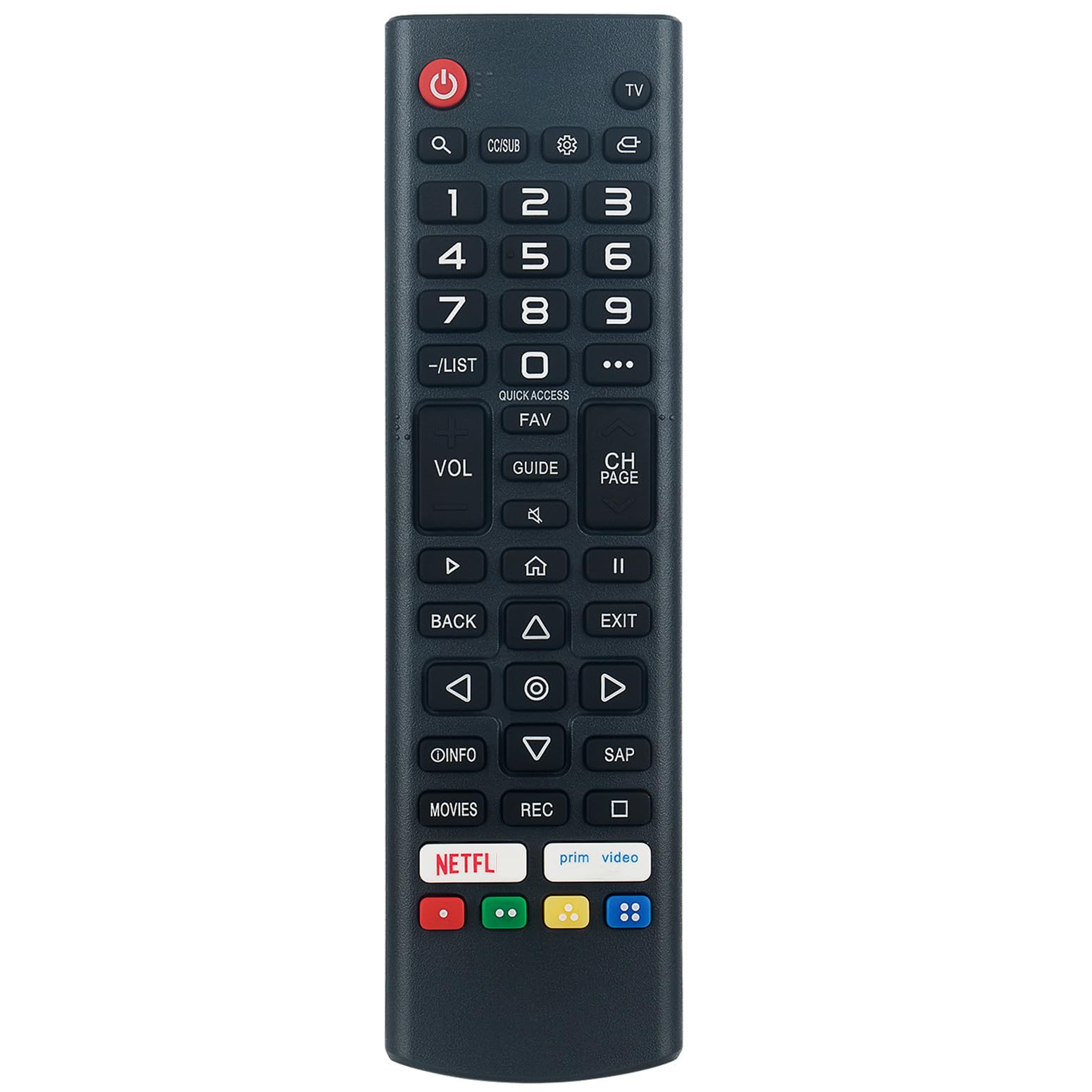
Obrázek: Úhlový view of the ZdalaMit AKB76037002 replacement remote control, showing its button layout.
Nastavení
The ZdalaMit AKB76037002 remote control is pre-programmed and does not require any additional setup or coding. Simply install the batteries, and it will be ready for immediate use with your compatible RCA TV.
Instalace baterie
- Najděte přihrádku na baterie na zadní straně dálkového ovladače.
- Posuňte kryt baterie dolů nebo stiskněte západku a zvedněte jej pro otevření.
- Vložte dvě (2) alkalické baterie typu AAA 1.5 V a ujistěte se, že kladný (+) a záporný (-) pól správně odpovídají označením uvnitř přihrádky.
- Nasaďte kryt baterie zpět jeho zasunutím zpět na místo, dokud bezpečně nezacvakne.

Obrázek: Zadní view of the remote control, indicating the location for battery insertion.
Poznámka: Batteries are not included with the remote control. Always use new alkaline batteries for optimal performance.
Návod k obsluze
Point the remote control directly at your RCA TV's infrared receiver. Ensure there are no obstructions between the remote and the TV.
Klíčové funkce
- Výkon (⏻): Zapíná nebo vypíná televizor.
- TELEVIZE: Přepne vstupní zdroj do režimu TV.
- Číselná tlačítka (0-9): Přímý výběr kanálů.
- VOL (+/-): Nastavuje úroveň hlasitosti.
- CH (Page Up/Down): Postupně mění kanály.
- Ztlumit (🔇): Ztlumí nebo zapne zvuk televizoru.
- Navigační tlačítka (nahoru, dolů, vlevo, vpravo, OK): Procházení nabídek a potvrzování výběrů.
- Zadní: Vrátí se na předchozí obrazovku nebo nabídku.
- Výstup: Ukončí aktuální menu nebo aplikaci.
- Domů (🏠): Accesses the TV's main home screen or smart features.
- Rychlý přístup: Provides quick access to frequently used functions or apps.
- OBLÍBENÉ: Přístup k seznamu oblíbených kanálů.
- PRŮVODCE: Zobrazuje elektronického programového průvodce.
- INFO: Zobrazuje informace o aktuálním programu nebo vstupu.
- Netflix, Prime Video: Dedicated buttons for direct access to these streaming services.
- Barevná tlačítka (červená, zelená, žlutá, modrá): Funkce se liší v závislosti na aplikaci nebo nabídce televizoru.

Obrázek: Přední strana view of the remote control, highlighting the layout of all buttons and overall dimensions.
Údržba
Výměna baterie
If the remote control becomes unresponsive or its range decreases, it is likely time to replace the batteries. Follow the battery installation steps outlined in the "Setup" section.
- Vždy vyměňujte obě baterie současně.
- Nekombinujte staré a nové baterie ani různé typy baterií.
- Pokud dálkový ovladač nebudete delší dobu používat, vyjměte baterie, abyste zabránili jejich vytečení.
Čištění
Dálkový ovladač jemně otřete měkkým, suchým hadříkem. Nepoužívejte tekuté čisticí prostředky, spreje ani abrazivní materiály, protože by mohly poškodit povrch dálkového ovladače nebo jeho vnitřní součásti.
Odstraňování problémů
Pokud narazíte na problémy s dálkovým ovladačem, postupujte podle následujících běžných kroků pro řešení problémů:
- Dálkové ovládání nereaguje:
- Ensure new AAA alkaline batteries are correctly installed.
- Zkontrolujte, zda nejsou baterie vybité a v případě potřeby je vyměňte.
- Verify there are no obstructions between the remote control and the TV's infrared sensor.
- Ujistěte se, že se nacházíte v efektivním provozním dosahu televizoru.
- Nefunkční konkrétní tlačítka:
- Očistěte dálkový ovladač, zejména okolí nereagujících tlačítek, abyste odstranili veškeré nečistoty a úlomky.
- If only certain buttons are affected, the remote may be damaged.
- TV not compatible:
- Confirm your RCA TV model is listed in the "Introduction" section as a compatible model. This remote is specifically designed for RCA 4K UHD webOS Smart TVs.
Specifikace
| Číslo modelu | AKB76037002 |
| Kompatibilní zařízení | RCA 4K UHD webOS Smart Televisions |
| Napájení | 2 x 1.5V AAA alkalické baterie (nejsou součástí balení) |
| Rozměry produktu | Přibližně 5 x 1.5 x 0.5 palce (12.7 x 3.8 x 1.3 cm) |
| Hmotnost položky | Přibližně 2 uncí (56.7 gramů) |
| Barva | Černý |
Informace o záruce
Specific warranty details for this ZdalaMit replacement remote control may vary. Please refer to the purchase documentation or contact your seller directly for information regarding warranty coverage and terms.
Podpora
For any questions or assistance regarding your ZdalaMit AKB76037002 replacement remote control, please contact the seller or manufacturer. They can provide further support and guidance.