
TRIGKEY Green G4 N100
Uživatelská příručka k mini počítači TRIGKEY Green G4
Model: Green G4 N100
1. Úvod
Thank you for choosing the TRIGKEY Green G4 Mini PC. This compact and powerful desktop computer is designed for a variety of uses, including home office, multimedia entertainment, and light design tasks. Featuring the 12th Generation Intel Alder Lake-N100 processor, 16GB DDR4 RAM, and a 500GB M.2 SSD, it offers a fast and fluid experience. This manual provides essential information for setting up, operating, maintaining, and troubleshooting your device.

Figure 1: TRIGKEY Green G4 Mini PC
The TRIGKEY Green G4 Mini PC is a compact and efficient computing solution, ideal for various daily tasks. Its small form factor allows for easy placement in any environment.
2. Vlastnosti produktu a dalšíview
The TRIGKEY Green G4 Mini PC is equipped with advanced components to ensure optimal performance and connectivity.
- Procesor: 12th Gen Intel Alder Lake-N100 (up to 3.40 GHz, 4 Cores/4 Threads, 15W TDP).
- Paměť: 16GB DDR4 3200 MHz (single channel).
- Skladování: 500GB M.2 2280 SSD, expandable with a 2.5" SSD/HDD (up to 2TB).
- Grafika: Integrated Intel UHD Graphics, supporting dual 4K@60Hz output via HDMI.
- Konektivita: Gigabit Ethernet, Dual-band Wi-Fi 6 (802.11ax), Bluetooth 5.2.
- Porty: Four USB 3.2 Gen2 ports, two HDMI ports, 3.5mm audio jack, DC power input, LAN port, CLR CMOS button.
- Operační systém: Pre-installed Windows 11 Pro, also supports Linux and Ubuntu.
- Další vlastnosti: Auto Power On, RTC Wake-up function, Wake-on-LAN.
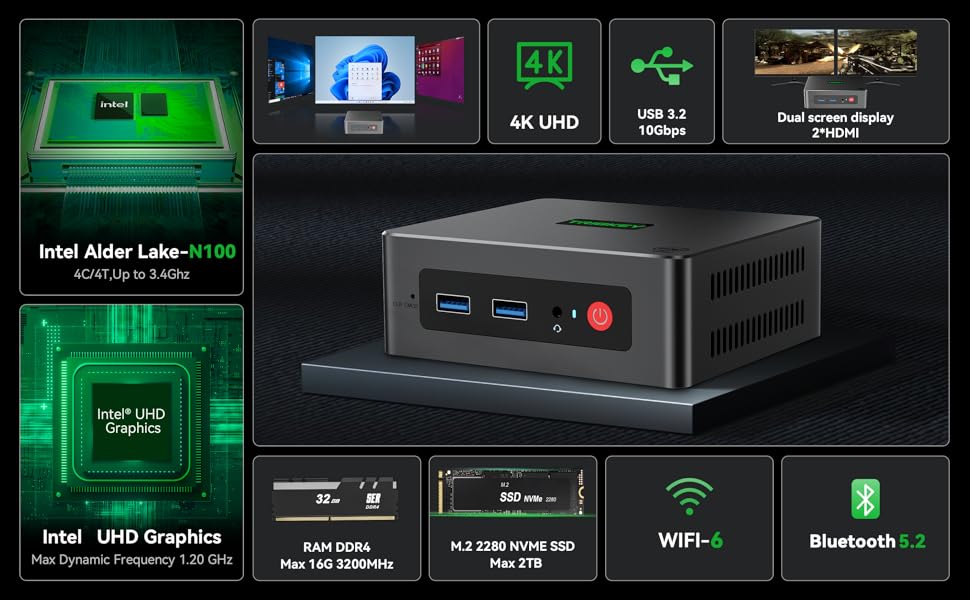
Obrázek 2: Podrobné specifikace produktu
Tento obrázek poskytuje komplexní přehledview of the TRIGKEY Green G4 Mini PC's technical specifications, including dimensions, CPU, graphics, wireless capabilities, storage, and interfaces.

Figure 3: Rich Interfaces Design
This diagram illustrates the various ports available on the TRIGKEY Green G4 Mini PC, including USB 3.2 Gen2, HDMI, LAN, and audio jacks, highlighting its versatile connectivity options.
3. Průvodce nastavením
3.1 Vybalení a úvodní kontrola
Carefully remove all components from the packaging. Verify that all accessories are present:
- Minipočítač TRIGKEY G4
- Napájecí adaptér
- VESA Mount
- HDMI Cable (long)
- Uživatelská příručka
- Screws for storage expansion
Inspect the Mini PC for any visible damage before proceeding.
3.2 Připojení periferních zařízení
- Připojení displeje: Connect your monitor(s) to the HDMI ports on the back of the Mini PC using the provided HDMI cable. The Green G4 supports dual 4K@60Hz displays.
- Připojení klávesnice a myši: Zapojte klávesnici a myš USB do kteréhokoli z dostupných portů USB 3.2.
- Připojení k síti (volitelné): For a wired connection, connect an Ethernet cable from your router to the LAN port on the Mini PC. For wireless, ensure your Wi-Fi network is available.
- Připojte napájení: Insert the power adapter into the DC input port on the Mini PC, then plug the adapter into a power outlet.
4. Návod k obsluze
4.1 Zapnutí/vypnutí
- Zapnutí: Stiskněte tlačítko napájení na přední straně Mini PC. Rozsvítí se kontrolka napájení.
- Vypnout: To shut down the system, go to the Start Menu in Windows and select "Power" > "Shut down". Alternatively, you can press and hold the power button for a few seconds for a forced shutdown (not recommended for regular use).
- Restartovat: From the Start Menu, select "Power" > "Restart".
4.2 Operating System and Initial Setup
The TRIGKEY Green G4 Mini PC comes with Windows 11 Pro pre-installed and activated. Upon first boot, you will be guided through the Windows setup process, including language selection, network connection, and user account creation. Follow the on-screen prompts to complete the setup.
The Mini PC also supports other operating systems like Linux and Ubuntu, allowing for flexible customization based on user preference.
4.3 Síťové připojení
- Wi-Fi: To connect to a wireless network, click the Wi-Fi icon in the system tray, select your desired network, enter the password, and click "Connect". The Mini PC supports Wi-Fi 6 for faster and more stable connections.
- Ethernet: Pokud je připojen ethernetový kabel, systém automaticky detekuje a připojí se k pevné síti.
- Bluetooth: To pair Bluetooth devices (e.g., headphones, speakers), go to Windows Settings > Bluetooth & devices, and follow the instructions to add a new device. The Mini PC features Bluetooth 5.2.
4.4 Nastavení duálního zobrazení
The TRIGKEY Green G4 Mini PC supports connecting two monitors simultaneously via its dual HDMI ports, enabling extended desktop or mirrored display modes.
- Připojte oba monitory k portům HDMI.
- Klikněte pravým tlačítkem myši na plochu a vyberte „Nastavení zobrazení“.
- V části „Více displejů“ vyberte preferovanou možnost zobrazení (např. „Rozšířit tyto displeje“ nebo „Duplikovat tyto displeje“).

Figure 4: Dual Screen Display Capability
This image demonstrates the TRIGKEY Green G4 Mini PC's ability to support two independent displays, enhancing productivity for office work or immersive viewing for movies.
5. Údržba
5.1 Rozšíření úložiště
The TRIGKEY Green G4 Mini PC comes with a 500GB M.2 2280 SSD. For additional storage, you can install a 2.5-inch SSD or HDD (up to 2TB).
- Ensure the Mini PC is powered off and unplugged.
- Locate the bottom cover of the Mini PC.
- Carefully remove the screws securing the cover.
- Install the 2.5-inch SSD/HDD into the designated slot and secure it with the provided screws.
- Replace the bottom cover and secure the screws.

Figure 5: M.2 2280 SSD and Expansion
This image highlights the M.2 2280 SSD and the potential for storage expansion with an additional 2.5-inch drive, demonstrating the system's upgradeability.
5.2 Cooling and General Care
The Mini PC features an integrated fan for cooling. To ensure optimal performance and longevity:
- Place the Mini PC in a well-ventilated area.
- Avoid blocking the ventilation holes.
- Keep the device clean and free from dust. Use a soft, dry cloth for cleaning the exterior.
- Nevystavujte zařízení extrémním teplotám, vlhkosti nebo přímému slunečnímu záření.
6. Řešení problémů
If you encounter issues with your TRIGKEY Green G4 Mini PC, refer to the following common troubleshooting steps:
| Problém | Možné řešení |
|---|---|
| Žádné zobrazení na monitoru |
|
| Žádná síla |
|
| Wi-Fi/Bluetooth nefunguje |
|
| Systém je pomalý nebo nereaguje |
|
For more complex issues or if the above steps do not resolve the problem, please contact TRIGKEY customer support.
7. Technické specifikace
| Funkce | Specifikace |
|---|---|
| Značka | TRIGKEY |
| Číslo modelu | Green G4 N100 |
| Značka procesoru | Intel |
| Typ procesoru | Celeron N (Alder Lake-N100) |
| Rychlost procesoru | Až 3.4 GHz |
| Počet jader | 4 |
| BERAN | 16 GB DDR4 |
| Maximální paměť | 16 GB |
| Velikost úložiště | 500 GB M.2 2280 SSD |
| Technologie skladování | SSD (expandable to 2TB with 2.5" SSD/HDD) |
| Značka grafického čipsetu | Intel |
| GPU | Grafika Intel UHD |
| Rozlišení displeje | 3840 x 2160 (4K@60Hz) |
| Typ připojení | Bluetooth, Wi-Fi 6, Gigabit Ethernet |
| Bezdrátová technologie | Bluetooth 5.2, 802.11ax |
| Hardwarové rozhraní | 3.5mm Audio, Bluetooth 5, HDMI, USB 3.2 Gen 2 |
| Počet portů HDMI | 2 |
| Počet portů USB 3.0 | 4 (USB 3.2 Gen2) |
| Operační systém | Windows 11 Pro (supports Linux, Ubuntu) |
| Rozměry balení | 21.4 x 12.8 x 5.4 cm |
| Hmotnost položky | 680 gramů |
8. Záruka a podpora
TRIGKEY is committed to providing excellent customer service.
- Záruka: The TRIGKEY Green G4 Mini PC comes with a 1-year warranty from the date of purchase.
- Technická podpora: Lifetime technical support is available for all TRIGKEY products.
- Zdroje: A variety of files and tutorials are available to help customers resolve common PC issues. Phone and remote assistance are also offered.
Kontaktní údaje:
If you have any questions or require assistance, please do not hesitate to contact TRIGKEY customer service.
Figure 6: TRIGKEY Customer Service
This image displays various contact methods for TRIGKEY customer support, including email, online consultation, website, and technical support.
Ask a question about this manual
Ask about setup, troubleshooting, compatibility, parts, safety, or missing instructions. Manuals+ will review the question and use this page’s manual context to help answer it.