
Zavedení
This manual provides detailed instructions for the proper use and maintenance of your Sunny CRS-300AT Android Smart LED TV Remote Control. This remote is designed for compatibility with AXEN LED TVs and features a dedicated Live TV button for convenient access to live broadcasts. Please read this manual carefully before using the remote control to ensure optimal performance and longevity.
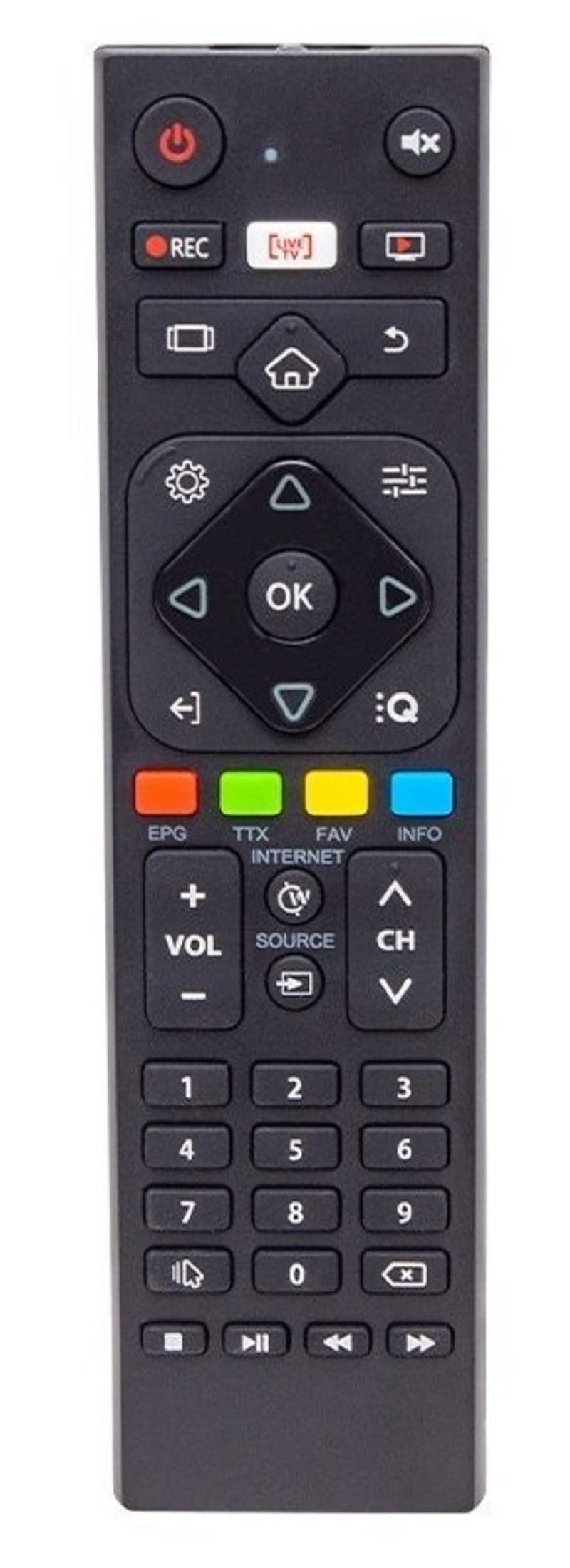
Image of the Sunny CRS-300AT remote control, showing its ergonomic design and button layout, including the dedicated Live TV button.
Nastavení
Instalace baterie
- Najděte přihrádku na baterie na zadní straně dálkového ovladače.
- Posuňte kryt přihrádky na baterie dolů nebo ve směru šipky, abyste jej otevřeli.
- Insert two AAA batteries (not included), ensuring the positive (+) and negative (-) terminals align correctly with the markings inside the compartment. Incorrect battery orientation can prevent the remote from functioning.
- Nasaďte kryt přihrádky na baterie tak, že jej zasunete zpět na místo, dokud bezpečně nezacvakne.
The remote control is an infrared (IR) device and does not require pairing. Once batteries are installed, it is ready for use with compatible AXEN LED TVs.
Návod k obsluze
Point the remote control directly at your television's IR receiver. Ensure there are no obstructions between the remote and the TV.
Klíčové funkce
- Tlačítko napájení (⏻): Zapíná nebo vypíná televizor.
- Zvýšení/snížení hlasitosti (Vol +/-): Nastavuje hlasitost zvuku.
- Kanál nahoru/dolů (Ch+/-): Mění televizní kanály.
- Ztlumit (🔇): Ztlumí nebo zapne zvuk televizoru.
- Číselná tlačítka (0-9): Directly select TV channels or input numbers.
- Navigační tlačítka (▲ ▼ ◀ ▶): Procházejte nabídky a možnosti.
- Tlačítko OK/Enter: Potvrzuje výběry v nabídkách.
- Tlačítko Zpět/Návrat: Vrátí se na předchozí obrazovku nebo nabídku.
- Tlačítko Domů (🏠): Accesses the Smart TV home screen or main menu.
- Tlačítko Živé vysílání: Directly switches to live television broadcasting.
- Tlačítko Vstup/Zdroj: Changes the input source (e.g., HDMI 1, HDMI 2, AV).
- Tlačítko nabídky: Opens the TV's main settings menu.
Specific button layouts and functions may vary slightly depending on your TV model, but the core functions remain consistent.
Údržba
Čištění
- Dálkový ovladač otřete měkkým, suchým hadříkem.
- Pro odolnou špínu lehceampen the cloth with water or a mild, non-abrasive cleaner. Do not spray liquids directly onto the remote.
- Avoid using harsh chemicals, solvents, or abrasive cleaning materials, as these can damage the remote's surface or internal components.
Péče o baterie
- Vyměňte baterie, když dálkový ovladač reaguje pomalu nebo přestane fungovat.
- Pokud dálkový ovladač nebudete delší dobu používat, vyjměte baterie, abyste zabránili jejich vytečení a možnému poškození.
- Použité baterie zlikvidujte v souladu s místními předpisy.
Skladování
Dálkový ovladač skladujte na chladném a suchém místě mimo dosah přímého slunečního záření, extrémních teplot a vysoké vlhkosti.
Odstraňování problémů
| Problém | Možná příčina | Řešení |
|---|---|---|
| Dálkové ovládání nefunguje. | Vybité nebo nesprávně vložené baterie. | Vyměňte baterie za nové a dbejte na správnou polaritu (+/-). |
| Dálkové ovládání nefunguje. | Obstruction between remote and TV's IR receiver. | Ensure a clear line of sight between the remote and the TV. Remove any objects blocking the signal. |
| Dálkové ovládání nefunguje. | Dálkový ovladač je příliš daleko od televizoru. | Move closer to the TV. The effective range for IR remotes is typically up to 7 meters (23 feet). |
| Některá tlačítka nereagují. | Nečistoty nebo nečistoty pod tlačítky. | Vyčistěte dálkový ovladač podle pokynů v části Údržba. |
| TV is not responding to any remote commands. | TV's IR receiver might be faulty or blocked. | Check your TV's user manual for troubleshooting its IR receiver. Try restarting the TV by unplugging it for a few minutes. |
Specifikace
- Model: Sunny CRS-300AT
- Značka: Sunny (Compatible with AXEN)
- Kompatibilní zařízení: Televisions (specifically AXEN LED TVs)
- Technologie připojení: Infračervený (IR)
- Zdroj napájení: 2 x AAA baterie (nejsou součástí balení)
- ASIN: B0BW4M6SRC
Informace o záruce
This product is typically covered by a manufacturer's warranty. For specific details regarding warranty duration, coverage, and claims process, please refer to the documentation provided with your purchase or contact the retailer where the product was acquired. Keep your proof of purchase for warranty purposes.
Podpora
If you encounter issues that cannot be resolved using the troubleshooting guide, or if you require further assistance, please contact:
- The retailer from whom you purchased the remote control.
- The manufacturer's customer support (refer to product packaging or manufacturer's webweb s kontaktními údaji).
When contacting support, please have your product model (CRS-300AT) and proof of purchase readily available.