
1. Úvod
This manual provides instructions for the Beyution RMT-V504A replacement infrared remote control. This remote is designed to operate various Sony DVD VCR Combo Player models without requiring any programming or setup. Simply insert batteries, and it is ready for use.
Kompatibilní modely zahrnují:
- RMT-V501A, RMT-V501, RMT-V501C, RMT-V501D, RMT-V501E, RMT-V501F
- SLV-D100, SLV-D281P, SLV-D380P, YSP-4000BL, HT-V1000D, HT-V1000DP, HT-V3000DP
- SLV-D201, SLV-D201P, SLV-D251, SLV-D251P, SLV-D261, SLV-D261P, SLV-D271, SLV-D271P
- SLV-D281, SLV-D300, SLV-D300P, SLV-D350, SLV-D350P, SLV-D360P, SLV-D370P, SLV-D380
- SLV-D550P, SLV-D560P, SLV-D570H, SLVD-100, SLVD100, SLVD281P, SLVD380P, YSP4000BL
- SLVD271P, SLVD500P, SLVD506P, SLV-D500, SLV-D506P, SLVD560P, SLVD570H, SLVD360
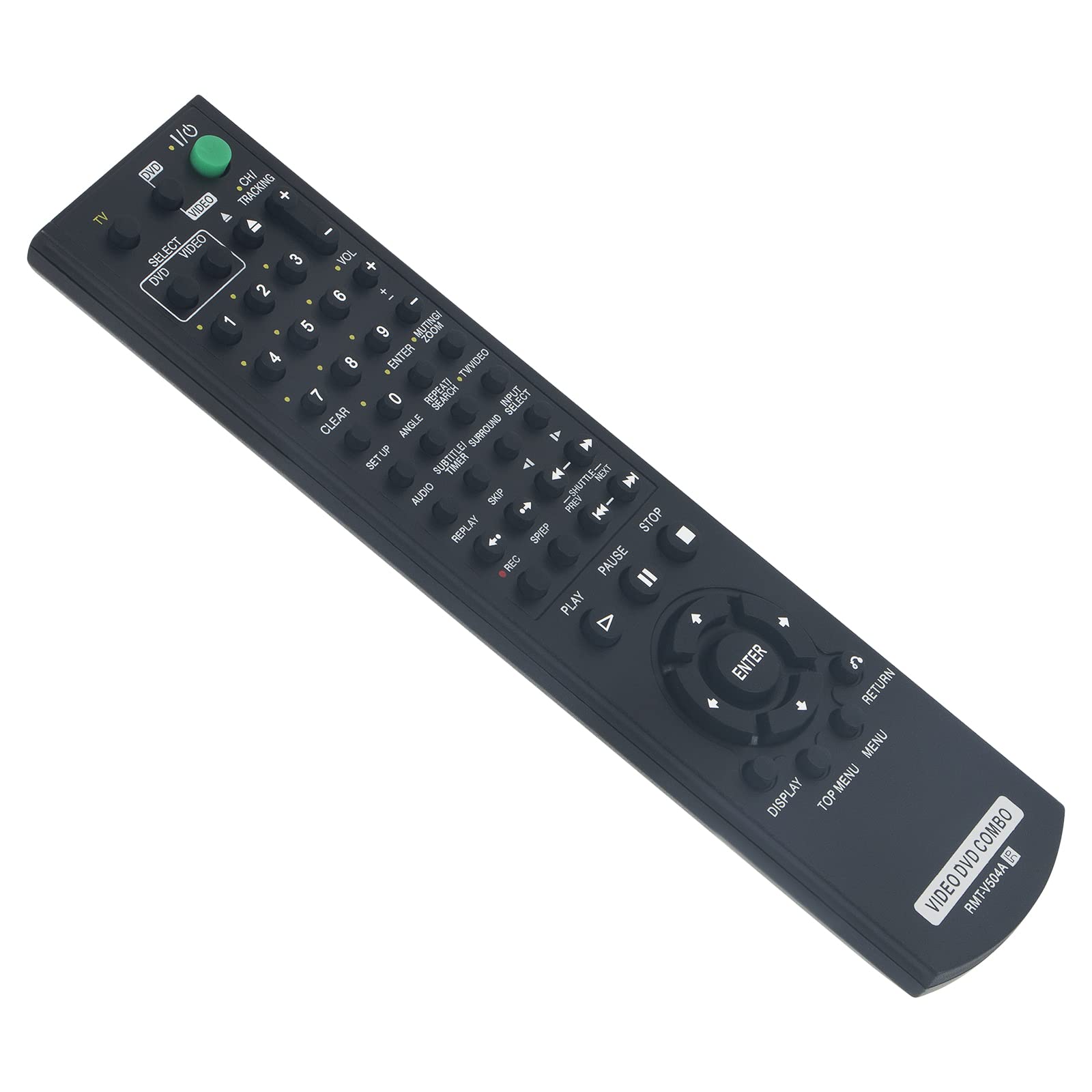
Figure 1: Beyution RMT-V504A Replacement Remote Control
2. Nastavení
2.1 Instalace baterie
The Beyution RMT-V504A remote control requires two (2) AAA batteries (not included) for operation.
- Najděte kryt prostoru pro baterie na zadní straně dálkového ovladače.
- Posuňte kryt dolů nebo stiskněte západku (pokud je k dispozici) a otevřete přihrádku.
- Vložte dvě nové alkalické baterie typu AAA a ujistěte se, že kladný (+) a záporný (-) pól odpovídají schématům uvnitř přihrádky.
- Nasaďte kryt přihrádky na baterie tak, že jej zasunete zpět na místo, dokud bezpečně nezacvakne.

Obrázek 2: Instalace baterie
2.2 První použití
This replacement remote control is pre-programmed and does not require any additional setup or coding. Once batteries are installed, it is ready to operate your compatible Sony DVD VCR Combo Player.
3. Návod k obsluze
Point the remote control directly at the infrared receiver on your Sony DVD VCR Combo Player. The effective operating distance is approximately 8 to 10 meters (26 to 33 feet).

Obrázek 3: Funkce dálkového ovládání
3.1 klíčové funkce
- POWER (TV I/O): Zapne nebo vypne připojené zařízení.
- SELECT DVD/VIDEO: Přepíná mezi režimy DVD a VCR.
- Číselná tlačítka (0-9): Používá se pro přímý výběr skladby/kapitoly nebo zadávání kanálů.
- VOL (+/-): Nastavuje úroveň hlasitosti.
- CH/TRACKING (+/-): Changes channels or adjusts VCR tracking.
- PŘEHRÁT (►): Spustí přehrávání.
- PAUSE (▮▮): Pozastaví přehrávání.
- STOP (■): Zastaví přehrávání.
- NAHRÁVÁNÍ (●): Initiates recording (VCR function).
- REW/FF (◀◀ / ►►): Přetáčí zpět nebo rychle vpřed.
- SKIP (◀► / ►►): Skips tracks/chapters.
- ZADEJTE: Potvrzuje výběry v nabídkách.
- ZOBRAZIT: Zobrazuje informace na obrazovce.
- TOP MENU/MENU: Accesses the main menu or disc menu.
- NÁVRAT: Návrat na předchozí obrazovku nebo do nabídky.
- Other buttons (SET UP, ANGLE, SUBTITLE, AUDIO, TIME, SEARCH, etc.) function according to your specific player's capabilities.
4. Údržba
4.1 Čištění
K čištění dálkového ovladače používejte měkký, suchý hadřík. Nepoužívejte tekuté čisticí prostředky, spreje ani abrazivní materiály, protože by mohly poškodit povrch dálkového ovladače nebo jeho vnitřní součásti.
4.2 Výměna baterie
Replace batteries when the remote's response becomes sluggish or it stops functioning. Always replace both batteries at the same time with new AAA alkaline batteries. Do not mix old and new batteries or different types of batteries.
4.3 Skladování
Store the remote control in a cool, dry place away from direct sunlight and extreme temperatures. If the remote will not be used for an extended period, remove the batteries to prevent leakage.
5. Řešení problémů
- Dálkový ovladač nereaguje:
- Ujistěte se, že jsou baterie vloženy správně se správnou polaritou.
- Vyměňte staré baterie za nové alkalické baterie typu AAA.
- Check for any obstructions between the remote control and the device's infrared receiver.
- Ensure you are within the effective operating range (8-10 meters) and pointing the remote directly at the device.
- Some functions are not working:
- Verify that your Sony DVD VCR Combo Player model is listed as compatible. While this remote is designed for broad compatibility, some specific functions may vary depending on the original remote's layout and your player's capabilities.
- Clean the remote's infrared emitter (the LED at the front) to ensure a clear signal.
- Remote received damaged or not working upon arrival:
- Okamžitě kontaktujte zákaznickou podporu a požádejte o pomoc.
6. Specifikace
| Číslo modelu | RMT-V504A |
| Technologie připojení | Infračervený (IR) |
| Materiál | ABS plast |
| Maximální provozní vzdálenost | Přibližně 10 metrů (33 stop) |
| Jsou vyžadovány baterie | 2 x AAA (nejsou součástí balení) |
| Rozměry produktu | 6.3 x 1.57 x 0.39 palce (16 x 4 x 1 cm) |
| Hmotnost položky | 2.82 unce (80 gramů) |

Figure 4: Remote Control Dimensions and Material
7. Záruka a podpora
7.1 Informace o záruce
This Beyution RMT-V504A remote control comes with a 6měsíční záruční doba od data nákupu. Tato záruka se vztahuje na výrobní vady a poruchy při běžném používání.
7.2 Zákaznická podpora
If you encounter any issues with your remote control, have questions about compatibility, or require assistance, please contact our customer service team. We aim to provide a satisfactory solution within 24 hours.
Kontaktní metoda: Please refer to your purchase documentation or the seller's contact information provided at the time of purchase (e.g., via email).