
Zavedení
Thank you for choosing the Baseus Adaman Digital Display Power Bank (Model: PPAD070001). This portable power bank is designed to provide reliable and efficient charging for your electronic devices. Please read this manual carefully before use to ensure proper operation and to maximize the lifespan of your device.
Bezpečnostní informace
- Nevystavujte powerbanku extrémním teplotám, přímému slunečnímu záření ani ohni.
- Zabraňte pádu, rozebírání nebo úpravě zařízení.
- Uchovávejte mimo dosah vody a jiných kapalin.
- Používejte pouze certifikované nabíjecí kabely a adaptéry.
- Uchovávejte mimo dosah dětí.
- Pokud powerbanka nabobtná, protéká nebo vydává neobvyklý zápach, okamžitě ji přestaňte používat.
Obsah balení
- Baseus Adaman Digital Display Power Bank (PPAD070001)
- USB nabíjecí kabel
- Uživatelská příručka
Konec produktuview
The Baseus Adaman Power Bank (Model PPAD070001) is a portable charging solution featuring a digital display for battery status and multiple ports for wide compatibility. Its slim design makes it convenient for travel.

Obraz: Nahoru view of the Baseus Adaman Power Bank showing its various input and output ports. From left to right: Type-C (Input/Output), IP/IN (Input), Micro/IN (Input), USB2 (Output), USB1 (Output).

Obraz: Boční profíkfile of the Baseus Adaman Power Bank, highlighting its slim and portable design.
- Port typu C: Supports both input and output (PD 3.0).
- USB1/USB2 Ports: Output ports for charging devices (QC 3.0).
- Micro-USB port: Input port for charging the power bank.
- IP/IN Port: Input port for charging the power bank (e.g., for Apple Lightning cables).
- Digitální displej: Zobrazuje procenta baterie v reálném časetage.
Nastavení
Before first use, fully charge the power bank. This ensures optimal battery performance.
Nabíjení powerbanky
- Connect the provided USB charging cable to one of the input ports on the power bank (Type-C, Micro-USB, or IP/IN).
- Druhý konec kabelu připojte k USB nabíječce (není součástí balení).
- The digital display will show the charging status and battery percentage.
- Once the display shows 100%, the power bank is fully charged. Disconnect it from the charger.
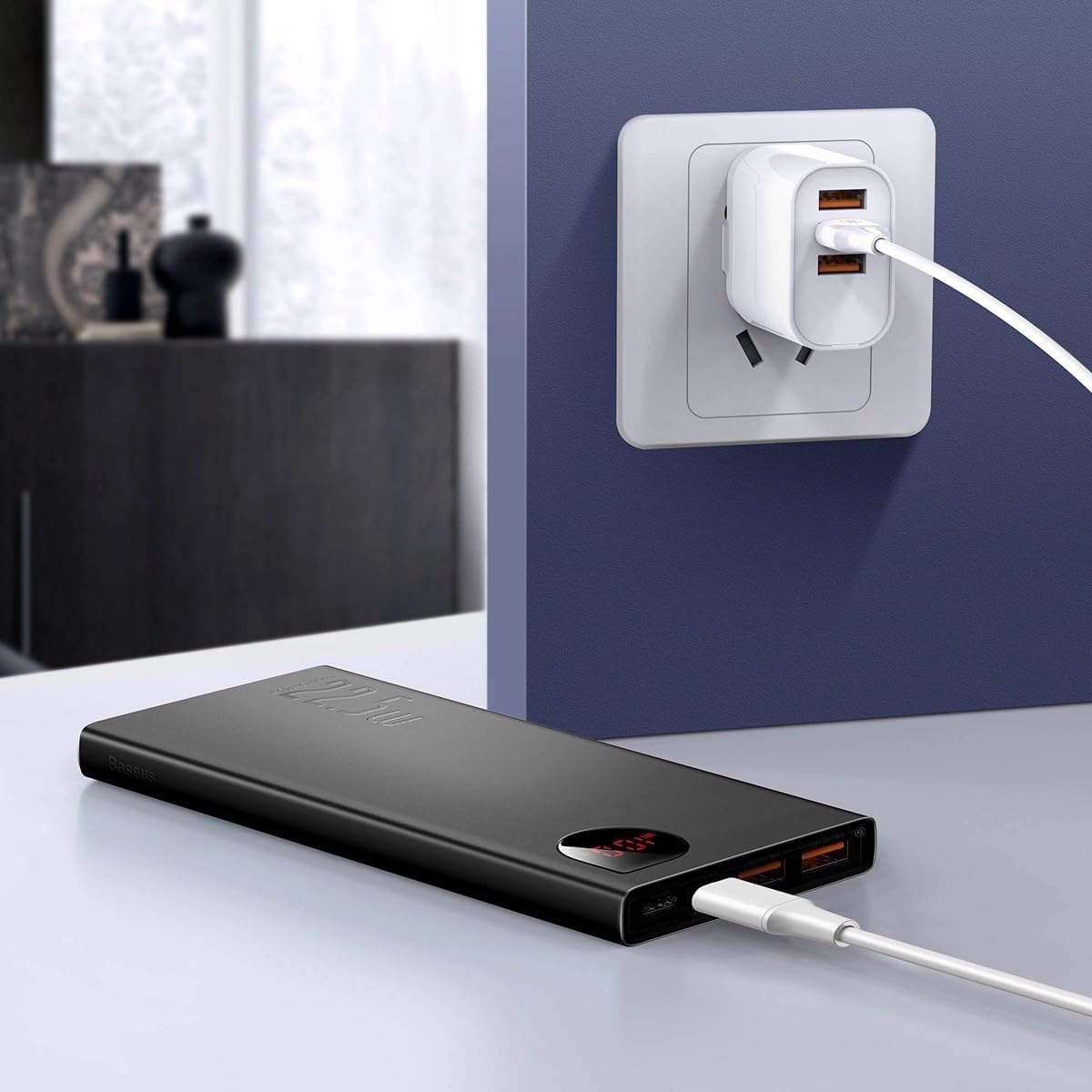
Obraz: The Baseus Adaman Power Bank connected to a wall charger via a USB cable, illustrating the process of recharging the power bank itself.
Návod k obsluze
Nabíjení vašich zařízení
- Connect your device's charging cable to one of the output ports on the power bank (Type-C, USB1, or USB2).
- Připojte druhý konec kabelu k zařízení.
- Powerbanka automaticky začne nabíjet vaše zařízení. Digitální displej zobrazí zbývající procenta baterie.tage.
- Chcete-li nabíjení zastavit, jednoduše odpojte zařízení od powerbanky.

Obraz: A smartphone being charged by the Baseus Adaman Power Bank, demonstrating the device's charging capability for mobile phones.
Kontrola úrovně baterie
The digital display on the power bank will show the current battery percentage when it is in use or when a device is connected. If the power bank is idle, you may need to briefly press the power button (if available, not explicitly mentioned but common) to activate the display.
Údržba
- Powerbanku čistěte měkkým, suchým hadříkem. Nepoužívejte agresivní chemikálie ani abrazivní materiály.
- Pokud powerbanku nepoužíváte, uchovávejte ji na chladném a suchém místě.
- For optimal battery health, fully charge and discharge the power bank at least once every three months if it's not used regularly.
Odstraňování problémů
| Problém | Možná příčina | Řešení |
|---|---|---|
| Powerbanka nenabíjí zařízení. | Low battery, faulty cable, incompatible device. | Charge the power bank. Try a different cable. Ensure your device is compatible. |
| Powerbanka se nedobíjí. | Faulty charging cable/adapter, damaged port. | Try a different charging cable and wall adapter. Check ports for damage. |
| Digitální displej nefunguje. | Power bank is off, low battery, malfunction. | Ensure power bank is on or connected to a device. Charge the power bank. If issue persists, contact support. |
Specifikace
| Funkce | Detail |
|---|---|
| Číslo modelu | PPAD070001 |
| Značka | Baseus |
| Kapacita baterie | 10000 XNUMX mAh |
| Speciální funkce | Digitální displej |
| Typy konektorů | Input: USB Type-C, Micro-USB, IP/IN; Output: USB Type-C, USB-A (x2) |
| svtage | 5 voltů |
| Proud | 5 Amps |
| Výkon | Up to 22.5W (PD 3.0, QC 3.0) |
| Složení článků baterie | Lithium Polymer |
| Počet výstupních portů | 3 (1x Type-C, 2x USB-A) |
| Number of Input Ports | 3 (1x Type-C, 1x Micro-USB, 1x IP/IN) |
| Kompatibilní zařízení | All Smartphones and other USB-powered devices |
| Přenosný | Ano |
Záruka a podpora
Tento produkt je dodáván s Bez záruky as per the provided specifications. For any technical support or inquiries, please refer to the official Baseus webnebo kontaktujte svého prodejce.
Pro více informací navštivte: www.baseus.com