
Boxlight P8 WX35NXT
Uživatelská příručka k DLP projektoru Boxlight P8 WX35NXT
Model: P8 WX35NXT
Zavedení
This manual provides essential information for the safe and efficient operation of your Boxlight P8 WX35NXT DLP Projector. Please read this manual thoroughly before using the projector and retain it for future reference. The Boxlight P8 WX35NXT is an Ultra Short Throw DLP projector designed for various applications, offering WXGA resolution and 3500 ANSI lumens brightness.
Důležité bezpečnostní informace
- Do not block ventilation openings: Ensure proper airflow around the projector to prevent overheating.
- Avoid direct eye exposure to the lens: The projector emits a bright light that can cause eye damage.
- Do not place near water or moisture: This can lead to electric shock or fire.
- Use only specified power supply: Refer to the product label for correct voltage a aktuální požadavky.
- Zacházejte opatrně: Zabraňte pádu projektoru na zem nebo jeho vystavení silným nárazům.
- Servis: Veškeré opravy svěřte kvalifikovanému servisnímu personálu.
Obsah balení
Ověřte, zda jsou v balení přítomny všechny položky:
- Boxlight P8 WX35NXT DLP Projector
- Napájecí kabel
- Dálkové ovládání (s bateriemi)
- VGA kabel
- Uživatelská příručka (tento dokument)
Konec produktuview
Součásti projektoru

Obrázek 1: Nahoru view of the Boxlight P8 WX35NXT projector. This image displays the main lens assembly, the integrated control panel with navigation buttons, and the overall casing design. The projector features an ultra-short throw lens positioned at the top front, allowing for projection from a very short distance.
- Projekční čočka: Located at the front-top, designed for ultra-short throw projection.
- Ovládací panel: Buttons for power, menu navigation, source selection, and keystone correction.
- Ventilační mřížky: Located on the sides and front for heat dissipation.
- Zaostřovací kroužek: Manual adjustment for image sharpness.
Porty připojení
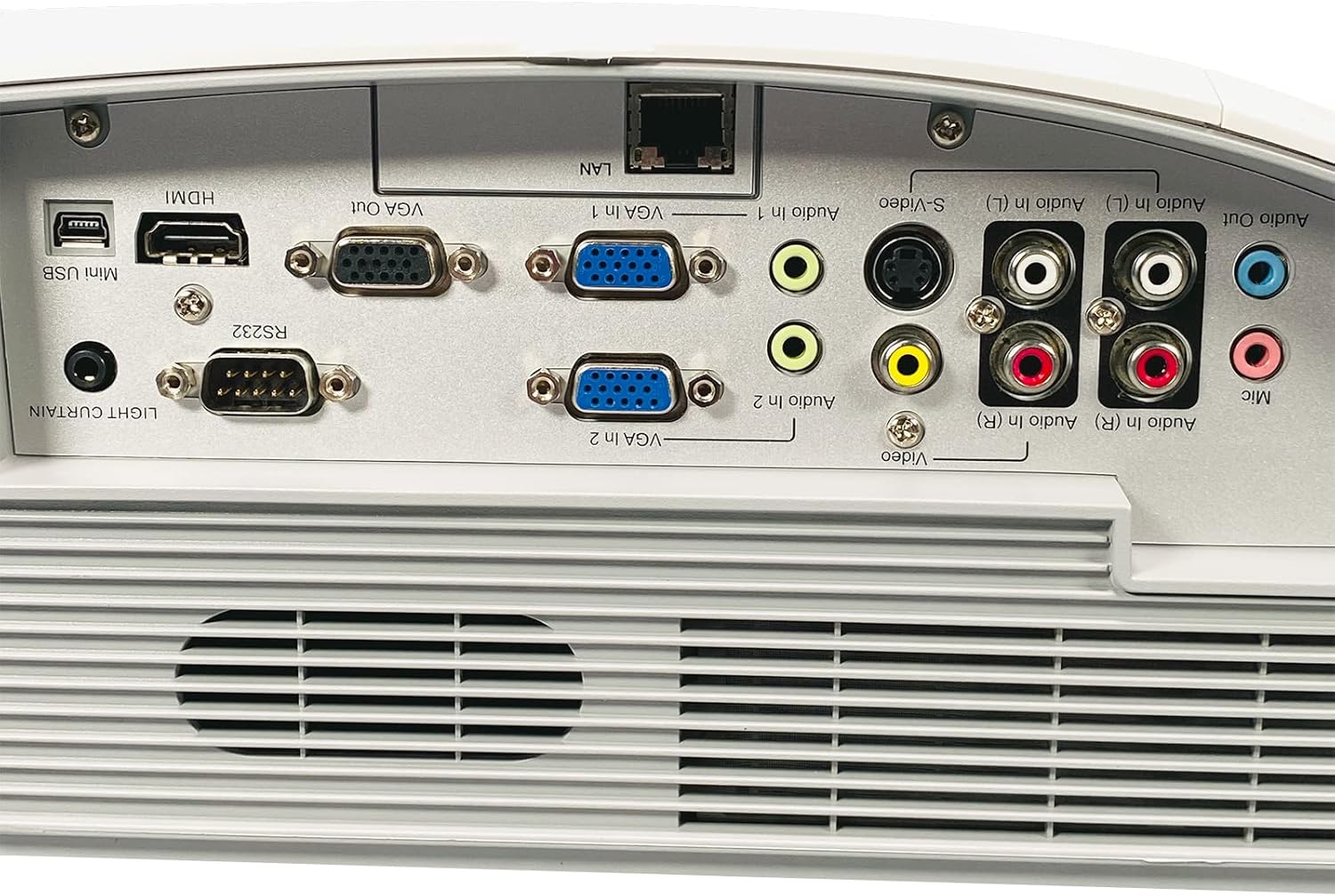
Obrázek 2: Rear panel of the Boxlight P8 WX35NXT projector, detailing the various input and output ports. From left to right, ports include Mini USB, HDMI, RS232, VGA Out, VGA In (x2), LAN, S-Video, Composite Video (RCA), Audio In (L/R), Audio Out, and Microphone input.
- HDMI: Digital video and audio input.
- VGA vstup (x2): Analogový video vstup pro počítače.
- VGA výstup: Analog video output for a monitor.
- LAN (RJ-45): Network connection for control and monitoring.
- Mini-USB: For service or interactive features.
- RS232 (DB-9pin): Sériový port pro ovládání projektoru.
- S-Video: Analogový video vstup.
- Kompozitní video (RCA): Analogový video vstup.
- Audio In (L/R): RCA audio inputs.
- Audio výstup: Audio výstup.
- Mikrofon: Vstup pro mikrofon.
Průvodce nastavením
1. Projector Placement
As an ultra-short throw projector, the P8 WX35NXT is designed to be placed very close to the projection surface (screen or wall). Position the projector on a stable, flat surface directly in front of the screen. Ensure there are no obstructions to the projection path or ventilation openings.
2. Připojení napájení
- Připojte napájecí kabel k napájecí zásuvce projektoru.
- Zapojte druhý konec napájecího kabelu do uzemněné elektrické zásuvky.
3. Připojení vstupních zdrojů
Connect your video source (e.g., computer, Blu-ray player) to the appropriate input port on the projector's rear panel (refer to Figure 2).
- HDMI: Pro digitální video a audio.
- VGA: For analog computer video. Connect an audio cable separately if needed.
- S-Video/kompozitní: Pro zdroje videa ve standardním rozlišení.
4. Počáteční zapnutí
- Stiskněte tlačítko Moc button on the projector's control panel or remote control.
- The power indicator light will change, and the projector will begin its startup sequence.
5. Nastavení zaostření
Adjust the focus ring located near the lens until the projected image is clear and sharp.
Návod k obsluze
Zapnutí/vypnutí
- Zapnutí: Stiskněte tlačítko Moc jednou tlačítko.
- Vypnutí: Stiskněte tlačítko Moc button twice. The projector will display a shutdown confirmation. Confirm to power off.
Výběr zdroje vstupu
Stiskněte tlačítko Zdroj button on the control panel or remote control to cycle through available input sources (HDMI, VGA1, VGA2, S-Video, Video).
Navigace v nabídce
Použijte Menu button to open the On-Screen Display (OSD) menu. Use the arrow buttons to navigate and the Vstupte pro výběr možností. Stiskněte tlačítko Menu znovu k výstupu.
Úpravy obrazu
- Jas/kontrast: Adjust these settings in the OSD menu to optimize image quality for your viewprostředí.
- Poměr stran: Select the appropriate aspect ratio (e.g., 16:10, 4:3) from the OSD menu to match your content.
- Korekce lichoběžníkového zkreslení: If the image appears trapezoidal, use the keystone correction function (often a dedicated button or in the OSD) to square the image.
Údržba
Čištění projektoru
- Casing: K otření projektoru použijte měkký, suchý hadřík.asing. For stubborn stains, damphadřík lehce navlhčete vodou s jemným čisticím prostředkem a poté otřete dosucha.
- Čočka: Use a professional lens cleaning cloth and lens cleaning solution. Avoid abrasive materials or excessive pressure.
- Větrání: Periodically check and clean the ventilation grilles to ensure proper airflow. Use a soft brush or compressed air to remove dust.
Lamp Nahrazení
The Boxlight P8 WX35NXT uses a DLP light source, which typically has a very long lifespan and does not require frequent lamp replacement like traditional projectors. If a light source issue occurs, contact technical support.
Odstraňování problémů
| Problém | Možná příčina | Řešení |
|---|---|---|
| Není zobrazen žádný obrázek |
|
|
| Obraz je rozmazaný |
|
|
| Obrázek je lichoběžníkový |
|
|
| Žádný zvuk |
|
|
Specifikace
| Značka | Boxlight |
| Model | P8 WX35NXT |
| Technologie displeje | DLP |
| Nativní rozlišení | 1280x800 (WXGA) |
| Maximální rozlišení | 1080p (FHD) |
| Jas | 3500 ANSI Lumens |
| Kontrastní poměr | 3000:1 |
| Poměr stran | 16:10 (nativní) |
| Poměr házení | Ultra-short Throw |
| Konektivita | HDMI, VGA In (x2), VGA Out, LAN (RJ-45), Mini USB, RS232, S-Video, Composite Video, Audio In (L/R), Audio Out, Mic |
| Vestavěné reproduktory | 10.0 wattů mono |
| Hmotnost položky | 17.7 lb (8.03 kg) |
| Vstup napájení | AC 100-240V~ 50/60 Hz 3.6A |
Záruka a podpora
For technical support or warranty inquiries, please contact Boxlight directly. Refer to the product label for specific contact information.

Obrázek 3: Product label on the underside of the projector. This label provides essential information including the manufacturer's address, technical support contact details, model number (P8 WX35NXT), input power specifications, and regulatory compliance marks (CE, UL, FC).
- Výrobce: Boxlight
- Technická podpora: International +1 360-464-2119, USA and Canada 1-866-972-1549
- Webmísto: www.boxlight.com
- Model: P8 WX35NXT
- sériové číslo: 330901135450075 (Napřample, actual serial number varies per unit)
Please register your product on the Boxlight webwebu pro aktivaci záruky a odběr aktualizací produktů.
Ask a question about this manual
Ask about setup, troubleshooting, compatibility, parts, safety, or missing instructions. Manuals+ will review the question and use this page’s manual context to help answer it.