
1. Úvod
Thank you for choosing the Kisonli I-570 Wired USB Multimedia Speaker. This manual provides essential information for the proper setup, operation, and maintenance of your speaker. Please read this manual thoroughly before using the product to ensure optimal performance and longevity.
The Kisonli I-570 is designed to deliver clear audio for your computer or other compatible devices. Its compact and lightweight design makes it suitable for various desktop environments.

Image 1.1: Kisonli I-570 speaker and its retail packaging. The image shows the black speaker unit next to its orange and black box, which features "USB 2.0 Multimedia speaker" text.
2. Důležité bezpečnostní pokyny
- Nevystavujte reproduktor vodě, vlhkosti ani extrémním teplotám.
- Vyvarujte se pádu reproduktoru nebo jej nevystavujte silným nárazům.
- Nepokoušejte se reproduktor rozebírat ani upravovat. Zrušíte tak platnost záruky a může dojít k jeho poškození.
- Udržujte reproduktor mimo dosah zdrojů tepla, jako jsou radiátory, topná tělesa, kamna nebo jiná zařízení (včetně amplifikátory), které produkují teplo.
- Používejte pouze nástavce/příslušenství specifikované výrobcem.
- Čistěte pouze suchým hadříkem.
- Odpojte toto zařízení během bouřky s blesky nebo když se delší dobu nepoužívá.
3. Obsah balení
Po vybalení zkontrolujte obsah balení. Pokud některé položky chybí nebo jsou poškozené, kontaktujte svého prodejce.
- Kisonli I-570 USB Multimedia Speaker (x1)
- Uživatelská příručka (tento dokument)
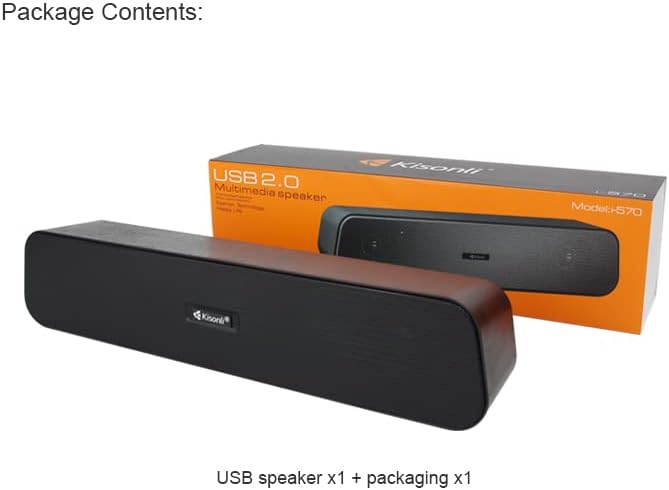
Image 3.1: Package contents showing one Kisonli I-570 USB speaker and its retail packaging. The speaker is black with a wooden-like texture on the sides.
4. Konec produktuview
The Kisonli I-570 is a compact, wired USB multimedia speaker designed for ease of use and reliable audio output. It features a single unit design with integrated controls.
4.1 Komponenty
- Reproduktorová jednotka: The main audio output device.
- USB kabel: For power and audio input (integrated).
- 3.5mm audio jack: For audio input (integrated).

Image 4.1: The Kisonli I-570 speaker unit, displaying its integrated USB cable and 3.5mm audio jack, ready for connection.
5. Pokyny k nastavení
Follow these steps to set up your Kisonli I-570 speaker:
- Umístění: Place the speaker on a stable, flat surface near your computer or audio source.
- Připojte USB: Plug the USB cable from the speaker into an available USB port on your computer or a USB power adapter (DC 5V). The USB connection provides power to the speaker.
- Připojit zvuk: Plug the 3.5mm audio jack from the speaker into the audio output port (headphone jack) of your computer, laptop, or other audio device.
- Zapnutí: The speaker will typically power on automatically once connected to a powered USB port. Some models may have a power switch or volume knob that also acts as a power switch.
- Nastavení hlasitosti: Adjust the volume using the integrated control on the speaker (if available) and/or your computer's volume settings.
6. Návod k obsluze
6.1 Základní přehrávání zvuku
Once connected, the speaker will play audio from your connected device. Ensure your device's audio output is directed to the connected 3.5mm jack.
6.2 Ovládání hlasitosti
Adjust the audio volume using the volume control knob or buttons on the speaker itself (if present). Additionally, you can control the volume through your computer's operating system or the audio source device.
6.3 Zapnutí/vypnutí
The speaker is powered via USB. To turn it off, disconnect the USB cable from the power source. If the speaker has an integrated power/volume knob, turn it fully counter-clockwise until it clicks off.
7. Údržba a péče
- Čištění: Wipe the speaker's exterior with a soft, dry cloth. Do not use liquid cleaners or abrasive materials.
- Skladování: When not in use for extended periods, store the speaker in a cool, dry place, away from direct sunlight and dust.
- Péče o kabely: Abyste předešli vnitřnímu poškození, vyhněte se nadměrnému ohýbání nebo kroucení kabelů.
8. Řešení problémů
| Problém | Možná příčina | Řešení |
|---|---|---|
| Z reproduktoru není slyšet žádný zvuk. |
|
|
| Zvuk je zkreslený nebo nejasný. |
|
|
| Počítač nerozpoznává reproduktor. |
|
|
9. Specifikace
The following table details the technical specifications of the Kisonli I-570 speaker:

Image 9.1: Visual representation of Kisonli I-570 speaker dimensions (336mm length, 62mm width, 70mm height) and a list of its technical specifications.
| Funkce | Detail |
|---|---|
| Značka | Kisonli |
| Model | Já-570 |
| Napájení | USB DC 5V |
| Výstupní výkon | 3W*2 |
| Maximální výkon | 3.5W |
| Impedance | 4Ω |
| Poměr signálu k šumu | ≥58 dB |
| Frekvenční odezva | 80Hz-20kHz |
| Zkreslení | ≤ 1 % |
| Velikost produktu (D x Š x V) | 336 mm x 62 mm x 70 mm |
| Funkce | AUX (3.5mm audio input) |
| Barva | Černý |
| Technologie připojení | USB, Wired (3.5mm) |
| Typ reproduktoru | Subwoofer |
| Typ montáže | Stolní deska |
| Hmotnost položky | 590 g |
10. Záruka a podpora
Kisonli products are manufactured to high-quality standards. For information regarding warranty coverage, please refer to the warranty card included with your purchase or contact your local retailer. Keep your proof of purchase for warranty claims.
For technical support or further assistance, please contact Kisonli customer service through the contact information provided on the product packaging or the official Kisonli webmísto.