
aonus A9 Pro
Uživatelská příručka k bezdrátovému tyčovému vysavači Aonus A9 Pro
Model: A9 Pro
Značka: Aonus
1. Úvod
Welcome to the Aonus A9 Pro Cordless Stick Vacuum Cleaner user manual. This guide provides essential information for the safe and efficient operation, maintenance, and troubleshooting of your new vacuum cleaner. Please read this manual thoroughly before first use and keep it for future reference.
2. Konec produktuview
2.1. Součásti zahrnuty
The Aonus A9 Pro package includes the following components:
- Hlavní motorová jednotka (s odpadkovou nádobou a LED displejem)
- Skládací prodlužovací trubice
- Motorized Brush Head (with LED lights)
- Vyjímatelná baterie
- Dok pro montáž na stěnu
- Napájecí adaptér/nabíječka
- Štěrbinový nástroj
- Kartáč na prach 2 v 1
- Cleaning Tool (for brush head and filter)
- Náhradní filtr

Figure 2.1: Aonus A9 Pro Cordless Vacuum Cleaner and its included accessories.
3. Nastavení
3.1. Montáž
- Insert the foldable extension tube into the main motor unit until it clicks securely into place.
- Attach the motorized brush head to the other end of the extension tube, ensuring it clicks firmly.
- For handheld use, attach desired accessories (crevice tool, dusting brush) directly to the main motor unit.
3.2. Nabíjení baterie
Před prvním použitím baterii plně nabijte. Baterii lze nabíjet připojenou k vysavači nebo samostatně.
- Connect the power adapter to the charging port on the main unit or directly to the battery pack.
- Zapojte adaptér do zásuvky ve zdi.
- LED displej bude indikovat stav nabíjení. Plné nabití obvykle trvá 4–5 hodin.

Figure 3.2: The removable battery pack and its charging indicators.
4. Návod k obsluze
4.1. Režimy zapnutí/vypnutí a sání
Press the power button to turn the vacuum on or off. Use the mode button on the LED display to switch between suction modes:
- Nízké sání: For light dust and extended runtime (up to 60 minutes).
- Střední sací výkon: For general cleaning.
- Vysoký sací výkon: For deep cleaning and stubborn dirt (up to 42KPa / 500W).
- Automatický režim: The vacuum intelligently detects dust concentration and adjusts suction power accordingly.

Figure 4.1.1: Intelligent LED control screen displaying battery life and suction mode.

Figure 4.1.2: Automatic dust detection adjusts suction for efficient cleaning.

Figure 4.1.3: Demonstration of the vacuum's powerful 42KPa suction.
4.2. Special Features and Usage
- Skládací design: The extension tube can be folded 180 degrees, allowing easy access under low furniture like beds and sofas without bending over.
- Kartáč proti zamotávání: The motorized brush head is designed to prevent hair entanglement, ensuring smooth operation and effective cleaning on various floor types including carpets, wood, marble, and tile.
- LED světlomety: The brush head features LED lights to illuminate dust and debris in dark areas, ensuring no spot is missed.
- Všestranné příslušenství: Use the crevice tool for narrow gaps and corners, and the 2-in-1 dusting brush for upholstery, keyboards, and delicate surfaces.
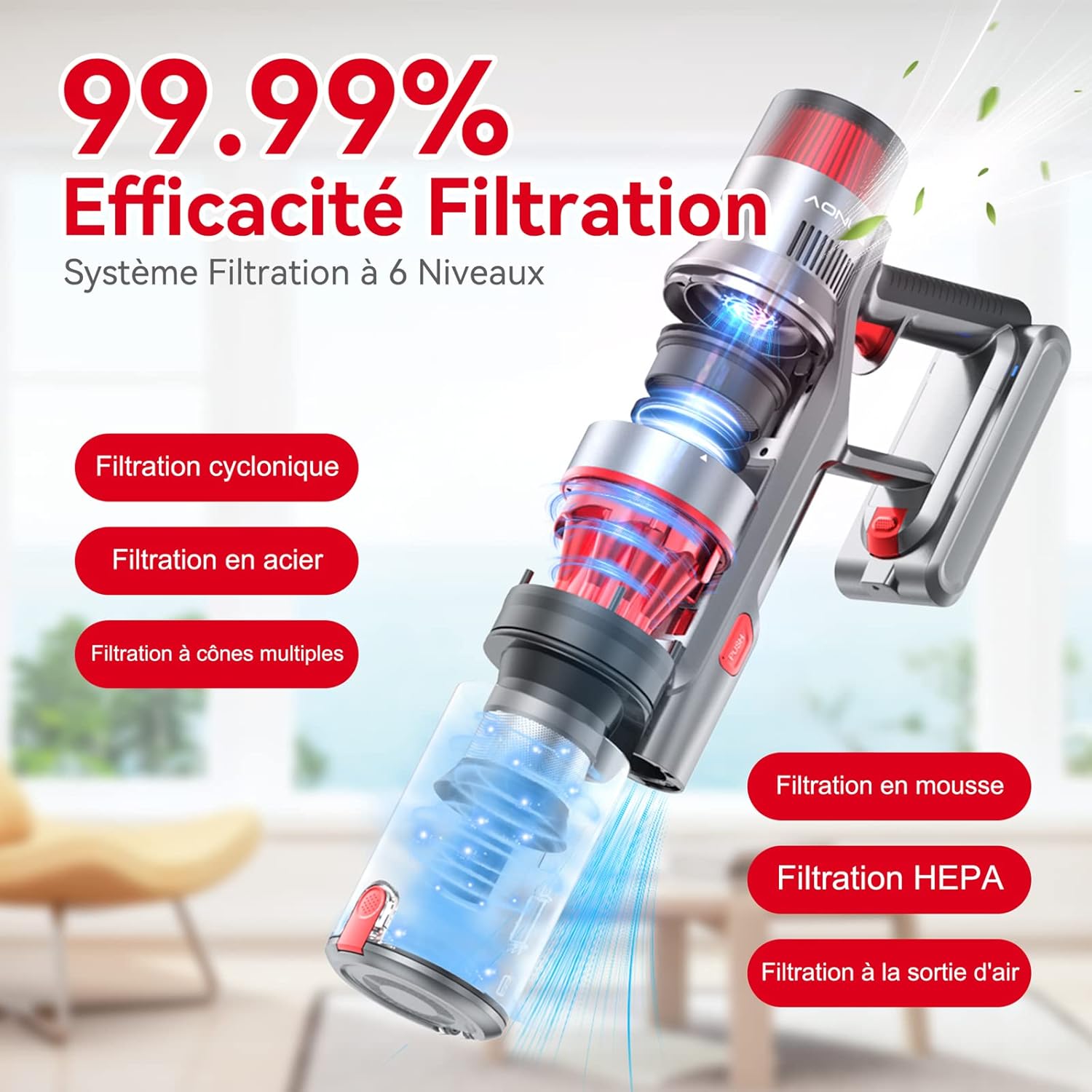
Figure 4.2.1: The 180-degree foldable design allows easy cleaning under low furniture.
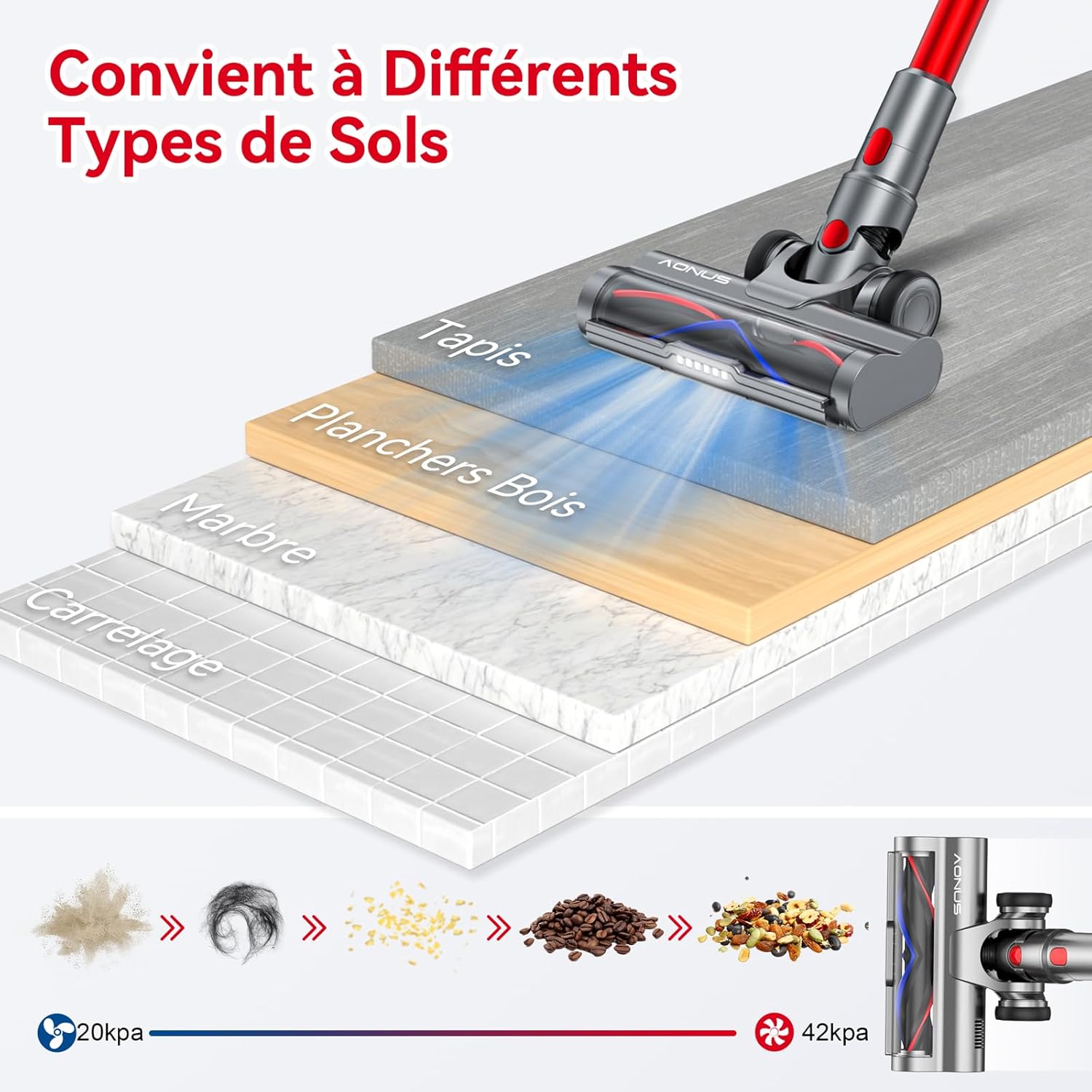
Figure 4.2.2: The vacuum is effective on various floor types including carpet, wood, marble, and tile.

Figure 4.2.3: The vacuum comes with multiple functional accessories for different cleaning scenarios.
5. Údržba
Regular maintenance ensures optimal performance and extends the lifespan of your Aonus A9 Pro vacuum cleaner.
5.1. Vyprázdnění popelnice
Empty the dustbin after each use or when the MAX line is reached.
- Držte hlavní jednotku nad odpadkovým košem.
- Press the dustbin release button (usually marked "PUSH" or with a trash can icon) to open the bottom flap and release debris.
- Po vyprázdnění bezpečně zavřete klapku.

Figure 5.1: One-click dust removal for quick and easy emptying.
5.2. Čištění filtrů
The Aonus A9 Pro features a 6-level filtration system, including washable HEPA and metal filters. Clean filters regularly (e.g., monthly, depending on usage) to maintain suction power and prevent secondary pollution.
- Twist and pull to remove the dustbin and filter assembly from the main unit.
- Separate the HEPA filter, metal filter, and foam filter.
- Všechny omyvatelné součásti filtru oplachujte pod tekoucí studenou vodou, dokud voda nebude čirá.
- Allow all filter components to air dry completely for at least 24 hours before reassembling and placing back into the vacuum. Do not use a dryer or direct heat.

Figure 5.2: Diagram illustrating the 6-level filtration system, including cyclonic, steel, multi-cone, foam, and HEPA filters.
5.3. Čištění hlavice kartáčku
Periodically check the brush head for tangled hair or debris. While designed to be anti-tangle, some accumulation may occur.
- Vypněte vysavač a sejměte hlavici kartáče.
- Use the provided cleaning tool to cut and remove any tangled hair or fibers from the brush roller.
- Ensure the roller spins freely before reattaching.
6. Řešení problémů
Běžné problémy a jejich řešení naleznete v tabulce níže.
| Problém | Možná příčina | Řešení |
|---|---|---|
| Vakuum se nezapne. | Baterie je vybitá nebo není správně nainstalována. | Plně nabijte baterii. Ujistěte se, že je baterie bezpečně zacvaknutá na místě. |
| Nízký sací výkon. | Dustbin is full, filters are clogged, or there's a blockage. | Empty the dustbin. Clean all filters thoroughly. Check the extension tube and brush head for blockages. |
| Hlava kartáčku se přestala otáčet. | Hair or debris tangled in the brush roller, or a blockage in the brush head. | Turn off the vacuum and remove any tangled hair or debris from the brush roller. Clear any blockages in the brush head assembly. |
| Krátká výdrž baterie. | Operating in High Suction mode frequently, or battery degradation. | Use Automatic or Low Suction mode for longer runtime. Ensure battery is fully charged before use. If battery life significantly decreases over time, consider battery replacement. |
7. Specifikace
| Funkce | Specifikace |
|---|---|
| Značka | Aonus |
| Číslo modelu | A9 Pro |
| Barva | Červený |
| Rozměry produktu (D x Š x V) | 12.7 x 7.62 x 12.7 cm |
| Hmotnost položky | 2.8 kg |
| Kapacita popelnice | 1 litrů |
| Moc | 500 wattů |
| Maximální sání | 33000 Pa |
| Materiál | Hliník, Plast |
| Doba běhu | Až 60 minut |
| Úroveň hluku | 60 dB |
| Speciální funkce | Washable Filter, HEPA, Portable, Cordless, Bagless, Foldable Design, LED Display, Automatic Dust Detection |
| Typ filtru | Kazeta (HEPA) |
| Doporučená použití | Car, Pet Hair, Floors |
8. Záruka a podpora
8.1. Informace o záruce
The Aonus A9 Pro Cordless Stick Vacuum Cleaner typically comes with a 2-year manufacturer's warranty. Please refer to the warranty card included in your product packaging for specific terms and conditions. Keep your proof of purchase for warranty claims.
8.2. Zákaznická podpora
For any questions, technical assistance, or warranty claims, please contact Aonus customer support through the retailer where you purchased the product or visit the official Aonus webstránky pro kontaktní údaje.
Ask a question about this manual
Ask about setup, troubleshooting, compatibility, parts, safety, or missing instructions. Manuals+ will review the question and use this page’s manual context to help answer it.