
Edifier CX7
Edifier CX7 Active 2.1 Home Entertainment System User Manual
Model: CX7
Zavedení
The Edifier CX7 is an active 2.1 home entertainment system designed to deliver high-quality audio for various devices, including televisions, personal computers, and notebooks. This system features Bluetooth V5.0 connectivity, an 8-inch subwoofer, and an infrared remote control for convenient operation. This manual provides essential information for setting up, operating, and maintaining your CX7 system.
Obsah balení
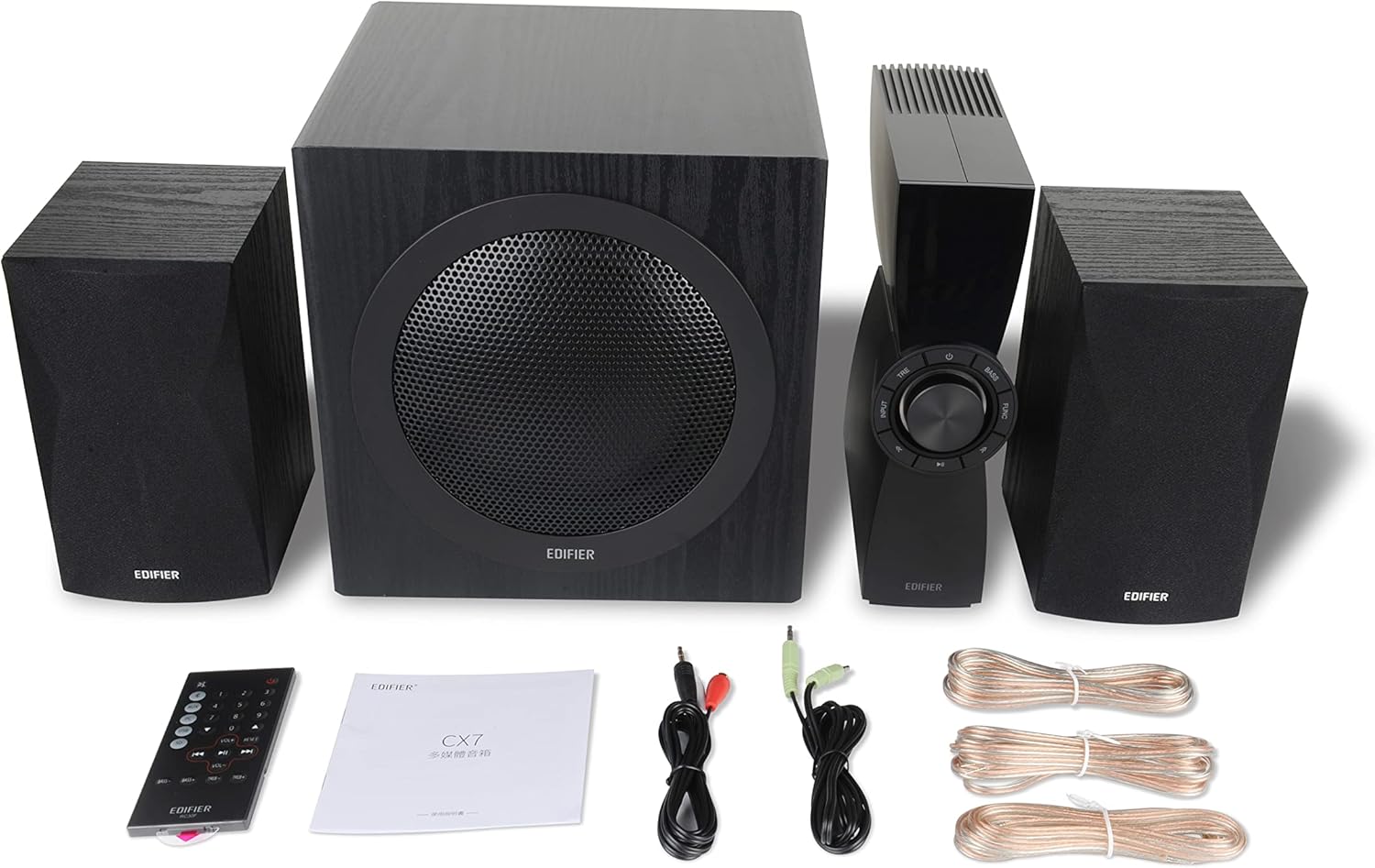
Figure 1: Edifier CX7 System Components
Ověřte prosím, zda jsou ve vašem balení obsaženy všechny níže uvedené položky:
- Subwoofer (1)
- Satellite Speakers (2)
- Control Unit (1)
- Infrared Remote Control (1)
- 3.5mm to RCA Audio Cable (1)
- RCA to RCA Audio Cable (1)
- Speaker Connection Cables (2)
- Uživatelský manuál (1)
Průvodce nastavením
1. Umístění
Position the subwoofer on the floor, preferably in a corner or near a wall for optimal bass response. Place the satellite speakers on either side of your listening area, equidistant from the listener, and at ear level if possible. Ensure the control unit is easily accessible.

Figure 2: Recommended System Placement
2. Připojení reproduktorů
Connect the satellite speakers to the speaker output terminals on the rear of the control unit using the provided speaker cables. Ensure correct polarity (red to red, black to black) for each speaker.
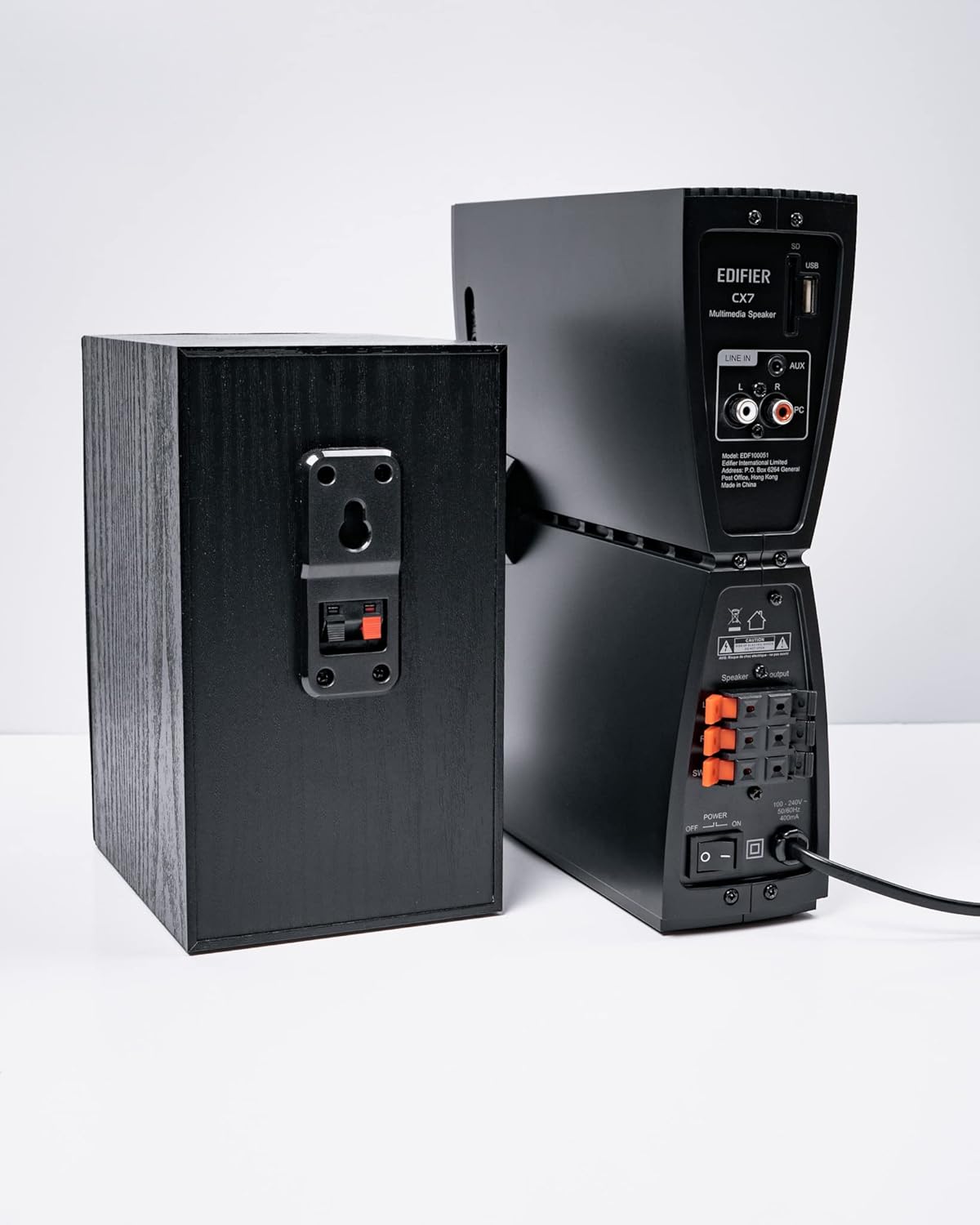
Obrázek 3: Připojení reproduktorů
3. Připojení zdrojů zvuku
The CX7 system supports multiple audio input options:
- Vstup AUX: Use the 3.5mm to RCA audio cable to connect devices like smartphones, tablets, or computers to the AUX input on the control unit.
- PC vstup: Use the RCA to RCA audio cable to connect your PC's audio output to the PC input on the control unit.
- Bluetooth: For wireless connection, refer to the "Bluetooth Pairing" section under Operating Instructions.
4. Připojení napájení
Connect the power cable to the control unit and then plug it into a standard wall outlet. Turn on the power switch located on the rear of the control unit.
Návod k obsluze
1. Zapnutí/vypnutí
After connecting the power, press the power button on the control unit or the remote control to turn the system on or off. The display on the control unit will illuminate when powered on.

Figure 4: Control Unit Display
2. Výběr vstupu
Press the "INPUT" button on the control unit or the remote control to cycle through available audio sources: AUX, PC, and Bluetooth. The selected input will be displayed on the control unit's screen.

Figure 5: Control Knob and Input Buttons
3. Ovládání hlasitosti
Rotate the large knob on the control unit clockwise to increase volume and counter-clockwise to decrease it. Alternatively, use the "VOL+" and "VOL-" buttons on the remote control.
4. Nastavení basů a výšek
Press the "BASS" or "TRE" (Treble) buttons on the control unit or remote control, then rotate the main knob to adjust the respective levels. The display will show the current bass/treble setting.
5. Párování Bluetooth
- Select the Bluetooth input on the CX7 system. The display will show "BT" and flash, indicating it's in pairing mode.
- Na svém zařízení (chytrém telefonu, tabletu atd.) povolte Bluetooth a vyhledejte dostupná zařízení.
- Select "EDIFIER CX7" from the list of found devices.
- Once paired, the "BT" indicator on the CX7 display will stop flashing and remain solid.
To disconnect a Bluetooth device, press and hold the "FUNC" button on the control unit or the Bluetooth button on the remote control for a few seconds.
6. Funkce dálkového ovládání

Figure 6: Infrared Remote Control
The remote control provides convenient access to all major functions:
- Moc: Zapíná/vypíná systém.
- Výběr vstupu: Cycles through AUX, PC, Bluetooth.
- Objem: Upravuje hlavní hlasitost.
- Basy/výšky: Upravuje úroveň basů a výšek.
- Ztlumit: Vypne/zapne zvuk.
- Ovládání přehrávání: Play/Pause, Previous/Next track (for Bluetooth mode).
Údržba
- Čištění: Use a soft, dry cloth to clean the surfaces of the speakers and control unit. Do not use liquid cleaners or abrasive materials.
- Větrání: Ensure adequate ventilation around the control unit and subwoofer to prevent overheating. Do not block ventilation openings.
- Prostředí: Avoid exposing the system to extreme temperatures, humidity, dust, or direct sunlight.
- Vypnout: If the system will not be used for an extended period, disconnect it from the power outlet.
Odstraňování problémů
| Problém | Možná příčina | Řešení |
|---|---|---|
| Žádný zvuk |
|
|
| Připojení Bluetooth se nezdařilo |
|
|
| Zkreslený zvuk |
|
|
Specifikace
| Funkce | Detail |
|---|---|
| Název modelu | CX7 |
| Typ reproduktoru | Systém reproduktorů 2.1 |
| Technologie připojení | Bluetooth |
| Technologie bezdrátové komunikace | Bluetooth V5.0 |
| Dosah Bluetooth | 10 metrů |
| Režim zvukového výstupu | Surround |
| Maximální výstupní výkon reproduktoru | 69 wattů |
| Technologie připojení subwooferu | Bezdrátový |
| Průměr basového reproduktoru | 8 palce |
| Materiál | Polypropylen |
| Barva | Černý |
| Rozměry produktu | 16.93"H x 17.72"Š x 13.39"V |
| Hmotnost položky | 29 liber (13.2 kilogramů) |
| Zdroj napájení | Elektrický kabel |
| Typ ovladače | Dálkové ovládání |
| Doporučená použití | Pro televizory, pro počítače, pro chytré telefony nebo tablety |
Záruka a podpora
For warranty information and technical support, please refer to the warranty card included with your product or visit the official Edifier webUschovejte si účtenku jako doklad o koupi pro případ reklamace.
Oficiální Edifier Webmísto: www.edifier.com
Ask a question about this manual
Ask about setup, troubleshooting, compatibility, parts, safety, or missing instructions. Manuals+ will review the question and use this page’s manual context to help answer it.