Thank you for choosing the Xiaomi Electric Scooter 4. This manual provides essential information for the safe assembly, operation, and maintenance of your scooter. Please read this manual thoroughly before your first ride to ensure optimal performance and safety. Keep this manual for future reference.
2. Bezpečnostní informace
2.1 Všeobecné bezpečnostní pokyny
Při jízdě vždy noste helmu a další ochranné pomůcky (chrániče kolen, lokty).
Před každou jízdou se ujistěte, že všechny komponenty jsou bezpečně upevněny a v dobrém provozním stavu.
Nejezděte v silném dešti, sněhu nebo na zledovatělém povrchu.
Dodržujte místní dopravní předpisy a předpisy.
Dodržujte bezpečnou vzdálenost od ostatních vozidel a chodců.
Vyhněte se jízdě pod vlivem alkoholu nebo drog.
Maximální nosnost je 110 kg. Nepřekračujte tento limit.
2.2 Brzdový systém
The Xiaomi Electric Scooter 4 is equipped with a dual braking system for enhanced safety:
Zadní kotoučová brzda: Provides strong and reliable stopping power.
Front E-ABS System: An electronic anti-lock braking system on the front wheel helps prevent wheel lock-up during sudden braking, improving control.
Regularly check the brake levers and cables for proper function and adjustment.
3. Konec produktuview
The Xiaomi Electric Scooter 4 features an optimized design for a comfortable and stable ride. Key components include a robust aluminum frame, 10-inch tubeless tires, and an intuitive handlebar display.
Obrázek 3.1: Strana view of the Xiaomi Electric Scooter 4, showcasing its sleek black design and red cable accents.
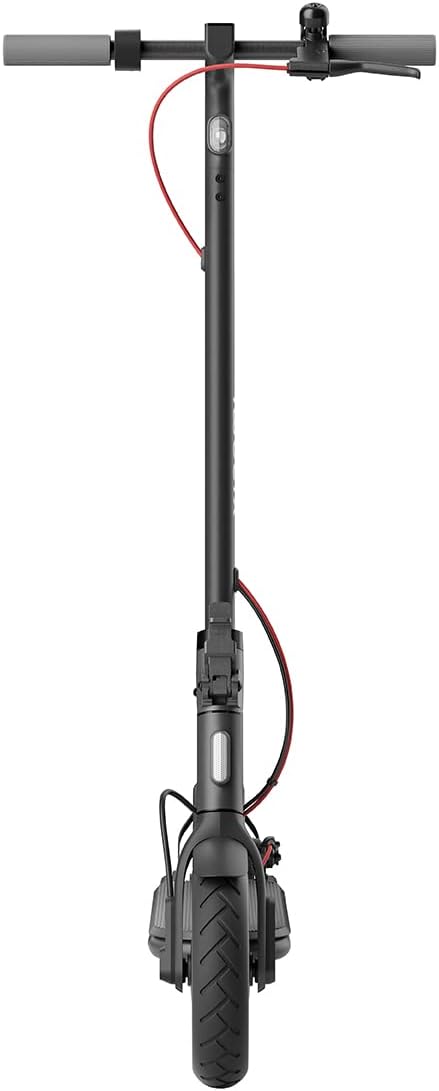
Obrázek 3.2: Přední strana view of the scooter, highlighting the front wheel and handlebar assembly.
Obrázek 3.3: Shora dolů view of the handlebars, showing the central display, bell, and brake levers.
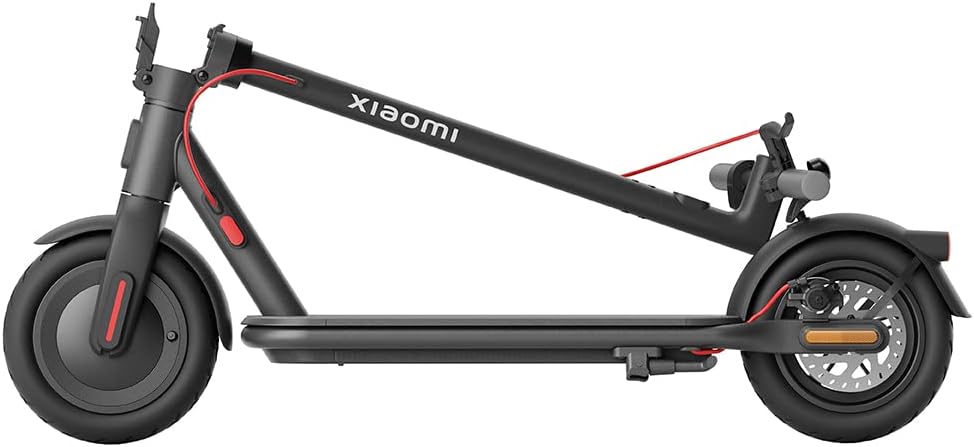
Figure 3.4: The scooter in its folded configuration, demonstrating its portability for storage or transport.
Figure 3.5: Size comparison illustrating the improved dimensions of the Xiaomi Electric Scooter 4 compared to the Electric Scooter 3, offering a more comfortable ride with increased length, height, handlebar width, and deck width.
Figure 3.6: Close-up of the 10-inch tubeless tires, designed for improved shock absorption, stability on uneven roads, and reduced puncture risk due to their deeper tread pattern.
Figure 3.7: Diagram illustrating the powerful 600W brushless Hall motor, enabling the scooter to reach speeds of up to 25 km/h and climb inclines of up to 16%.
Figure 3.8: Visual representation of the three adjustable speed levels: Pedestrian, Standard, and Sport, allowing riders to adapt to various riding conditions and preferences.
4. Nastavení
4.1 Rozložení koloběžky
Umístěte skútr na rovnou plochu.
Locate the new front hinge mechanism near the base of the handlebar stem.
Release the locking mechanism by pulling the lever.
Opatrně zvedejte představec řídítek, dokud se nezajistí ve svislé poloze. Ujistěte se, že je zajišťovací mechanismus zcela zajištěn.
Video 4.1: This video demonstrates the quick and easy folding and unfolding process of the Xiaomi Electric Scooter 4, highlighting the front hinge mechanism for convenient transport and storage.
4.2 Počáteční poplatek
Před prvním použitím plně nabijte baterii koloběžky.
Connect the charger to the charging port on the scooter and then to a power outlet.
Kontrolka na nabíječce se po dokončení nabíjení změní.
4.3 Kontrola tlaku v pneumatikách
Although equipped with tubeless tires, it is recommended to check tire pressure regularly for optimal performance and safety. Refer to the tire sidewall for recommended pressure.
5. Návod k obsluze
5.1 Zapnutí/vypnutí
Pro zapnutí stiskněte a podržte tlačítko napájení na displeji na řídítkách, dokud se obrazovka nerozsvítí.
Pro vypnutí stiskněte a podržte tlačítko napájení, dokud se displej nevypne.
5.2 Jízdní režimy
The scooter offers three riding modes to suit different environments and preferences:
Režim pro chodce: Maximum speed of 6 km/h. Ideal for crowded areas or when walking alongside the scooter.
Standardní režim: Maximum speed of 20 km/h. Suitable for general urban commuting.
Sportovní režim: Maximum speed of 25 km/h. Provides maximum power and speed for experienced riders on open roads.
To switch between modes, short press the power button while the scooter is on.
5.3 Jízda na koloběžce
Položte jednu nohu na desku a druhou nohou se odrazte, abyste získali počáteční hybnost.
Jakmile se rozjedete, jemně stiskněte páku plynu pro zapnutí motoru.
Udržujte rovnováhu a řiďte nakláněním a otáčením řídítek.
To brake, gently squeeze the brake levers. For emergency stops, apply both brakes firmly.
5.4 Xiaomi Home App Integration
Connect your scooter to the Xiaomi Home app on your smartphone for advanced features and control:
View real-time riding data (speed, battery level, mileage).
Zamknout/odemknout skútr.
Aktualizujte firmware.
Adjust settings and preferences.
The app provides a comprehensive overview and control over your scooter's functions.
6. Údržba
6.1 Čištění
Otřete koloběžku měkkým hadříkemamp hadříkem. Nepoužívejte vysokotlaké vodní paprsky ani agresivní čisticí prostředky.
Před čištěním se ujistěte, že je kryt nabíjecího portu bezpečně uzavřen.
6.2 Péče o baterii
Pravidelně nabíjejte baterii, i když koloběžku nepoužíváte, abyste prodloužili její životnost.
Zabraňte úplnému vybití baterie.
Skladujte koloběžku na chladném a suchém místě mimo dosah přímého slunečního záření a extrémních teplot.
6.3 Údržba pneumatik
Regularly inspect tires for wear, cuts, or punctures.
Maintain recommended tire pressure for optimal ride quality and tire longevity.
7. Řešení problémů
If you encounter issues with your Xiaomi Electric Scooter 4, please refer to the following common troubleshooting tips:
Problém
Možná příčina
Řešení
Koloběžka se nezapne
Slabá baterie; uvolněné kontakty
Nabijte baterii; zkontrolujte všechna kabelová připojení.
The Xiaomi Electric Scooter 4 comes with a limited warranty. For detailed warranty terms and conditions, please refer to the warranty card included with your product or visit the official Xiaomi website. For technical support, spare parts, or service inquiries, please contact Xiaomi customer service or an authorized service center.
You can also find additional resources and FAQs on the Xiaomi Home app or the official Xiaomi support page: www.mi.com/global/support
Ask a question about this manual
Ask about setup, troubleshooting, compatibility, parts, safety, or missing instructions. Manuals+ will review the question and use this page’s manual context to help answer it.