
Konec produktuview
The Clarion JM-Carry On is a portable speaker designed for versatile audio playback. It features a wired microphone input, multi-color light effects, and an in-built battery for on-the-go use. Its compact and portable design allows for easy transport and setup in various environments.

Image: Clarion JM-Carry On Portable Bluetooth Speaker shown with its wired microphone.
Video: Overview of the Clarion Portable Bluetooth Speaker, highlighting its features and audio performance.
Obsah balení
Zaškrtněte prosím políčko u následujících položek:
- Clarion JM-Carry On Portable Bluetooth Speaker
- Kabelový mikrofon
- Nabíjecí kabel
Počáteční nastavení
- Nabíjení reproduktoru: Connect the provided charging cable to the speaker's charging port and a suitable power source. The LED indicator will show charging status. Ensure the speaker is fully charged before first use for optimal battery life.
- Zapnutí/vypnutí: Locate the power switch on the speaker. Slide it to the 'ON' position to power on the device. Slide it to 'OFF' to power off.
- Bluetooth párování:
- Zapněte reproduktor. Automaticky se přepne do režimu párování Bluetooth, což bude signalizováno blikající LED diodou.
- Na svém smartphonu nebo tabletu povolte Bluetooth a vyhledejte dostupná zařízení.
- Select "Clarion JM-Carry On" from the list. A confirmation tone will sound upon successful pairing.
- Connecting Wired Microphone: Insert the wired microphone's plug into the designated microphone input jack on the speaker.
Návod k obsluze
- Výběr režimu: Use the 'Mode' button to switch between Bluetooth (BT), FM Radio, USB, and AUX input modes.
- Režim Bluetooth: Once paired, audio from your connected device will play through the speaker. Use your device or the speaker's controls for volume and track navigation.
- Režim rádia FM: In FM mode, press and hold the 'Play/Pause' button to auto-scan and save available radio stations. Use the 'Next/Previous' buttons to navigate through saved stations.
- Režim USB/AUX: Insert a USB drive into the USB port for MP3 playback or connect an external audio device via the AUX input using a 3.5mm audio cable.
- TWS (True Wireless Stereo) Functionality: To connect two JM-Carry On speakers for stereo sound, ensure both speakers are in Bluetooth mode and not connected to any device. Press and hold the TWS button on one speaker until you hear a pairing tone. The two speakers will connect, and then you can pair your device to the primary speaker.
- Ovládání zvuku: Adjust the master volume using the main rotary knob. Separate controls may be available for microphone volume and echo effects.
- LED světelné efekty: The speaker features multi-color LED light effects. Use the dedicated 'Light' button to cycle through different light modes or turn them off.
Péče a údržba
- Čištění: K čištění vnější strany reproduktoru používejte měkký, suchý hadřík. Nepoužívejte abrazivní čisticí prostředky ani rozpouštědla.
- Skladování: Reproduktor skladujte na chladném a suchém místě mimo dosah přímého slunečního záření a extrémních teplot.
- Péče o baterie: Chcete-li prodloužit životnost baterie, vyvarujte se častého úplného vybíjení. Reproduktor pravidelně nabíjejte, i když jej delší dobu nepoužíváte.
- Voděodolnost: Tento reproduktor není vodotěsný. Nevystavujte jej vodě nebo vysoké vlhkosti.
Průvodce řešením problémů
| Problém | Řešení |
|---|---|
| Reproduktor se nezapne. | Ensure the battery is charged. Connect the charging cable and try again. Check the power switch position. |
| Z reproduktoru nevychází žádný zvuk. | Check the volume level on both the speaker and the connected device. Ensure the correct input mode (BT, AUX, USB) is selected. |
| Párování Bluetooth selhalo. | Ensure the speaker is in pairing mode. Turn off and on Bluetooth on your device. Move the device closer to the speaker. Disconnect from other Bluetooth devices. |
| Mikrofon nefunguje. | Ensure the microphone is securely plugged into the correct jack. Check the microphone volume control on the speaker. |
| Příjem FM rádia je špatný. | Adjust the speaker's position. Extend any external antenna if available. |
Technické specifikace
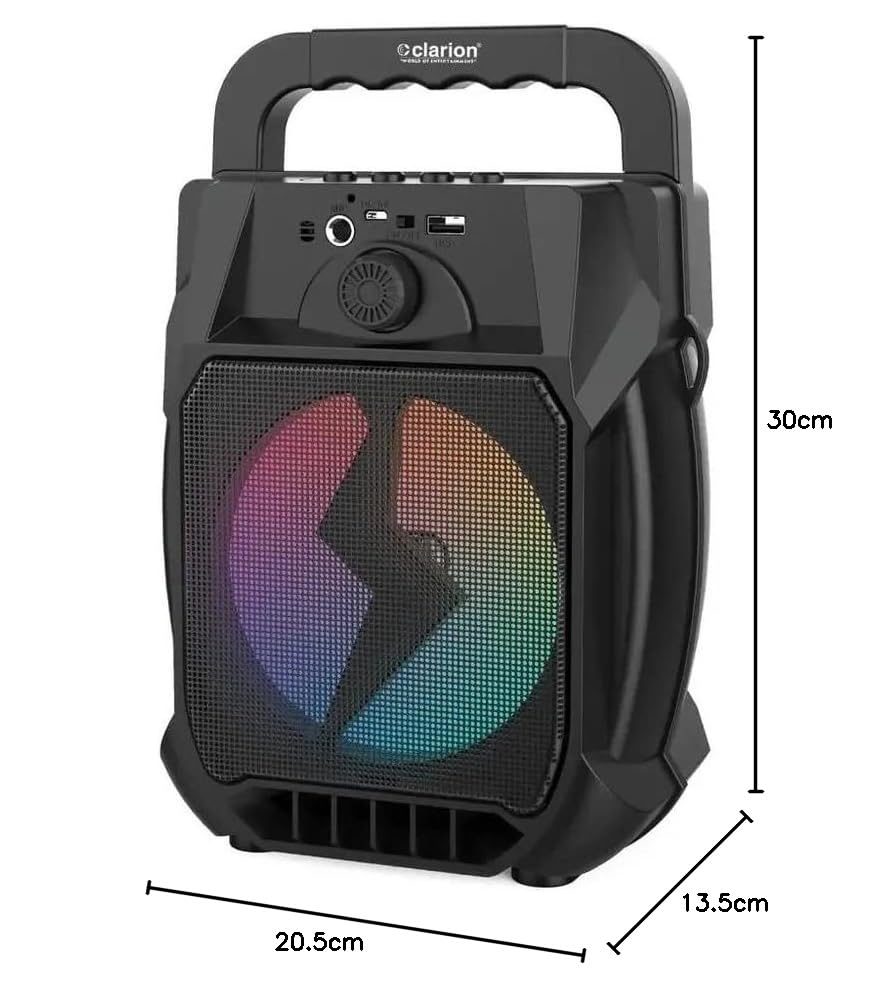
Image: Clarion JM-Carry On Portable Bluetooth Speaker with its dimensions indicated.
- Značka: Clarion (Generic)
- Název modelu: JM-Carry On
- Maximální výstupní výkon reproduktoru: 20 W RMS
- Technologie připojení: Pomocný, Bluetooth, USB
- Režim výstupu zvuku: Stereo
- Typ montáže: Stojící na podlaze
- Typ reproduktoru: Satelit
- Vlastnosti produktu: Built-In Microphone, Radio, Subwoofer, Multi-color Light Effect, Sound Controller
- Způsob ovládání: Dotek
- Woofer Driver Diameter: 6.5 palce
- Průměrná životnost baterie: 3-4 hodin
- Kapacita baterie: 1.2 Amp Hodiny (3.7 V)
- Rozměry položky (D x Š x V): 13.5 x 20.5 x 30 centimetrů
- Kompatibilní zařízení: Smartphone, tablet
- Zdroj napájení: Napájení z baterie
Záruka a zákaznická podpora
This Clarion JM-Carry On Portable Bluetooth Speaker comes with a 1-letá záruka on the speaker unit from the date of purchase. Please retain your purchase receipt as proof of warranty.
For any technical assistance, troubleshooting, or warranty claims, please contact Clarion Computers customer support. Refer to your purchase documentation for specific contact details or visit the official Clarion Computers webstránky s informacemi o podpoře.
Note: The warranty typically covers manufacturing defects and does not cover damage caused by misuse, accidents, unauthorized modifications, or normal wear and tear.