
NANLITE FORZA300BII
Uživatelská příručka Nanlite Forza 300B MarkII
Model: FORZA300BII
Zavedení
This user manual provides detailed instructions for the safe and effective operation of your Nanlite Forza 300B MarkII Bi-Color LED Light. The Forza 300B MarkII is a compact and powerful bi-color spotlight designed for professional content creation, offering precise control over color temperature and green-to-magenta shift. Please read this manual thoroughly before use to ensure optimal performance and longevity of your equipment.
Obsah balení
Po vybalení se prosím ujistěte, že jsou všechny níže uvedené položky přítomny a v dobrém stavu:
- Nanlite Forza 300B MarkII Fixture
- Napájení AC-DC
- Bowens Mount Reflector
- Stojan Clamp
- Propojovací kabely
- Přepravní pouzdro
Průvodce nastavením
1. Montáž svítidla
Attach the Forza 300B MarkII fixture to a compatible light stand using the included stand clamp. Ujistěte se, že třamp is securely tightened to prevent accidental movement or falling.
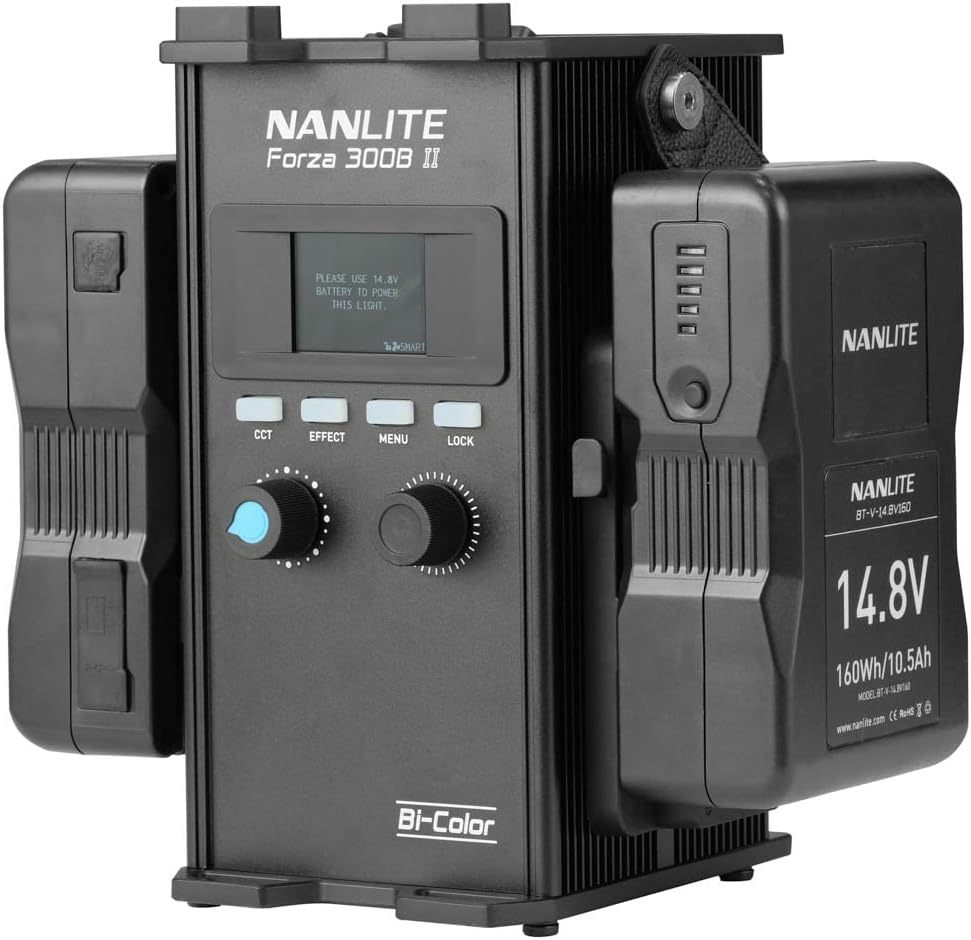
Figure 1: Nanlite Forza 300B MarkII fixture securely mounted on a light stand.
2. Připojení napájení
Connect the AC-DC Power Supply to the control unit. Then, connect the control unit to the fixture using the provided connecting cable. Ensure all connections are firm and secure. The control unit can also be powered by compatible V-mount batteries (sold separately) for portable operation.

Figure 2: The control unit connected to the power supply and fixture cable.
3. Připevnění příslušenství
The Forza 300B MarkII features a standard Bowens Mount, allowing for easy attachment of various light modifiers such as softboxes, reflectors, and fresnel lenses. Align the accessory with the mount and twist until it locks into place.

Figure 3: The Forza 300B MarkII with a standard Bowens Mount reflector attached.
Návod k obsluze
1. Řídicí jednotka Overview
The control unit provides intuitive access to all light settings. It features a clear display, control knobs, and buttons for various functions.

Figure 4: Front panel of the control unit, showing the display and controls.
2. Zapnutí/vypnutí
Locate the power switch on the control unit. Flip the switch to the 'ON' position to power on the light. Flip it to 'OFF' to power down.
3. Adjusting Brightness and Color Temperature (CCT)
Use the dedicated knobs on the control unit to adjust the light's intensity (brightness) and Color Correlated Temperature (CCT). The Forza 300B MarkII allows for bi-color adjustment, ranging from warm to cool tones.
4. Green-to-Magenta Adjustment
The Forza 300B MarkII features a unique green-to-magenta shift adjustment (+/- 80), enabling fine-tuning of color accuracy to match other light sources or achieve specific creative looks. This is controlled via the WW(RG) LED source and light-mixing chamber.
5. Special Effects (FX) Modes
The control unit provides access to various built-in special effects modes. Refer to the display and controls to navigate and select desired effects such as Storm, TV, or Firework. Adjust the speed and intensity of these effects as needed.
6. Možnosti dálkového ovládání
The light can be controlled remotely via Bluetooth using the free NANLINK app for iOS & Android devices. It also supports 2.4G for the WS-RC-C2 Remote Control and WS-TB-1 Transmitter Box (both sold separately), and features locking ports for DMX/RDM control for professional setups.
Údržba
Regular maintenance ensures the longevity and optimal performance of your Nanlite Forza 300B MarkII.
- Čištění: Use a soft, dry cloth to clean the exterior of the fixture and control unit. For stubborn dirt, a slightly damp Lze použít hadřík s jemným mýdlem, ale dbejte na to, aby se do zařízení nedostala žádná tekutina.
- Skladování: When not in use, store the light in its original carrying case in a cool, dry place, away from direct sunlight and extreme temperatures.
- Údržba ventilátoru: The fan in the head is designed for quiet operation. Ensure the fan vents are clear of obstructions to maintain proper airflow and prevent overheating.
- Péče o kabely: Inspect power and connecting cables regularly for any signs of wear or damage. Replace damaged cables immediately to prevent electrical hazards.
Odstraňování problémů
If you encounter issues with your Nanlite Forza 300B MarkII, refer to the following common problems and solutions:
| Problém | Možná příčina | Řešení |
|---|---|---|
| Světlo se nerozsvítí. | Žádné napájení, uvolněné připojení, vadný zdroj napájení. |
|
| Světelný výstup je nekonzistentní nebo bliká. | Unstable power, overheating, loose cable. |
|
| Remote control/App not connecting. | Bluetooth/2.4G interference, incorrect pairing. |
|
If the problem persists after attempting these solutions, please contact Nanlite customer support for further assistance.
Specifikace
| Funkce | Detail |
|---|---|
| Číslo modelu | FORZA300BII |
| Značka | NANLITE |
| Rozměry produktu | 13 x 9 x 4.84 palce |
| Hmotnost položky | 6.38 libry |
| Technologie připojení | Bluetooth |
| Hardwarové rozhraní | Bluetooth |
| Úroveň odolnosti proti vodě | Není odolný vůči vodě |
| CRI | 96 |
| TLCI | 97 |
| Output (1 meter) | 68060 Lux, 6323 fc |
Záruka a podpora
For warranty information and technical support, please refer to the official Nanlite webnebo se obraťte na autorizovaného prodejce. Uschovejte si účtenku jako doklad o koupi pro případ reklamace.
Optional protection plans may be available for extended coverage. Please check with your retailer for details on plans such as the 3-Year Protection Plan or Complete Protect options.
Související dokumenty - FORZA300BII
 |
Uživatelská příručka k LED bodovému světlu Nanlite Forza 300B II Bi-Color Komplexní uživatelská příručka pro bodové světlo Nanlite Forza 300B II LED Bi-Color, s podrobným popisem vlastností produktu, technických specifikací, nastavení, provozních režimů (CCT, efekty, DMX/RDM), dálkového ovládání, bezpečnostních pokynů a řešení problémů. |
 |
Nanlite Forza 300B LED Bi-color Spot Light User Manual Comprehensive user manual for the Nanlite Forza 300B LED Bi-color Spot Light. Includes setup instructions, remote control operation, DMX settings, and troubleshooting guide. |
 |
NANLITE FS-300B LED Bi-color Spot Light User Manual Comprehensive user manual for the NANLITE FS-300B LED Bi-color Spot Light. Learn about product features, technical specifications, operation, settings, safety precautions, and troubleshooting. |
 |
Uživatelská příručka k dvoubarevnému LED bodovému světlu FC-300B Uživatelská příručka pro LED bodové světlo FC-300B od Nanlite, která zahrnuje technické údaje, možnosti dálkového ovládání, bezpečnostní opatření a shodu s předpisy FCC. |
 |
NANLITE Forza 150B LED Bi-color Spot Light User Manual Comprehensive user manual for the NANLITE Forza 150B LED Bi-color Spot Light, covering setup, operation, DMX control, and troubleshooting. |
 |
Forza 60CR LED RGBLAC Spot Light User Manual User manual for the Forza 60CR LED RGBLAC Spot Light, including technical specifications, remote control operation, safety precautions, and FCC compliance information. |
Ask a question about this manual
Ask about setup, troubleshooting, compatibility, parts, safety, or missing instructions. Manuals+ will review the question and use this page’s manual context to help answer it.