
Zavedení
This manual provides instructions for the RETROSUN AA59-00600A replacement remote control, designed for various Samsung TV models. This remote offers a direct replacement solution, requiring no programming or pairing for immediate use.

Image: The AA59-00600A remote control shown alongside a Samsung television, illustrating its intended use as a replacement.
Nastavení
Instalace baterie
The AA59-00600A remote control requires two (2) AAA batteries (not included) for operation. Follow these steps to install the batteries:
- Najděte kryt prostoru pro baterie na zadní straně dálkového ovladače.
- Zatlačte na jazýček a sejměte kryt.
- Vložte dvě nové baterie AAA a ujistěte se, že kladný (+) a záporný (-) pól správně odpovídají označením uvnitř přihrádky.
- Zasuňte kryt přihrádky na baterie zpět na místo, dokud bezpečně nezacvakne.

Image: A diagram showing the correct orientation for inserting two AAA batteries into the remote control's battery compartment.
První použití
This remote control is designed to work immediately with compatible Samsung TV models without any programming or pairing. Once batteries are installed, point the remote at your TV and begin using it.

Image: The remote control shown with a TV screen, indicating that no programming or pairing is required after battery installation.
Návod k obsluze
The AA59-00600A remote control provides standard functions for your Samsung TV. Ensure a clear line of sight between the remote's infrared emitter and your TV's IR receiver for optimal performance.
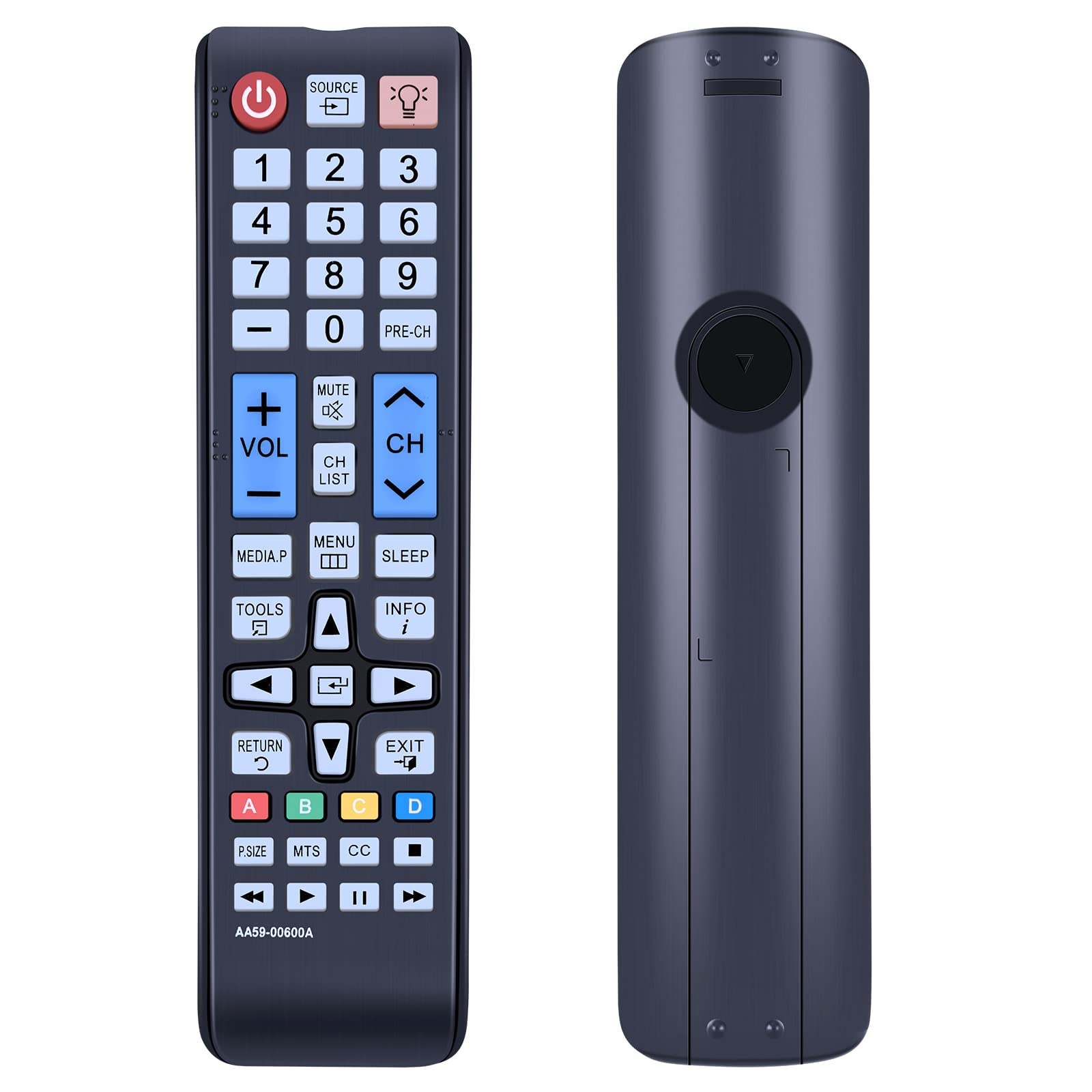
Obrázek: Jasný view of the AA59-00600A remote control, highlighting its button layout and ergonomic design.
Klíčové funkce:
- Výkon (⏻): Zapne nebo vypne televizor.
- Zdroj: Vybírá vstupní zdroje (HDMI, AV atd.).
- Číselná tlačítka (0-9): Přímý výběr kanálu.
- VOL (+/-): Zvýší nebo sníží hlasitost.
- CH (nahoru/dolů): Změní kanály.
- Ztlumit: Mutes or unmutes TV audio.
- Menu: Otevře hlavní nabídku televizoru.
- Nástroje: Opens a quick menu for common functions.
- Info: Zobrazuje informace o aktuálním programu.
- Spát: Sets the TV sleep timer.
- Směrová klávesnice (nahoru, dolů, vlevo, vpravo) a Enter: Procházení nabídek a potvrzování výběrů.
- Návrat: Návrat na předchozí obrazovku nebo do nabídky.
- Výstup: Ukončí aktuální menu nebo funkci.
- Barevná tlačítka (A, B, C, D): Used for specific functions within certain TV applications or menus.
- P.SIZE, MTS, CC: Picture size, Multi-Track Sound, Closed Captioning.
- Přehrát, Pozastavit, Zastavit, Rychle vpřed, Přetočit zpět: Ovládací prvky přehrávání médií.
The remote utilizes infrared technology for long-distance and precise control, effective up to 10 meters (33 feet).

Image: The remote control being used to operate a TV from a distance, demonstrating its long-range infrared capability.
Údržba
Čištění
Pro zachování výkonu a vzhledu dálkového ovladače:
- Otřete povrch měkkým suchým hadříkem.
- Na odolné nečistoty lehce dampnavlhčete hadřík vodou nebo jemným neabrazivním čisticím prostředkem.
- Nepoužívejte agresivní chemikálie, rozpouštědla nebo abrazivní čisticí prostředky, protože by mohly poškodit povrchovou úpravu nebo vnitřní součásti dálkového ovladače.
Výměna baterie
Vyměňte baterie, když dálkový ovladač reaguje pomalu nebo přestane fungovat. Vždy vyměňujte obě baterie současně za nové baterie AAA. Nekombinujte staré a nové baterie ani různé typy baterií, mohlo by dojít k vytečení nebo poruše.
Skladování
Pokud dálkový ovladač nebudete delší dobu používat, vyjměte baterie, abyste zabránili jejich vytečení a poškození.
Odstraňování problémů
- Dálkové ovládání nereaguje:
- Ensure batteries are installed correctly with the correct polarity (+/-).
- Vyměňte staré baterie za nové baterie typu AAA.
- Zkontrolujte, zda se mezi dálkovým ovladačem a infračerveným přijímačem televizoru nenacházejí nějaké překážky.
- Zkontrolujte, zda je dálkový ovladač namířen přímo na televizor.
- Nefunkční konkrétní tlačítka:
- This may indicate a faulty button or low battery power. Try replacing batteries.
- Ujistěte se, že je dálkový ovladač čistý a že v tlačítkách nejsou žádné nečistoty.
- Dálkové ovládání funguje přerušovaně:
- This often indicates low battery power. Replace batteries.
- Ensure there are no strong light sources (like direct sunlight or fluorescent lights) interfering with the IR signal.
- Remote does not control TV:
- Confirm your Samsung TV model is listed as compatible with the AA59-00600A remote control. While this remote is widely compatible, some specific models may require a different remote.
- If your TV model is listed as compatible and the remote still does not work after battery replacement, contact customer support.
Specifikace
| Název modelu | AA59-00600A |
| Značka | RETROSUN |
| Kompatibilní zařízení | Samsung Televisions (Specific models listed in introduction) |
| Technologie připojení | Infračervený (IR) |
| Zdroj napájení | 2 x AAA baterie (nejsou součástí balení) |
| Materiál | ABS plast |
| Speciální funkce | Ergonomický design, není nutné žádné programování |
| Množství tlačítek | 25 |

Obrázek: Porovnání vedle sebe view of the remote control, displaying its approximate length (6.88 inches), width (1.77 inches), and thickness (0.94 inches).
Informace o záruce
Specific warranty details for the RETROSUN AA59-00600A remote control are not provided in the product information. Please refer to your purchase documentation or contact the seller directly for warranty terms and conditions.
Zákaznická podpora
If you encounter any issues or have questions regarding your RETROSUN AA59-00600A replacement remote control, please contact us through the Amazon messenger tool. Our support team is available to assist you.