
Unitech TS100
Unitech TS100 2D Hands-Free Presentation Barcode Scanner
Uživatelská příručka
Zavedení
This manual provides essential information for the proper setup, operation, and maintenance of your Unitech TS100 2D Hands-Free Presentation Barcode Scanner. Please read this manual thoroughly before using the device to ensure optimal performance and to prevent damage.
The Unitech TS100 is an omnidirectional USB wired desktop barcode reader designed for efficient and intuitive scanning of 1D and 2D barcodes, including PDF417 and Data Matrix, in retail and other point-of-sale environments.
Bezpečnostní informace
- Do not expose the scanner to extreme temperatures, humidity, or direct sunlight.
- Zabraňte pádu skeneru ani jeho vystavování silným nárazům.
- Nepokoušejte se skener rozebírat ani upravovat. Ztratíte tak záruku.
- Pro připojení používejte pouze dodaný kabel USB.
- Keep the scanning window clean to ensure accurate barcode reading.
Obsah balení
Zkontrolujte prosím obsah balení, abyste se ujistili, že jsou přítomny všechny položky:
- Unitech TS100 2D Presentation Barcode Scanner
- USB kabel
- Stručný průvodce (pokud je k dispozici)
Konec produktuview
The Unitech TS100 features a compact design with a large scan window for easy barcode presentation. Its omnidirectional scanning capability allows for quick and efficient data capture.
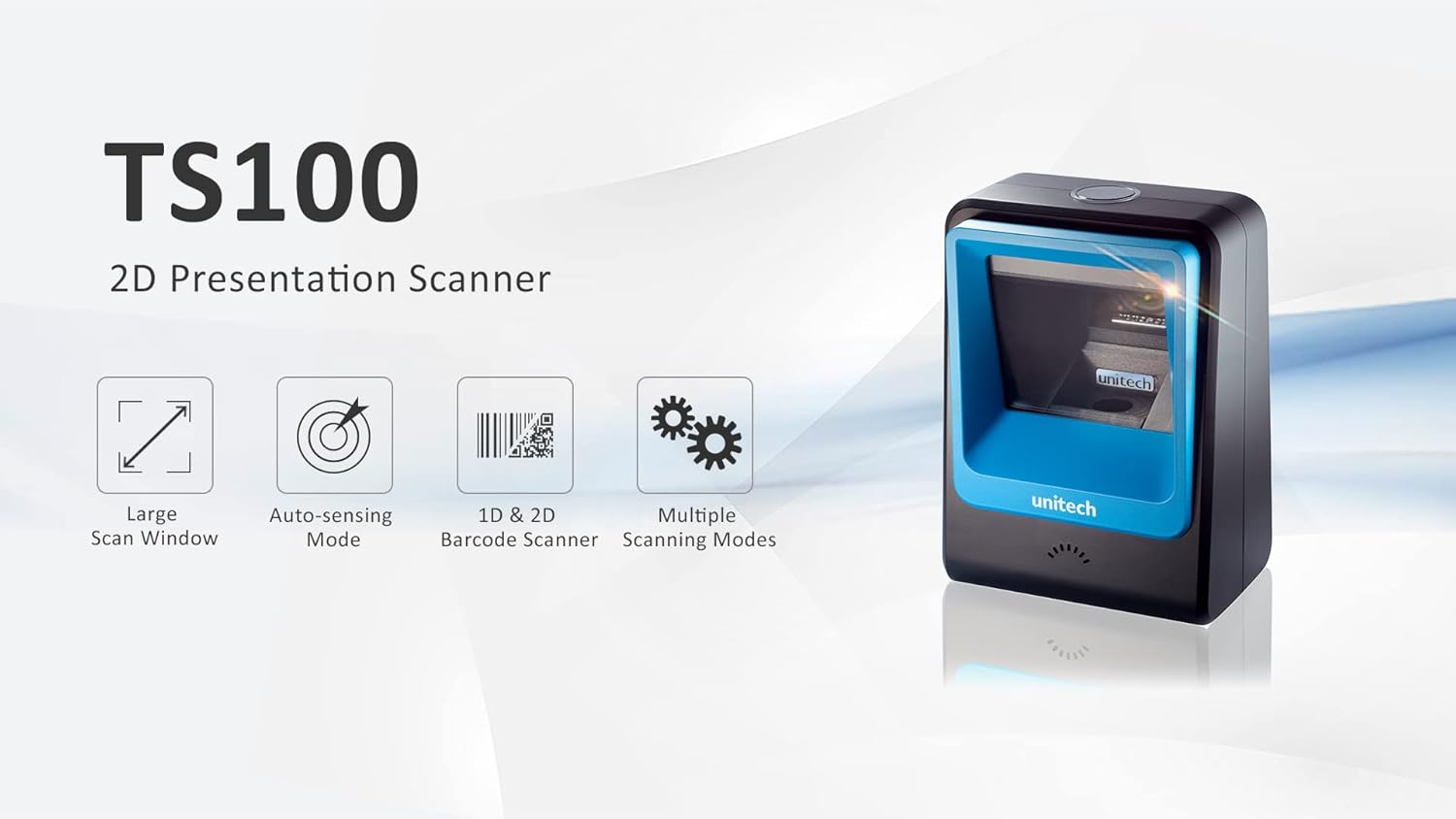
Figure 1: Unitech TS100 2D Presentation Scanner highlighting its large scan window, auto-sensing mode, 1D & 2D barcode scanning, and multiple scanning modes.

Obrázek 2: Přední strana view of the Unitech TS100 scanner, showing the blue scanning window and the Unitech logo.

Obrázek 3: Zpět view of the Unitech TS100 scanner, displaying the product label with model number TS100-SUCB00-SG and power specifications.
Nastavení
Follow these steps to set up your Unitech TS100 barcode scanner:
- Vybalení skeneru: Carefully remove the TS100 scanner and its accessories from the packaging.
- Připojte kabel USB: Insert the USB cable into the port at the back of the scanner.
- Připojení k hostitelskému zařízení: Plug the other end of the USB cable into an available USB port on your computer, laptop, or POS system.
- Instalace ovladače: The scanner is typically plug-and-play. Your operating system should automatically detect and install the necessary drivers. Wait for the installation to complete.
- Zapnutí: The scanner will power on automatically once connected to a powered USB port. A beep and/or LED indicator will confirm it is ready for use.
Návod k obsluze
The Unitech TS100 is designed for hands-free operation, offering multiple scanning modes for various applications.
Základní skenování
- Place the barcode within the scanner's field of view, facing the scanning window.
- The scanner will automatically detect the barcode and emit a successful scan indication (e.g., a beep and/or green LED).
- The scanned data will be transmitted to your connected host device as keyboard input.
Režimy skenování
The TS100 supports multiple scanning modes to optimize performance for different barcode types and environments:
- Normální režim: Standard scanning for most 1D and 2D barcodes.
- Smartphone Mode: Optimized for reading barcodes displayed on smartphone screens, which can sometimes be reflective.
- Rychlý režim: Designed for faster scanning of multiple barcodes in quick succession.
Refer to the full programming manual (available on the Unitech website) for instructions on how to switch between these modes using configuration barcodes.
Údržba
Správná údržba zajišťuje dlouhou životnost a výkon vašeho skeneru:
- Čištění skenovacího okna: Lehce používejte měkký hadřík, který nepouští vlákna dampOmyjte vodou nebo jemným neabrazivním čisticím prostředkem. Nepoužívejte agresivní chemikálie ani abrazivní materiály.
- Čištění exteriéru: Otřete vnější povrch skeneru měkkým, suchým hadříkem.
- Skladování: Pokud skener nepoužíváte, skladujte jej v čistém a suchém prostředí mimo dosah přímého slunečního záření a extrémních teplot.
Odstraňování problémů
If you encounter issues with your TS100 scanner, refer to the table below for common problems and solutions:
| Problém | Možná příčina | Řešení |
|---|---|---|
| Skener se nezapne. | USB cable not properly connected or host device USB port is not powered. | Ujistěte se, že je kabel USB bezpečně připojen ke skeneru i hostitelskému zařízení. Zkuste jiný port USB nebo hostitelské zařízení. |
| Skener nečte čárové kódy. | Barcode is damaged, poorly printed, or not supported. Scanning window is dirty. Incorrect scanning mode. | Ensure the barcode is clear and undamaged. Clean the scanning window. Verify the barcode symbology is supported. Try switching scanning modes (e.g., Smartphone Mode for screen barcodes). |
| Naskenovaná data jsou nesprávná nebo neúplná. | Poor barcode quality. Scanner configuration issues. | Ensure the barcode is clear. Refer to the programming manual for advanced configuration settings. |
| Skener pípá, ale žádná data se nepřenášejí. | Host device not recognizing the scanner as a keyboard input. | Ensure the cursor is in a text field on your host device. Reconnect the USB cable. Restart the host device. |
Specifikace
Detailed technical specifications for the Unitech TS100 scanner:
| Funkce | Specifikace |
|---|---|
| Senzor | Image Sensor with 1280x800 pixels |
| Osvětlení | 650nm RED LED |
| Rychlost skenování | 60 snímků za sekundu |
| Úhel zkosení | Horizontal Angle: 50°; Vertical Angle: 35° |
| Úhel sklonu | ±65° |
| Úhel natočení | 360° |
| Optické rozlišení | 1D: 4 mil; 2D: 6.7 mil |
| Printing Contrast Scale | 25 % |
| Rozhraní | USB |
| Rozměry (D x Š x V) | 4.1 palce x 5.7 palce x 2.7 palce (105 mm x 146 mm x 70 mm) |
| Hmotnost | 12.1 oz / 345g (without cable) |
| 1D Symbologies Supported | UPC-A/E, EAN-8/13, UPC/EAN Supplementals, EAN-8 Extend, Code 128, Code 39, Code 93, Code 11, Interleaved 2 of 5, Matrix 2 of 5, Codabar, MSI Plessey, GS1 DataBar, China Postal, Korean Postal, etc. |
| 2D Symbologies Supported | PDF417, MicroPDF417, DataMatrix, DataMatrix-Inverse, Maxicode, QRcode, MicroQR, Aztec, Aztec Inverse, Han Xin, Han Xin Inverse |
| Indikátor | LED, bzučák |
| Provozní teplota | 32 °F až 122 °F (0 °C až 50 °C) |
| Skladovací teplota | -40 °F až 158 °F (-40 °C až 70 °C) |
| Relativní vlhkost | 0 % až 95 % nekondenzující |
Záruka a podpora
The Unitech TS100 barcode scanner main unit comes with a 1-letá záruka od data nákupu. Tato záruka se vztahuje na vady materiálu a zpracování při běžném používání.
For technical support, warranty claims, or further assistance, please contact Unitech customer service or visit the official Unitech webUschovejte si účtenku jako doklad o koupi pro případ záručního servisu.
Unitech America Webmísto: www.unitechamerica.com
Související dokumenty - TS100
 |
Stručný návod k obsluze skeneru čárových kódů Unitech TS100 2D Presentation Začněte rychle s 2D prezentačním skenerem čárových kódů Unitech TS100. Tato příručka popisuje instalaci, připojení, testování, LED a bzučákové indikátory, možnosti konfigurace a nastavení jazyka. |
 |
Bezdrátový 2D skener čárových kódů Unitech MS838B 2.4G - Stručný návod k nastavení Tato příručka poskytuje rychlé pokyny k nastavení bezdrátového 2D skeneru čárových kódů Unitech MS838B 2.4G a popisuje připojení, konfiguraci a provozní režimy pro různá bezdrátová a USB rozhraní. |
 |
Unitech MS838B Quick Start Guide: Setup and Configuration for 2D Barcode Scanner Quick start guide for the Unitech MS838B 2.4G Wireless 2D Barcode Scanner, detailing setup, configuration, and operational modes. |
 |
Unitech MS912+ Wireless Barcode Scanner Quick Guide Quick guide for the Unitech MS912+ Wireless Barcode Scanner. Includes setup instructions, configuration, specifications, and troubleshooting for Bluetooth and USB connectivity. |
 |
Uživatelská příručka k nositelnému 2D skeneru prstenů Unitech MS652Plus Komplexní uživatelská příručka pro nositelný 2D prstencový skener Unitech MS652Plus, s podrobným popisem nastavení, provozu, údržby, shody s předpisy a pokročilých funkcí skenování pro modely MS652-AUDB00-SG a MS652-AUDB00-1G. |
 |
TS100 Soldering Iron Tip: Installation, Use, and Maintenance Guide Comprehensive guide for the TS100 DC low-voltage integrated heating core soldering iron tip, covering installation, first use, welding specifications, cleaning, precautions, and safety warnings for electronic maintenance and DIY projects. |
Ask a question about this manual
Ask about setup, troubleshooting, compatibility, parts, safety, or missing instructions. Manuals+ will review the question and use this page’s manual context to help answer it.