
1. Konec produktuview
The QIYIDA X99 H9 Motherboard is designed for high-performance computing, specifically supporting Intel Xeon E5 LGA2011-3 series processors (including V3 and V4 series) and DDR4 memory. It features a robust design suitable for gaming and demanding applications, offering multiple connectivity options including USB 3.0, SATA, and NVMe M.2 support.

Obrázek 1.1: Přední strana view of the QIYIDA X99 H9 Motherboard, showcasing its layout with CPU socket, RAM slots, and various connectors.
Klíčové vlastnosti:
- Patice CPU: LGA2011-3, compatible with Intel Xeon E5 V3 and V4 series processors.
- Paměť: 4 x DDR4 memory slots, supporting speeds up to 2666/2400/2133/1866 MHz.
- Skladování: NVMe M.2 support and multiple SATA ports.
- Konektivita: USB 3.0 ports, Gigabit Ethernet, and audio interfaces.
- Napájecí rozhraní: Standard 24-pin + 8-pin power connectors.
2. Specifikace
| Funkce | Detail |
|---|---|
| Značka | QYIDA |
| Model | X99 H9 |
| Zásuvka CPU | LGA 2011-3 |
| Kompatibilní procesory | Řada Intel Xeon E5 V3/V4 |
| Čipová sada | Q87/H81/B85 (randomly selected) |
| Technologie paměti | DDR4 |
| Paměťové sloty | 4x DDR4 DIMM |
| Podpora rychlosti paměti | 2666/2400/2133/1866 MHz |
| Maximální kapacita paměti | 32 GB |
| Úložná rozhraní | NVMe M.2, SATA 3.0 |
| USB porty | USB 3.0, USB 2.0 |
| Ethernet | Gigabit Ethernet |
| Napájecí konektory | 24pinový ATX, 8pinový procesor |
| Motherboard Dimensions | Rozměr 23.5 cm x 18.5 cm |
| Kompatibilní operační systém | Windows 10 |
3. Průvodce nastavením
3.1 Identifikace součásti
Before installation, familiarize yourself with the various components and connectors on the motherboard. Refer to the diagram below for key component locations.

Figure 3.1: Labeled diagram of the QIYIDA X99 H9 Motherboard, indicating CPU fan pin, 24-pin power supply, 4*SATA 3.0, NVME M.2, 8-pin CPU power, 4*DDR4 slots, WIFI, USB 2.0, USB 3.0, Gigabit Ethernet, Audio interface, PCIe 16X, and Front Audio/Power headers.
3.2 kroky instalace
- Připravte si systém: Ensure your computer case is ready and you have all necessary components (CPU, RAM, power supply, storage, etc.).
- Instalace procesoru: Carefully open the LGA2011-3 CPU socket lever. Align the CPU with the socket's notches and gently place it in. Close the lever to secure the CPU.
- Instalace chladiče CPU: Připojte kompatibilní chladič procesoru podle pokynů výrobce.
- Instalace RAM: Insert DDR4 memory modules into the designated DIMM slots. Ensure they are fully seated by pressing down until the clips on both sides lock into place.
- Montáž základní desky: Secure the motherboard into your PC case using appropriate standoffs and screws.
- Připojte napájení: Připojte 24pinový konektor napájení ATX a 8pinový konektor napájení CPU ze zdroje k základní desce. Note: A power supply of at least 500W is recommended for stable operation.
- Instalace úložných zařízení: Connect SATA drives to the SATA 3.0 ports. For NVMe M.2 SSDs, insert them into the M.2 slot and secure with a screw.
- Připojení periferií: Connect front panel headers (power button, reset, USB, audio), USB devices, and other peripherals to their respective ports.
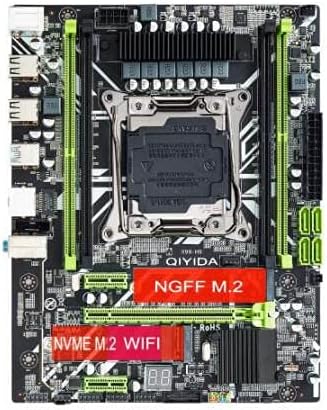
Obrázek 3.2: Shora dolů view of the QIYIDA X99 H9 Motherboard, showing the NVMe M.2 and NGFF M.2 slots.
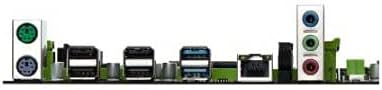
Figure 3.3: Rear I/O panel of the QIYIDA X99 H9 Motherboard, displaying various ports for external device connections.
4. Návod k obsluze
Once all components are installed and connected, you can power on your system. The motherboard will initiate the Power-On Self-Test (POST) process. Ensure your operating system is installed on a compatible storage device.
4.1 Nastavení BIOSu/UEFI
Pro přístup k nastavení BIOS/UEFI stiskněte určenou klávesu (běžně DEL, F2nebo F10) during the initial boot sequence. From here, you can configure boot order, system time, and other advanced settings.
4.2 Instalace ovladače
After installing your operating system (e.g., Windows 10), install the necessary drivers for the motherboard's chipset, audio, network, and other integrated components. These drivers are typically provided on a CD/DVD or can be downloaded from the manufacturer's webmísto.
5. Údržba
Správná údržba zajistí dlouhou životnost a optimální výkon vaší základní desky.
- Odstranění prachu: Pravidelně čistěte prach ze základní desky a dalších vnitřních součástí pomocí stlačeného vzduchu. Před čištěním se ujistěte, že je systém vypnutý a odpojený od sítě.
- Aktualizace BIOSu: Pravidelně kontrolujte aktualizace systému BIOS/UEFI od výrobce. website. Updates can improve compatibility, stability, and performance. Follow update instructions carefully to avoid system damage.
- Správa kabelů: Ensure all cables are neatly routed to promote better airflow and prevent interference.
6. Řešení problémů
This section addresses common issues you might encounter with your QIYIDA X99 H9 Motherboard.
6.1 Běžné problémy a řešení
- System Fails to Power On:
- Zkontrolujte napájení: Ensure your power supply is connected correctly to both the 24-pin ATX and 8-pin CPU power connectors. The platform requires strong power; ensure your power supply is sufficient (at least 500W recommended).
- Ověřte připojení: Double-check all power cables, front panel headers, and component connections.
- Žádný výstup na displej:
- Check Graphics Card: Ensure the graphics card is properly seated in its PCIe slot and has adequate power connected.
- Připojení monitoru: Verify the monitor cable is securely connected to both the graphics card and the monitor.
- Nestabilita nebo pády systému:
- Problémy s pamětí: Reseat RAM modules. Test with one RAM stick at a time to identify a faulty module. Ensure RAM is compatible with DDR4 2666/2400/2133/1866 MHz.
- Přehřívání: Ensure CPU cooler is properly installed and fans are spinning. Check for adequate case airflow.
- Problémy s ovladači: Ujistěte se, že jsou nainstalovány a aktuální všechny potřebné ovladače.
- Kompatibilita komponent:
- Chipset Variation: Note that the main chipset (Q87/H81/B85) may vary. This does not affect core functionality but is a manufacturing variation.
7. Záruka a podpora
For warranty information and technical support, please refer to the documentation provided with your purchase or visit the official QIYIDA webUschovejte si doklad o koupi pro případ reklamace.
Note: The battery shown in some motherboard photos is removed before shipment due to shipping regulations. This does not affect the product's functionality. Product images are for reference only; actual product may vary slightly based on available components.