
SABLUTE LD-135
SABLUTE Large Print Backlit Keyboard User Manual
Model: LD-135 | Brand: SABLUTE
1. Úvod
This user manual provides comprehensive instructions for the setup, operation, maintenance, and troubleshooting of your new SABLUTE Large Print Backlit Keyboard. Designed for enhanced visibility and comfort, this wired USB keyboard is ideal for a wide range of users, including seniors, students, office workers, and individuals with visual impairments.
2. Obsah balení
Prosím, ověřte, zda jsou v balení přítomny všechny položky:
- SABLUTE Large Print Backlit Keyboard (with integrated USB cable)
3. Nastavení
The SABLUTE Large Print Backlit Keyboard is designed for simple plug-and-play functionality. No additional drivers or software are required for basic operation.
3.1 Připojení klávesnice
- Locate an available USB-A port on your computer (PC, Laptop, Windows, macOS, Vista, Chrome OS).
- Insert the USB-A connector of the keyboard's integrated cable into the USB port.
- The keyboard will automatically be recognized by your operating system, and the backlight will illuminate.

Figure 3.1: The SABLUTE Large Print Backlit Keyboard with its integrated USB cable, ready for connection.
4. Návod k obsluze
4.1 Large Print Keys
The keyboard features oversized letters, which are 4 times larger than standard keyboard fonts. This design significantly improves readability and reduces typing errors, especially for users with visual challenges or those who prefer larger characters.

Figure 4.1: Comparison illustrating the 4X larger print on the keyboard keys for improved visibility.
4.2 ovládání podsvícení
The keyboard offers 7 different backlight colors and 4 lighting modes with 8 levels of brightness. This allows for comfortable typing in various lighting conditions, including low-light environments.
- Zapnout/vypnout podsvícení: Stiskněte Fn + PrtSc (Print Screen) to toggle the backlight on or off.
- Change Backlight Color (Monochrome Mode): Stiskněte Fn + M2 (Function key + F2) repeatedly to cycle through 7 unique backlight colors (White, Green, Red, Purple, Yellow, Cyan, Blue).
- Upravit jas: Stiskněte Fn + ↑ (Šipka nahoru) pro zvýšení jasu a Fn + ↓ (Down Arrow) to decrease brightness (8 levels).
- Změna režimů podsvícení:
- M1 (Monochrome Breathing Mode): Stiskněte Fn + M1 (Function key + F1). The selected color will fade in and out.
- M2 (Monochrome Mode): Stiskněte Fn + M2 (Function key + F2). The keyboard will always light up in the chosen color.
- M3 (7-Color Strobe Mode): Stiskněte Fn + M3 (Function key + F3). The keyboard will change its color with seven colors in turn upon key press.
- M4 (7-Color Breathing Mode): Stiskněte Fn + M4 (Function key + F4). The keyboard will turn off and light up in seven colors in turn.
- Adjust Breathing/Strobe Speed: Stiskněte Fn + ← (Left Arrow) to decrease speed and Fn + → (Right Arrow) to increase speed (6 levels).

Obrázek 4.2: Zobrazení klávesniceasing its 7-color backlight options and different lighting modes.
Video 4.1: Demonstration of the SABLUTE Large Print Wired Keyboard's 7 backlight colors and various modes, including brightness adjustments.
Video 4.2: Konecview of the Wired Large Print Backlit Computer Keyboard, highlighting its features and ease of use.
4.3 Ergonomický design
The keyboard features foldable stands on the back, allowing you to adjust the typing angle for a more comfortable and ergonomic experience. This helps maintain a natural wrist position, reducing strain and fatigue during extended use.

Figure 4.3: The keyboard with its foldable legs extended, providing an optimal 7-degree typing angle for comfort.
4.4 Quiet Operation and Responsiveness
The keyboard is designed with quiet switches, ensuring a low-noise typing experience. As a wired keyboard, it provides a very fast response speed with no input delay, contributing to a smoother and more efficient typing experience.
4.5 Kompatibilita
Klávesnice je kompatibilní s širokou škálou operačních systémů a zařízení:
- Windows (všechny verze)
- PC
- Notebooky
- Průhled
- macOS (Note: Multimedia keys may not be fully compatible with macOS systems)
- Chrome OS
5. Specifikace
| Funkce | Popis |
|---|---|
| Číslo modelu | LD-135 |
| Rozměry | 17.4 x 5.1 x 1.3 palce |
| Hmotnost | 1.32 libry |
| Konektivita | Wired USB-A (5.2ft cable) |
| Typ klíče | Large Print, Quiet Switches |
| Barvy podsvícení | 7 (RGB) |
| Režimy podsvícení | 4 (Monochrome Breathing, Monochrome, 7-Color Strobe, 7-Color Breathing) |
| Úrovně jasu | 8 |
| Speed Levels (Breathing/Strobe) | 6 |
| Počet klíčů | 106 |
| Speciální funkce | Spill Proof, Foldable Stand, Hotkeys and Media Keys |
| Země původu | Čína |
6. Řešení problémů
| Problém | Řešení |
|---|---|
| Keyboard not responding / No backlight |
|
| Backlight settings reset after restart/shutdown |
|
| Keys feel stiff or stuck |
|
| Multimedia keys not working on macOS |
|
7. Údržba
Abyste zajistili dlouhou životnost a optimální výkon klávesnice, dodržujte tyto pokyny pro údržbu:
- Čištění: Použijte měkký hadřík, který nepouští vlákna dampKlávesy a povrch klávesnice otřete vodou nebo jemným čisticím roztokem. Zabraňte nadměrné vlhkosti.
- Odstranění prachu: K odstranění prachu a nečistot z prostoru mezi klávesami použijte stlačený vzduch.
- Ochrana proti rozlití: While the keyboard is designed to be spill-proof, it is recommended to avoid direct liquid exposure. In case of a spill, immediately unplug the keyboard and allow it to dry completely before reconnecting.
- Skladování: Pokud klávesnici delší dobu nepoužíváte, skladujte ji na chladném a suchém místě mimo dosah přímého slunečního záření a extrémních teplot.
8. Záruka a podpora
SABLUTE is committed to providing high-quality products and excellent customer service. Your keyboard is covered by the following:
- 90denní výměna: For any manufacturing defects within 90 days of purchase.
- 360 Days Manufacturer Warranty: Covers defects in materials and workmanship for 360 days from the date of purchase.
- Brand Care: Dedicated support to ensure your satisfaction.
Zákaznická podpora:
V případě jakýchkoli dotazů nebo potřeby podpory nás prosím kontaktujte:
- Telefon: 1-213-296-1273 (USA)
- Otevírací doba: Monday - Friday, 9:00 AM - 1:00 PM PST and 2:00 PM - 6:00 PM PST
- Doba odezvy: Snažíme se odpovědět do 24 hodin.
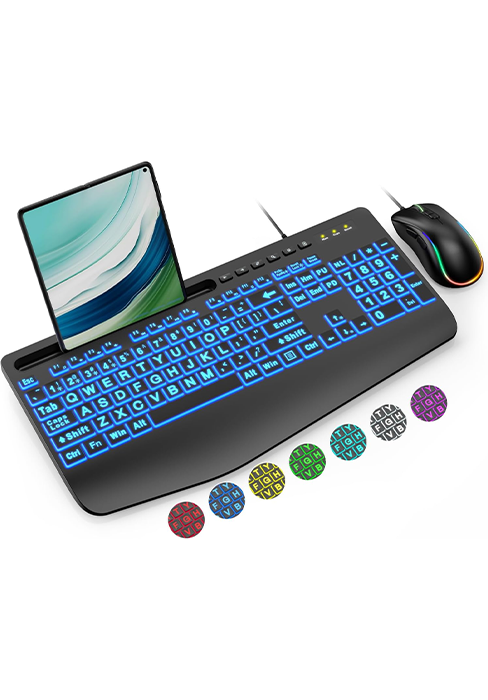
Figure 8.1: SABLUTE customer support details for assistance.
Ask a question about this manual
Ask about setup, troubleshooting, compatibility, parts, safety, or missing instructions. Manuals+ will review the question and use this page’s manual context to help answer it.