
1. Úvod
Welcome to the user manual for your Pico 4 VR Headset. This guide provides essential information to help you set up, operate, and maintain your device, ensuring an optimal virtual reality experience. The Pico 4 VR Headset offers an immersive experience with its lightweight design, advanced pancake lenses, and high-resolution display.

Figure 1: The Pico 4 VR Headset with its two next-generation controllers. The headset features a sleek, lightweight design in white with a dark front panel.
2. Co je v krabici
Upon opening your Pico 4 VR Headset package, please verify that all the following components are included:
- Pico 4 VR Headset
- 2x Next Generation Pico Controllers
- 2x Lanyards for Controllers
- 4x AA Batteries (for controllers)
- Nabíjecí kabel USB-C
- AC adaptér
- Face Pad
- Vymezovač brýlí
- Nosní podložka
- Product Manuals (this document)
3. Průvodce nastavením
3.1. Nabíjení náhlavní soupravy
Before first use, fully charge your Pico 4 VR Headset.
- Connect the USB-C charging cable to the headset's USB-C port.
- Connect the other end of the cable to the provided AC adapter.
- Zapojte AC adaptér do elektrické zásuvky.
- The indicator light on the headset will show charging status. A full charge can take approximately 2-3 hours.
3.2. Inserting Controller Batteries
Each Pico controller requires two AA batteries.
- Locate the battery compartment on each controller.
- Otevřete kryt přihrádky.
- Vložte dvě baterie typu AA a dbejte na správnou polaritu (+/-).
- Bezpečně zavřete kryt přihrádky.
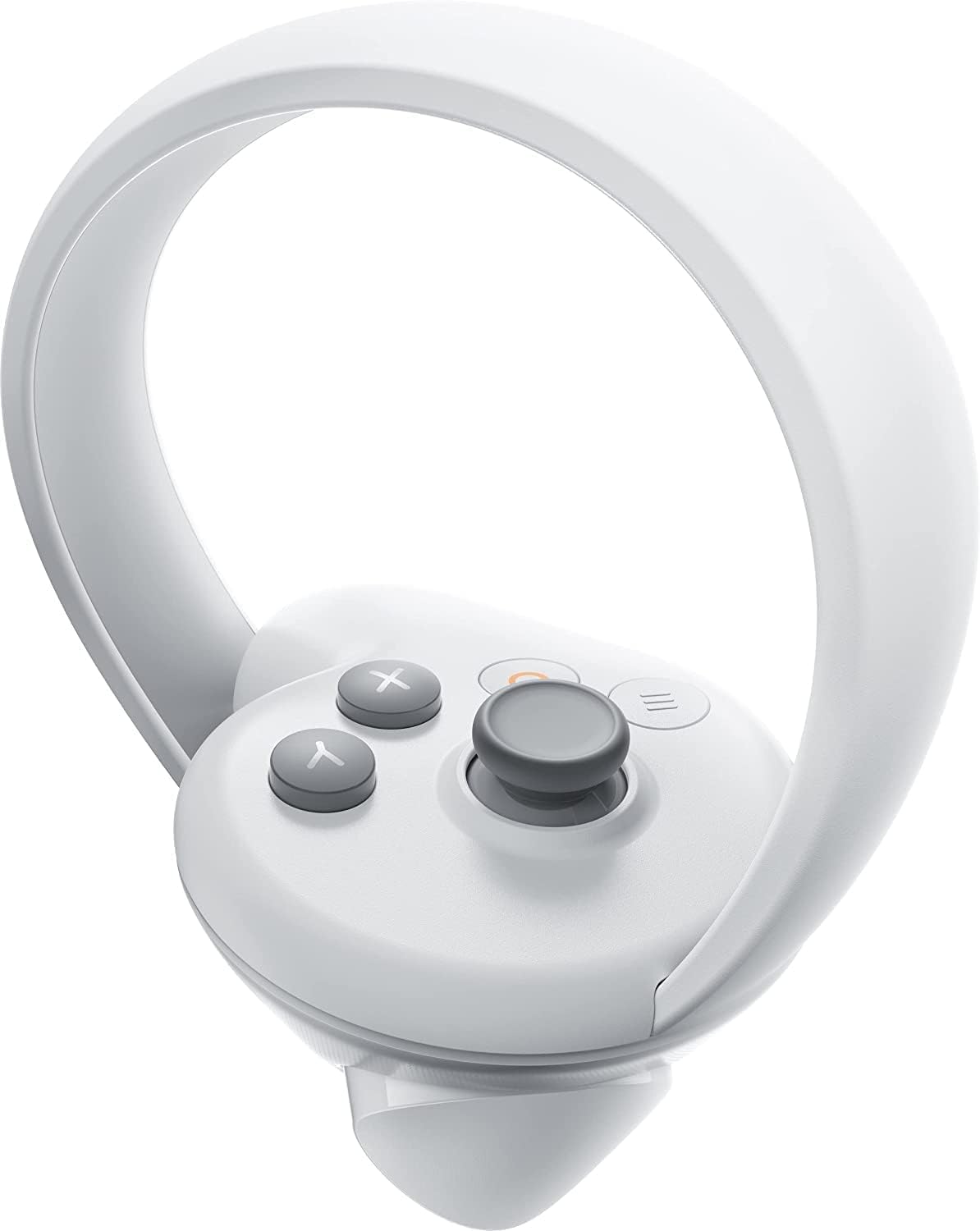
Figure 2: A single Pico 4 VR controller, showing its ergonomic design and button layout.
3.3. Initial Headset Fit and IPD Adjustment
Proper fit and Interpupillary Distance (IPD) adjustment are crucial for comfort and visual clarity.
- Place the headset on your head, ensuring the front is comfortable on your face and the rear strap cradles the back of your head.
- Adjust the top strap and side straps for a snug, yet comfortable fit.
- The Pico 4 features mechanical and continuously configurable IPD adjustment, supporting a spectrum of 62-72 millimeters. Adjust the IPD dial (usually located on the bottom or side of the headset) until the image appears clear and comfortable for both eyes.
- If you wear glasses, use the included glasses spacer for a better fit.

Obrázek 3: Strana view of the Pico 4 VR Headset, highlighting its compact design and side strap.
4. Ovládání náhlavní soupravy
4.1. Zapnutí/vypnutí
- To power on: Press and hold the power button (located on the side of the headset) until the Pico logo appears.
- To power off: Press and hold the power button until a power-off menu appears, then select "Power Off".
4.2. Basic Navigation and Controller Usage
The Pico 4 VR Headset operates wirelessly and does not require a PC for standalone use.
- Use the joystick on the controller to navigate menus and move in virtual environments.
- The trigger button is typically used for selection or interaction.
- Familiarize yourself with the A/B/X/Y buttons and menu buttons for in-app functions.
- The headset features 5 integrated cameras for inside-out 6DoF tracking, providing accurate movement tracking without external sensors.
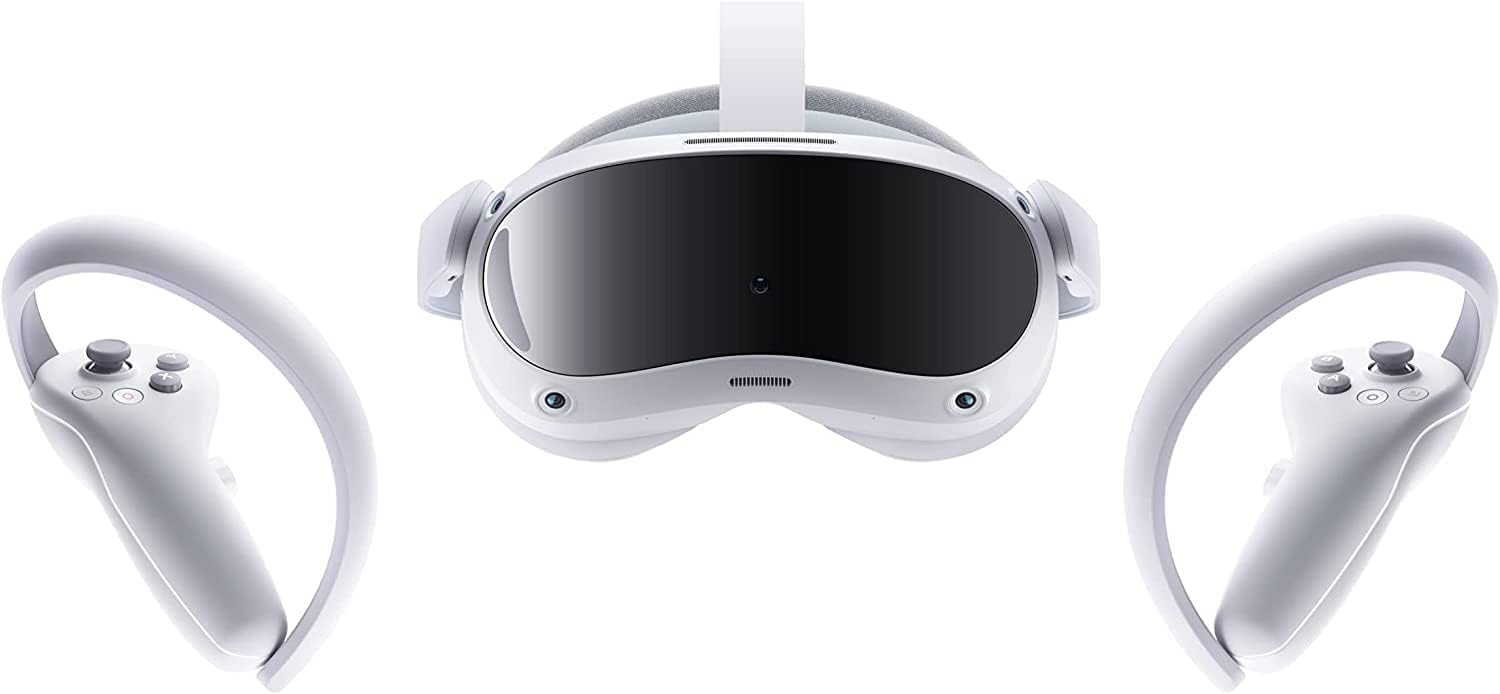
Obrázek 4: Přední strana view of the Pico 4 VR Headset and its controllers, showcasing the integrated cameras for tracking.
4.3. Using the Pico Fitness App
The Pico 4 includes a special Pico Fitness app designed to track your activity.
- Launch the Pico Fitness app from the main menu.
- The app features a calorie counter and performance tracker.
- It can record your calories and activities across all compatible VR applications, providing a comprehensive overview of your VR fitness sessions.
4.4. PC Streaming and Wireless Usability
The Pico 4 supports excellent PC streaming and wireless usability for an enhanced VR experience.
- Ensure your PC meets the minimum system requirements for VR streaming (e.g., Windows operating system).
- Connect your headset to your PC via Wi-Fi 6 for optimal wireless performance.
- Refer to the Pico software documentation for detailed instructions on setting up PC VR streaming.
5. Údržba a péče
5.1. Cleaning the Headset and Lenses
- Use a dry microfiber cloth to gently wipe the lenses. Do not use liquid cleaners or abrasive materials.
- For the headset body and face pad, use a soft, damp cloth. Ensure the headset is powered off and disconnected from power before cleaning.
- The face pad can be removed for more thorough cleaning if necessary, following instructions in the full product manual (if available).
5.2. Péče o baterie
- To maximize battery life, avoid fully discharging the headset frequently.
- Pokud sluchátka nepoužíváte, skladujte je na chladném a suchém místě.
- If storing for an extended period, charge the headset to about 50% before storage.
6. Řešení problémů
| Problém | Možná příčina | Řešení |
|---|---|---|
| Sluchátka se nezapínají | Slabá baterie; Tlačítko napájení nebylo podrženo dostatečně dlouho. | Charge the headset; Press and hold the power button for several seconds |
| Ovladače nereagují | Dead batteries; Not paired; Out of range | Replace AA batteries; Re-pair controllers via headset settings; Ensure controllers are within tracking range |
| Rozmazaný obraz | Incorrect IPD setting; Lenses dirty; Headset not properly fitted | Adjust IPD dial; Clean lenses with microfiber cloth; Adjust headset straps for snug fit |
| Problémy s připojením Wi-Fi | Weak signal; Incorrect password; Router issues | Move closer to Wi-Fi router; Re-enter Wi-Fi password; Restart router and headset |
7. Specifikace
Below are the key technical specifications for the Pico 4 VR Headset:
- CPU: Qualcomm Snapdragon XR2 processor
- Zobrazit: 4K+ LCD display with pancake lenses
- Rezoluce: 2160 x 2160 pixels per eye
- Pole View (FOV): 105 stupňů
- BERAN: 8 GB
- Vnitřní paměť: 256 GB
- Hmotnost: 295g (headset only)
- Životnost baterie: Až 3 hodin
- Obnovovací frekvence: 90 Hz
- Sledování: 5 integrated cameras for inside-out 6DoF tracking
- Konektivita: USB-C, Bluetooth 5.1, Wi-Fi 6
- Zvuk: Integrované reproduktory a mikrofon
- IPD Adjustability: Mechanically and continuously configurable (62 – 72 mm)
- Operační systém: Windows (for PC streaming)
- Rozměry produktu: 16 x 10 x 6 palce
8. Záruka a podpora
For information regarding warranty coverage, technical support, or service, please refer to the official Pico webnebo se obraťte na jejich zákaznický servis. Uschovejte si doklad o koupi pro případ reklamace.
Další zdroje a odpovědi na často kladené otázky naleznete na Pico Official Webmísto.