
1. Úvod
Thank you for choosing the SABLUTE Wireless Keyboard. This full-size ergonomic keyboard features 7 colored backlights, a comfortable wrist rest, and a convenient phone holder. Designed for a quiet and efficient typing experience, it connects wirelessly via 2.4G and is rechargeable. This manual provides detailed instructions for setup, operation, maintenance, and troubleshooting to ensure optimal performance and longevity of your device.

Image: The SABLUTE Wireless Keyboard, featuring its full layout, integrated phone holder with a smartphone, and the included 2.4G USB dongle and Type-C adapter.
2. Co je v krabici
Zkontrolujte prosím obsah balení, abyste se ujistili, že jsou přítomny všechny položky:
- Bezdrátová klávesnice *1
- USB A Dongle *1
- TYPE C Adapter *1
- TYPE C Charging Cable *1
- Návod k použití *1
3. Klíčové vlastnosti
- 7-Color Backlighting: Choose from 7 switchable backlight colors and 3 brightness levels to customize your typing environment.
- Ergonomic Design with Wrist Rest: Scientifically designed to encourage healthy wrist posture, reducing strain and fatigue during long hours of use.
- Integrovaný držák na telefon/tablet: A convenient U-shaped holder allows you to prop up your smartphone or tablet for easy viewpři práci. Note: This holder does not have a charging function.
- Tiché klávesy: Unique scissor-switch key design provides a comfortable typing experience with over 95% noise reduction.
- Dobíjecí baterie: Built-in battery offers extended use on a single charge, with a user-friendly power-saving feature that puts the keyboard into sleep mode after 15 minutes of inactivity.
- Stable 2.4G Wireless Connection: Provides a fast and stable connection up to 33 feet, ensuring no delay and plug-and-play functionality.
- Univerzální kompatibilita: Compatible with devices featuring USB and Type-C ports, supporting Windows OS, iOS, Chrome OS, Linux, and Android OS.
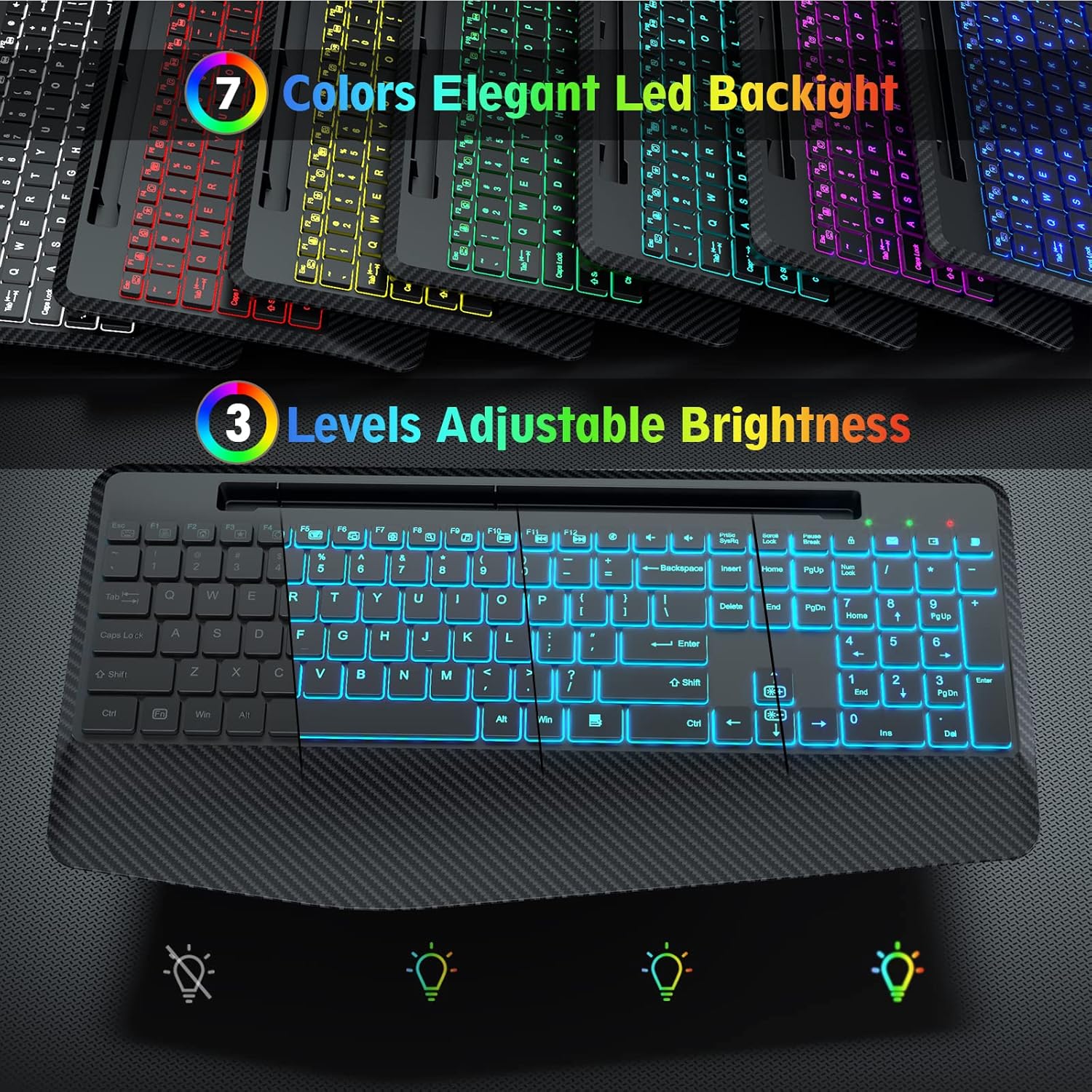
Image: Illustration of the keyboard's 7 switchable backlight colors and 3 adjustable brightness levels.

Image: The ergonomic wrist rest design of the keyboard, showing how it helps reduce strain during typing.

Obrázek: Detailní záběr view highlighting the silent and stable nature of the keyboard's keys, designed for comfortable and quiet typing.
4. Průvodce nastavením
4.1 Připojení klávesnice
- Vyhledejte USB přijímač: The small transparent bag contains a USB A dongle and a Type C adapter. The USB A dongle is typically stored in a compartment on the keyboard itself for safekeeping.
- Choose Your Port:
- For devices with a standard USB-A port (e.g., most PCs, Laptops), plug the USB A dongle directly into an available USB port.
- For devices with a Type-C port (e.g., MacBooks, newer laptops, some tablets/smartphones), attach the Type C adapter to the USB A dongle, then plug the combined unit into the Type-C port.
- Zapnutí: Locate the ON/OFF switch on the keyboard (usually on the back or top edge) and slide it to the 'ON' position.
- Automatické připojení: The keyboard should automatically connect to your device. No additional drivers are required.

Image: Visual guide demonstrating how to connect the keyboard using the USB A dongle for traditional computers and the Type C adapter for devices like MacBooks.
5. Návod k obsluze
5.1 ovládání podsvícení
The keyboard features 7 switchable backlight colors and 3 adjustable brightness levels:
- Změna barev: Stiskněte tlačítko Fn + Scroll Lock keys simultaneously to cycle through the 7 available backlight colors.
- Nastavení jasu: Stiskněte tlačítko Fn + Page Up keys to increase brightness and Fn + Page Down keys to decrease brightness. There are 3 levels of brightness.
- Zapnutí/vypnutí podsvícení: Stiskněte Fn + Scroll Lock repeatedly until the backlight turns off, or use the dedicated backlight key if available.
5.2 Používání držáku telefonu/tabletu
The integrated U-shaped groove at the top of the keyboard is designed to hold your smartphone or tablet, allowing for convenient viewing while typing. Simply place your device into the groove. Ensure your device fits securely. Please note that this holder does not provide charging functionality.

Image: The full-size keyboard with a phone and tablet in its integrated holder, illustrating its dimensions and how it helps declutter your workspace.
5.3 Foldable Stands
The keyboard is equipped with foldable stands on the underside. Gently pull out these stands to adjust the typing angle for a more comfortable and ergonomic experience.

Image: The keyboard with its foldable stands extended, demonstrating how to adjust the angle for more comfortable typing.
6. Nabíjení a výdrž baterie
The SABLUTE Wireless Keyboard features a built-in rechargeable battery. To charge the keyboard, use the provided Type-C charging cable.
- Nabíjení: Connect the Type-C end of the cable to the keyboard's charging port and the USB-A end to a wall charger, PC, or power bank.
- Indikátor nabíjení: A red light will appear when the keyboard is charging. The power indicator will turn off once fully charged.
- Indikátor slabé baterie: A green light will flash when the battery is low, indicating it's time to recharge.
- Životnost baterie: The keyboard can be used normally for up to 90 days without the backlight function on a single charge. With the backlight function turned on, it can work for 12-24 hours, depending on the brightness level.
- Šetření energie: The keyboard has a smart sleep mode that activates after 15 minutes of non-use to conserve battery. If the keyboard remains idle for 90 seconds, the backlight will automatically turn off.

Image: The keyboard connected via its Type-C charging port, highlighting its rechargeable battery and power-saving features.

Obrázek: Overview of the keyboard's underside, detailing the Type-C charging port, ON/OFF switch, non-slip pads, foldable stands, and indicator lights for NUM, CAPS, and Power/Battery status.
7. Kompatibilita
The SABLUTE Wireless Keyboard offers broad compatibility with various devices and operating systems:
- Kompatibilní zařízení: PC, Laptops, Smart TVs, MacBooks, Tablets, Smartphones.
- Kompatibilní operační systémy: Supports all Windows OS (XP/7/10/Vista), iOS, Chrome OS, Linux, Android OS.
Important Note: This keyboard can only be used with one device at a time and cannot be connected to multiple devices simultaneously.

Image: The keyboard's multi-system compatibility, showing it can be used with various devices and operating systems.
8. Údržba
Abyste zajistili dlouhou životnost a optimální výkon vaší klávesnice, dodržujte tyto jednoduché pokyny pro údržbu:
- Čištění: Use a soft, dry, lint-free cloth to wipe down the keyboard surface. For stubborn dirt, slightly dampOmyjte hadřík vodou nebo jemným, neabrazivním čisticím prostředkem. Zabraňte nadměrné vlhkosti.
- Odstranění prachu: K odstranění prachu a nečistot z prostoru mezi klávesami použijte stlačený vzduch.
- Vyhněte se tekutinám: Do not spill liquids on the keyboard. In case of accidental spills, immediately disconnect the keyboard and allow it to dry completely before re-using.
- Skladování: Pokud klávesnici delší dobu nepoužíváte, skladujte ji na chladném a suchém místě mimo dosah přímého slunečního záření a extrémních teplot.
9. Řešení problémů
If you encounter any issues with your SABLUTE Wireless Keyboard, please refer to the following common solutions:
- Klávesnice nereaguje:
- Ensure the keyboard is turned 'ON'.
- Check if the USB receiver is securely plugged into your device's USB or Type-C port. Try a different port if available.
- Ensure the keyboard is charged. Connect it to the charging cable and allow it to charge for a while.
- Move the keyboard closer to the USB receiver to ensure it's within the 33-foot wireless range.
- Restartujte počítač/zařízení.
- Backlight Not Working or Flickering:
- Ensure the keyboard is sufficiently charged. Low battery can affect backlight performance.
- Stiskněte Fn + Scroll Lock to cycle through colors and ensure the backlight is not turned off.
- Stiskněte Fn + Page Up pro zvýšení jasu.
- Klávesy se zasekávají nebo nereagují:
- Očistěte okolí a oblast pod postiženými klávesami pomocí stlačeného vzduchu, abyste odstranili veškeré nečistoty.
- Krátká výdrž baterie:
- Před použitím se ujistěte, že je klávesnice plně nabitá.
- Reduce backlight brightness or turn off the backlight when not needed to extend battery life.
- Allow the keyboard to enter sleep mode when idle.
If the issue persists after trying these steps, please contact SABLUTE customer support for further assistance.
10. Specifikace
| Funkce | Specifikace |
|---|---|
| Číslo modelu | 225 KN |
| Rozměry produktu | 16.6 x 8.42 x 0.55 palce |
| Hmotnost položky | 1.72 libry |
| Technologie připojení | 2.4G USB A Wireless |
| Počet klíčů | 112 |
| Podsvícení klávesnice | 7 Colored Backlits (RGB) |
| Úrovně jasu | 3 |
| Nabíjecí port | Typ-C |
| Bezdrátové Dosah | Až 33 stop |
| Doporučená použití | Office, Personal, Business |
11. Záruka a podpora
SABLUTE is committed to providing high-quality products and excellent customer service.
- Záruka: Your SABLUTE Wireless Keyboard comes with a warranty of up to 24 months from the date of purchase. This warranty covers manufacturing defects and product malfunctions under normal use.
- Zákaznická podpora: If you experience any issues with your product, such as malfunctions, missing accessories, or require assistance with usage, please do not hesitate to contact our professional after-sales service team. We are dedicated to helping you solve any problems within 24 hours.

Image: Our customer service team is ready to assist you.