
United LED24HS82A11
Uživatelská příručka k chytré televizi UNITED LED24HS82A11 s úhlopříčkou 24 palců a HD Ready a systémem Android
Model: LED24HS82A11
Zavedení
This user manual provides comprehensive instructions for the setup, operation, maintenance, and troubleshooting of your UNITED LED24HS82A11 24-inch HD Ready Smart Android TV. Please read this manual thoroughly before using your television to ensure proper and safe operation.
The UNITED LED24HS82A11 is a versatile 24-inch HD Ready Smart TV powered by Android 11, offering a wide range of entertainment options. It features pre-installed applications, built-in Chromecast and Airplay for seamless content streaming, and full internet connectivity via Wi-Fi and Ethernet. It also supports DVB/T2/S2/C, MPEG-4, and HEVC Main 10 for various broadcasting standards.
Bezpečnostní informace
Vždy dodržujte následující bezpečnostní opatření, abyste předešli požáru, úrazu elektrickým proudem nebo zranění:
- Nevystavujte televizor dešti ani vlhkosti.
- Nezakrývejte ventilační otvory.
- Ujistěte se, že napájecí kabel není přiskřípnut nebo po něm nešlape.
- Během bouřek nebo pokud televizor delší dobu nepoužíváte, odpojte jej ze zásuvky.
- Veškeré opravy svěřte kvalifikovanému servisnímu personálu.
Nastavení
1. Vybalení a instalace stojanu
Carefully remove the TV and all accessories from the packaging. Place the TV face down on a soft, clean surface to prevent screen damage.
Attach the two stand feet to the bottom of the TV using the provided screws. Ensure they are securely fastened.

Obrázek 1: Strana view of the UNITED LED24HS82A11 TV, illustrating its slim profile and potential port locations.
2. Propojovací kabely
- Moc: Zapojte napájecí kabel do napájecího vstupu televizoru a poté do zásuvky ve zdi.
- Anténa/kabel: Connect your antenna or cable TV coaxial cable to the "RF In" port.
- Zařízení HDMI: Connect external devices like Blu-ray players, game consoles, or set-top boxes to the HDMI ports.
- Ethernet (volitelné): For a wired internet connection, connect an Ethernet cable from your router to the TV's LAN port.
3. Průvodce počátečním nastavením
Once powered on, the TV will guide you through the initial setup process. Follow the on-screen prompts to:
- Vyberte preferovaný jazyk.
- Připojte se k síti Wi-Fi (pokud nepoužíváte Ethernet).
- Sign in with your Google account (optional, but recommended for full Smart TV features).
- Vyhledejte dostupné televizní kanály (anténa/kabel).
Provozní
Dálkové ovládání skončiloview
Familiarize yourself with the buttons on the remote control for easy navigation and control of your TV's functions.
Základní funkce televizoru
- Zapnutí/vypnutí: Stiskněte tlačítko napájení na dálkovém ovladači nebo televizoru.
- Ovládání hlasitosti: Použijte tlačítka pro zvýšení/snížení hlasitosti.
- Výběr kanálu: Použijte tlačítka pro výběr kanálů nahoru/dolů nebo numerickou klávesnici.
- Vstupní zdroj: Press the "Source" or "Input" button to switch between HDMI, TV, and other inputs.
Smart TV Features (Android 11)
Your TV runs on Android 11, providing access to a vast ecosystem of apps and services.

Figure 2: The UNITED LED24HS82A11 TV showcasing its Android TV home screen, featuring popular streaming applications like YouTube, Prime Video, and Netflix.
- Domovská obrazovka: Navigate the home screen to access pre-installed apps (Netflix, YouTube, Prime Video), recommended content, and settings.
- Obchod Google Play: Stáhněte si další aplikace, hry a obsah z Obchodu Google Play.
- Vestavěný Chromecast: Cast content directly from your compatible smartphone, tablet, or computer to the TV. Look for the Cast icon in supported apps.
- Airplay: For Apple devices, use Airplay to stream videos, photos, and music from your iPhone, iPad, or Mac to the TV.
- Připojení k internetu:
- Wi-Fi: Go to Settings > Network & Internet to connect to your wireless network.
- Ethernet: If an Ethernet cable is connected, the TV will automatically use the wired connection.
Údržba
Čištění televizoru
- Před čištěním vždy odpojte televizor ze zásuvky.
- K jemnému otření obrazovky použijte měkký hadřík, který nepouští vlákna. V případě odolných skvrn použijteampen the cloth slightly with water or a screen cleaner specifically designed for electronics.
- Otřete televizor casinměkkým, suchým hadříkem. Nepoužívejte abrazivní čisticí prostředky ani rozpouštědla.
Aktualizace softwaru
Your TV may receive software updates to improve performance and add new features. You can check for updates via Settings > Device Preferences > About > System update.
Odstraňování problémů
Pokud se s televizorem setkáte s problémy, podívejte se na následující běžné problémy a jejich řešení:
| Problém | Možná příčina / řešení |
|---|---|
| Žádná síla | Zkontrolujte, zda je napájecí kabel bezpečně zapojený do televizoru a zásuvky. Zkuste jinou zásuvku. |
| Žádný obraz / Žádný zvuk | Ensure the correct input source is selected (e.g., HDMI 1, TV). Check cable connections. For TV channels, perform a channel scan. |
| Nelze se připojit k Wi-Fi | Ověřte heslo k Wi-Fi. Restartujte router a televizor. Ujistěte se, že je televizor v dosahu signálu Wi-Fi. |
| Dálkové ovládání nefunguje | Zkontrolujte a vyměňte baterie. Ujistěte se, že mezi dálkovým ovladačem a infračerveným senzorem televizoru nejsou žádné překážky. |
| Aplikace se nenačítají / pomalý výkon | Check your internet connection speed. Clear app cache (Settings > Apps > [App Name] > Clear cache). Restart the TV. |
Specifikace
Below are the technical specifications for the UNITED LED24HS82A11 TV:
| Funkce | Specifikace |
|---|---|
| Značka | Sjednocený |
| Číslo modelu | LED24HS82A11 |
| Velikost obrazovky | 24 palce |
| Technologie displeje | LED |
| Rezoluce | 768p (1366 x 768 pixelů) |
| Obnovovací frekvence | 60 Hz |
| Operační systém | Android 11 |
| Konektivita | Wi-Fi, Ethernet, HDMI, RF, USB |
| Speciální funkce | Flat Screen, Chromecast Built-in, Airplay, Pre-installed Apps (Netflix, YouTube, Prime Video) |
| Poměr stran | 16:9 |
| Rozměry produktu (D x Š x V) | 12 D x 60.5 Š x 43.2 V centimetrů |
| Zahrnuté komponenty | 1 mini AV adapter cable, 1 remote control with 2 AAA 1.5V batteries |
| Třída energetické účinnosti | F |
| Spotřeba energie (SDR) | 21.0 W |
| Spotřeba energie (HDR) | 21.0 W |
| Spotřeba energie (pohotovostní režim) | 0.3 W |

Figure 3: The energy efficiency label for the UNITED LED24HS82A11 TV, indicating an 'F' energy class rating and 21 kWh per 1000 hours of operation.
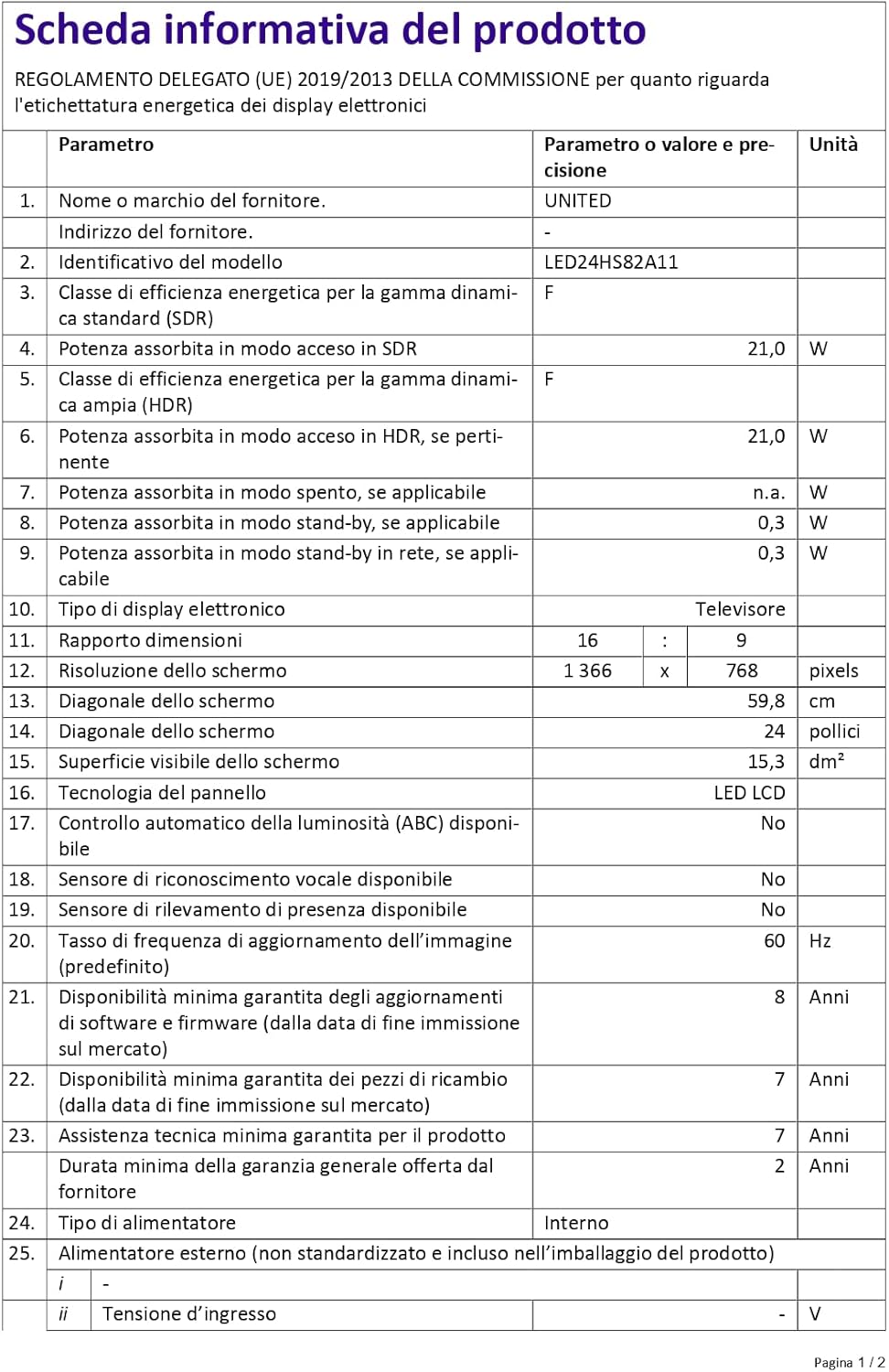
Figure 4: A detailed product information sheet for the UNITED LED24HS82A11 TV, providing comprehensive technical specifications and compliance details.
Pro podrobnější informace se prosím podívejte do oficiální databáze EPREL: https://eprel.ec.europa.eu/qr/1087921
Záruka a podpora
Your UNITED LED24HS82A11 TV comes with the following support and warranty provisions:
- Minimum General Warranty: 2 roky
- Dostupnost technické pomoci: 7 roky
- Aktualizace softwaru zaručeny do: 8 Years from market placement date
- Dostupnost náhradních dílů: 7 Years from market placement date
For technical support or warranty claims, please contact your retailer or the manufacturer's authorized service center. Keep your proof of purchase for warranty validation.
Ask a question about this manual
Ask about setup, troubleshooting, compatibility, parts, safety, or missing instructions. Manuals+ will review the question and use this page’s manual context to help answer it.