
1. Úvod
The Walfront CHLT-63 is a 3-phase DIN rail mounted device designed to monitor voltage and current, and provide automatic overvoltage and overcurrent protection for electrical systems. It features a digital display for real-time monitoring and an automatic reset function to ensure continuous operation within specified parameters. This manual provides essential information for the safe installation, operation, and maintenance of the device.
2. Bezpečnostní informace
Před instalací nebo provozem tohoto zařízení si prosím přečtěte a pochopte všechny bezpečnostní pokyny. Nedodržení těchto pokynů může vést k úrazu elektrickým proudem, požáru nebo vážnému zranění.
- Instalaci a údržbu by měli provádět pouze kvalifikovaní elektrikáři.
- Před jakoukoli instalací, zapojením nebo údržbou se ujistěte, že je odpojeno napájení.
- Verify that the device's voltage and current ratings match your electrical system specifications.
- Nepoužívejte zařízení, pokud je poškozené nebo nefunkční.
- Nevystavujte zařízení vlhkosti, extrémním teplotám nebo korozivnímu prostředí.
3. Konec produktuview
3.1 Klíčové vlastnosti
- Snadná instalace: Designed for standard 35mm DIN rail mounting.
- Automatická ochrana: Automatically cuts off power during overvoltage, podpaltage, or overcurrent conditions.
- Rychlá odpověď: Sensitive internal components ensure rapid response to electrical anomalies.
- Digitální displej: Real-time display of working voltage and current for each phase (L1, L2, L3).
- Automatický reset: Features an automatic reset function to restore power once conditions return to normal, preventing prolonged outages.
3.2 Součásti a indikátory

Obrázek 1: Rozložení předního panelu
This image displays the front panel of the Walfront CHLT-63 protector. It clearly shows three pairs of digital displays for Voltage (V) and Current (A) for phases L1, L2, and L3. Below the displays are four control buttons: a Manual switch (power symbol), a Menu key (M), and two Adjustment keys (up and down arrows). To the right of the buttons, various indicator symbols are labeled: Output indication, Over-voltage indication, Under-voltage indication, Over-current indication, and Voltage unbalance indication.
- svtage Display Screen: Zobrazuje objem v reálném časetage for each phase (L1, L2, L3).
- Current Display Screen: Shows the real-time current for each phase (L1, L2, L3).
- Ruční spínač: Power button to manually turn the device on/off.
- Menu Key (M): Used to access and navigate the device's settings menu.
- Tlačítka pro nastavení (nahoru/dolů): Used to adjust parameter values within the settings menu.
- Output Indication (-): Označuje stav výstupu.
- Voltage Indication (>U): Lights up when an overvoltagJe detekován stav.
- Pod voltage Indication (
- Over-current Indication (>I): Lights up when an overcurrent condition is detected.
- svtage Unbalance Indication (Asy): Lights up when voltage unbalance is detected.
4. Specifikace
| Parametr | Hodnota |
|---|---|
| Model | CHLT-63 |
| Číslo modelu položky | WALFRONT9kh62i4ya0-11 |
| Materiál | PC |
| Zatěžovací proud | 1-63A |
| Přepětítage Rozsah nastavení | AC230-300V |
| Podpětítage Rozsah nastavení | AC120V-210V |
| Power Off Time (Voltage) | 1-600 sekund |
| Power Off Time (Current) | 1-600 sekund |
| Instalace | Approx. 35mm DIN rail |
| Rozměry balení | 4.09 x 3.98 x 2.87 palce |
| Hmotnost položky | 14.3 unce |
5. Nastavení a instalace
The CHLT-63 protector is designed for easy installation on a standard 35mm DIN rail. Ensure all power is disconnected before proceeding with installation.
5.1 Montáž
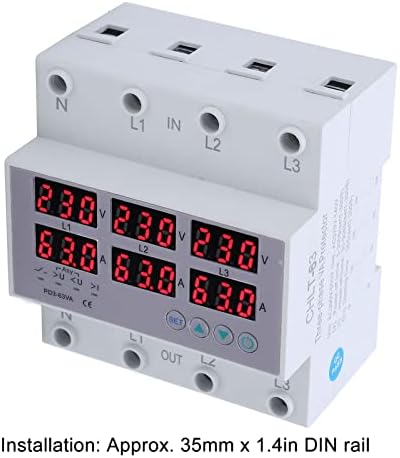
Figure 2: DIN Rail Installation
Tento obrázek ukazuje stranu view of the Walfront CHLT-63 protector, highlighting its compatibility with a 35mm DIN rail. The text overlay confirms the installation method: "Installation: Approx. 35mm x 1.4in DIN rail."
- Najděte vhodnou 35mm DIN lištu ve vašem elektrickém rozvaděči.
- Align the protector's mounting clips with the DIN rail.
- Pevně zatlačte, dokud zařízení bezpečně nezacvakne na své místo na kolejnici.
5.2 Zapojení

Figure 3: Wiring Terminals
Toto šikmé view of the Walfront CHLT-63 protector clearly shows the input (IN) and output (OUT) terminals. The terminals are labeled for Neutral (N) and three phases (L1, L2, L3) at both the top (IN) and bottom (OUT) of the device, indicating where the main power supply and protected load should be connected.
- Identify the input (IN) and output (OUT) terminals on the device. The input terminals are typically at the top, labeled N, L1, L2, L3 IN. The output terminals are at the bottom, labeled N, L1, L2, L3 OUT.
- Connect the incoming 3-phase power supply (Neutral, L1, L2, L3) to the corresponding IN terminals.
- Connect the load (the circuit or equipment to be protected) to the corresponding OUT terminals.
- Ensure all connections are secure and properly tightened to prevent loose contacts and overheating.
- Double-check all wiring before restoring power.
6. Provoz
6.1 Powering On and Real-time Monitoring
Once installed and wired, restore power to the circuit. The device will power on, and the digital display screens will show the real-time voltage and current for each phase (L1, L2, L3).
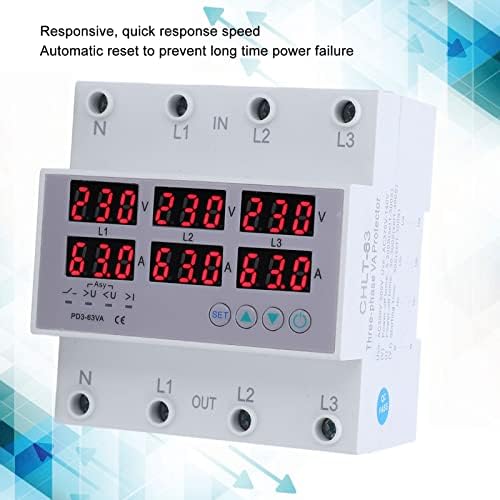
Figure 4: Real-time Display and Responsiveness
This image shows the Walfront CHLT-63 protector with its digital displays active, showing voltage and current readings for all three phases. The accompanying text highlights its "Responsive, quick response speed" and "Automatic reset to prevent long time power failure," indicating its operational efficiency.
- The top row of displays indicates voltage (V) for L1, L2, and L3.
- The bottom row of displays indicates current (A) for L1, L2, and L3.
- Observe these readings to ensure the system is operating within normal parameters.
6.2 Nastavení parametrů ochrany
The device allows you to set specific thresholds for overvoltage, podpaltage, and power-off times. Refer to Figure 1 for button identification.
- Stiskněte tlačítko Menu key (M) pro vstup do režimu nastavení.
- Použijte Adjustment keys (Up/Down) to navigate through the different parameters (e.g., Overvoltage Setting Value, Undervoltage Setting, Power Off Time).
- When the desired parameter is displayed, press the Menu key (M) again to select it for editing.
- Použijte Adjustment keys (Up/Down) pro změnu hodnoty.
- Stiskněte tlačítko Menu key (M) to confirm the new value and move to the next parameter or exit the settings.
- Přepětítage Setting Value: Adjustable from AC230-300V.
- Podpětítage Nastavení: Adjustable from AC120V-210V.
- Power Off Time (Voltage/Aktuální): Adjustable from 1-600 seconds. This setting determines how long the device waits before cutting power after a fault, and how long it waits before automatically resetting after conditions normalize.
6.3 Ochranná funkce
Když sledovaný svtage or current exceeds the set thresholds, the protector will automatically cut off the power supply to the load. The corresponding indicator light (e.g., >U for overvoltage) will illuminate.
After the fault condition is resolved and the system returns to normal operating parameters, the device's automatic reset function will restore power to the load after the set power-off time delay. This prevents long-term power failure and ensures system stability.
7. Údržba
The Walfront CHLT-63 protector is designed for minimal maintenance. However, regular checks can help ensure its longevity and reliable operation.
- Pravidelná prohlídka: Visually inspect the device and its wiring connections periodically for any signs of damage, loose connections, or discoloration.
- Čištění: V případě potřeby jemně očistěte vnější povrch zařízení suchým, měkkým hadříkem. Nepoužívejte abrazivní čisticí prostředky ani rozpouštědla. Před čištěním se ujistěte, že je zařízení odpojeno od napájení.
- Podmínky prostředí: Ensure the operating environment remains within the recommended temperature and humidity ranges to prevent premature failure.
8. Řešení problémů
If you encounter issues with your Walfront CHLT-63 protector, refer to the following common troubleshooting steps:
| Problém | Možná příčina | Řešení |
|---|---|---|
| Zařízení se nezapne. | No power supply; incorrect wiring; device fault. | Check incoming power supply. Verify wiring connections. If power is present and wiring is correct, the device may be faulty and require replacement. |
| Power cuts off frequently. | Frequent overvoltage/podvoltage/overcurrent conditions; incorrect protection settings. | Monitor the display for fault indicators. Check the actual voltage and current of your system. Adjust protection thresholds if they are set too sensitively for your application. Investigate the cause of power fluctuations. |
| Displej zobrazuje nesprávné hodnoty. | Loose wiring connections; device fault. | Ensure all wiring terminals are securely tightened. If readings remain inaccurate, the device may be faulty. |
| Device does not reset automatically. | Fault condition persists; automatic reset function disabled (if applicable); device fault. | Zajistěte, aby byl proveden chybový stav (přepětítage, etc.) has truly cleared. Check the power-off time setting. If the issue persists, the device may require service or replacement. |
For issues not covered here, or if troubleshooting steps do not resolve the problem, contact qualified personnel or Walfront customer support.
9. Záruka a podpora
Walfront products are manufactured to high-quality standards. While specific warranty details are not provided in this manual, please retain your proof of purchase for any warranty claims. For technical support, service, or inquiries regarding your Walfront CHLT-63 protector, please refer to the contact information provided with your purchase or visit the official Walfront webmísto.