
1. Konec produktuview
The Dangbei DBX3 Pro is an infrared remote control designed for seamless interaction with compatible Dangbei devices, primarily televisions. It features an ergonomic design for comfortable handling and intuitive button placement for easy navigation and control.
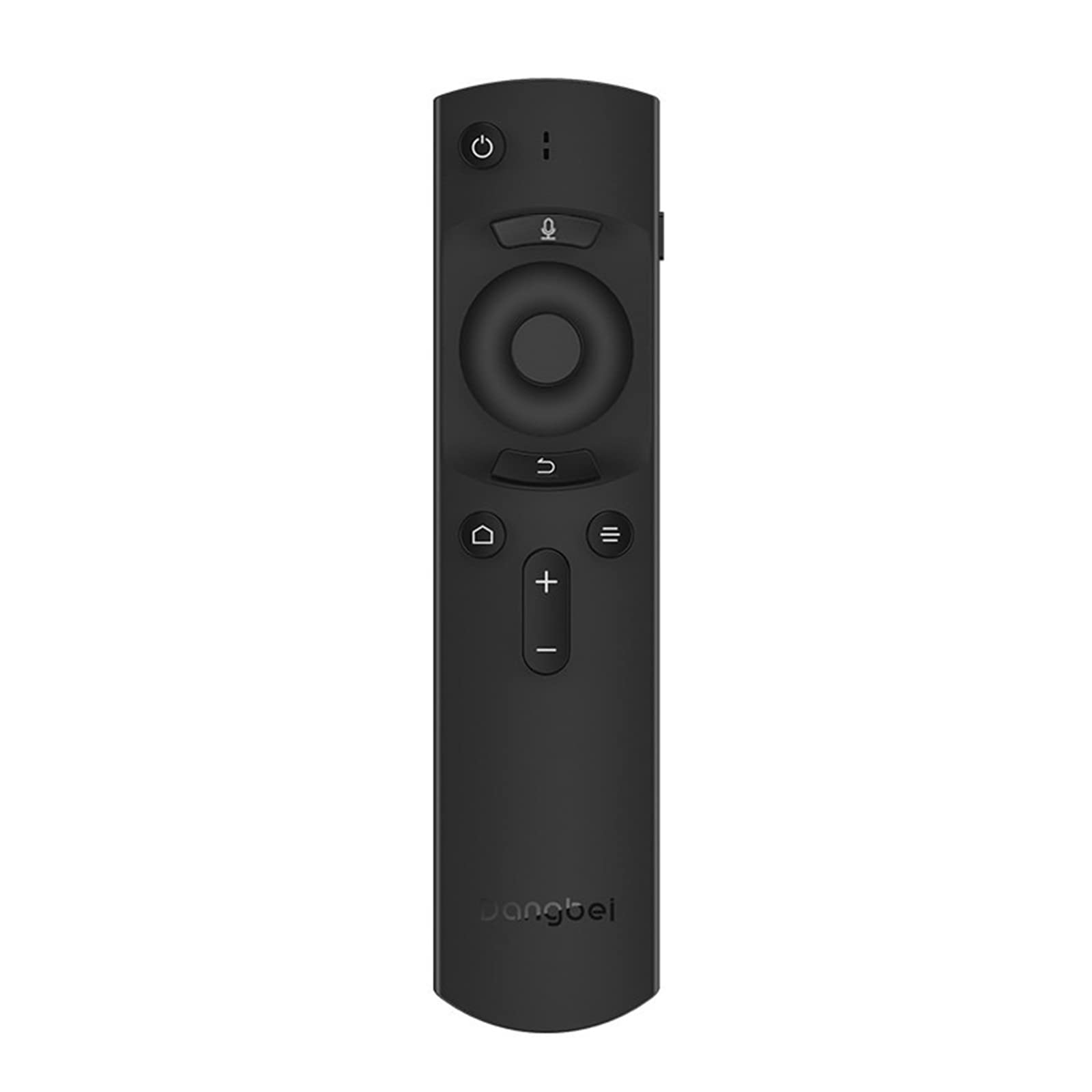
Obrázek 1: Dangbei DBX3 Pro Remote Control. This image displays the remote control from an angled perspective, highlighting its ergonomic shape and the layout of its primary control buttons, including power, navigation, volume, and home.
Funkce tlačítek:
- Tlačítko napájení (⏻): Zapne nebo vypne připojené zařízení.
- Tlačítko mikrofonu (🎙): Activates voice control or voice search features (if supported by the connected device).
- Navigační tlačítko (nahoru, dolů, vlevo, vpravo): Používá se k navigaci v nabídkách a výběru položek.
- Tlačítko OK: Potvrzuje výběry nebo vstupuje do nabídek.
- Tlačítko Zpět (↩): Vrátí se na předchozí obrazovku nebo nabídku.
- Tlačítko Menu/Možnosti (☰): Zpřístupňuje další možnosti nebo kontextové nabídky.
- Tlačítko Domů (🏠): Returns to the main home screen of the connected device.
- Tlačítka pro zvýšení/snížení hlasitosti (+/-): Nastavuje hlasitost zvuku.
2. Nastavení
2.1. Instalace baterie
- Najděte kryt prostoru pro baterie na zadní straně dálkového ovladače.
- Posuňte kryt dolů nebo stiskněte západku pro jeho otevření.
- Vložte dvě baterie AAA (nejsou součástí balení) a ujistěte se, že kladný (+) a záporný (-) pól správně odpovídají označením uvnitř přihrádky.
- Nasaďte kryt přihrádky na baterie zpět, dokud bezpečně nezacvakne.
2.2. První použití
The Dangbei DBX3 Pro remote control operates using infrared (IR) technology. For the remote to function, ensure there is a clear line of sight between the remote's IR emitter (located at the front tip) and the IR receiver on your compatible Dangbei device. Point the remote directly at the device you wish to control.
3. Návod k obsluze
3.1. Základní navigace
- Použijte Navigační podložka (Up, Down, Left, Right arrows) to move through menus, lists, and content on your screen.
- Stiskněte tlačítko Tlačítko OK to select a highlighted item, confirm an an action, or open an application.
- Stiskněte tlačítko Tlačítko Zpět to return to the previous screen or exit a menu.
- Stiskněte tlačítko Tlačítko Domů to quickly access the main interface of your device.
3.2. Power and Volume Control
- Stiskněte tlačítko Tlačítko napájení once to turn your device on or off.
- Použijte Zvýšení hlasitosti (+) a Snížit hlasitost (-) tlačítky pro nastavení úrovně zvuku.
3.3. Voice Control (If Supported)
If your connected Dangbei device supports voice control, press and hold the Tlačítko mikrofonu. Speak clearly into the remote control's microphone. Release the button when you have finished speaking. Refer to your device's manual for specific voice command capabilities.
4. Údržba
4.1. Čištění
Pro čištění dálkového ovladače jemně otřete jeho povrch měkkým, suchým hadříkem. V případě odolných nečistot lehceampOtřete hadřík vodou nebo jemným neabrazivním čisticím prostředkem. Nepoužívejte agresivní chemikálie, rozpouštědla nebo abrazivní materiály, protože by mohly poškodit povrchovou úpravu dálkového ovladače nebo vnitřní součásti.
4.2. Výměna baterie
Replace batteries when the remote's response becomes sluggish or stops working. Always replace both batteries simultaneously with new AAA batteries. Do not mix old and new batteries, or different types of batteries, as this can lead to leakage or malfunction. Dispose of used batteries according to local regulations.
4.3. Skladování
Store the remote control in a cool, dry place away from direct sunlight, extreme temperatures, and high humidity. If the remote will not be used for an extended period, it is recommended to remove the batteries to prevent potential leakage.
5. Řešení problémů
| Problém | Možná příčina | Řešení |
|---|---|---|
| Dálkový ovladač nereaguje. |
|
|
| Tlačítka nereagují nebo se zasekávají. |
|
|
| Krátký provozní dosah. |
|
|
6. Specifikace
- Model: DBX3 Pro
- Značka: Danbei
- Technologie připojení: Infračervený (IR)
- Kompatibilní zařízení: Television (specifically compatible Dangbei devices)
- Zdroj napájení: 2 x AAA baterie (nejsou součástí balení)
- Rozměry produktu: 1.5 x 9.06 x 3.94 palce (přibližně 3.8 x 23.0 x 10.0 cm)
- Hmotnost položky: 4.6 unce (přibližně 130 gramů)
- Speciální funkce: Ergonomický design
7. Záruka a podpora
7.1. Informace o záruce
This Dangbei product is covered by a limited manufacturer's warranty. The specific terms and duration of the warranty may vary by region and purchase date. Please retain your proof of purchase for warranty claims. For detailed warranty information, refer to the documentation provided with your primary Dangbei device or visit the official Dangbei webmísto.
7.2. Zákaznická podpora
For technical assistance, troubleshooting, or inquiries regarding your Dangbei DBX3 Pro remote control, please contact Dangbei customer support. Contact information can typically be found on the official Dangbei website or within the support section of your primary Dangbei device's user interface.
Oficiální Webmísto: www.dangbei.com (Zkontrolujte prosím regionální odchylky)