
Zavedení
The Eyoyo EY-037 is an industrial-grade barcode scanner designed for demanding environments such as warehouses and production halls. It offers robust construction, versatile connectivity, and efficient scanning capabilities for various barcode types. This manual provides detailed instructions for setup, operation, and maintenance to ensure optimal performance of your device.

Figure 1: Eyoyo EY-037 Industrial Barcode Scanner
Konec produktuview
Obsah balení
Po vybalení se prosím ujistěte, že jsou v balení všechny následující položky:
- Industrial Barcode Scanner x1
- Versatile Base x1
- Base Cable x1
- Nabíjecí kabel x1
- USB to Type-C Converter x1
- Uživatelská příručka x1

Figure 2: Included items in the Eyoyo EY-037 package
Klíčové vlastnosti
- Industrial Robustness: Designed to withstand harsh environments, including 100 drops from 3 meters and 7,000 tumbles from 1 meter, minimizing downtime and maintenance costs.
- 3 v 1 připojení: Supports Bluetooth, 2.4G wireless (via dongle), and USB wired connections. Compatible with Windows, Mac OS, iOS, Android, and Linux devices.
- Krytí IP65: Water and dustproof, suitable for indoor and outdoor use in dusty or wet conditions.
- Ergonomický design: Features a comfortable grip and responsive trigger for extended use without fatigue. Includes a wrist strap buckle for easy carrying.
- Více režimů skenování: Offers Manual Trigger, Continuous Scan, and Automatic Scan modes for flexible operation.
- Režim paměti: Stores up to 100,000 barcodes when out of wireless range, ensuring data is not lost.
- Baterie 2500 mAh: Poskytuje prodlouženou provozní dobu.

Figure 3: Industrial-grade robustness of the scanner
Nastavení a připojení
Nabíjení skeneru
The scanner can be charged using two methods:
- Using the Versatile Base: Place the scanner directly onto the charging base. Ensure the base is connected to a computer, POS system, or another USB power source.
- Direct USB Type-C Connection: Connect the scanner directly to a USB power source using the provided USB Type-C cable. A USB to Type-C converter is included for broader compatibility.

Figure 4: Charging options for the scanner
Connecting via 2.4G Wireless
For 2.4G wireless connection:
- Locate the 2.4G wireless dongle (often stored in the scanner's handle).
- Insert the dongle into an available USB port on your computer or device.
- The scanner will automatically connect to the dongle. You can then begin scanning.

Figure 5: 2.4G Wireless connection setup
Připojení přes Bluetooth
Pro připojení přes Bluetooth:
- Press and hold the Bluetooth pairing button on the scanner. The blue LED indicator will flash, signifying that the scanner is in pairing mode.
- Na hostitelském zařízení (chytrý telefon, tablet nebo počítač) přejděte do nastavení Bluetooth.
- Hledat available devices and select "NT Barcode Scanner" or a similar identifier.
- Once successfully paired, the blue LED on the scanner will become solid.
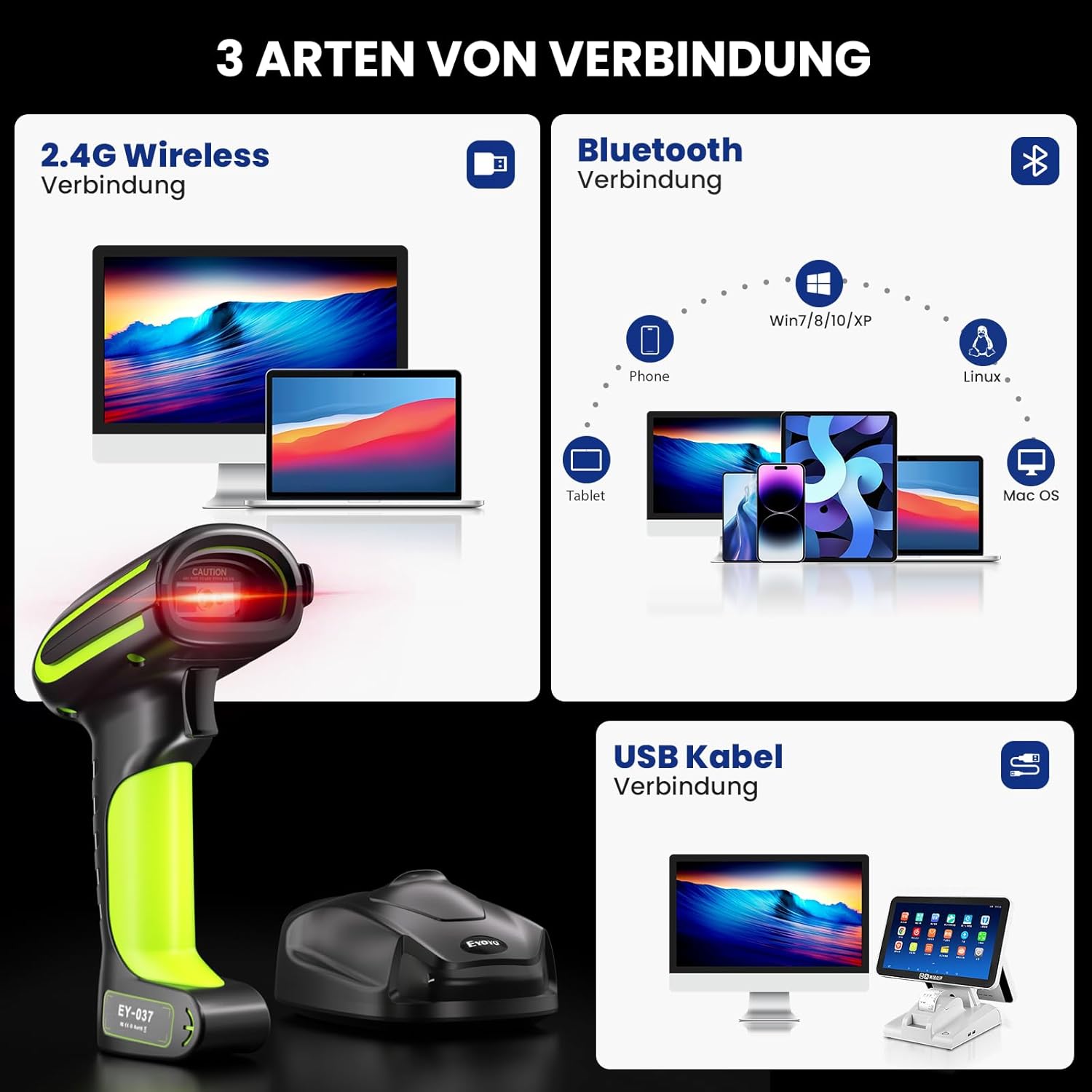
Figure 6: Bluetooth connection process
Připojení přes USB kabel
Pro přímé kabelové připojení:
- Connect the scanner directly to your computer or device using the provided USB cable.
- The scanner will function as a wired device, and scanned data will be transmitted directly.

Obrázek 7: Přesview of 3-in-1 connection types
Provozní režimy
Režimy skenování
The EY-037 offers three distinct scanning modes to suit various operational needs:
- Manuální spouštěcí režim: Press the trigger button to activate the scan beam and read each barcode individually.
- Režim nepřetržitého skenování: The scanner continuously emits a scan beam, automatically reading barcodes as they are presented. This mode is ideal for hands-free operation when the scanner is placed on a stand (stand sold separately).
- Automatic Scan Mode: The scanner activates the scan beam only when it detects a barcode within its field of view, conserving power and reducing unnecessary beam emission.

Figure 8: Three available scanning modes
Režimy nahrávání dat
Vyberte si ze dvou metod nahrání dat:
- Režim okamžitého nahrávání: Scanned barcodes are immediately transmitted to the connected device. This is the default mode for real-time data entry.
- Režim úložiště: When out of wireless range or if real-time transmission is not required, scanned barcodes are stored in the scanner's internal memory. The scanner can store up to 100,000 barcodes, which can be uploaded to your device later.

Figure 9: Instant upload and storage data modes
Pokročilé funkce
Podporované typy čárových kódů
The Eyoyo EY-037 scanner is capable of reading a wide range of barcode types, including 1D, 2D, and QR codes.
Scanning from Screens and Paper
The scanner's advanced imaging technology allows for accurate and rapid scanning of barcodes from both printed materials and digital screens, such as smartphones and tablets.

Figure 10: Scanning capability from various surfaces
Keyboard Language Support
The scanner supports 33 different keyboard languages, ensuring compatibility and ease of use in diverse international environments.

Figure 11: Multi-language keyboard support
Nastavení hlasitosti
The scanner's beep volume can be adjusted to high, medium, low, or muted entirely to suit your working environment.

Figure 12: Volume adjustment options
Prefix/Suffix and Data Hiding
Customize your scanning output by adding specific prefixes or suffixes to the scanned data. The scanner also supports functions to hide or omit certain parts of the barcode data as needed.

Figure 13: Data customization options
Specifikace
| Funkce | Specifikace |
|---|---|
| Značka | Eyoyo |
| Model | EY-037 |
| Zdroj napájení | Elektrický kabel |
| Technologie připojení | Bluetooth, USB, 2.4G Wireless |
| Počet baterií | A Batteries required (included) |
| Rozměry produktu (DxŠxV) | 14.5 x 10.5 x 18.5 centimetrů |
| Provozní svtage | 5 voltů |
| Hodnocení IP | IP65 (vodotěsný a prachotěsný) |
| Kapacita baterie | 2500 XNUMX mAh |
| Podporované čárové kódy | 1D, 2D, QR |
| Pohotovostní doba | > 30 dní |
Odstraňování problémů
If you encounter issues with your Eyoyo EY-037 barcode scanner, please refer to the following common troubleshooting steps:
- Skener se nepřipojuje: Ensure the scanner is fully charged. Verify that the 2.4G dongle is properly inserted into your device, or that Bluetooth is enabled and successfully paired.
- No data transmission: Check the selected connection type (USB, 2.4G, or Bluetooth). Confirm the scanner is in "Instant Upload Mode" if immediate data transfer is desired. If in "Storage Mode," remember to manually upload the stored data.
- Nelze skenovat některé čárové kódy: Ensure the barcode type is supported by the scanner. Inspect the barcode for any damage, smudges, or poor print quality. Adjust the scanning distance and angle.
- Scanner beeps but no data appears: Confirm that the cursor is active in the target application (e.g., a text editor or spreadsheet) on your connected device.
- Krátká výdrž baterie: Ensure the scanner is fully charged before each use. If applicable, reduce scan frequency or adjust power-saving settings.
Záruka a podpora
Informace o záruce
The Eyoyo EY-037 Industrial Barcode Scanner comes with a 1-letá záruka od data nákupu. Uschovejte si prosím doklad o koupi pro případné reklamace.
Obrázek 14: Dvouletá záruka
Často kladené otázky (FAQ)
- What makes Eyoyo products unique?
- Eyoyo values feedback from every customer to maintain its leading position in barcode scanning technology.
- Proč milujeme to, co děláme?
- Eyoyo Barcode Scanner is committed to manufacturing affordable, durable, fast, and easy-to-use scanners to help businesses increase productivity.
- What problems do we aim to solve?
- Quick and accurate inventory management, faster checkouts, and instant, precise product information are the benefits provided by Eyoyo barcode scanners.