

1. Úvod
This manual provides essential information for the safe and efficient operation of your Sygonix Built-in Thermostat SY-5044424. This device is designed as a built-in solution for regulating and monitoring heat generators within heating, climate, and ventilation technology systems. Please read these instructions thoroughly before installation and use, and retain them for future reference.
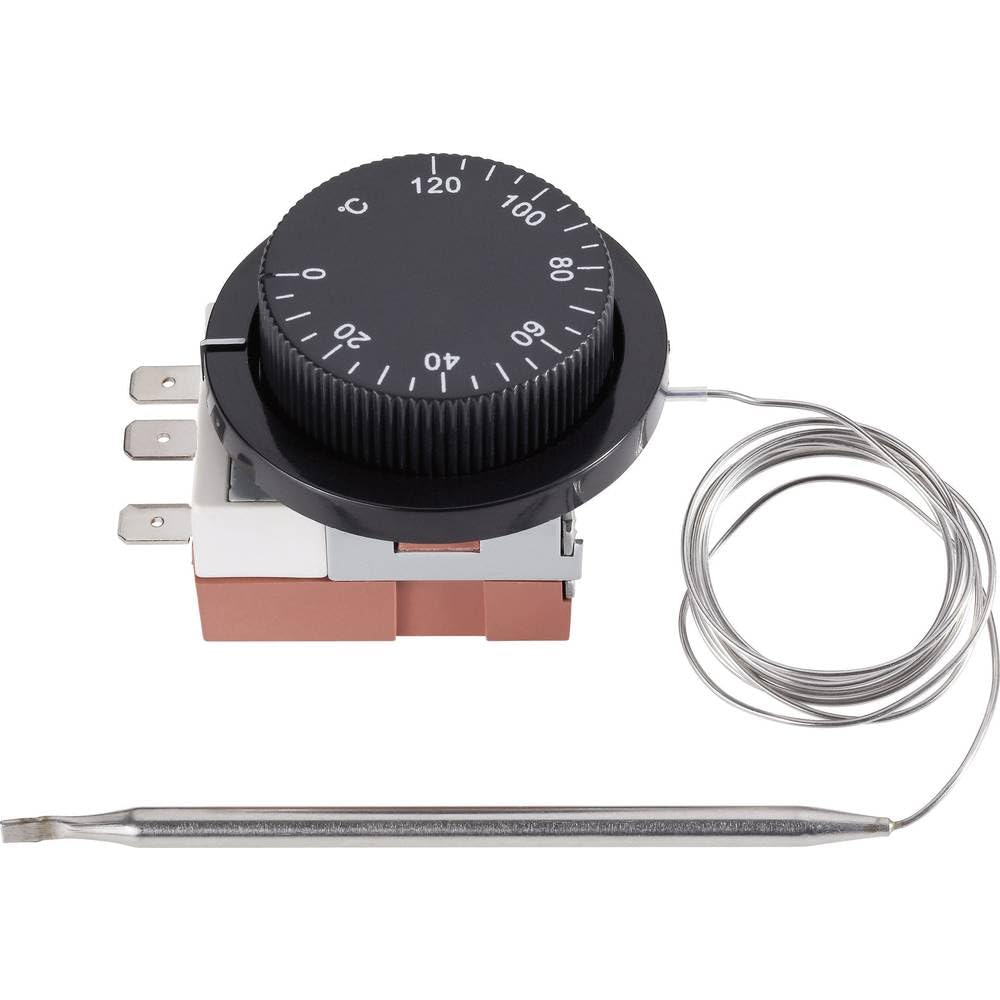
Image 1.1: The Sygonix Built-in Thermostat SY-5044424. This image shows the compact design of the thermostat, ready for integration into a control panel or wall unit.
2. Bezpečnostní pokyny
Varování: Nedodržení těchto bezpečnostních pokynů může vést k požáru, úrazu elektrickým proudem, zranění nebo poškození produktu či majetku.
- Instalaci musí provést kvalifikovaný elektrikář v souladu se všemi místními a národními elektrotechnickými předpisy.
- Před instalací, údržbou nebo odstraňováním problémů se ujistěte, že je odpojeno napájení.
- Nevystavujte zařízení vlhkosti, extrémním teplotám ani přímému slunečnímu záření.
- Nepokoušejte se zařízení sami upravovat ani opravovat. Kontaktujte kvalifikovaný servisní personál.
- Uchovávejte obalové materiály mimo dosah dětí.
3. Vlastnosti produktu
- Setting range: 0 - 120 °C
- Switching differential: 3 ± 1.5 °C
- Vestavěný design pro bezproblémovou integraci
- Suitable for heating, climate, and ventilation systems
- Remote control capability (via RF connectivity)
4. Nastavení a instalace
The Sygonix Built-in Thermostat is designed for integration into existing control systems or panels. Professional installation is highly recommended.
4.1. Kontroly před instalací
- Verify that the power supply matches the thermostat's requirements (230V).
- Ensure the installation location is free from excessive vibration, moisture, and direct heat sources.
- Confirm that all necessary mounting hardware is available.
4.2. Zapojení
- Odpojit napájení: Turn off the main power supply to the circuit where the thermostat will be installed. Use a voltage tester to confirm that power is off.
- Montáž: Secure the thermostat in its designated built-in location using the provided mounting hardware.
- Připojit dráty: Follow the wiring diagram provided with the product packaging. Connect the power input, load output, and sensor wires to the appropriate terminals. Ensure all connections are secure.
- Umístění senzoru: Position the temperature sensor in an area that accurately reflects the ambient temperature to be controlled, away from drafts or direct heat sources.
- Obnovit napájení: Once all connections are secure and verified, restore power to the circuit.
5. Návod k obsluze
The Sygonix Built-in Thermostat is designed for straightforward temperature control. Specific operation details may vary based on the integrated system and any connected remote control unit.
5.1. Počáteční zapnutí
- Upon first power-on, the thermostat may display a default temperature or enter a calibration mode. Refer to the specific display indicators in your product packaging.
5.2. Nastavení teploty
- Use the integrated controls (if any) or a compatible remote control unit to adjust the desired temperature. The setting range is 0 to 120 °C.
- The thermostat will activate or deactivate the connected heating/cooling device to maintain the set temperature within the specified switching differential.
5.3. Remote Control Functionality
- The thermostat supports RF connectivity for remote control. Pair your compatible remote control or smart system according to its specific instructions.
- Ensure the remote control unit is within the effective range and has fresh batteries (if applicable).
6. Údržba
The Sygonix Built-in Thermostat requires minimal maintenance.
- Čištění: Gently wipe the surface of the thermostat with a soft, dry cloth. Do not use abrasive cleaners, solvents, or excessive moisture.
- Pravidelné kontroly: Periodically inspect the wiring connections for any signs of wear or damage. Ensure the temperature sensor is clean and unobstructed.
- Cyklus napájení: If the device behaves unexpectedly, try disconnecting and reconnecting the power supply for a few minutes.
7. Řešení problémů
Pokud narazíte na problémy s termostatem, podívejte se na následující běžné problémy a jejich řešení:
| Problém | Možná příčina | Řešení |
|---|---|---|
| Termostat se nezapíná | Chybí napájení; nesprávné zapojení | Check circuit breaker; verify wiring connections (ensure power is off first). |
| Nesprávné údaje o teplotě | Sensor obstructed or misplaced; faulty sensor | Ensure sensor is clean and in an appropriate location; contact support if suspected faulty. |
| Heating/cooling device not responding | Incorrect wiring; thermostat setting issue; device malfunction | Verify wiring; check thermostat settings; test the heating/cooling device independently. |
| Dálkové ovládání nefunguje | Remote not paired; batteries low; out of range | Pair remote as per its instructions; replace batteries; ensure remote is within RF range. |
Pokud problém přetrvává i po vyzkoušení těchto řešení, kontaktujte zákaznickou podporu.
8. Specifikace
| Funkce | Detail |
|---|---|
| Značka | Sygonix |
| Číslo modelu | SY-5044424 |
| Barva | Černý |
| Rozměry produktu | 7 x 5 x 18 cm; 14 kg (or 17D x 6W x 5H cm) |
| Kapacita | 10 litrů |
| Výkon/objtage | 280 |
| svtage | 230 V |
| Úroveň hluku | 1 decibelů |
| Speciální funkce | Dálkové ovládání |
| Výrobce | Sygonix |
| Číslo položky | SY-5044424 |
| ASIN | B0BPX282HB |
| Typ ovladače | Ruční ovladač |
| Specifické použití produktu | Building heating and air conditioning |
| Typ řízení teploty | Smart/Remote Control |
| Technologie připojení | RF |
| Zahrnuté komponenty | Montážní hardware |
| Rozsah nastavení | 0 - 120 °C |
| Spínací diferenciál | 3 ± 1.5 °C |
9. Záruka a podpora
For warranty information and technical support, please refer to the documentation included with your purchase or visit the official Sygonix webUschovejte si doklad o koupi pro případ reklamace.