
1. Úvod
This manual provides comprehensive instructions for the safe and efficient operation of your Walfront RF Signal Generator, Model Walfront493bt51fvu. This device is designed to generate radio frequency (RF) signals with audio modulation capabilities, covering a frequency range of 0.5MHz to 470MHz. Its compact design and robust construction make it suitable for various applications in aviation, wireless communication, automotive electronics, and manufacturing.
Please read this manual thoroughly before using the device to ensure proper setup, operation, and maintenance.
2. Bezpečnostní informace
Dodržujte následující bezpečnostní opatření, abyste předešli zranění a poškození zařízení:
- Zajistěte napájení objtage odpovídá požadavkům zařízení (12 voltů).
- Neprovozujte zařízení ve vlhku nebo damp podmínky.
- Nevystavujte zařízení extrémním teplotám nebo přímému slunečnímu záření.
- Nepokoušejte se zařízení otevírat ani upravovat. Veškerý servis svěřte kvalifikovanému personálu.
- Disconnect power before cleaning or when the device is not in use.
- Zacházejte se zařízením opatrně, abyste zabránili fyzickému poškození.
3. Konec produktuview
The Walfront RF Signal Generator features a user-friendly interface with a clear display and tactile controls. Its durable ABS casing ensures longevity and resistance to environmental factors.
3.1. Rozložení předního panelu

Obrázek 1: Přední view of the Walfront RF Signal Generator, showing the display, keypad, RF output, and power button.

Obrázek 2: Detailní záběr view of the front panel, highlighting the LCD display, numeric keypad (0-9, F1-F4), RF OUT BNC connector, and the red power button.
- Vypínač: Red button on the left for turning the device on/off.
- RF OUT Connector: BNC connector for RF signal output.
- LCD displej: Shows current frequency, modulation status, and other operational parameters.
- Numerická klávesnice (0-9): Used for entering frequency values.
- Funkční klávesy (F1–F4): Specific functions for modulation, frequency steps, or presets (refer to display for exact function).
- Arrow Keys (∧, ∨): For adjusting values or navigating menus.
3.2. Boční View
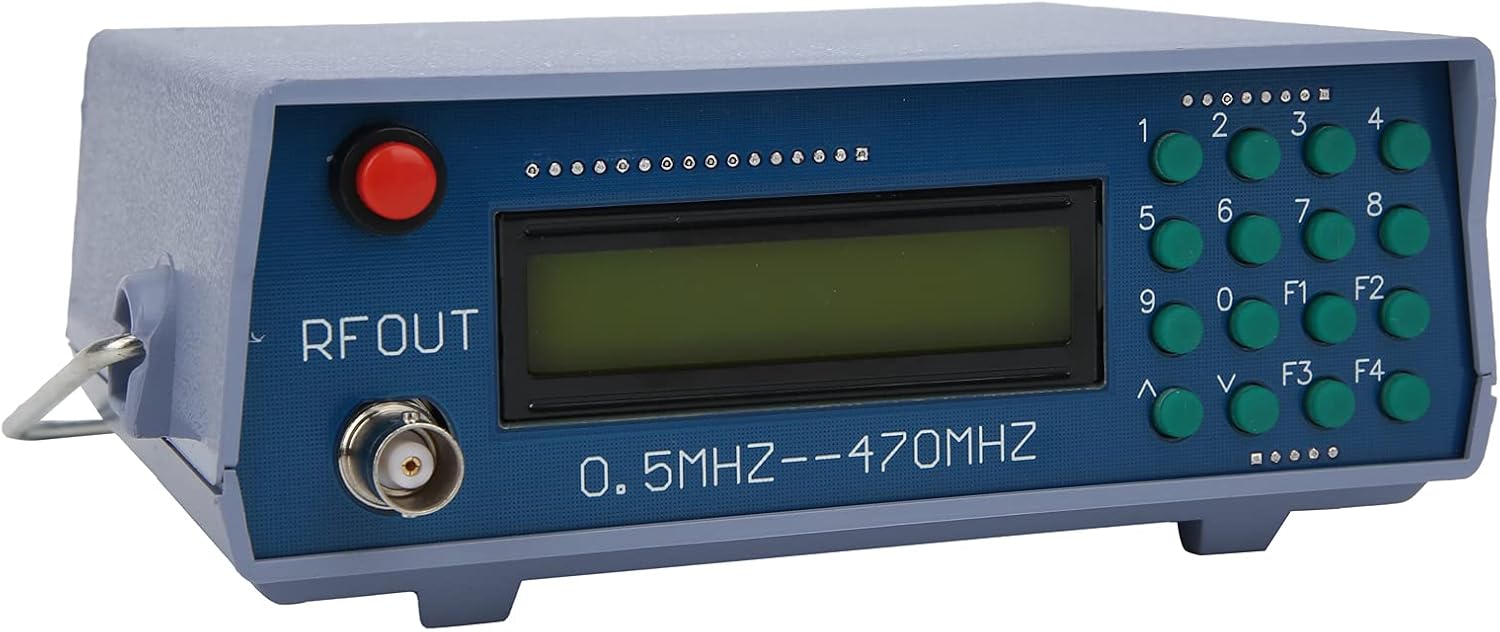
Obrázek 3: Úhlové view of the device, illustrating its compact form factor and side panel design.

Obrázek 4: Strana view of the RF signal generator, showing the ventilation slots and overall casing structure.
4. Nastavení
- Rozbalení: Carefully remove the RF Signal Generator from its packaging. Inspect for any signs of damage.
- Připojení napájení: Connect a 12V DC power adapter (not included) to the power input port on the rear or side of the device. Ensure the adapter's polarity is correct.
- Výstupní připojení: Connect a BNC cable (not included) to the "RF OUT" connector on the front panel. Connect the other end of the cable to your receiving device (e.g., spectrum analyzer, radio receiver).
- Zapnutí: Press the red power button on the front panel to turn on the device. The LCD display should illuminate.
5. Návod k obsluze
This section outlines basic operation. Specific functions of F1-F4 keys may vary based on firmware version; observe the display for context.
- Nastavení frekvence:
- Use the numeric keypad (0-9) to enter the desired frequency. The display will show the entered digits.
- Press a function key (e.g., F1, F2) or an arrow key (∧, ∨) to confirm the entry or select the frequency unit (MHz, kHz).
- The device supports frequencies from 0.5MHz to 470MHz.
- Nastavení frekvence:
- Use the ∧ and ∨ arrow keys to fine-tune the frequency in small increments.
- Some function keys (F1-F4) might allow for larger step adjustments or direct frequency presets.
- Audio Modulation:
- The device supports audio modulation. Look for a function key (e.g., F3 or F4) that activates or adjusts modulation settings.
- The display will indicate the modulation status (e.g., AM, FM, or audio tone frequency).
- The internal audio modulation frequency is 800Hz.
- Vypnout: Press the red power button again to turn off the device.
6. Údržba
- Čištění: K čištění vnější strany zařízení používejte měkký, suchý hadřík. Nepoužívejte tekuté čisticí prostředky ani rozpouštědla.
- Skladování: Přístroj skladujte na chladném a suchém místě mimo dosah přímého slunečního záření a extrémních teplot.
- Inspekce: Pravidelně kontrolujte kabely a konektory, zda nejsou opotřebované nebo poškozené.
7. Řešení problémů
| Problém | Možná příčina | Řešení |
|---|---|---|
| Zařízení se nezapne. | No power, incorrect adapter, faulty power button. | Check power adapter connection and voltage. Ensure the power outlet is functional. |
| No RF signal output. | Incorrect frequency setting, faulty BNC cable, receiving device issue. | Verify frequency setting on the display. Check BNC cable for proper connection and integrity. Ensure the receiving device is correctly configured. |
| Displej je prázdný nebo nečitelný. | Problém s napájením, vnitřní závada. | Cycle power. If the problem persists, contact customer support. |
8. Specifikace
| Značka | Walfront |
| Model | Walfront493bt51fvu |
| Číslo dílu | Walfront493bt51fvu |
| Frekvenční rozsah | 0.5 MHz - 470 MHz |
| Audio Modulation Frequency | 800 Hz |
| svtage | 12 voltů |
| CasinMateriál | ABS |
| Rozměry balení | 20 x 14.3 x 10.7 cm |
| Hmotnost | 350 g |
| Baterie jsou součástí dodávky | Žádný |
| Provoz na baterie | Žádný |
| ASIN | B0BPSCC6ND |
9. Záruka a podpora
Walfront products are manufactured to high-quality standards. For warranty information, technical support, or service inquiries, please refer to the documentation included with your purchase or contact your retailer. Keep your purchase receipt as proof of purchase.
For further assistance, you may visit the Walfront store on Amazon: Walfront Store