
Zavedení
This manual provides instructions for the Beyution RM-STHC60J replacement remote control. This remote is designed to function as a direct replacement for the original JVC RM-STHC60J remote, offering full functionality for compatible JVC DVD Digital Cinema Systems without requiring any programming or setup.
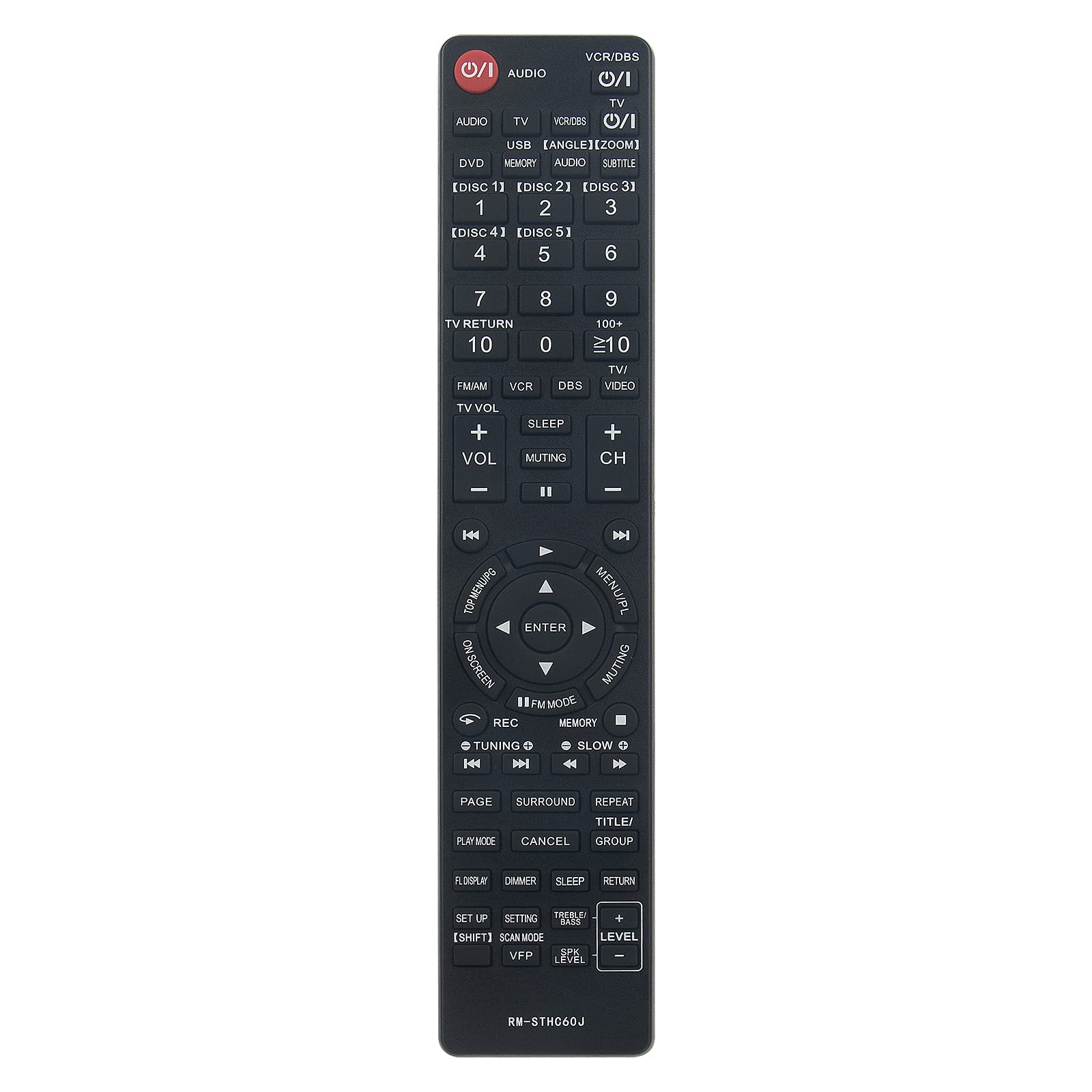
Image: Comparison showing the original JVC remote control on the right and the Beyution RM-STHC60J replacement remote control on the left, with a red arrow indicating replacement.
Nastavení
1. Instalace baterie
The Beyution RM-STHC60J remote control requires two (2) AAA batteries (not included) for operation. Follow these steps to install the batteries:
- Najděte přihrádku na baterie na zadní straně dálkového ovladače.
- Stiskněte jazýček a posuňte kryt baterie dolů, abyste jej otevřeli.
- Vložte dvě baterie typu AAA a ujistěte se, že kladný (+) a záporný (-) pól správně shodují s označením uvnitř přihrádky.
- Zasuňte kryt baterie zpět na místo, dokud bezpečně nezapadne.
No programming or pairing is required. The remote is ready for use once batteries are installed.
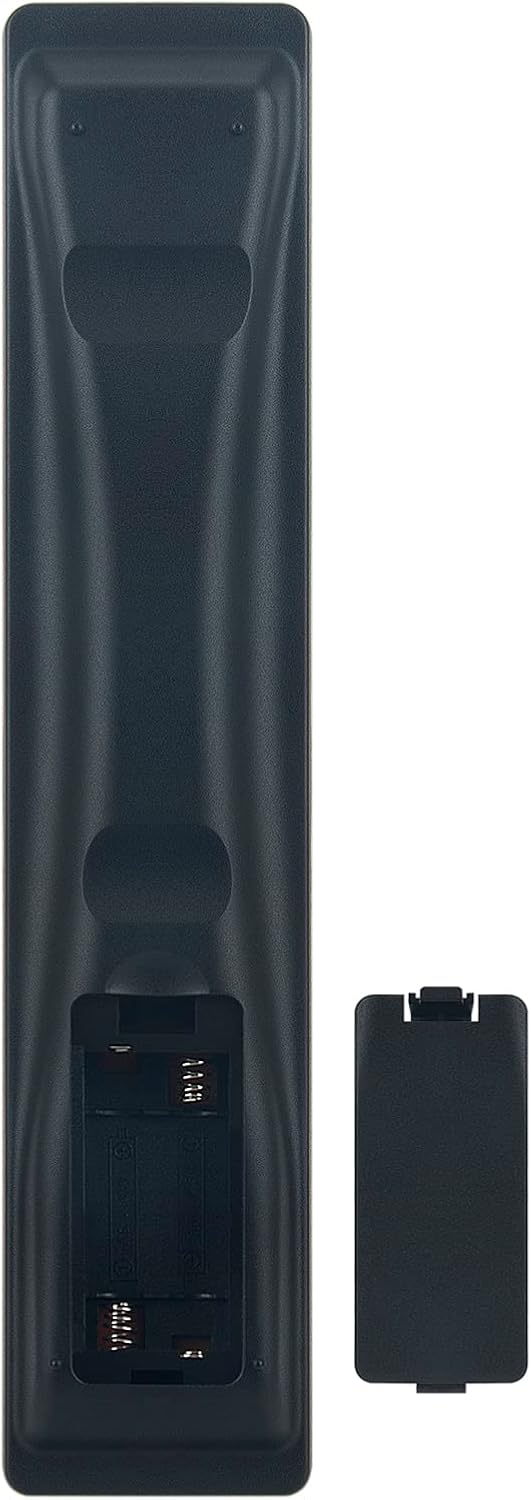
Image: The back of the Beyution RM-STHC60J remote control with the battery compartment open, showing the slots for two AAA batteries.
Návod k obsluze
This remote control provides full functionality for your compatible JVC DVD Digital Cinema System. Point the remote directly at the system's infrared receiver for optimal performance.

Obrázek: Jasná přední strana view of the Beyution RM-STHC60J replacement remote control, displaying all buttons and their labels.
Klíčové funkce:
- Power (①/I): Zapíná nebo vypíná systém.
- AUDIO: Selects audio input.
- VCR/DBS, TV, DVD, USB: Vybírá vstupní zdroje.
- Number Buttons (0-9, 10+, ≥10): For direct track/chapter selection or channel input.
- DISC [1]-[5]: Selects specific discs in a multi-disc changer.
- VOL +/-, CH +/-, Muting: Adjusts volume, changes channels, or mutes sound.
- Navigační klávesnice (nahoru, dolů, vlevo, vpravo, ENTER): Prochází menu a potvrzuje výběr.
- MENU/PL, TOP MENU/PG: Přístup k systémovým nabídkám.
- Přehrát, Pozastavit, Zastavit, Rychle vpřed, Přetočit vzad, Přeskočit: Ovládá přehrávání médií.
- REC: Initiates recording (if supported by the system).
- ZALOŽIT: Přístup k nabídce nastavení.
- SUBTITLE, ANGLE, ZOOM: Controls specific DVD playback features.
Kompatibilita:
This remote control is compatible with the following JVC DVD Digital Cinema System models:
- TH-C60, TH-C20, TH-C43C, TH-C40, TH-C50, TH-C30, TH-C30U
- THC30, XVTHC20, THC50, XVTHC50, XVTHC40, THC30J, THC20
- THC40, THC60, XVTHC60, SPTHC60F
Údržba
Čištění:
K čištění dálkového ovladače použijte měkký, suchý hadřík. V případě odolných nečistot jej lehce setřete.ampen the cloth with water or a mild, non-abrasive cleaner. Avoid using harsh chemicals or solvents, as these can damage the remote's finish or internal components.
Péče o baterie:
- Vyměňte baterie, když se výkon dálkového ovladače sníží nebo když přestane reagovat.
- Vždy vyměňujte obě baterie současně za nové stejného typu (AAA).
- Nekombinujte staré a nové baterie ani různé typy baterií.
- Pokud dálkový ovladač nebudete delší dobu používat, vyjměte baterie, abyste zabránili vytečení baterií a poškození.
Odstraňování problémů
Dálkové ovládání nereaguje:
- Zkontrolujte baterie: Ujistěte se, že jsou baterie vloženy správně se správnou polaritou (+/-) a nejsou vybité. V případě potřeby je vyměňte za nové baterie typu AAA.
- Přímá viditelnost: Make sure there are no obstructions between the remote control and the infrared sensor on your JVC DVD Digital Cinema System. The remote requires a clear line of sight to operate.
- Vzdálenost: The maximum effective range is approximately 10 meters (33 feet). Ensure you are within this range.
- Infračervené rušení: Bright sunlight or other strong infrared sources can interfere with the remote's signal. Try operating the remote in a different lighting condition.
Nesprávná funkčnost:
- Verify that your JVC DVD Digital Cinema System model is listed in the compatibility section. This remote is a direct replacement for specific models.
- If your model is not listed, or if the remote still does not function correctly after troubleshooting, please contact customer support.
Specifikace
| Funkce | Detail |
|---|---|
| Model | RM-STHC60J |
| Materiál | ABS plast |
| Technologie připojení | Infračervený |
| Maximální vzdálenost | 10 metru (přibližně 33 stop) |
| Rozměry (D x Š x V) | 6.3 x 1.57 x 0.39 palce |
| Hmotnost položky | 2.47 unce |
| Jsou vyžadovány baterie | 2 x AAA (nejsou součástí balení) |
| Barva | Černý |
| Speciální funkce | Ergonomický design |
Informace o záruce
This Beyution RM-STHC60J replacement remote control comes with a 6měsíční záruční doba from the date of purchase. This warranty covers manufacturing defects and ensures the remote functions as intended under normal use.
Pro případné reklamace si prosím uschovejte doklad o koupi. Záruka se nevztahuje na škody způsobené nesprávným použitím, nehodami, neoprávněnými úpravami nebo běžným opotřebením.
Zákaznická podpora
If you encounter any issues with your Beyution RM-STHC60J remote control that cannot be resolved using the troubleshooting guide, or if you have questions regarding compatibility or warranty, please contact our customer service team.
For assistance, please reach out via email. Our customer service staff will provide a satisfactory solution within 24 hours.
Note: If you find that your device model is not included in our compatibility list, please contact us to verify compatibility before purchasing.