
1. Úvod
This document provides essential information for the use and maintenance of your new replacement IR remote control. This remote is designed to function with specific Pyle Audio and Bauhn sound bar models, including PSBV600BT, ASBW-0716, ASBWS-0419, ASBW-0718, and ASBW-1018. Please ensure your original device model is listed for compatibility.
This remote is an infrared (IR) replacement and may not offer all functions present on your original remote. It is intended to provide core functionalities for your audio system.
2. Nastavení: Instalace baterie
The remote control requires one CR2025 coin cell battery (not included). Follow these steps to install or replace the battery:
- Najděte přihrádku na baterie na zadní straně dálkového ovladače.
- Jemně zatlačte na západku označenou „OPEN“ a vysuňte přihrádku na baterii ven.
- Vložte jednu baterii CR2025 kladným pólem (+) nahoru, jak je vyznačeno uvnitř přihrádky.
- Zasuňte přihrádku na baterie zpět do přihrádky, dokud bezpečně nezacvakne na místo.

Obrázek 2.1: Zadní view of the replacement remote control, illustrating the battery compartment and the correct orientation for CR2025 battery insertion.
3. Návod k obsluze
Point the remote control directly at the IR receiver on your sound bar system. Ensure there are no obstructions between the remote and the sound bar.
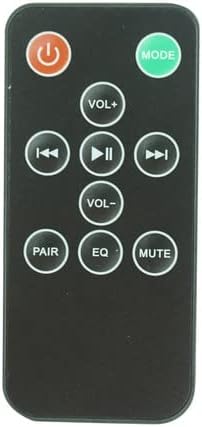
Obrázek 3.1: Přední strana view náhradního dálkového ovladače se všemi tlačítky, které jsou jasně viditelné.
Funkce tlačítek:
| Tlačítko | Funkce |
|---|---|
| Výkon (⏻) | Turns the sound bar system On or Off. |
| MODE | Cycles through input modes (e.g., Bluetooth, AUX, Optical, USB). |
| VOL+ | Zvyšuje úroveň hlasitosti. |
| VOL- | Snižuje úroveň hlasitosti. |
| Předchozí skladba (⏮) | Skips to the beginning of the current track or to the previous track. |
| Přehrát/Pozastavit (⏸) | Přehraje nebo pozastaví aktuální přehrávání zvuku. |
| Další skladba (⏭) | Přeskočí na další skladbu. |
| PÁR | Initiates Bluetooth pairing mode for compatible sound bar models. |
| EQ | Cykluje mezi předvolbami ekvalizéru (např. Film, Hudba, Zprávy). |
| ZTLUMIT | Vypne nebo vypne zvuk. |
4. Údržba
- Čištění: Dálkový ovladač otírejte měkkým, suchým hadříkem. Nepoužívejte tekuté čisticí prostředky ani abrazivní materiály.
- Výměna baterie: Replace the CR2025 battery when the remote's range decreases or it stops responding. Refer to Section 2 for battery installation instructions.
- Skladování: If the remote will not be used for an extended period, remove the battery to prevent leakage. Store in a cool, dry place.
5. Řešení problémů
| Problém | Možné řešení |
|---|---|
| Dálkové ovládání nereaguje. |
|
| Některé funkce nefungují. |
|
6. Specifikace
- Typ produktu: Náhradní infračervený dálkový ovladač
- Kompatibilita: Pyle Audio PSBV600BT, Bauhn ASBW-0716, ASBWS-0419, ASBW-0718, ASBW-1018 Sound Bar Systems
- Konektivita: Infračervený (IR)
- Zdroj napájení: 1 x knoflíková baterie CR2025 (není součástí balení)
- Materiál: ABS plast
7. Záruka a podpora
This product is a replacement remote control. For any questions or concerns regarding its functionality or compatibility, please contact the seller directly through the platform where the purchase was made. Please note that specific warranty terms may vary and are typically provided by the seller at the time of purchase.
It is recommended to retain your purchase receipt for any support inquiries.