
1. Úvod
The Zgrmbo F500 Digital Wall Clock is designed for clear visibility and ease of use, featuring large 4-inch digits suitable for various environments such as living rooms, classrooms, garages, and bedrooms. This manual provides detailed instructions for setting up, operating, and maintaining your clock, ensuring optimal performance and longevity.

Přední view of the Zgrmbo F500 Digital Wall Clock, showing its large, clear digital display.
2. Obsah balení
Prosím, ověřte, zda jsou v balení přítomny všechny položky:
- 1 x Zgrmbo F500 Digital Wall Clock
- 1 x baterie CR2302 (předinstalovaná nebo samostatná)
- 1 x Napájecí kabel USB
- 1 x Uživatelská příručka
- 2 x Wall Nails
- 1 x Ruler (for wall mounting assistance)
Poznámka: The CR2302 battery is for memory backup only and does not power the clock. It retains settings during power outagnebo když je odpojen od sítě.
3. Nastavení
3.1 Napájení hodin
- Připojte dodaný napájecí kabel USB ke vstupnímu portu napájení hodin.
- Plug the other end of the USB cable into a compatible USB power adapter (not included), a laptop, computer, or power bank.
- The clock display will illuminate upon successful power connection.
3.2 Battery Installation (Memory Backup)
- Najděte přihrádku na baterie na zadní straně hodin.
- If not already installed, insert the CR2302 coin cell battery into the compartment, ensuring correct polarity (+ side up).
- Close the battery compartment securely. This battery ensures that your time and alarm settings are retained in case of a power interruption.
4. Návod k obsluze

An illustration of the Zgrmbo F500 Digital Clock, detailing its dimensions and icons representing features.
4.1 Nastavení času a data
The clock typically has buttons on the side or back for setting. Refer to the labels next to the buttons (e.g., SET, UP, DOWN, MODE).
- Stiskněte tlačítko SOUBOR or MODE tlačítko pro vstup do režimu nastavení času. Číslice hodin pravděpodobně začnou blikat.
- Použijte + (Nahoru a - (DOWN) buttons to adjust the hour.
- Stiskněte SOUBOR or MODE again to move to minute setting, then adjust minutes using +/-.
- Pokračujte v stisknutí SOUBOR or MODE to cycle through setting the year, month, and day.
- Jakmile jsou všechna nastavení dokončena, stiskněte SOUBOR or MODE one last time, or wait a few seconds for the clock to exit setting mode automatically.
4.2 Nastavení jasu

Visual representation of custom brightness levels and the automatic brightness mode.
- Custom Brightness: Stiskněte tlačítko SVĚTLO button repeatedly to cycle through different brightness levels (e.g., 100%, 80%, 60%, 20%, 0%).
- Automatic Dimming Mode: Dlouze stiskněte SVĚTLO tlačítko. Poté použijte tlačítko + or - buttons to toggle the automatic dimming mode ON or OFF. When ON, the clock will adjust brightness automatically based on the time of day:
- 07:00 - 19:00: 100% jas
- 19:00 - 23:00: 60% jas
- 23:00 - 07:00: 25% jas
4.3 Nastavení alarmu
The clock supports one alarm with three operating modes.
- Stiskněte tlačítko POPLACH button to enter alarm setting mode. The alarm time digits will flash.
- Použijte + a - tlačítky nastavte požadovanou hodinu a minutu budíku.
- Stiskněte POPLACH again to select the alarm operating mode:
- 1-5: Alarm sounds Monday to Friday only.
- 1-6: Alarm sounds Monday to Saturday only.
- 1-7: Budík zvoní každý den.
- Stiskněte POPLACH one last time or wait for the clock to exit setting mode.
- Chcete-li zapnout nebo vypnout budík, krátce stiskněte POPLACH button outside of setting mode. An alarm icon will appear/disappear on the display.
4.4 Time Format (12/24 Hour)

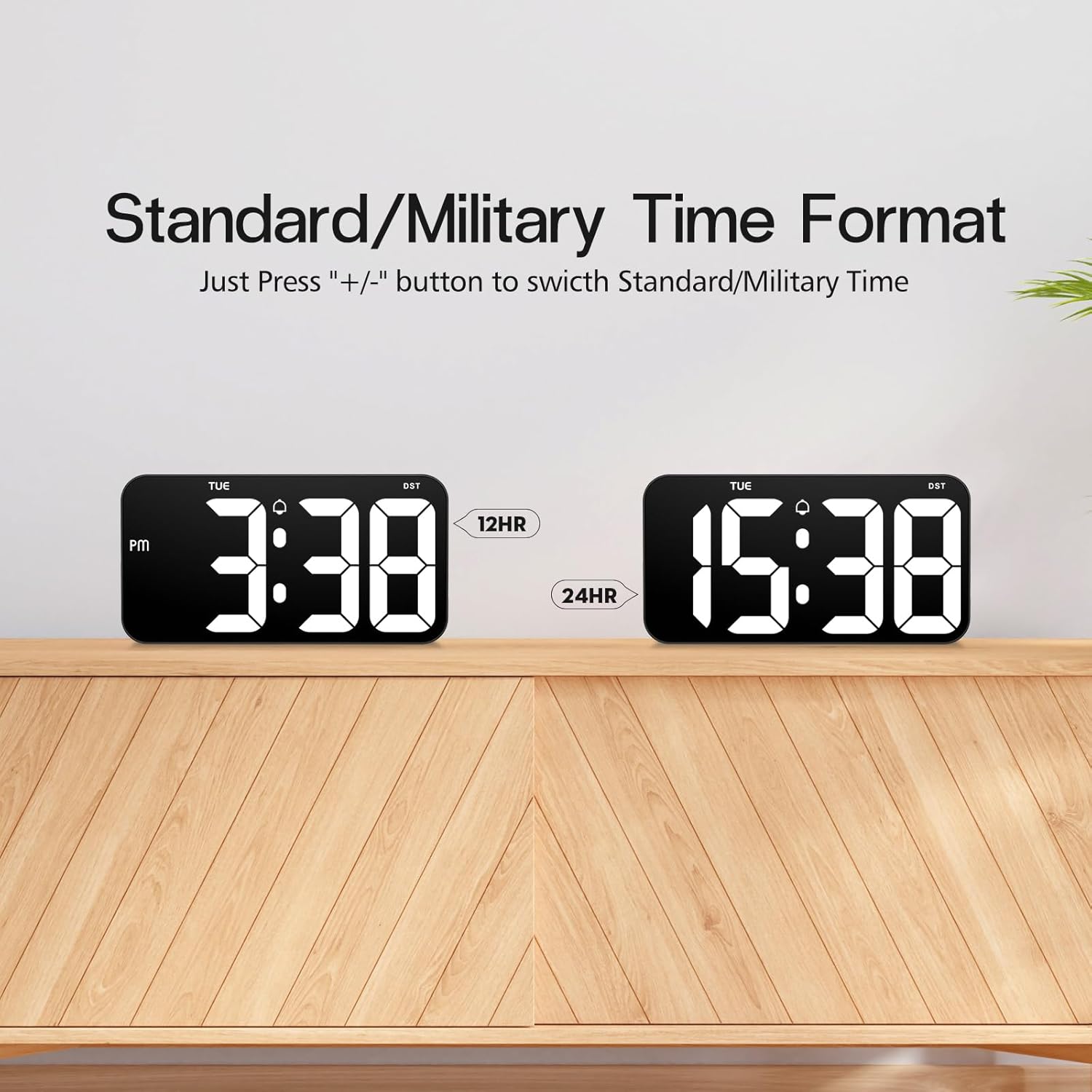
Comparison of the 12-hour (Standard) and 24-hour (Military) time formats.
To switch between Standard (12-hour with AM/PM indicator) and Military (24-hour) time formats, simply press the + or - button when the clock is displaying the time normally (not in setting mode).
4.5 Funkce letního času (DST)

Illustration of the Daylight Saving Time (DST) function.
The clock supports a Daylight Saving Time (DST) function. Typically, a dedicated DST button or a combination of buttons is used to activate or deactivate this feature, which adjusts the time by one hour forward or backward. Consult the specific button labels on your clock for this function.
4.6 Paměť výpadku napájení

Illustration demonstrating the power failure memory feature.
Thanks to the built-in CR2302 coin cell battery, the Zgrmbo F500 clock retains all its settings (time, date, alarm, etc.) even during a power outage or when unplugged. You will not need to reset the clock once power is restored.
4.7 Možnosti zobrazení
- Flashing Center Dots: Dlouze stiskněte + button to turn on or off the flashing colon (:) between the hour and minute digits.
- Alternating Time/Date Display: Dlouze stiskněte - button to enable or disable the alternating display of time and date. When enabled, the clock will switch between showing the current time and the current date.
5. Instalace
Detailní view of the back of the Zgrmbo F500 Digital Clock, highlighting mounting and stand features.
5.1 Montáž na stěnu
The clock features a double wall-hung hole design for secure mounting.
- Určete požadované umístění na zdi.
- Use the provided ruler to mark the positions for the two wall nails, ensuring they are level and spaced correctly to align with the hanging holes on the back of the clock.
- Carefully insert the two wall nails into the marked positions.
- Align the clock's hanging holes with the nails and gently slide the clock down to secure it on the wall.
- Utilize the hidden cable winder support on the back of the clock to manage any excess power cable, ensuring a neat appearance.
5.2 Umístění stolu
For desk or tabletop use, the clock is equipped with two hidden, stable standing brackets.
- Locate the two hidden feet on the back of the clock.
- Gently pull out and unfold these feet until they lock into position, providing a stable angle for the clock to stand on a flat surface.
- Place the clock on your desk, nightstand, or TV counter.
- The hidden cable winder can also be used to keep the power cable tidy when placed on a surface.
6. Údržba
- Čištění: Chcete-li hodiny vyčistit, jemně otřete displej a casins měkkým, suchým nebo mírně damp cloth. Avoid using abrasive cleaners, solvents, or chemical sprays, as these may damage the surface.
- Výměna baterie: If the clock fails to retain settings during a power outage, the CR2302 memory backup battery may need replacement. Follow the instructions in Section 3.2 to replace the battery.
- Skladování: If storing the clock for an extended period, disconnect it from power and consider removing the CR2302 battery to prevent potential leakage. Store in a cool, dry place.
7. Řešení problémů
| Problém | Možná příčina | Řešení |
|---|---|---|
| Zobrazení hodin je vypnuté nebo bliká. | No power, loose connection, faulty cable/adapter. | Ujistěte se, že je kabel USB bezpečně připojen. Zkuste jiný port USB nebo napájecí adaptér. |
| Clock does not retain settings after power loss. | CR2302 memory battery is dead or not installed correctly. | Replace the CR2302 battery. Ensure it is inserted with correct polarity. |
| Alarm se nespustí. | Alarm is not activated, alarm volume is too low (if adjustable), incorrect alarm time/mode. | Ensure the alarm icon is displayed. Re-check alarm time and operating mode settings. |
| Displej je příliš jasný nebo příliš tmavý. | Brightness setting is incorrect, auto-dimming mode is active. | Stiskněte tlačítko SVĚTLO button to adjust brightness. Long press SVĚTLO to toggle auto-dimming mode. |
| Čas je nepřesný. | Time was set incorrectly. | Re-set the time following instructions in Section 4.1. |
8. Specifikace
| Funkce | Detail |
|---|---|
| Značka | Zgrmbo |
| Číslo modelu | F500 |
| Barva | Černá/Bílá |
| Rozměry (D x Š x V) | 26.04 x 3.81 x 13.46 cm (10.25 x 1.5 x 5.3 palce) |
| Hmotnost | 426 gramů (0.94 lb) |
| Materiál | Akrylonitrilbutadienstyren (ABS) |
| Typ zobrazení | Digitální LED |
| Velikost číslice | 4 palců (10.2 cm) |
| Zdroj napájení | USB Cable (Electric) |
| Speciální funkce | Large Display, Auto-Dimming, Custom Brightness, Alarm, Time Memory, 12/24H Format, DST Function, Wall Mountable, Desk Stand |
9. Záruka a podpora
Zgrmbo provides an Záruka 18 měsíců for the F500 Digital Wall Clock, covering manufacturing defects and malfunctions under normal use. Additionally, a 45denní zásada vrácení is offered for your peace of mind.
For any questions, technical assistance, warranty claims, or support, please do not hesitate to contact Zgrmbo customer service through the Amazon platform where you purchased the product. Please provide your order number and a detailed description of the issue to facilitate a quick resolution.