
Zavedení
Welcome to the user manual for your new VERTU iVERTU-81 5G smartphone. This guide provides essential information to help you set up, operate, maintain, and troubleshoot your device. Please read this manual thoroughly to ensure optimal performance and longevity of your smartphone.
Co je v krabici
Upon unboxing your VERTU iVERTU-81, please verify that all components are present:
- VERTU iVERTU-81 5G Smartphone
- Napájecí adaptér
- USB-C Cable (not explicitly listed but implied for charging)
- SIM Ejector Tool (not explicitly listed but implied for SIM tray)
- Stručný průvodce (není výslovně uveden, ale je implicitní)
Pokud některé položky chybí nebo jsou poškozené, kontaktujte prosím zákaznickou podporu.
Nastavení
1. Vkládání SIM karet
The VERTU iVERTU-81 supports dual Nano SIM cards for 5G dual card dual standby functionality.
- Vyhledejte držák SIM karty na boku telefonu.
- Vložte nástroj pro vysunutí SIM karty do malého otvoru vedle zásobníku a jemně zatlačte, dokud zásobník nevyskočí.
- Place your Nano SIM cards into the designated slots on the tray, ensuring the gold contacts face down.
- Opatrně vložte zásobník SIM karty zpět do telefonu, dokud nezacvakne na místo.
2. Počáteční zapnutí a nastavení
- Press and hold the power button until the VERTU logo appears.
- Postupujte podle pokynů na obrazovce a vyberte jazyk, připojte se k síti Wi-Fi a nastavte si účet Google.
- Configure security settings such as fingerprint, face unlock, or a PIN/pattern.
3. Nabíjení baterie
Before first use, it is recommended to fully charge your device. Use the provided power adapter and USB-C cable.
- Připojte kabel USB-C k nabíjecímu portu ve spodní části telefonu.
- Druhý konec kabelu připojte k napájecímu adaptéru a poté zapojte adaptér do zásuvky ve zdi.
- The phone supports 55W fast charging. A full charge can be achieved rapidly.

Image: The VERTU iVERTU-81 smartphone connected to a charger, displaying a '55W Fast Charge' notification on its screen, indicating rapid battery replenishment.
Obsluha vašeho zařízení
Displej a navigace
The iVERTU-81 features a 6.67-inch OLED FHD+ display with a 120Hz high refresh rate, providing a clear and immersive viewing experience. The display is designed to adapt to blue light, caring for your eyes.
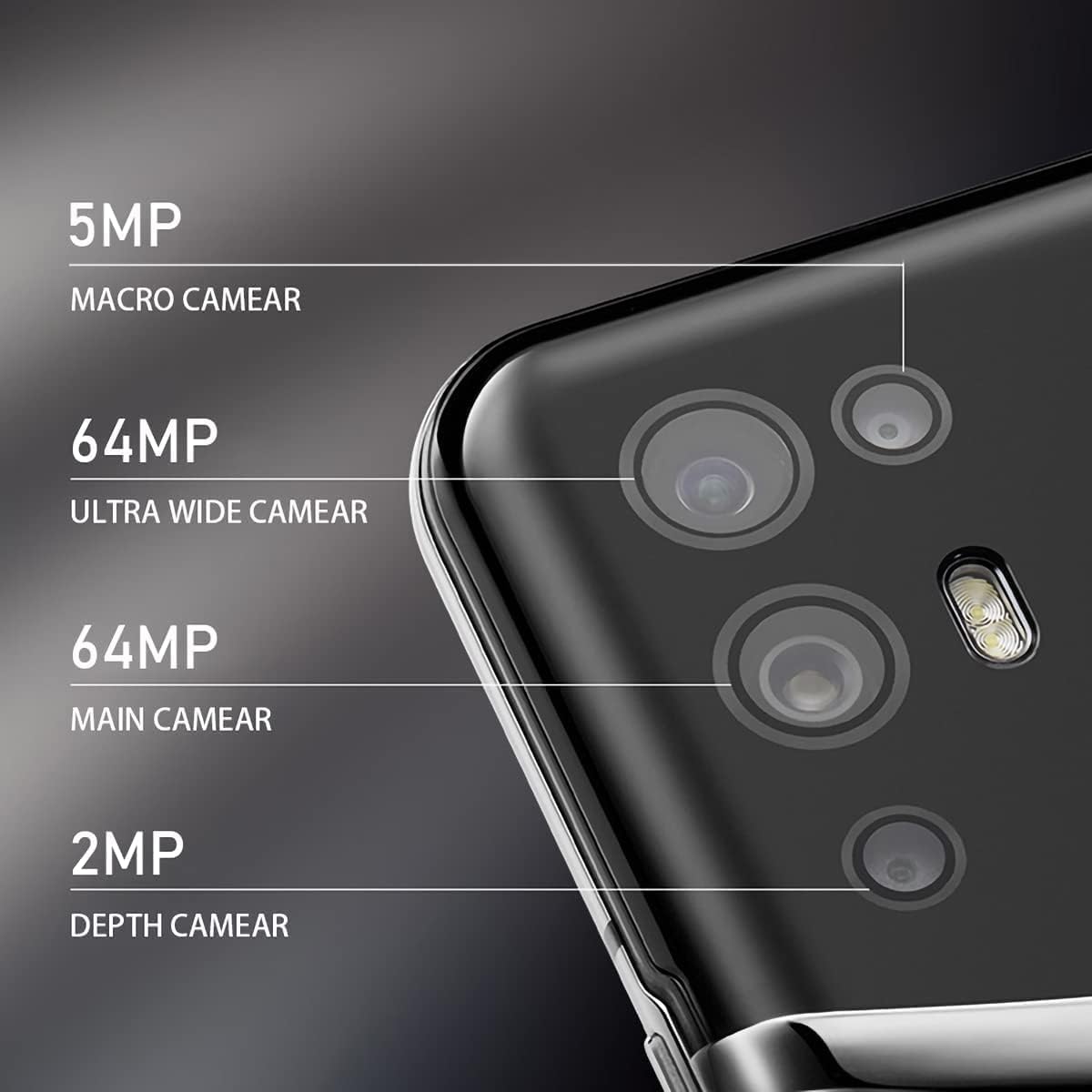
Image: The VERTU iVERTU-81 smartphone showcasing its 6.67-inch OLED display with vibrant colors, featuring a dancer and text highlighting '6.67" OLED Display' and '90hZ' (likely indicating refresh rate).
Výkon
Powered by a Snapdragon 888 octa-core chip and 12GB RAM, the iVERTU-81 delivers powerful performance for a smooth gaming and multitasking experience.

Image: Two hands holding the VERTU iVERTU-81 smartphone, which displays a graphically intensive game, illustrating the device's 'Powerful Performance'.
Kvalita zvuku
Experience master sound quality with 3D audio technology and HiFi sound. The device also features exclusive ringtones compiled by the London Symphony Orchestra.

Image: The VERTU iVERTU-81 smartphone displaying an image of an orchestra, accompanied by text highlighting 'Master Sound Quality', '3D audio technology', 'HiFi sound quality', and 'London Symphony Orchestra compiled exclusive ringtones'.
Vlastnosti fotoaparátu
The iVERTU-81 is equipped with a professional photography configuration, allowing you to capture high-quality images and videos.
Zadní kamerový systém
- 64MP hlavní fotoaparát: Pro fotografie ve vysokém rozlišení.
- 64MP Ultra Wide Angle Camera: For expansive landscape and group shots.
- 5MP makro fotoaparát: Pro detailní fotografování zblízka.
- 2MP hloubkový fotoaparát: For enhanced portrait mode with bokeh effects.
Přední kamera
- 16MP přední fotoaparát: Pro ostré selfie a videohovory.
Nahrávání videa
Support for 4K 60FPS high-definition video shooting with two-way anti-shake technology ensures smooth and stable video capture. Intelligent focus assists in sharp and clear recordings.

Obrázek: Podrobný view of the VERTU iVERTU-81's rear camera module, labeling its four lenses: 5MP Macro, 64MP Ultra Wide, 64MP Main, and 2MP Depth cameras.

Image: The VERTU iVERTU-81 smartphone displaying its camera interface, capturing a snowboarder in action, with text emphasizing 'Professional Photography' and support for '4K 60FPS HD video shooting, two-way anti-shake, intelligent focus'.
Údržba
To ensure the longevity and optimal performance of your VERTU iVERTU-81 smartphone, follow these maintenance guidelines:
- Čištění: K čištění obrazovky a těla telefonu používejte měkký hadřík, který nepouští vlákna. Nepoužívejte abrazivní materiály ani agresivní chemikálie.
- Aktualizace softwaru: Pravidelně kontrolujte a instalujte aktualizace systému, abyste zajistili, že vaše zařízení má nejnovější bezpečnostní záplaty a funkce.
- Péče o baterie: Avoid extreme temperatures. Do not fully discharge the battery frequently. Use only the provided or certified charging accessories.
- Správa úložiště: Pravidelně odstraňujte nepotřebné files and apps to maintain optimal performance. The phone comes with 512GB ROM.
- Ochrana: Consider using a protective case and screen protector to guard against physical damage.
Odstraňování problémů
If you encounter issues with your VERTU iVERTU-81, refer to the following common troubleshooting steps:
Zařízení se nezapíná
- Ujistěte se, že je baterie nabitá. Před opětovným zapnutím připojte telefon k nabíječce alespoň na 15 minut.
- Stiskněte a podržte tlačítko napájení po dobu 10–15 sekund pro vynucení restartu.
Slabý síťový signál
- Zkontrolujte, zda je vaše SIM karta správně vložena.
- Přesuňte se do oblasti s lepším pokrytím sítě.
- Restartujte telefon.
- Verify that your mobile data or 5G settings are correctly configured.
Aplikace padá nebo zamrzávají
- Zavřete problematickou aplikaci a znovu ji otevřete.
- Clear the app's cache and data in the phone's settings.
- Ujistěte se, že je aplikace aktualizována na nejnovější verzi.
- Restartujte telefon.
Rychlé vybíjení baterie
- Snižte jas obrazovky a nastavte kratší dobu vypnutí obrazovky.
- Disable unused features like Wi-Fi, Bluetooth, GPS, or 5G when not needed.
- Identifikujte a ukončete energeticky náročné aplikace běžící na pozadí.
- Zkontrolujte aktualizace systému, protože často zahrnují optimalizace baterie.

Image: The VERTU iVERTU-81 smartphone connected to a charger, displaying '4200mAh Long Battery Life' and '55W fast charge' text, emphasizing its battery capacity and quick charging capability.
Communication Encryption
The device features communication encryption for double protection of your data and privacy.

Image: A visual representation of a safe door, overlaid with various security-related terms such as 'encryption', 'firewalls', 'privacy', and 'information security', illustrating the concept of 'Communication Encryption Double Protection'.
Specifikace
| Funkce | Specifikace |
|---|---|
| Název modelu | iVERTU-81 |
| Operační systém | Android |
| Procesor | Snapdragon 888 (Octa-core) |
| BERAN | 12 GB |
| Kapacita paměti | 512 GB |
| Velikost obrazovky | 6.67 palce |
| Typ zobrazení | OLED |
| Rezoluce | 2400 x 1080 |
| Obnovovací frekvence | 120 Hz |
| Zadní kamera | 64MP Main + 64MP Ultra Wide + 5MP Macro + 2MP Depth |
| Přední kamera | 16 MP |
| Kapacita baterie | 4200 miliamp hodiny |
| Nabíjení | Rychlé nabíjení 55W |
| Bezdrátový nosič | Odemčený |
| Buněčná technologie | 5G |
| Technologie připojení | Wi-Fi, GPS |
| Barva | Calf Leather-Brown |
Záruka a podpora
For warranty information and customer support, please refer to the warranty card included with your product or visit the official VERTU webUschovejte si doklad o koupi pro případ reklamace.
For technical assistance or service inquiries, please contact VERTU customer service through the channels provided on their official webmísto.