
Zavedení
This manual provides instructions for the proper setup, operation, and maintenance of your Comix C-2031 Desk Calculator. This calculator is designed for general arithmetic tasks in home, office, or school environments, featuring a large 12-digit LCD display and dual power sources.

Klíčové vlastnosti
The Comix C-2031 Desk Calculator is equipped with several features designed for ease of use and reliability:
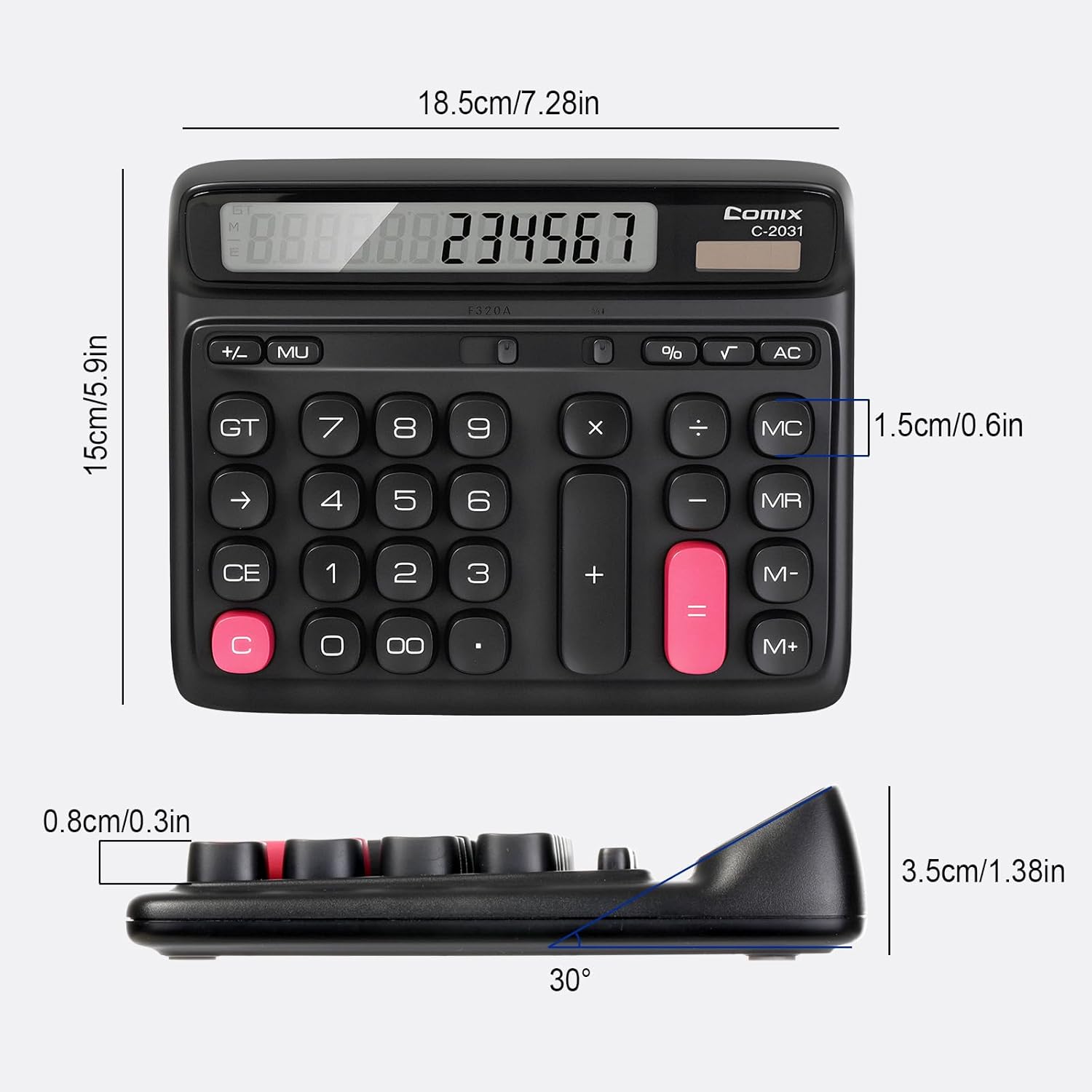
- 12místný velký LCD displej: Provides clear and accurate readings with a 30° tilt for comfortable viewIng.
- Ergonomic Computer Key Design: Features round keys for comfortable touch and clear feedback, designed for efficient data entry.
- Duální zdroj napájení: Operates on solar energy in well-lit conditions and includes a 1 AA battery for consistent performance, especially in low light.
- Protiskluzové nožičky: Equipped with four non-slip feet to ensure stability on your desk during use.
- Kompaktní velikost: Measures 7.28 x 5.9 x 1.38 inches, fitting conveniently on any desk.

Nastavení
Zdroj napájení
The Comix C-2031 calculator utilizes a dual power system, operating on both solar energy and a single AA battery. For optimal display clarity and consistent operation, especially in environments with varying light conditions, using the AA battery is recommended.
- Solární energie: The calculator will automatically use solar power when sufficient light is available. Ensure the solar panel (located above the display) is exposed to light for operation without battery power.
- Instalace baterie:
- Vyhledejte přihrádku na baterie na zadní straně kalkulačky.
- Otevřete kryt bateriového prostoru.
- Vložte jednu baterii typu AA a dbejte na správnou polaritu (+/-).
- Bezpečně zavřete kryt bateriového prostoru.

Návod k obsluze
Familiarize yourself with the calculator's key functions for efficient use.

Základní operace
- Zadání čísla: Stiskněte číselná tlačítka (0-9) pro zadání číslic.
- Desetinná čárka: Press the "." key for decimal values.
- Addition (+), Subtraction (-), Multiplication (×), Division (÷): Press the corresponding operator key after entering the first number, then enter the second number, and press "=" for the result.
- Rovná se (=): Displays the result of a calculation.
Vymazat funkce
- C (Clear the Screen): Clears the current entry on the display without affecting memory or ongoing calculations.
- CE (čisté zadání): Clears the last entered number or operation.
- AC (Clear All): Clears all entries, operations, and memory content, resetting the calculator to its initial state.
- Zpět (→): Smaže poslední zadanou číslici.
Paměťové funkce
- M+ (Memory Plus): Přidá zobrazené číslo do paměti.
- M- (minus paměti): Odečte zobrazené číslo z paměti.
- MR (vyvolání paměti): Recalls the value stored in memory to the display.
- MC (vymazání paměti): Vymaže obsah paměti.
Pokročilé funkce
- % (procentotagE): Používá se pro procentatage výpočty. Napřample, to calculate 10% of 200, enter 200 × 10 %, which will display 20.
- √ (druhá odmocnina): Vypočítá druhou odmocninu zobrazeného čísla.
- GT (celkový součet): Accumulates the results of all calculations. Pressing GT displays the grand total.
- MU (Mark-Up): Used for profit margin calculations.
Konec produktuview Video
Údržba
- Čištění: Wipe the calculator with a soft, dry cloth. Do not use liquid cleaners or abrasive materials.
- Výměna baterie: If the display becomes dim or unresponsive, replace the AA battery in the compartment on the back of the unit. Ensure proper polarity.
- Skladování: Kalkulačku skladujte na chladném a suchém místě mimo dosah přímého slunečního záření a extrémních teplot.
Odstraňování problémů
| Problém | Možná příčina | Řešení |
|---|---|---|
| Displej je prázdný nebo tmavý. | Nedostatek světla pro solární napájení nebo slabá baterie. | Move the calculator to a brighter area or replace the AA battery. |
| Klávesy nereagují. | Temporary software glitch or low power. | Press the AC button to reset. If the issue persists, replace the battery. |
| Nesprávné výsledky výpočtu. | Incorrect key sequence or function usage. | Review the operating instructions for the specific function. Press AC to clear all previous entries and start a new calculation. |
Specifikace
- Model: C-2031
- Zobrazit: 12místný velký LCD displej
- Zdroj napájení: Solar and 1 x AA Battery (included)
- Rozměry produktu: 7.28 x 5.9 x 1.38 palce (18.5 x 15 x 3.5 cm)
- Hmotnost položky: 10.5 unce (297.67 gramů)
- Typ klíče: Ergonomic Computer Keys
- Vlastnosti: 30° Tilt Display, Non-Slip Feet
Záruka a podpora
Comix products are manufactured with quality and reliability in mind. For any questions, technical support, or warranty inquiries, please refer to the contact information provided with your purchase or visit the official Comix webstránky. Uschovejte si prosím doklad o koupi pro případ reklamace.