Zavedení
This manual provides comprehensive instructions for the Thomson ROC4301 4-in-1 Web-Programmable Universal Remote Control. This device allows you to control up to four different infrared-controlled electronic devices, such as TVs, DVD players, Blu-ray players, Set-Top Boxes (STB), VCRs, and audio equipment, using a single remote.
The ROC4301 features web-based programming for easy setup and a continuously updated code database to ensure compatibility with a wide range of brands and models.
Klíčové vlastnosti
- Controls up to 4 devices via one infrared remote control.
- Fast and easy programming via a web-based database accessible on PC, laptop, or tablet.
- Data transfer to the remote control is facilitated by a 3.5 mm jack cable (30 cm).
- Up to 4 devices can be programmed simultaneously.
- Compatible with TV, DVD, Blu-ray player, STB, VCR, and audio equipment.
- Continuously updated code database available online.
Nastavení a programování
The Thomson ROC4301 remote control is programmed using an online database, ensuring access to the latest device codes. This method requires a computer (PC, laptop, or tablet) with internet access and the included 3.5 mm jack cable.
Kroky pro Web-Based Programming:
- Příprava dálkového ovladače: Ensure fresh AAA batteries are installed in the remote control. (See "Maintenance" section for battery installation).
- Access the Programming Webmísto: Otevřete a web browser on your PC, laptop, or tablet and navigate to the official Thomson remote control programming website. (Refer to the product packaging or manufacturer's webweb pro přesné URL).
- Připojte dálkový ovladač: Plug one end of the supplied 3.5 mm jack cable into the designated port on the remote control and the other end into the headphone jack of your computer.
- Vyberte zařízení: On the programming website, follow the on-screen instructions to select the types of devices (e.g., TV, DVD, STB) and their respective brands and models you wish to control. The database will provide the necessary codes.
- Transfer Codes: Once you have selected your devices, initiate the data transfer process on the website. The codes will be transmitted through the audio jack to your remote control. Ensure your computer's volume is set to a suitable level as instructed by the webmísto.
- Otestujte dálkový ovladač: After the transfer is complete, disconnect the remote control from your computer. Test the remote with each programmed device to ensure all functions work correctly. If a device does not respond or functions are incorrect, repeat the programming process, trying alternative codes if available on the webmísto.
The web database is continuously updated, providing access to codes for new devices. You can program up to four devices simultaneously.
Obsluha dálkového ovládání
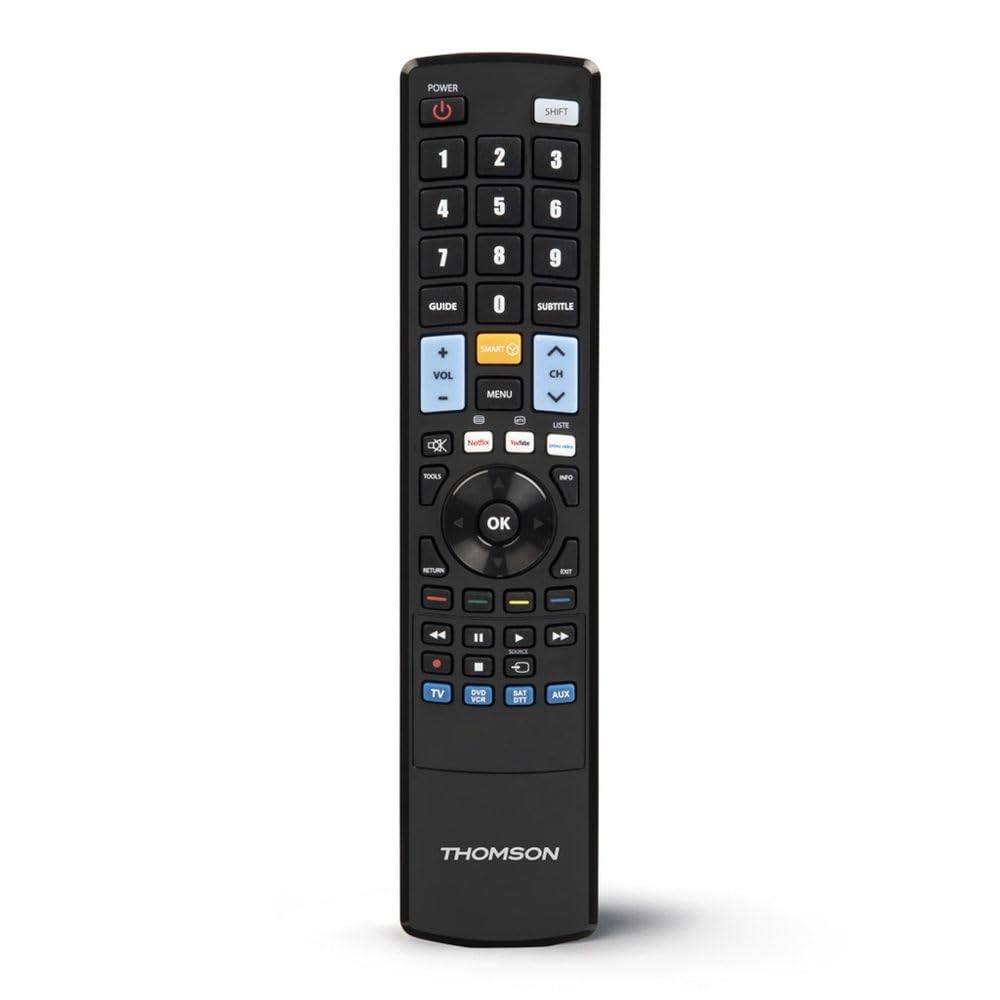
Once programmed, the Thomson ROC4301 functions like a standard remote control for your selected devices. It features 48 buttons designed for intuitive control.
Obecný provoz:
- Výběr zařízení: Use the dedicated device buttons (e.g., TV, DVD, STB, AUDIO) at the top of the remote to switch between controlling different devices. The remote will typically indicate which device is currently selected (e.g., via an LED indicator).
- Zapnutí/vypnutí: Stiskněte tlačítko MOC tlačítko pro zapnutí nebo vypnutí vybraného zařízení.
- Kanál/Hlasitost: Použijte KANÁL +/- a OBJEM +/- buttons to adjust channels and volume respectively.
- Navigace: The directional pad (up, down, left, right) and OK button are used for menu navigation on most devices.
- Numerická klávesnice: Use the numeric buttons (0-9) to directly enter channel numbers or other numerical inputs.
- Funkční tlačítka: Other buttons such as Play, Pause, Stop, Fast Forward, Rewind, Menu, Exit, and colored function buttons will perform their corresponding actions on the selected device.
Ensure there is a clear line of sight between the remote control and the infrared receiver of the device you are operating. The maximum effective range is approximately 10 meters.
Údržba
Instalace a výměna baterie:
The Thomson ROC4301 remote control requires two AAA batteries (included). When the remote's performance degrades or it stops responding, it's time to replace the batteries.
- Najděte kryt prostoru pro baterie na zadní straně dálkového ovladače.
- Posuňte kryt dolů nebo stiskněte západku a zvedněte jej, abyste přihrádku otevřeli.
- Remove the old batteries, if any.
- Vložte dvě nové baterie typu AAA a ujistěte se, že kladný (+) a záporný (-) pól odpovídají označení uvnitř přihrádky.
- Nasaďte kryt přihrádky na baterie zpět, dokud bezpečně nezacvakne.
Důležité: Always dispose of used batteries responsibly according to local regulations. Do not mix old and new batteries, or different types of batteries.
Čištění:
K čištění dálkového ovladače použijte měkký, suchý hadřík. V případě odolných nečistot lehceamphadřík vodou. Nepoužívejte abrazivní čisticí prostředky, rozpouštědla ani alkohol, protože by mohly poškodit povrch dálkového ovladače nebo jeho vnitřní součásti.
Odstraňování problémů
If you encounter issues with your Thomson ROC4301 universal remote control, try the following troubleshooting steps:
- Dálkové ovládání nereaguje:
- Check the batteries. Ensure they are correctly inserted and have sufficient charge. Replace them if necessary.
- Ujistěte se, že mezi infračerveným vysílačem dálkového ovladače a infračerveným přijímačem zařízení je volná viditelnost. Překážky mohou signál blokovat.
- Make sure you have selected the correct device mode (e.g., TV, DVD) on the remote.
- Device Not Responding After Programming:
- Re-program the remote for that specific device. The web database often provides multiple codes for a single brand/model. Try the next available code if the first one doesn't work.
- Ensure the 3.5 mm jack cable connection was secure and the computer's volume was adequate during programming.
- Verify that the device you are trying to control is indeed an infrared-controlled device.
- Některé funkce nefungují:
- Even with the correct code, some advanced functions might not be fully supported by a universal remote.
- Try alternative codes for your device, as some codes might offer better functionality mapping.
- Programming Issues (e.g., data transfer failure):
- Zkontrolujte připojení k internetu.
- Ujistěte se, že máte aktuální ovladače zvuku v počítači.
- Temporarily disable any sound enhancements or equalizers on your computer that might interfere with the audio signal.
- Try using a different computer or web browser if problems persist.
If these steps do not resolve the issue, please refer to the "Support" section for further assistance.
Specifikace
| Značka | Thomson |
| Název modelu | ROC4301 Web-Programmable Universal Remote Control 4-in-1 |
| Číslo modelu položky | 00132679 |
| Technologie připojení | Infračervený (IR) |
| Maximální počet podporovaných zařízení | 4 |
| Kompatibilní zařízení | TV, DVD, Blu-ray player, STB, VCR, Audio equipment |
| Typ ovladače | Ovládání tlačítkem |
| Počet tlačítek | 48 |
| Maximální dosah | 10 metrů |
| Barva | Černý |
| Baterie | 2 baterie AAA (součástí balení) |
| Rozměry produktu | 22.9 x 5.2 x 2.5 cm |
| Hmotnost položky | 149.32 g |
| Výrobce | Thomson |
| Země původu | Čína |
Informace o záruce
The Thomson ROC4301 Universal Remote Control comes with a 2letá záruka výrobce. Please retain your proof of purchase for warranty claims. For specific terms and conditions, refer to the warranty documentation included with your product or visit the official Thomson webmísto.
Podpora
For further assistance, updated device codes, or to access the web-based programming tool, please visit the official Thomson support webweb. Můžete tam také najít nejčastější dotazy a další zdroje.
If you require technical support, please contact Thomson customer service through the channels provided on their official webmísto.
Konec produktuview