
1. Úvod a konecview
This manual provides detailed instructions for the proper setup, operation, and maintenance of your Techbee TE02 Indoor Digital Electrical Outlet Timer Plug. This device is designed to automate the power supply to your electrical appliances, offering convenience, energy savings, and enhanced home security through its programmable features.
The Techbee TE02 timer plug features a large, easy-to-read display and intuitive controls, allowing for precise scheduling of up to 20 ON/OFF programs per day. It also includes advanced functions such as a countdown timer and a random ON/OFF mode for vacation security. Its built-in battery ensures that your programmed settings are retained even during power outages.
2. Vlastnosti produktu
- Extensive Programming: Supports up to 20 weekly ON-OFF timing programs for flexible scheduling.
- Funkce odpočítávání: Allows for precise delay ON/OFF timing, from 1 second up to 99 hours, 59 minutes, and 59 seconds.
- Anti-theft Random Mode: Activates lights or other appliances at varying times to simulate occupancy, deterring potential intruders.
- Uživatelsky přívětivý displej: Features a large screen for clear visibility of digits and numbers.
- Power Outage ochrana: Equipped with a built-in NiMH 1.2V battery to retain programmed settings for over 30 days during power interruptions.
- Versatile Time Format: Interchangeable 12-hour (AM/PM) and 24-hour formats.
- Uzemněná zásuvka: Designed with a 3-prong plug and socket for safe use with a wide range of appliances.
- Tichý provoz: Operates completely silently, making it suitable for home use.
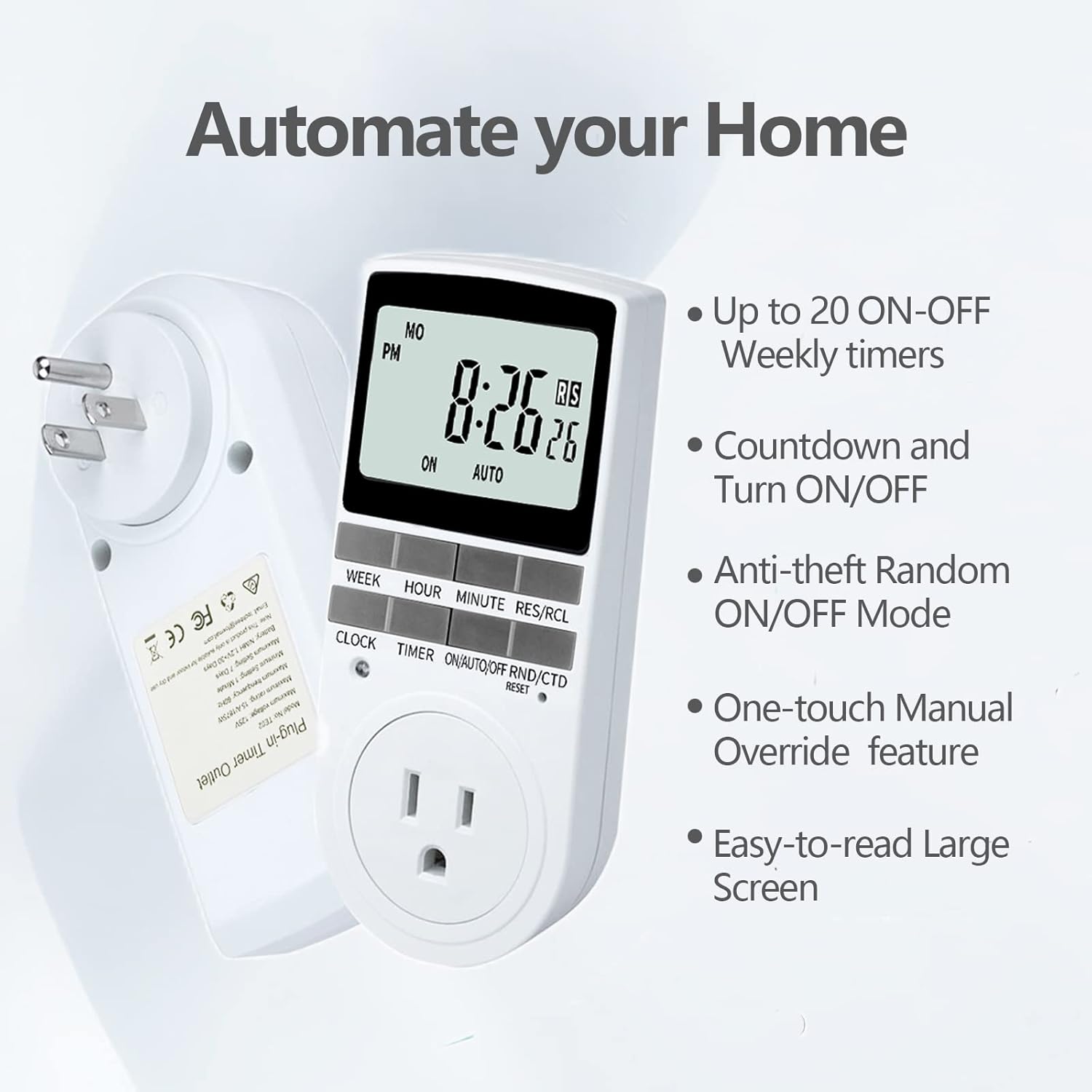
Figure 2.1: Key features of the Techbee TE02 Digital Timer Plug.
3. Specifikace
| Specifikace | Hodnota |
|---|---|
| Číslo modelu | TE02 |
| Maximální objemtage | 125V |
| Maximální hodnocení | 15 A / 1875 XNUMX W. |
| Maximální frekvence | 60 Hz |
| Minimální interval nastavení | 1 Minute (1 second for countdown) |
| Maximum Setting Duration | 7 dní |
| Typ baterie | NiMH 1.2V (retains settings >30 days) |
| Počet nastavení | 20 ON-OFF programs |

Figure 3.1: Technical data and features as displayed on the product packaging.
4. Nastavení
Before initial use, it is recommended to plug the timer into a live outlet for at least 30 minutes to charge the internal battery. This ensures that the timer retains its settings even if unplugged or during a power outage.
- Unpack the timer plug and included instruction manual.
- Locate a standard 125V grounded electrical outlet.
- Plug the Techbee TE02 timer directly into the wall outlet. The display should illuminate.
- Stiskněte tlačítko RESETOVAT button (usually a small recessed button) using a non-metallic pointed object (like a pen tip) to clear all previous settings and ensure proper function.
- Proceed to set the current time and day as described in the 'Operating Instructions' section.

Figure 4.1: The Techbee TE02 Digital Timer Plug ready for setup.
Video 4.1: Overview of the Techbee TE02 timer plug, including unboxing and initial setup steps.
5. Návod k obsluze
5.1. Nastavení aktuálního času a dne
- Stiskněte tlačítko HODINY button. The display will show the current time.
- Zatímco držíte HODINY tlačítko, stiskněte TÝDEN pro nastavení aktuálního dne (PO, ÚT, ST, ČT, PÁ, SO, NE).
- Zatímco držíte HODINY tlačítko, stiskněte HODINA to set the current hour (12-hour or 24-hour format).
- Zatímco držíte HODINY tlačítko, stiskněte MINUTA pro nastavení aktuální minuty.
- Uvolněte HODINY pro uložení nastavení.
5.2. Programming ON/OFF Times (Up to 20 Programs)
- Stiskněte tlačítko ČASOVAČ button to enter programming mode. The display will show "1 ON".
- Stiskněte TÝDEN to select the day(s) for this program (e.g., MO, TU, WE, TH, FR, SA, SU, or various combinations).
- Stiskněte HODINA pro nastavení požadované hodiny zapnutí.
- Stiskněte MINUTA pro nastavení požadované minuty zapnutí.
- Stiskněte ČASOVAČ znovu. Na displeji se zobrazí „1 VYP“.
- Opakujte kroky 2–4 pro nastavení požadovaného času vypnutí pro tento program.
- Pokračujte v stisknutí ČASOVAČ to cycle through programs "2 ON", "2 OFF" up to "20 ON", "20 OFF", setting each as needed.
- Po nastavení všech požadovaných programů stiskněte tlačítko HODINY tlačítko pro ukončení programovacího režimu a návrat k zobrazení aktuálního času.

Figure 5.1: Programming the timer for daily routines.
5.3. Funkce odpočítávání
The countdown function allows the timer to turn ON or OFF after a specified duration.
- Stiskněte tlačítko ON/AUTO/OFF RND/CTD button repeatedly until "CTD" appears on the display.
- Stiskněte HODINA, MINUTAa RES/RCL (for seconds) to set the desired countdown duration.
- Stiskněte ČASOVAČ to start the countdown. The display will show the remaining time.
- Once the countdown reaches zero, the connected appliance will either turn ON or OFF, depending on its initial state.

Figure 5.2: Setting a countdown timer to turn an appliance ON or OFF.
5.4. Random Function (Anti-theft Mode)
The random function helps deter intruders by turning connected lights or appliances ON and OFF at irregular intervals.
- Stiskněte tlačítko ON/AUTO/OFF RND/CTD button repeatedly until "RND" appears on the display.
- The timer will now randomly turn the connected appliance ON and OFF within a set time window (typically 6 PM to 6 AM, but the Techbee TE02 offers random from any time).
- Pro deaktivaci stiskněte tlačítko ON/AUTO/OFF RND/CTD button again until "AUTO" or "ON"/"OFF" is displayed.

Figure 5.3: Utilizing the random function for home security.
5.5. Ruční ovládání
You can manually switch the timer's output state without affecting the programmed settings.
- Stiskněte tlačítko ON/AUTO/OFF RND/CTD tlačítko pro procházení režimů: ON (always on), AUTO (follows programs), VYPNUTO (always off), RND (random), CTD (countdown).
- Vybrat ON or VYPNUTO for immediate control. The timer will remain in this state until manually changed or switched back to AUTO.
6. Údržba
- Čištění: Před čištěním odpojte časovač ze zásuvky. Vnější povrch otřete měkkým, suchým hadříkem. Nepoužívejte tekuté čisticí prostředky ani abrazivní materiály.
- Skladování: If storing the timer for an extended period, ensure the internal battery is charged by plugging it in for a few hours every few months. Store in a cool, dry place away from direct sunlight and extreme temperatures.
- Baterie: The internal NiMH battery is designed for long-term use and retains settings for over 30 days. It is not user-replaceable.
7. Řešení problémů
- Displej časovače je prázdný:
- Ujistěte se, že je časovač bezpečně zapojený do aktivní elektrické zásuvky.
- The internal battery might be fully discharged. Plug the timer in for at least 30 minutes to charge it.
- Programs Not Activating:
- Verify that the current time and day are set correctly.
- Check that the timer is in AUTO režimu.
- Ensure the ON/OFF programs are set correctly and do not overlap in an unintended way.
- Confirm the connected appliance is functioning correctly and its power switch is in the ON position.
- Timer Not Responding to Buttons:
- Perform a full reset by pressing the RESETOVAT button with a pointed object. You will need to re-enter all settings after a reset.
- Appliance Does Not Turn ON/OFF with Countdown:
- Ujistěte se, že je časovač zapnutý CTD mode and the countdown duration is set.
- Verify the connected appliance is working and its power switch is ON.
8. Záruka a podpora
For warranty information, technical support, or any inquiries regarding your Techbee TE02 Digital Timer Plug, please refer to the official documentation provided with your product or visit the official Techbee store.
Další podporu a informace o produktu naleznete na adrese Techbee Store on Amazon.
A detailed PDF instruction manual is also available for download: Návod k použití (PDF).