

Zavedení
This manual provides comprehensive instructions for the Xtrfy M8 Wireless Gaming Mouse. Designed for professional gamers, the M8 offers an ultra-lightweight design, symmetrical shape, and lag-free 2.4 GHz wireless connectivity.
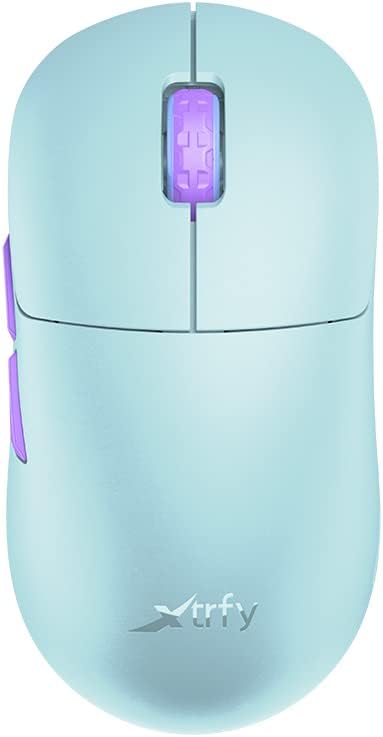
Image: The Xtrfy M8 Wireless Gaming Mouse in Frosty Mint, showcasing jeho ergonomický design.
A key design feature is its ultra-low front, measuring just 4mm, which allows for a unique grip style.

Obrázek: Detailní záběr view of the Xtrfy M8 mouse's front, highlighting its low profile 4 mm.
Obsah balení
Ověřte, zda jsou v balení přítomny všechny položky:
- Xtrfy M8 Wireless Gaming Mouse
- Nabíjecí kabel USB-C
- Bezdrátový USB přijímač (dongle)
- USB-A to USB-C Adapter (for receiver extension)
- Návod k použití (tento dokument)

Image: The USB-C charging cable and the USB wireless receiver (dongle) for the Xtrfy M8 mouse.
Nastavení
- Nabijte myš: Before first use, connect the USB-C charging cable to the mouse and a powered USB port. The mouse has an internal Lithium Ion battery.
- Připojení bezdrátového přijímače USB:
- Insert the USB wireless receiver directly into an available USB-A port on your computer.
- For optimal signal strength or if your computer's USB port is not easily accessible, use the provided USB-A to USB-C adapter with the charging cable to extend the receiver closer to the mouse.
- Zapnutí myši: Locate the power switch on the underside of the mouse. Slide the switch to the "ON" position.
- Automatické připojení: The mouse should automatically connect to the receiver. No additional pairing software is typically required for 2.4 GHz wireless operation.

Image: The underside of the Xtrfy M8 mouse, displaying the power switch, optical sensor, and hardware adjustment buttons.
Návod k obsluze
The Xtrfy M8 mouse features standard left and right click buttons, a scroll wheel, and two side buttons. All functions are plug-and-play compatible with most operating systems.
Hardware Adjustments
The Xtrfy M8 allows for on-the-fly adjustment of key performance settings directly from the mouse hardware, without the need for software. These settings are typically located on the underside of the mouse.
- DPI/CPI (Dots Per Inch / Counts Per Inch): Adjusts mouse sensitivity. Use the dedicated button on the mouse bottom to cycle through preset DPI levels. An indicator light may change color to show the current setting.
- Polling Rate (PR): Determines how often the mouse reports its position to the computer. Higher polling rates (e.g., 1000 Hz) provide smoother tracking but consume more battery.
- Lift-off Distance (LOD): Controls how high the mouse can be lifted before tracking stops. A lower LOD prevents unwanted cursor movement when repositioning the mouse.
Refer to the markings near the buttons on the mouse's underside for specific adjustment procedures.

Obrázek: Boční view of the Xtrfy M8 mouse, highlighting the main click buttons, scroll wheel, and two programmable side buttons.
Nabíjení a baterie
The Xtrfy M8 Wireless Gaming Mouse is equipped with a rechargeable Lithium Ion battery. To charge the mouse, connect the supplied USB-C cable to the front port of the mouse and the other end to a powered USB port on your computer or a USB wall adapter.
- A small LED indicator on the mouse will typically show charging status (e.g., solid light for charging, off or different color for fully charged).
- The mouse can be used while charging, though the cable connection point may feel unusual during active use.
- Battery life varies based on usage and polling rate settings.
Údržba
Proper maintenance ensures the longevity and performance of your Xtrfy M8 mouse.
- Čištění: K otření povrchu myši použijte měkký, suchý hadřík. V případě odolné nečistoty lehceamphadřík vodou. Vyhněte se agresivním chemikáliím nebo abrazivním materiálům.
- Senzor: Udržujte optický senzor na spodní straně myši čistý a bez prachu a nečistot. V případě potřeby použijte vatový tampon nebo stlačený vzduch.
- Skladování: Pokud myš delší dobu nepoužíváte, skladujte ji na suchém a chladném místě.
- Péče o kabely: Avoid sharp bends or excessive pulling on the USB-C charging cable to prevent damage.
Odstraňování problémů
If you encounter issues with your Xtrfy M8 mouse, refer to the following common solutions:
- Myš nereaguje:
- Ujistěte se, že je myš zapnutá.
- Zkontrolujte, zda je bezdrátový USB přijímač bezpečně zapojený do funkčního USB portu.
- Verify the mouse battery is charged. Connect the charging cable and observe the indicator light.
- Zkuste zapojit přijímač do jiného USB portu.
- Zpoždění nebo odpojení:
- Ujistěte se, že je přijímač blízko myši a není zakrytý kovovými předměty.
- Neumisťujte přijímač do blízkosti jiných bezdrátových zařízení, která by mohla způsobovat rušení (např. Wi-Fi routery, jiná bezdrátová periferie).
- Lower the polling rate setting on the mouse if experiencing frequent disconnections in a crowded wireless environment.
- Nepřesné sledování:
- Vyčistěte optický senzor na spodní straně myši.
- Ujistěte se, že myš používáte na vhodném povrchu (doporučuje se podložka pod myš).
- Adjust the DPI/CPI settings to a comfortable level.
- Scroll Wheel Issues (e.g., jumping):
- Ensure the mouse firmware is up to date (check the Xtrfy official website for any available updates).
- If the issue persists, contact Xtrfy customer support.
Specifikace
| Číslo modelu | M8 |
| Značka | Xtrfy |
| Technologie připojení | Radio Frequency (2.4 GHz), USB (for charging/wired mode) |
| Technologie detekce pohybu | Optický |
| Speciální funkce | Lehký, bezdrátový |
| Hmotnost položky | 1.94 unce (cca 55 gramů) |
| Baterie | 1 lithium-iontová baterie (součástí balení) |
| Rozměry balení | 7.32 x 4.06 x 2.44 palce |
| ASIN | B0BMLF5FMT |
| Datum první dostupnosti | 16. listopadu 2022 |
Záruka a podpora
The Xtrfy M8 Wireless Gaming Mouse typically comes with a 1-year manufacturer's warranty. For specific warranty details, claims, or technical support, please contact Xtrfy directly through their official webmísto.
Xtrfy Official Webmísto: www.xtrfy.com
Always refer to the manufacturer's official resources for the most current support information and firmware updates.